
Microsoft SQL Server
Stored Procedure
A Stored Procedure in SQL Server is a precompiled collection of one or more SQL statements stored in the database. Stored procedures allow you to encapsulate business logic, making it reusable, efficient, and secure. Using stored procedures can improve performance by reducing the amount of code that needs to be sent to the server, and it can also enhance security by limiting direct access to tables.
Key Concepts of Stored Procedures:
- Creating a Stored Procedure
- You can create a stored procedure using the
CREATE PROCEDUREstatement, which defines the procedure logic. Parameters can be passed into the procedure, allowing for dynamic behavior.
Example:
CREATE PROCEDURE GetCustomerSales
@CustomerID INT
AS
BEGIN
    SELECT s.sale_id, s.sale_date, p.product_name, s.total_amount
    FROM sales s
    JOIN products p ON s.product_id = p.product_id
    WHERE s.customer_id = @CustomerID;
END;
- You can create a stored procedure using the
- Executing a Stored Procedure
- Once the stored procedure is created, you can execute it using the
EXECorEXECUTEcommand. If the procedure takes parameters, you must pass values to them when executing.
Example:
EXEC GetCustomerSales @CustomerID = 1;
- Once the stored procedure is created, you can execute it using the
- Updating a Stored Procedure
- You can modify an existing stored procedure using the
ALTER PROCEDUREstatement. This allows you to change the logic inside the procedure without having to drop and recreate it.
Example:
ALTER PROCEDURE GetCustomerSales
@CustomerID INT
AS
BEGIN
    SELECT s.sale_id, s.sale_date, p.product_name, s.total_amount, c.customer_name
    FROM sales s
    JOIN products p ON s.product_id = p.product_id
    JOIN customers c ON s.customer_id = c.customer_id
    WHERE s.customer_id = @CustomerID;
END;
- You can modify an existing stored procedure using the
- Dropping a Stored Procedure
- If a stored procedure is no longer needed, it can be removed from the database using the
DROP PROCEDUREcommand.
Example:
DROP PROCEDURE GetCustomerSales; - If a stored procedure is no longer needed, it can be removed from the database using the
- Performance: Stored procedures are precompiled, reducing execution time.
- Security: Limit direct table access by encapsulating queries.
- Reusability: Write once and reuse the logic multiple times.
- Maintainability: Easier to update logic in one place rather than in multiple application layers.
Additional Points on Stored Procedure Usage:
- Stored procedures can return data in the form of result sets or output parameters, making them useful for both queries and logic encapsulation.
- They can contain control-of-flow statements like
IF,WHILE, andBEGIN...END, allowing for more complex logic beyond simple SQL queries. - Input and output parameters are supported, enabling stored procedures to be flexible and dynamic based on the passed input.
- Transactions can be managed within a stored procedure, making them a useful tool for ensuring data integrity.
This introduction provides beginners with a clear understanding of stored procedures in Microsoft SQL Server, showing how they can improve efficiency, security, and maintainability in database operations.
Features of SQL Server Stored Procedures
- Precompiled Execution: SQL Server compiles the stored procedure once and then reuses the execution plan. This reduces the overhead of parsing and compiling SQL commands every time the procedure is run.
- Parameterized Inputs: Stored procedures can accept parameters, allowing them to be executed with different data inputs, which adds flexibility and reusability.
- Modular Programming: They allow for modular programming by enabling you to break complex processes into simpler sub-procedures.
- Performance Benefits: Because they are precompiled and reduce client-server communication, stored procedures can significantly improve performance, especially in database applications with heavy traffic.
- Enhanced Security: By granting permissions on stored procedures rather than on underlying tables, you can give users access to the data without granting direct access to the database objects.
Creating a Stored Procedure in SQL Server
The syntax for creating a stored procedure is as follows:
CREATE PROCEDURE procedure_name
    @param1 datatype [= default_value],
    @param2 datatype OUTPUT
AS
BEGIN
    -- SQL statements
END
Parameters prefixed with @ can be of type INPUT or OUTPUT, and you can also provide default values for them.
Invoking a Stored Procedure
To execute a stored procedure, use the EXEC or EXECUTE command followed by the procedure name and any required parameters.
EXEC procedure_name @param1 = value1, @param2 = value2 OUTPUT;Advantages of Using Stored Procedures
- Efficient Network Usage: Stored procedures reduce network traffic between clients and servers.
- Reduced Development Time: By using stored procedures, developers can save time by reusing code and avoiding duplication.
- Centralized Business Logic: Business rules and logic can be centralized in the database server, making them easier to update and manage.
- Better Performance: As stored procedures are precompiled, they execute faster than dynamic SQL statements.
Considerations
- Portability: Stored procedures are generally specific to the database system, so moving to another system might require rewriting.
- Debugging: Debugging stored procedures can sometimes be more challenging than application code due to limited debugging capabilities.
- Complexity: Overusing stored procedures can lead to a complex web of dependencies, which can be difficult to manage and understand.
Overall, stored procedures in MS SQL Server are a vital tool for database developers and administrators, offering a way to improve performance, manageability, and security of database applications.
MS SQL SERVER STORED PROCEDURE EXAMPLE
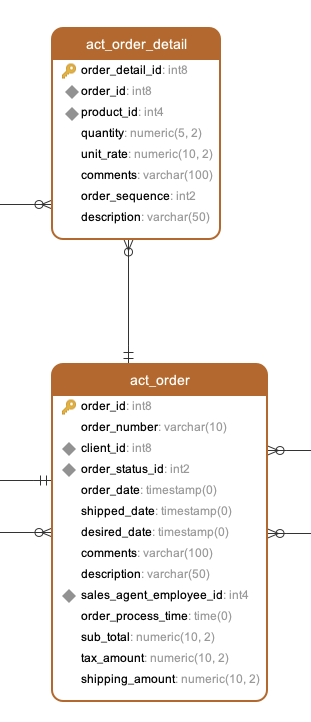
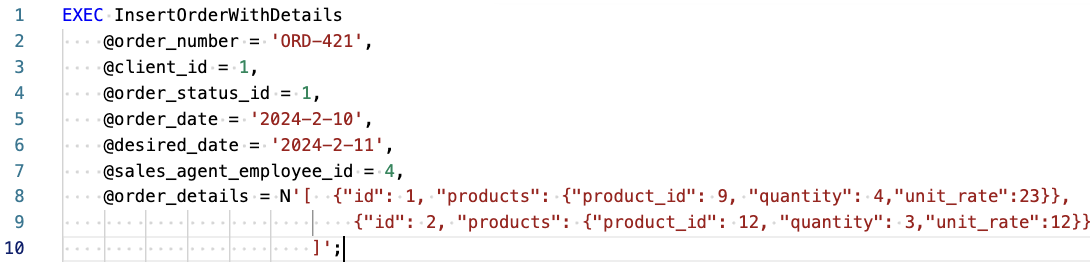
Create a Microsoft SQL Server stored procedure that can accept order details as input and perform inserts into both the act_order and act_order_detail tables, accommodating multiple products per order. After this description, you'll discover the stored procedure definition along with sample code illustrating how to utilize it. Additionally, a data model is provided to understand the structure of the order and order details tables.
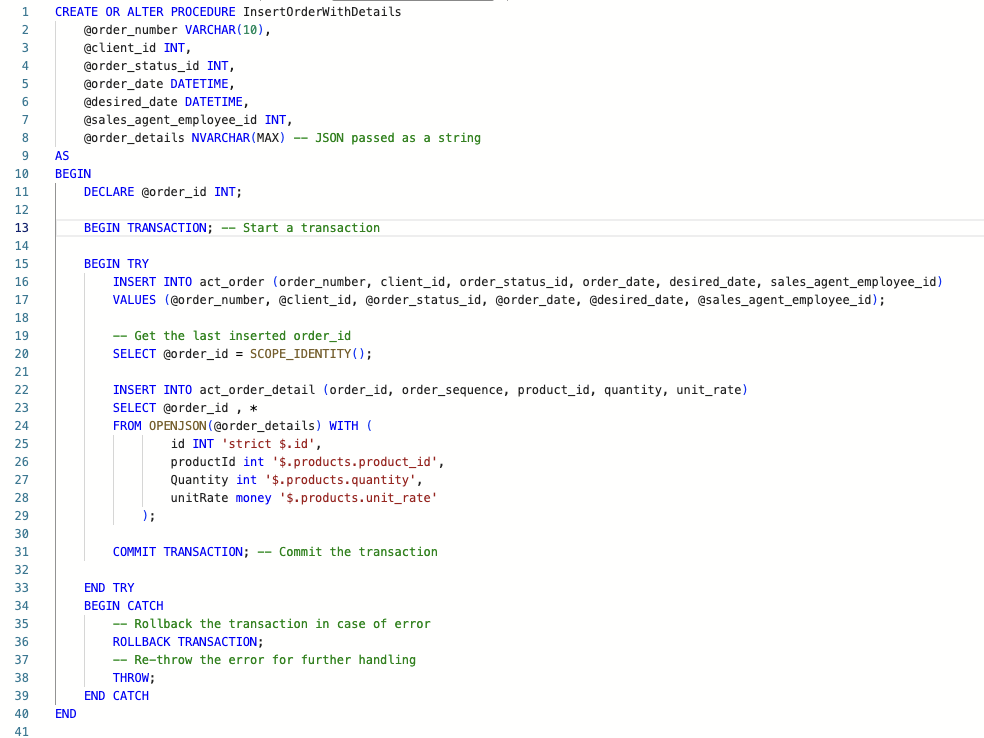
CREATE OR ALTER PROCEDURE InsertOrderWithDetails
@order_number VARCHAR(10),
@client_id INT,
@order_status_id INT,
@order_date DATETIME,
@desired_date DATETIME,
@sales_agent_employee_id INT,
@order_details NVARCHAR(MAX)
AS
BEGIN
DECLARE @order_id INT;

BEGIN TRANSACTION;

BEGIN TRY

INSERT INTO act_order(order_number, client_id, order_status_id, order_date, desired_date, sales_agent_employee_id)
VALUES(@order_number, @client_id, @order_status_id, @order_date, @desired_date, @sales_agent_employee_id);

SELECT @order_id = SCOPE_IDENTITY();

INSERT INTO act_order_detail(order_id, order_sequence, product_id, quantity, unit_rate)
SELECT @order_id, *
FROM OPENJSON(@order_details) WITH (
id INT 'strict $.id',
productId INT '$.products.product_id',
Quantity INT '$.products.quantity',
unitRate MONEY '$.products.unit_rate'
);

COMMIT TRANSACTION;

END TRY
BEGIN CATCH
ROLLBACK TRANSACTION;
THROW;
END CATCH
END
Comments Not Found