
Microsoft SQL Server
SQL Execution Order
In Microsoft SQL Server, SQL queries are executed in a specific logical order, which may differ from the way queries are written. Understanding the execution order is crucial for beginners, as it helps you write more efficient queries, troubleshoot issues, and optimize performance. The execution order defines how the SQL engine processes each clause in a query, ensuring that results are returned in the correct sequence.
Below is a detailed explanation of the SQL execution order, along with examples and best practices.
1. FROM – Selecting the Data Source
The FROM clause is processed first. It defines the tables or views from which data will be retrieved. If any joins are involved, they are also evaluated at this stage.
SELECT *
FROM Products;
This query retrieves all rows from the Products table. The FROM clause is evaluated first to identify the data source.
2. JOIN – Combining Data from Multiple Tables
If the query includes a JOIN clause, it is evaluated after the FROM clause to combine data from multiple tables based on a specified condition.
SELECT Orders.OrderID, Customers.CustomerName
FROM Orders
JOIN Customers ON Orders.CustomerID = Customers.CustomerID;
This query joins the Orders and Customers tables to retrieve order IDs and customer names.
3. WHERE – Filtering Rows
The WHERE clause is used to filter rows based on a condition. It is processed after the FROM and JOIN clauses, ensuring that only rows meeting the condition are included in the result set.
SELECT *
FROM Products
WHERE Price > 100;
This query retrieves all products with a price greater than 100.
4. GROUP BY – Grouping Rows
The GROUP BY clause groups rows that have the same values in specified columns. It is processed after the WHERE clause and before any aggregate functions like SUM() or COUNT() are calculated.
SELECT Category, COUNT(*) AS ProductCount
FROM Products
WHERE Price > 100
GROUP BY Category;
This query groups products by category and counts how many products in each category have a price greater than 100.
5. HAVING – Filtering Groups
The HAVING clause filters the results after the GROUP BY operation. It is similar to the WHERE clause but is used for filtering groups based on aggregate results.
SELECT Category, COUNT(*) AS ProductCount
FROM Products
GROUP BY Category
HAVING COUNT(*) > 5;
This query retrieves categories that have more than 5 products.
6. SELECT – Selecting Columns
The SELECT clause is evaluated after filtering and grouping have been performed. It defines the columns to be included in the result set.
SELECT ProductName, Price
FROM Products
WHERE Price > 100;
This query retrieves the product name and price for products priced over 100.
7. DISTINCT – Removing Duplicates
The DISTINCT keyword removes duplicate rows from the result set. It is processed after the SELECT clause.
SELECT DISTINCT Category
FROM Products;
This query retrieves unique categories from the Products table.
8. ORDER BY – Sorting the Results
The ORDER BY clause is the last step in the execution process and is used to sort the result set based on one or more columns.
SELECT ProductName, Price
FROM Products
ORDER BY Price DESC;
This query retrieves products and their prices, sorting them in descending order by price.
9. LIMIT/TOP – Limiting the Result Set
The LIMIT (or TOP in SQL Server) clause is evaluated last to limit the number of rows returned by the query.
SELECT TOP 5 ProductName, Price
FROM Products
ORDER BY Price DESC;
This query retrieves the top 5 most expensive products by limiting the result set to 5 rows.
SQL Execution Order in Summary
- FROM – Determine the source of the data.
- JOIN – Combine data from multiple tables.
- WHERE – Filter rows based on a condition.
- GROUP BY – Group rows based on specified columns.
- HAVING – Filter groups based on aggregate conditions.
- SELECT – Select the columns to be returned.
- DISTINCT – Remove duplicate rows from the result set.
- ORDER BY – Sort the result set.
- LIMIT/TOP – Limit the number of rows returned.
Best Practices for SQL Execution Order
Understand the Execution Order for Efficient Query Writing – Writing queries with the proper execution order in mind can help optimize your query performance and avoid unnecessary complexity.
SELECT Category, SUM(SalesAmount)
FROM Sales
WHERE SaleDate > '2023-01-01'
GROUP BY Category
HAVING SUM(SalesAmount) > 10000
ORDER BY SUM(SalesAmount) DESC;
Use
WHEREBeforeGROUP BYfor Performance – Apply theWHEREclause beforeGROUP BYto filter out unnecessary rows early, which improves performance.Limit Data Early – If you're working with large datasets, consider using
TOPorLIMITearly in the process to minimize the number of rows being processed, especially in combination withORDER BY.Use
HAVINGSparingly – TheHAVINGclause is processed after aggregation, so use it only when you need to filter based on aggregate results. If possible, try filtering in theWHEREclause instead.
By mastering the SQL execution order, you can write more efficient and optimized queries, making it easier to retrieve and analyze data from SQL Server databases.
To gain complete access, login with gmail or outlook, no need of signup, click here
SQL Query Order of Execution
Below is an illustration depicting the internal processing sequence of different clauses in a SQL statement by the SQL engine. It's important to note that in this example, the DISTINCT and LIMIT clauses are not utilized.
SQL Execution Order
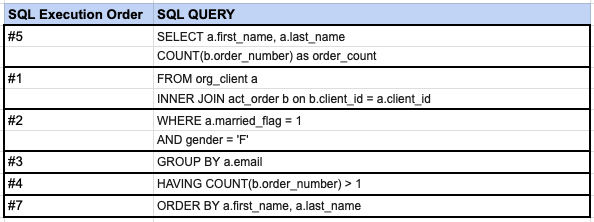
As illustrated in this image, the SQL engine initially executes the FROM clause and any INNER JOINs, followed by the other steps as depicted.
Comments Not Found