
Microsoft SQL Server
Logical Operators
In Microsoft SQL Server, logical operators are used to combine multiple conditions in SQL queries. They allow you to refine your searches and apply conditional logic when retrieving data. The most commonly used logical operators include AND, OR, and NOT. Understanding these operators is crucial for performing complex filtering, as they help you define more flexible and powerful conditions within WHERE clauses or JOIN conditions.
Below is a detailed explanation of each logical operator with examples and best practices.
1. AND Operator
The AND operator combines two or more conditions, returning rows only if all conditions are true.
SELECT column_name
FROM table_name
WHERE condition1 AND condition2;
Example:
SELECT ProductName, Price
FROM Products
WHERE Price > 50 AND Category = 'Electronics';
This query retrieves all products from the Electronics category that are priced above 50. Both conditions must be true for a row to be returned.
2. OR Operator
The OR operator combines two or more conditions, returning rows if at least one condition is true.
SELECT column_name
FROM table_name
WHERE condition1 OR condition2;
Example:
SELECT ProductName, Price
FROM Products
WHERE Category = 'Clothing' OR Price < 50;
This query retrieves all products that are either in the Clothing category or have a price lower than 50.
3. NOT Operator
The NOT operator is used to reverse the result of a condition. It returns rows where the condition is not true.
SELECT column_name
FROM table_name
WHERE NOT condition;
Example:
SELECT ProductName, Price
FROM Products
WHERE NOT Category = 'Electronics';
This query retrieves all products except those in the Electronics category.
4. Combining AND, OR, and NOT in Complex Conditions
You can combine AND, OR, and NOT to create complex filtering conditions. Always use parentheses to group conditions and control the order of evaluation.
SELECT ProductName, Price
FROM Products
WHERE (Category = 'Electronics' OR Category = 'Clothing') AND Price > 100;
This query retrieves all products that are either in the Electronics or Clothing category, but only if their price is greater than 100.
5. Using Logical Operators with NULL Values
When working with NULL values, logical operators can be combined with the IS NULL or IS NOT NULL conditions.
SELECT CustomerName, Email
FROM Customers
WHERE Email IS NOT NULL AND Country = 'USA';
This query retrieves all customers from the USA who have provided an email address.
6. Best Practices for Using Logical Operators
Use
ANDfor Narrowing Results – Use theANDoperator when you need to filter data based on multiple true conditions. Ensure both conditions are true for a row to be returned.SELECT * FROM Sales WHERE SaleAmount > 1000 AND SaleDate > '2023-01-01';Use
ORfor Broader Searches – Use theORoperator when you want to include rows that meet at least one of several conditions. Be mindful thatORcan broaden your result set significantly.SELECT * FROM Customers WHERE Country = 'USA' OR Country = 'Canada';Use
NOTto Exclude Specific Data – TheNOToperator is useful when you need to exclude rows that match a certain condition.SELECT * FROM Products WHERE NOT Category = 'Clothing';Use Parentheses for Complex Queries – Always group your conditions using parentheses to ensure that logical operators are evaluated in the correct order. SQL evaluates
ANDbeforeOR, so parentheses help control the logic flow.SELECT * FROM Products WHERE (Category = 'Electronics' OR Category = 'Furniture') AND Price < 500;Optimize for Performance with Indexes – When using logical operators on large datasets, ensure that columns involved in the conditions are indexed to improve query performance.
Handle
NULLValues Carefully – Logical operators don’t handleNULLvalues by default. Always include conditions likeIS NULLorIS NOT NULLwhen necessary to avoid unexpected results.
By mastering logical operators like AND, OR, and NOT, you can build complex and flexible SQL queries that allow you to retrieve precisely the data you need from Microsoft SQL Server. These operators are fundamental in query optimization and data analysis.
To gain complete access, login with gmail or outlook, no need of signup, click here

Test code
To choose male customers located in the state of New York, use the following query:
SELECT *
FROM org_client
WHERE gender = 'M'
AND state = 'NY';To select customers either from the state of Pennsylvania or the city of Miami, use the following query:
SELECT *
FROM org_client
WHERE city = 'Miami'
OR state = 'PA';To get records of customers who do not reside in the state of New York, use the following query:
SELECT *
FROM org_client
WHERE state <> 'NY';To select married customers whose credit limit exceeds that of all bachelors, use the following query:
SELECT *
FROM org_client
WHERE credit_limit > ALL (SELECT credit_limit FROM org_client WHERE married_flag = 0)
AND married_flag = 1;To select single female clients born in the same year as any single male clients, use the following query:
SELECT *
FROM org_client
WHERE birth_year = ANY (SELECT birth_year FROM org_client WHERE gender = 'M' AND married_flag = 0)
AND gender = 'F'
AND married_flag = 0;To select all customers who have placed an order, use the following query:
SELECT *
FROM org_client
WHERE EXISTS (SELECT 1 FROM act_order WHERE org_client.client_id = act_order.client_id);To fetch all rows from the clients table where the birth year column matches any of the specified values (1990, 1980), use the following query:
SELECT *
FROM org_client
WHERE birth_year IN (1990, 1980);AND operator
SELECT * FROM org_client WHERE gender = 'M' AND state = 'NY';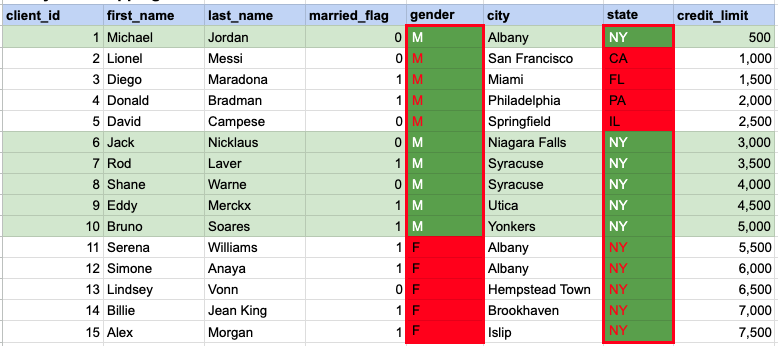
In the given image, the green hue indicates the data that has been chosen or meets the criteria specified in our query. When using the AND operator, both column values must satisfy the specified criteria.
OR operator
SELECT * FROM org_client WHERE city = 'Miami' OR state = 'PA';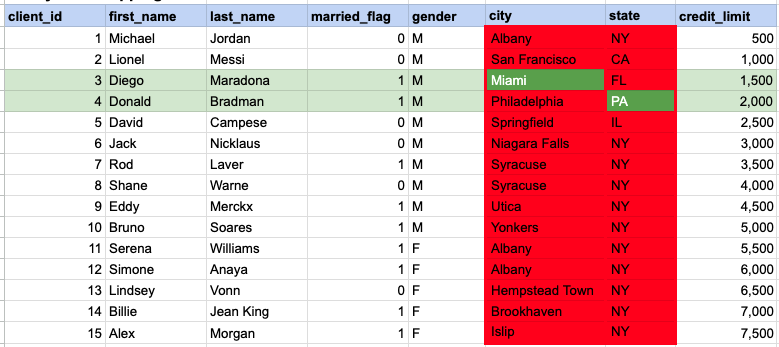
In the given image, the green hue indicates the data that has been chosen or meets the criteria specified in our query. In the case of the OR operator, at least one of the column values needs to meet the specified criteria.
SQL ALL Clause
SELECT * FROM org_client WHERE credit_limit > ALL (SELECT credit_limit FROM org_client WHERE married_flag = 0) AND married_flag = 1;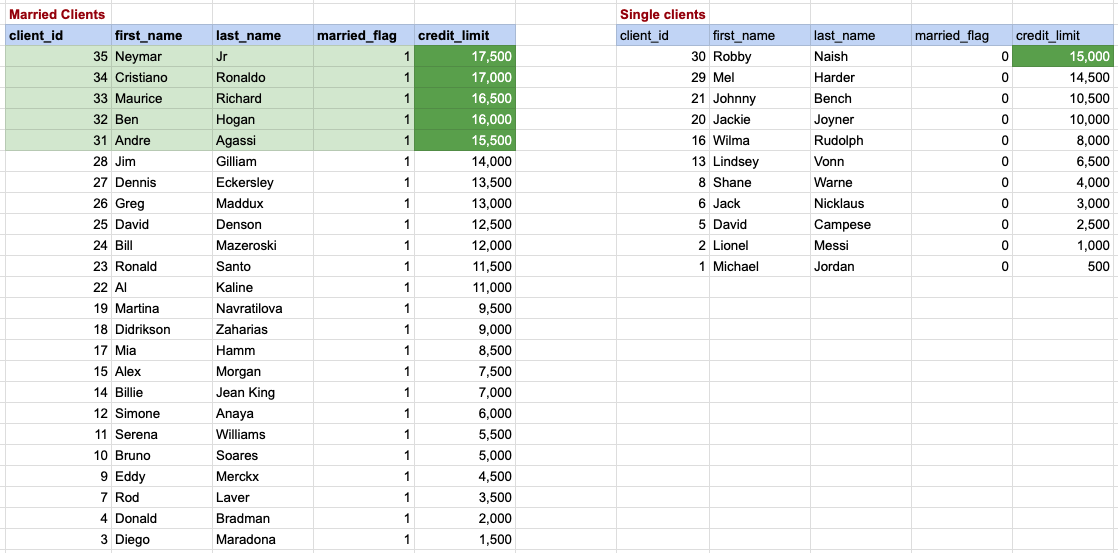
In this context, we are focused on identifying married couples whose credit limit is higher than the highest credit limit among bachelors. The bachelors and their respective credit limits are displayed on the right side, arranged in descending order with the top credit limit being 15,000. Therefore, for married clients to have a higher credit rating than all bachelors, they must exceed this top credit limit. Rows with a green background on the left represent the data of married couples that fulfill our criteria.
SQL ANY Clause
SELECT * FROM org_client WHERE birth_year = ANY (SELECT birth_year FROM org_client WHERE gender = 'M' AND married_flag = 0) AND gender = 'F' AND married_flag = 0;
In this case, our goal is to find single female clients who share the same birth year as any of the single male clients. The data for single females, along with their birth years, is displayed on the left, while the information for single males is listed on the right. Single female clients whose data is highlighted with a green background are those whose birth year matches with that of a single male from the right side.
SQL EXISTS Clause
SELECT * FROM org_client WHERE EXISTS (SELECT 1 FROM act_order WHERE org_client.client_id = act_order.client_id);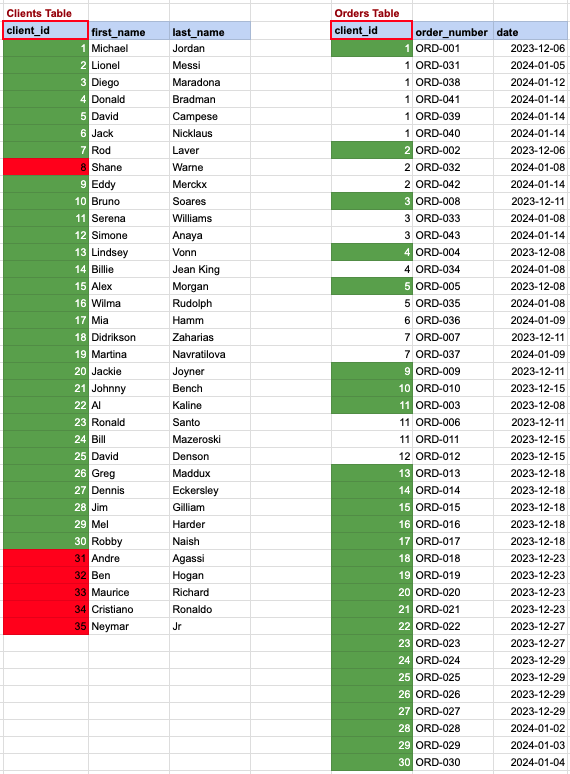
In this scenario, we aim to list clients who have made at least one order. Referring to the image, the clients from the 'clients' table, highlighted with a green background, meet our criteria, as they have placed one or more orders in the 'orders' table on the right. Conversely, clients marked with a red background are those who haven't placed any orders in the table on the right.
IN OPERATOR
SELECT * FROM org_employee WHERE designation IN ('Sales Manager', 'Financial Analyst', 'CFO');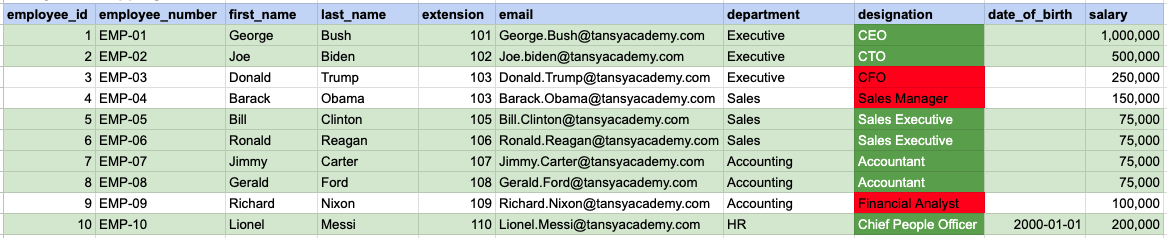
In the provided image, the green color signifies the data that has been selected or satisfies the conditions specified in our query. Data points in red indicate information that does not meet the criteria set by the query.
Comments Not Found