
Microsoft SQL Server
TOP FETCH OFFSET
In Microsoft SQL Server, TOP, OFFSET, and FETCH are used to limit the number of rows returned by a query. These commands are particularly useful when you need to retrieve a subset of data, such as the top 10 highest sales, or implement pagination for large result sets. Understanding how to use these commands allows you to control the amount of data retrieved from the database efficiently, which is essential for optimizing performance in queries that return large datasets.
Below is a detailed explanation of how to use TOP, FETCH, and OFFSET with examples and best practices.
1. TOP – Limiting the Number of Rows
The TOP keyword is used to retrieve a specific number or percentage of rows from a result set. You can use it to get the first few rows of a query, which is often useful for returning the top records based on a certain condition.
SELECT TOP (number) column_name(s)
FROM table_name
ORDER BY column_name;
Example:
SELECT TOP 5 ProductName, Price
FROM Products
ORDER BY Price DESC;
This query retrieves the top 5 most expensive products by ordering them in descending order of price.
2. Using TOP with Percentage
You can also use TOP with a percentage to return a percentage of rows from the result set.
SELECT TOP (percentage) PERCENT column_name(s)
FROM table_name
ORDER BY column_name;
Example:
SELECT TOP 10 PERCENT ProductName, Price
FROM Products
ORDER BY Price DESC;
This query retrieves the top 10 percent of products by price.
3. OFFSET and FETCH – Pagination
The OFFSET and FETCH keywords are used for pagination, allowing you to skip a specific number of rows and then fetch a set number of rows from the result set. This is especially useful when implementing pagination in web applications.
SELECT column_name(s)
FROM table_name
ORDER BY column_name
OFFSET number_of_rows ROWS
FETCH NEXT number_of_rows ROWS ONLY;
Example:
SELECT ProductName, Price
FROM Products
ORDER BY Price DESC
OFFSET 10 ROWS
FETCH NEXT 5 ROWS ONLY;
This query skips the first 10 rows and fetches the next 5 rows from the result set, which could be useful when displaying the second page of results in a paginated list.
4. Using OFFSET Without FETCH
You can use the OFFSET clause without FETCH to simply skip a certain number of rows.
SELECT ProductName, Price
FROM Products
ORDER BY Price DESC
OFFSET 5 ROWS;
This query skips the first 5 rows and returns all the remaining rows.
5. Combining TOP with ORDER BY
TOP is often combined with ORDER BY to ensure that you retrieve the most relevant rows based on a specified condition, such as getting the highest or lowest values.
SELECT TOP 3 ProductName, Price
FROM Products
ORDER BY Price ASC;
This query retrieves the 3 least expensive products by ordering them in ascending order of price.
6. Best Practices for Using TOP, OFFSET, and FETCH
Use
TOPfor Quick Data Sampling – UseTOPto retrieve a quick snapshot of your data, especially when you only need to see the highest or lowest values.SELECT TOP 10 ProductName, Price FROM Products ORDER BY Price DESC;Combine
ORDER BYwithTOPfor Accurate Results – Always useORDER BYwithTOPto ensure the rows returned are sorted in a meaningful way. WithoutORDER BY, the query may return arbitrary rows.Use
OFFSETandFETCHfor Pagination – When implementing pagination in applications, useOFFSETandFETCHto retrieve a specific subset of rows. This is particularly useful for displaying large datasets over multiple pages.SELECT ProductName, Price FROM Products ORDER BY Price OFFSET 50 ROWS FETCH NEXT 10 ROWS ONLY;Beware of Performance with Large Datasets – Both
TOPandOFFSET/FETCHmay slow down when working with large datasets. Ensure that columns used inORDER BYare indexed to improve query performance.Use
TOPwith Percent for Sampling – UseTOPwith a percentage to retrieve a sample of the data, which can be useful for testing or exploratory analysis.SELECT TOP 5 PERCENT * FROM Sales;
By mastering the TOP, FETCH, and OFFSET clauses, you can efficiently limit and control the rows returned by your queries, making it easier to work with large datasets in SQL Server. These tools are particularly valuable when implementing pagination, sampling data, or retrieving only the most relevant records.
To gain complete access, login with gmail or outlook, no need of signup, click here

Test code
If you want to select a percentage of rows, you can use a percentage instead of a specific number.
SELECT TOP 10 PERCENT employee_id, first_name, last_name
FROM org_employee
ORDER BY last_name;Skip the first 3 rows and then retrieve the next 6 rows.
SELECT *
FROM org_employee
ORDER BY employee_id
OFFSET 3 ROWS
FETCH NEXT 6 ROWS ONLY;Example 1:
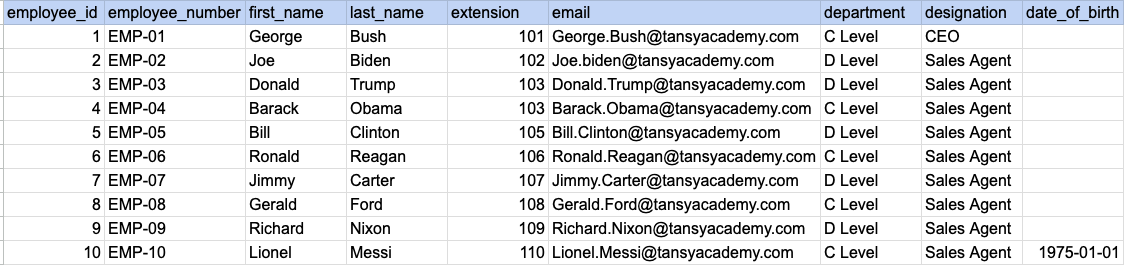
Let's understand the process of extracting data from a specified table using TOP clause. In this case, we aim to retrieve top 5 rows from the employee table.
Example 1 - Raw data from employee table
Example 1 - Query
SELECT TOP 5 * FROM org_employee;Example 1 - Query data mapping
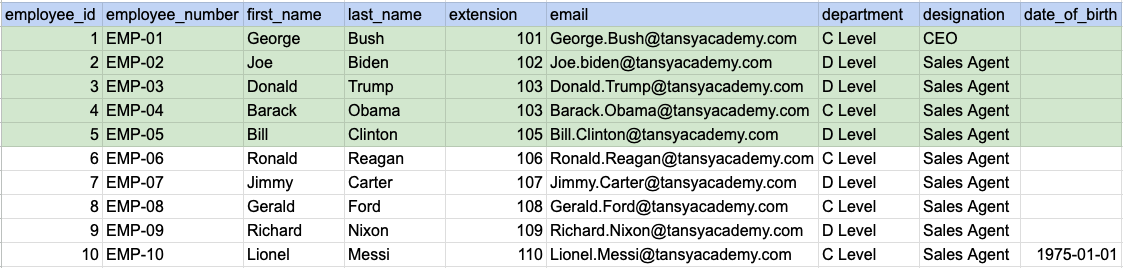
In the image above, the green color indicates the data that has been chosen or meets the criteria for our query.
Example 1 - Query Output

Example 2:
Let's understand the process of extracting data from a specified table using FETCH clause in combination with offset. In this exmaple we are trying to skip 3 rows and retreive next 6 rows
Example 2 - Raw data from employee table
Example 2 - Query
SELECT * FROM org_employee ORDER BY employee_id OFFSET 3 ROWS FETCH NEXT 6 ROWS ONLY;Example 2 - Query data mapping
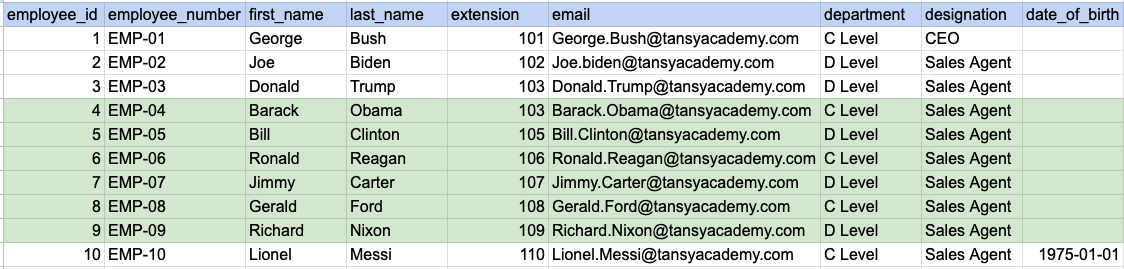
In the image above, the green color indicates the data that has been chosen or meets the criteria for our query.
Example 2 - Query Output

Example 3:
Let's understand the process of extracting data using FETCH in combination with ORDER BY clause. Here we are trying to order the data by last name and then select top 4 rows.
Example 3 - Raw data from employee table
Example 3 - Query
SELECT * FROM org_employee ORDER BY last_name OFFSET 0 ROWS FETCH NEXT 4 ROWS ONLY;Example 3 - Step 1 Order the raw data by last name
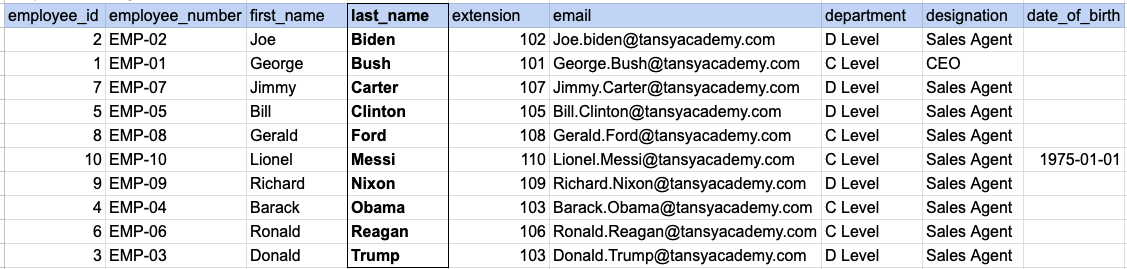
As step 1 first we have to order our raw data by last name as shown in above image.
Example 3 - Query data mapping
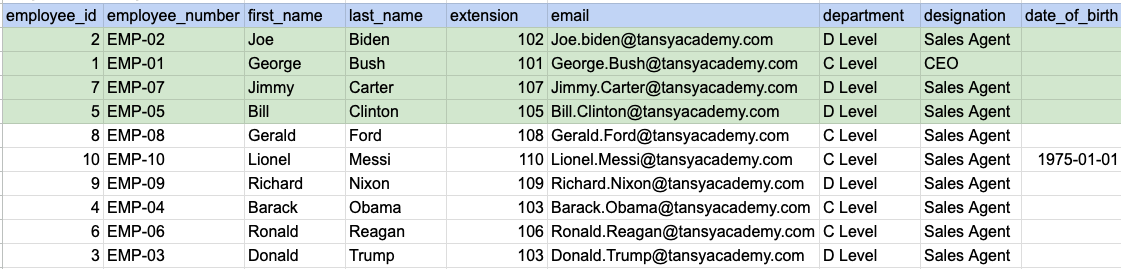
In the image above, the green color indicates the data that has been chosen or meets the criteria for our query.
Example 3 - Query Output

Comments Not Found