
Microsoft SQL Server
BETWEEN Operator
In Microsoft SQL Server, the BETWEEN operator is part of the Data Query Language (DQL) and is used to filter the result set within a specific range of values. It is commonly used with numbers, dates, and even text data. The BETWEEN operator is inclusive, meaning it includes the values specified at the boundaries. For beginners, understanding how to use BETWEEN effectively can help when working with large datasets that need to be filtered by a range.
Below is a detailed breakdown of how to use the BETWEEN operator with examples to help you get started.
1. Basic Syntax of BETWEEN
The BETWEEN operator is used to select values within a given range, including the endpoints.
SELECT column_name
FROM table_name
WHERE column_name BETWEEN value1 AND value2;
- Replace
column_namewith the column you want to filter. - Replace
table_namewith the actual table name. value1andvalue2represent the lower and upper bounds of the range.
Example:
SELECT ProductName, Price
FROM Products
WHERE Price BETWEEN 10 AND 50;
This query retrieves products whose prices fall between 10 and 50, inclusive.
2. Using BETWEEN with Dates
You can use the BETWEEN operator to filter data based on a range of dates, which is useful for querying time-bound data like sales.
SELECT *
FROM Sales
WHERE SaleDate BETWEEN '2023-01-01' AND '2023-12-31';
This query retrieves all sales that occurred between January 1, 2023, and December 31, 2023.
3. Using BETWEEN with Text Data
Though not as common, you can also use BETWEEN with text values. SQL Server compares text values based on alphabetical order.
SELECT CustomerName
FROM Customers
WHERE CustomerName BETWEEN 'A' AND 'L';
This query retrieves customer names that start with any letter between 'A' and 'L'.
4. Combining BETWEEN with Other Conditions
You can combine the BETWEEN operator with other SQL conditions, such as AND or OR, to further refine the query results.
SELECT ProductName, Price
FROM Products
WHERE Price BETWEEN 20 AND 100
AND Category = 'Electronics';
This query retrieves products in the "Electronics" category with prices between 20 and 100.
5. Using NOT BETWEEN
To exclude a range of values, you can use the NOT BETWEEN operator.
SELECT ProductName, Price
FROM Products
WHERE Price NOT BETWEEN 30 AND 70;
This query retrieves all products whose prices are not between 30 and 70.
6. Best Practices for Using BETWEEN
Use
BETWEENfor Date and Number Ranges – TheBETWEENoperator is most effective when used for filtering date ranges and numerical ranges, making your queries easier to read and maintain.Make Sure Endpoints are Inclusive – Remember that
BETWEENis inclusive, meaning the lower and upper bounds are included in the results. If you don’t want to include the boundaries, you’ll need to modify the condition using<or>.SELECT * FROM Sales WHERE SaleDate > '2023-01-01' AND SaleDate < '2023-12-31';Watch for Case Sensitivity with Text – If you are using
BETWEENwith text data, be aware that the results may depend on the collation (case sensitivity) settings of your SQL Server instance.Use
BETWEENwith Indexed Columns – For large datasets, usingBETWEENon indexed columns (such as dates or numbers) can improve performance as SQL Server can search through the range more efficiently.
By following these steps and practices, you'll be able to use the BETWEEN operator effectively to filter records and make your SQL queries more powerful and efficient.
To gain complete access, login with gmail or outlook, no need of signup, click here
Test code
In Microsoft SQL Server, to fetch clients from the "org_client" table whose birth year falls between 1985 and 1995, you can use this SQL query:
SELECT *
FROM org_client
WHERE birth_year BETWEEN 1985 AND 1995;In Microsoft SQL Server, to fetch employees from the "org_employee" table whose salary falls between $50,000 and $100,000, you can use this SQL query:
SELECT *
FROM org_employee
WHERE salary BETWEEN 50000 AND 100000;In Microsoft SQL Server, to fetch order data from the "act_order" table where the order date falls between '2023-12-10' and '2023-12-17', you can use this SQL query:
SELECT *
FROM act_order
WHERE order_date BETWEEN '2023-12-10' AND '2023-12-17';Example 1:
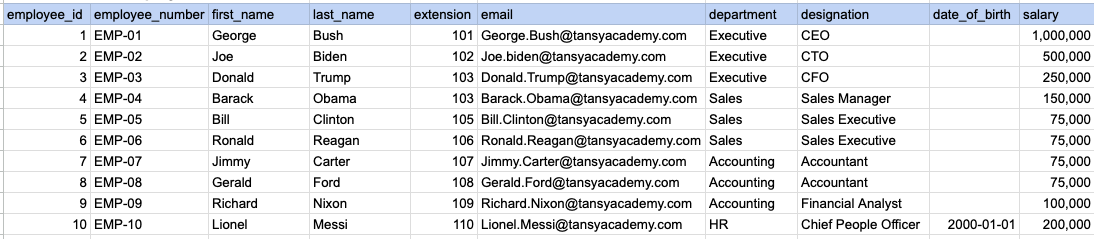
Let's explore the procedure of extracting information from a designated table using the BETWEEN SQL operator with currency data. In this instance, our goal is to fetch employee data where the salary falls between 100k and 250k.
Example 1 - Raw data from employee table
Example 1 - Query
SELECT * FROM org_employee WHERE salary BETWEEN 100000 AND 250000;Example 1 - Query data mapping
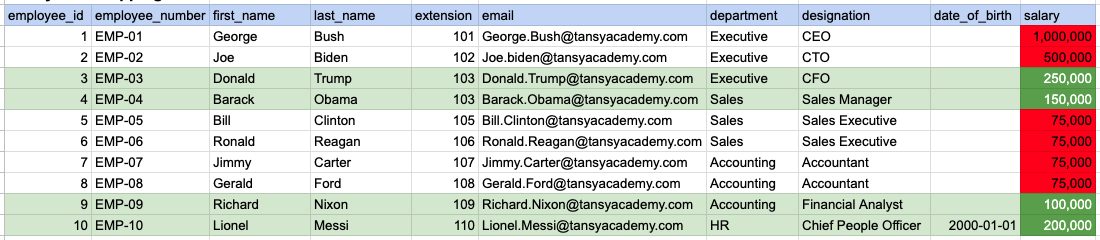
In the provided image, the green color signifies the data that has been selected or satisfies the conditions specified in our query. Data points in red indicate information that does not meet the criteria set by the query.
Example 1 - Query Output

Example 2:
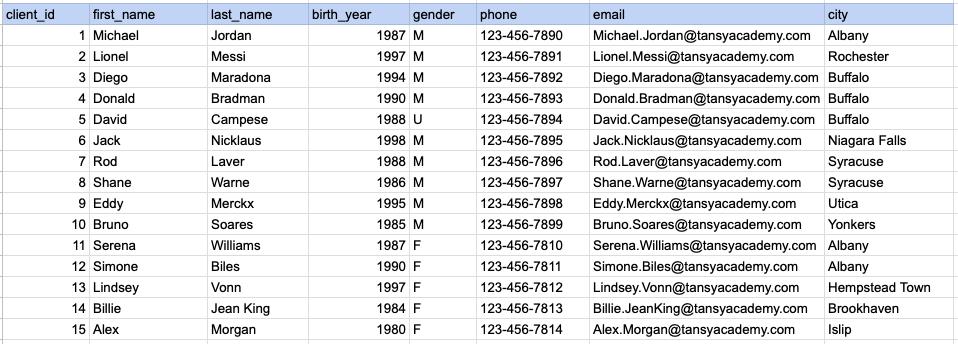
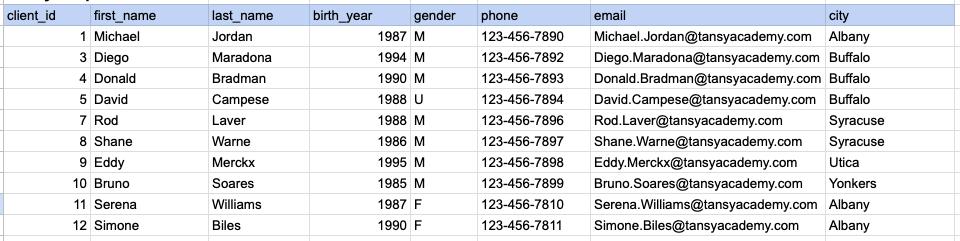
Let's explore the procedure for extracting information from a designated table using the BETWEEN SQL operator on integer data. In this instance, our goal is to fetch client data where the birth year falls between 1985 and 1995.
Example 2 - Raw data from client table
Example 2 - Query
SELECT * FROM org_client WHERE birth_year BETWEEN 1985 AND 1995;Example 2 - Query data mapping
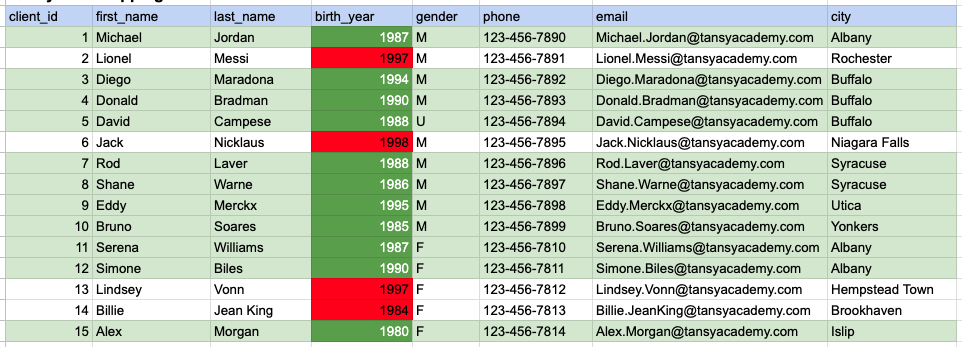
In the provided image, the green color signifies the data that has been selected or satisfies the conditions specified in our query. Data points in red indicate information that does not meet the criteria set by the query.
Example 2 - Query Output
Example 3:
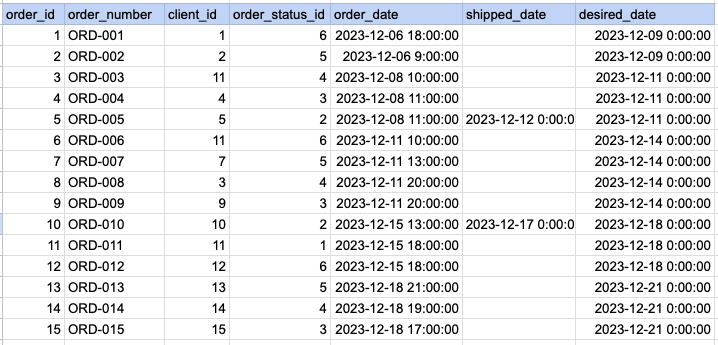
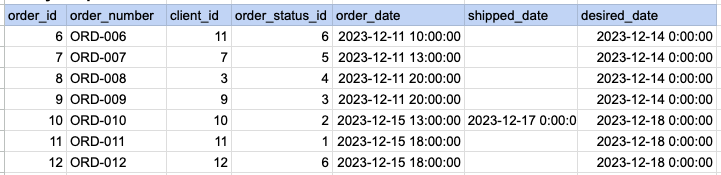
Let's explore the procedure for extracting information from a designated table using the BETWEEN SQL operator on date time data. In this instance, our goal is to fetch order data where the order date falls between Dec 12th and Dec 17th.
Example 3 - Raw data from order table
Example 3 - Query
SELECT * FROM act_order WHERE order_date BETWEEN '2023-12-10' AND '2023-12-17';Example 3 - Query data mapping
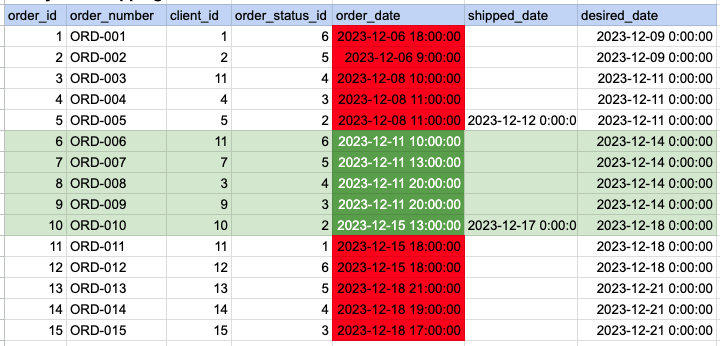
In the provided image, the green color signifies the data that has been selected or satisfies the conditions specified in our query. Data points in red indicate information that does not meet the criteria set by the query.
Example 3 - Query Output
Comments Not Found