
Microsoft SQL Server
SQL Aliases
In Microsoft SQL Server, an alias is a temporary name given to a table or column in a query. It makes SQL queries easier to read and understand, especially when dealing with complex queries involving multiple tables or columns. Aliases are defined using the AS keyword, although this keyword is optional in many cases. For beginners, learning how to use aliases will help simplify your queries, enhance readability, and make it easier to reference tables and columns in complex SQL queries.
Below is a detailed explanation of how to use column and table aliases with examples and best practices.
1. Basic Syntax of Column Alias
A column alias temporarily renames a column in the result set, making it easier to reference or giving the column a more meaningful name in the output.
SELECT column_name AS alias_name
FROM table_name;
- Replace
column_namewith the actual column name. - Replace
alias_namewith the temporary name for the column.
Example:
SELECT ProductName AS Name, Price AS Cost
FROM Products;
This query retrieves the ProductName and Price columns, but renames them as Name and Cost in the result set.
2. Basic Syntax of Table Alias
A table alias temporarily renames a table within a query. This is particularly useful when you are working with multiple tables or performing self-joins.
SELECT column_name
FROM table_name AS alias_name;
Example:
SELECT p.ProductName, s.SaleAmount
FROM Products p
JOIN Sales s ON p.ProductID = s.ProductID;
In this query, p is an alias for the Products table, and s is an alias for the Sales table, simplifying the query and making it more readable.
3. Using Aliases in JOIN Queries
Aliases are extremely useful when joining multiple tables, as they help reduce the length of table names and make the query more concise.
SELECT c.CustomerName AS Customer, s.SaleAmount AS Amount
FROM Customers c
JOIN Sales s ON c.CustomerID = s.CustomerID;
This query retrieves customer names and sales amounts by joining the Customers and Sales tables. The aliases c and s make the query shorter and easier to understand.
4. Using Aliases in Subqueries
You can also use aliases within subqueries to make complex queries easier to follow.
SELECT p.ProductName,
       (SELECT AVG(Price) FROM Products WHERE Category = 'Electronics') AS AvgPrice
FROM Products p
WHERE p.Category = 'Electronics';
In this example, the subquery calculates the average price of all products in the Electronics category and assigns the alias AvgPrice to this result.
5. Best Practices for Using Aliases
Use Meaningful Alias Names – Always use descriptive alias names that make it clear what data is being represented. For example, use
Customerinstead ofcif it makes the query easier to read.SELECT p.ProductName, p.Price FROM Products p;Use Aliases in Complex Queries – Aliases are especially useful in complex queries involving multiple tables or subqueries. They make it easier to understand the relationships between different tables.
SELECT c.CustomerName, o.OrderDate
FROM Customers c
JOIN Orders o ON c.CustomerID = o.CustomerID;
Avoid Overusing Short Aliases – While short aliases like
corpcan make a query shorter, avoid overusing them in a way that makes the query difficult to understand. Stick to clear, meaningful names when possible.Use
ASfor Clarity – Although theASkeyword is optional, using it can improve the readability of your query by making it explicit that you are creating an alias.SELECT ProductName AS Name FROM Products;Ensure Alias Names are Unique – When using multiple aliases in a query, ensure that each alias is unique to avoid confusion and errors, especially in complex queries with multiple joins or subqueries.
By using aliases effectively, you can write cleaner and more understandable SQL queries that enhance readability, especially when working with large or complex databases in SQL Server.
To gain complete access, login with gmail or outlook, no need of signup, click here
Test code
In Microsoft SQL Server, a SQL query employing aliases for columns and tables can improve column name readability and abbreviate table names. Here is an example:
SELECT a.order_number AS "Order Number",
CAST(a.order_date AS date) AS "Order Date",
CAST(a.order_date AS time) AS "Order Time",
b.order_status AS "Order Status"
FROM act_order a
INNER JOIN act_lkp_order_status b ON b.order_status_id = a.order_status_id;Example 1:Table and Column ALIAS
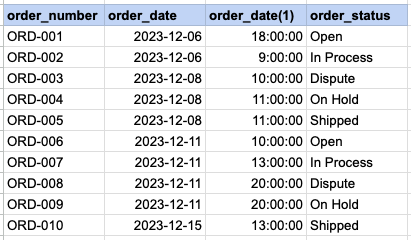
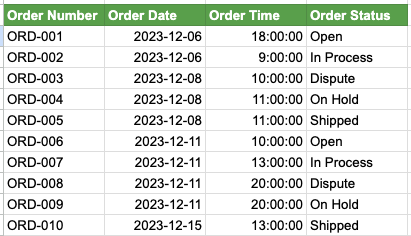
We have two SQL queries for comparison. In Query 1, SQL aliases are not used, leading to less clear output column names, particularly the one extracting time from the order date. In contrast, Query 2 employs SQL aliases, resulting in a more easily understandable column headers, such as Order Time. Additionally, it is evident that lengthy table names are extensively used throughout Query 1, whereas in Query 2, table aliases are employed to abbreviate these table names.'
Example 1 - Query with no alias
SELECT act_order.order_number ,cast(act_order.order_date as date) ,cast(act_order.order_date as time) ,act_lkp_order_status.order_status FROM act_order INNER JOIN act_lkp_order_status on act_lkp_order_status.order_status_id = act_order.order_status_id ;Example 1 - Query with alias
SELECT a.order_number as 'Order Number' ,cast(a.order_date as date) as 'Order Date' ,cast(a.order_date as time) as 'Order Time' ,b.order_status as 'Order Status' FROM act_order a INNER JOIN act_lkp_order_status b on b.order_status_id = a.order_status_id ; -- Oracle TO_CHAR(a.order_date,'HH:MI:SS AM')Example 1 - Query output with no ALIASES
Example 1 - Query output using ALIASES
Comments Not Found