
Microsoft SQL Server
NOT IN Operator
The NOT IN operator in Microsoft SQL Server is part of the Data Query Language (DQL) and is used to filter rows by excluding values from a specified list. It works by returning only those records where the column’s value is not in the provided list. This is useful when you want to filter out certain values from your results. For beginners, learning how to use NOT IN effectively helps in creating queries that exclude specific data points without writing multiple AND conditions.
Below is a detailed explanation of how to use the NOT IN operator, along with examples.
1. Basic Syntax of NOT IN
The basic syntax for using NOT IN is as follows:
SELECT column_name
FROM table_name
WHERE column_name NOT IN (value1, value2, ..., valueN);
- Replace
column_namewith the column you want to filter. - Replace
table_namewith the actual table name. - The values inside the parentheses are the list of values to exclude.
Example:
SELECT ProductName, Category
FROM Products
WHERE Category NOT IN ('Electronics', 'Furniture');
This query retrieves all products that are not in the Electronics or Furniture categories.
2. Using NOT IN with Numeric Values
You can use the NOT IN operator with numeric values to exclude specific numbers from your query.
SELECT CustomerName, Country
FROM Customers
WHERE CustomerID NOT IN (1, 3, 5, 7);
This query retrieves all customers whose CustomerID is not 1, 3, 5, or 7.
3. Using NOT IN with Subqueries
The NOT IN operator is often used with subqueries to exclude rows based on the result of another query. This is helpful when you want to filter out data dynamically.
SELECT ProductName, Price
FROM Products
WHERE ProductID NOT IN (SELECT ProductID FROM Sales WHERE SaleDate = '2023-09-01');
This query retrieves all products that were not sold on September 1, 2023, using a subquery to identify which ProductID values to exclude.
4. Handling NULL Values with NOT IN
Be cautious when using NOT IN with columns that may contain NULL values. If a NULL is returned within the subquery or list of values, NOT IN will return an empty result set, as SQL Server cannot evaluate NULL against other values.
Example:
SELECT CustomerName
FROM Customers
WHERE CustomerID NOT IN (NULL, 1, 2, 3);  -- Will return no rows
5. Combining NOT IN with Other Conditions
You can combine NOT IN with other SQL conditions such as AND or OR to further refine your search.
SELECT ProductName, Price
FROM Products
WHERE Price > 50
AND ProductID NOT IN (1, 2, 3);
This query retrieves all products priced above 50, except for those with ProductID values of 1, 2, or 3.
6. Best Practices for Using NOT IN
Be Careful with
NULLValues – When usingNOT IN,NULLvalues can cause unexpected results because SQL Server will not return any rows ifNULLexists in the list of excluded values. Consider usingIS NOT NULLif there is a possibility ofNULLvalues in your data.SELECT ProductName FROM Products WHERE ProductID NOT IN (1, 2, 3) AND ProductID IS NOT NULL;Use Subqueries for Dynamic Filtering – When the list of values to exclude may change, using a subquery with
NOT INis a powerful way to dynamically filter data based on another query.Avoid Overusing
NOT INwith Large Lists – UsingNOT INwith long lists can impact performance. If you need to exclude a large number of values, consider usingLEFT JOINorNOT EXISTSfor better performance.SELECT p.ProductName FROM Products p LEFT JOIN Sales s ON p.ProductID = s.ProductID WHERE s.ProductID IS NULL;Test Performance on Large Data Sets – When using
NOT INwith subqueries, especially on large datasets, always test performance. In some cases, alternative methods likeNOT EXISTSmight yield better query performance.
By understanding and applying the NOT IN operator, you can write cleaner and more efficient SQL queries for excluding specific values or dynamically filtering out data, especially when working with subqueries.
To gain complete access, login with gmail or outlook, no need of signup, click here

Test code
In Microsoft SQL Server, the NOT IN operator is used to filter rows by excluding specified string values. This query retrieves all rows from the "org_employee" table where the designation column does not correspond to any of the specified values ('Sales Manager', 'Financial Analyst', 'CFO'):
SELECT *
FROM org_employee
WHERE designation NOT IN ('Sales Manager', 'Financial Analyst', 'CFO');In Microsoft SQL Server, the NOT IN operator is used to filter rows by excluding specified numeric values. This query retrieves all rows from the "org_client" table where the birth year column does not correspond to any of the specified values (1990, 1980):
SELECT *
FROM org_client
WHERE birth_year NOT IN (1990, 1980);In Microsoft SQL Server, the NOT IN operator is used to filter rows by excluding specified datetime values. This query retrieves all rows from the "act_order" table where the desired_date column does not match any of the specified values ('2023-12-09', '2023-12-10', '2023-12-18', '2023-12-25'):
SELECT *
FROM act_order
WHERE desired_date NOT IN ('2023-12-09', '2023-12-10', '2023-12-18', '2023-12-25');Example 1:
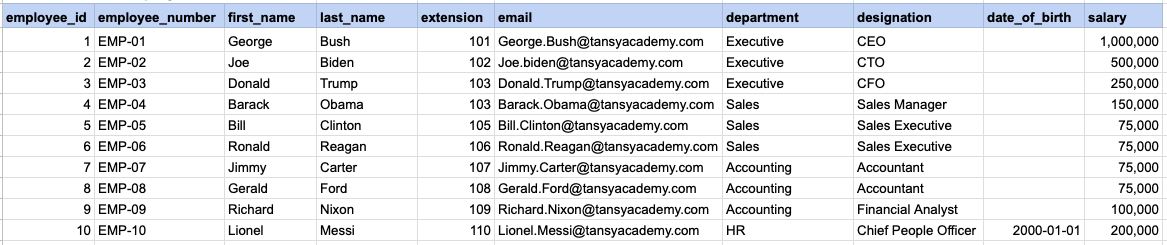
Let's explore the procedure of extracting information from a designated table using the NOT IN SQL operator with string data. This query retrieves all rows from the employees table where the designation column does not corresponds to any of the specified values ('Sales Manager', 'Financial Analyst', 'CFO').
Example 1 - Raw data from employee table
Example 1 - Query
SELECT * FROM org_employee WHERE designation NOT IN ('Sales Manager', 'Financial Analyst', 'CFO');Example 1 - Query data mapping
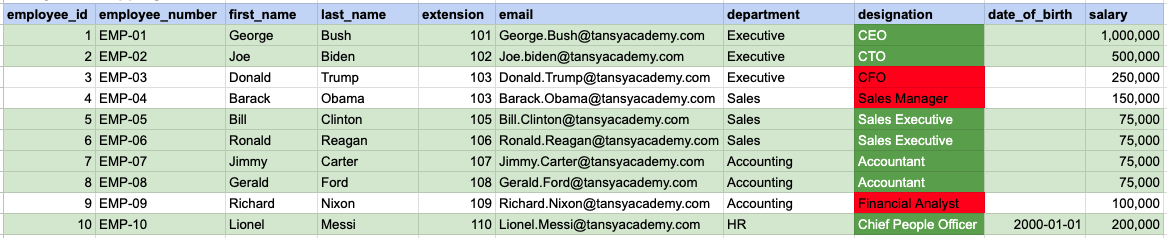
In the provided image, the green color signifies the data that has been selected or satisfies the conditions specified in our query. Data points in red indicate information that does not meet the criteria set by the query.
Example 1 - Query Output

Example 2:
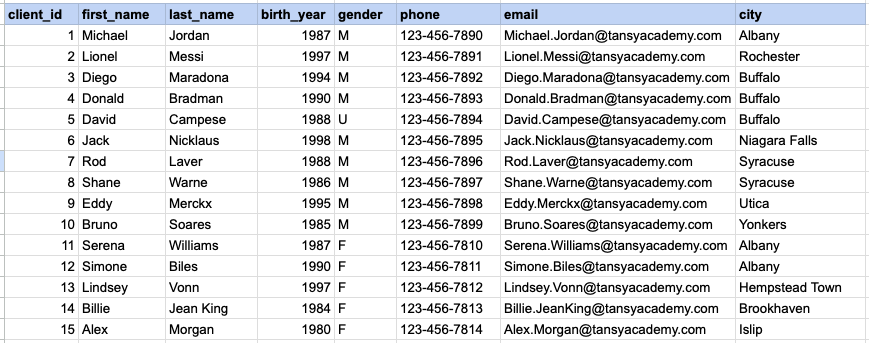
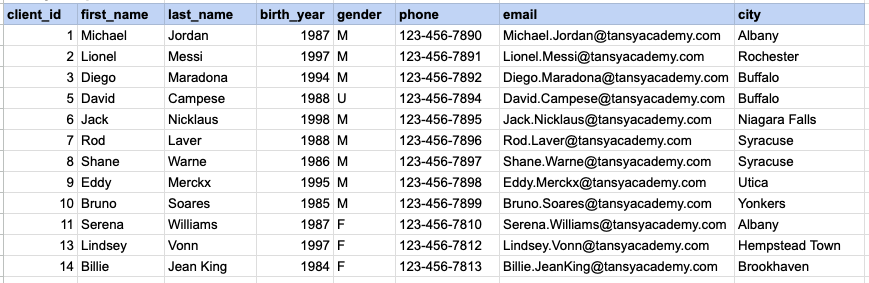
Let's explore the procedure for extracting information from a designated table using the NOT IN SQL operator on integer data. The query fetches all rows from the clients table where the birth year column do not match any of the specified values (1990, 1980).
Example 2 - Raw data from client table
Example 2 - Query
SELECT * FROM org_client WHERE birth_year NOT IN (1990, 1980);Example 2 - Query data mapping
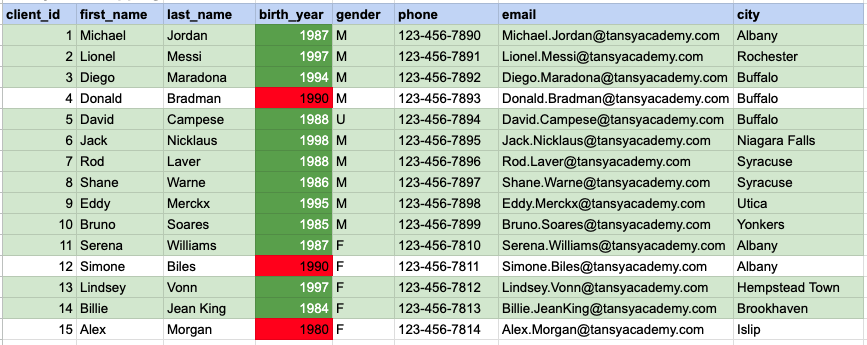
In the provided image, the green color signifies the data that has been selected or satisfies the conditions specified in our query. Data points in red indicate information that does not meet the criteria set by the query.
Example 2 - Query Output
Example 3:
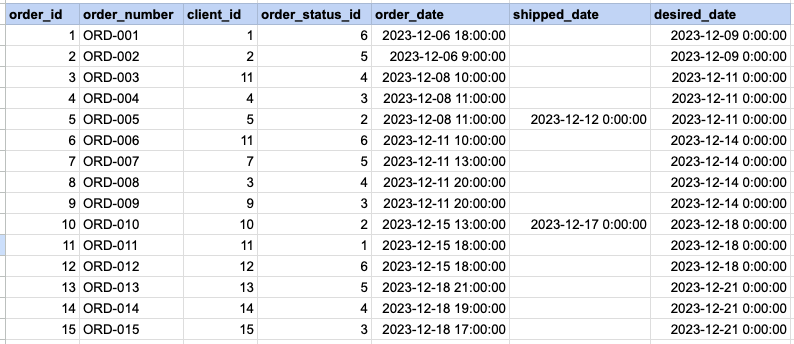
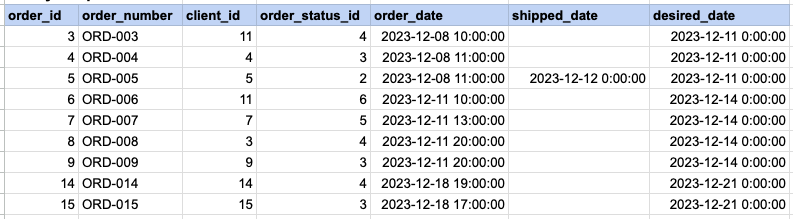
Let's explore the procedure for extracting information from a designated table using the NOT IN SQL operator on date time data. This query retrieves all rows from the orders table where the desired ship date column does not corresponds to any of the specified values ('2023-12-09', '2023-12-10', '2023-12-18', '2023-12-25').
Example 3 - Raw data from order table
Example 3 - Query
SELECT * FROM act_order WHERE desired_date NOT IN ('2023-12-09', '2023-12-10', '2023-12-18', '2023-12-25');Example 3 - Query data mapping
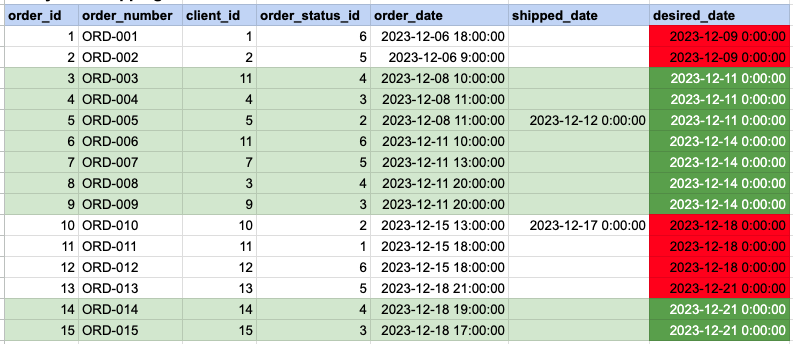
In the provided image, the green color signifies the data that has been selected or satisfies the conditions specified in our query. Data points in red indicate information that does not meet the criteria set by the query.
Example 3 - Query Output
Comments Not Found