
Microsoft SQL Server
COALESCE
In Microsoft SQL Server, the COALESCE function is used to return the first non-NULL value from a list of expressions. This is especially useful when dealing with columns that may contain NULL values and you want to provide a default or fallback value. For beginners, understanding COALESCE is important when handling potential gaps in data, ensuring that your queries return meaningful results even when some values are missing.
Here’s an extended version with the additional bullet points on how to use COALESCE in various contexts:
Using COALESCE for Default Values:
- COALESCE is excellent for providing default values when a column might be
NULL. - Example:
IfSELECT ProductID, COALESCE(ProductDescription, 'No description available') AS ProductDescription FROM Products;ProductDescriptionisNULL, the default text 'No description available' will be returned.
- COALESCE is excellent for providing default values when a column might be
Combining Multiple Columns with COALESCE:
- COALESCE is useful for combining values from multiple columns, especially if some might be
NULL. - Example:
This query checks for the first non-null value betweenSELECT CustomerID, COALESCE(FirstName, LastName, 'Guest') AS DisplayName FROM Customers;FirstNameandLastName. If both areNULL, it will return 'Guest'.
- COALESCE is useful for combining values from multiple columns, especially if some might be
COALESCE with Numeric Calculations:
- You can use COALESCE with numeric values to handle missing data in calculations.
- Example:
This query returnsSELECT ProductID, COALESCE(SalePrice, CostPrice, 0) AS FinalPrice FROM Products;SalePriceif available, otherwiseCostPrice, and if both areNULL, it defaults to0.
Using COALESCE in String Concatenation:
- COALESCE can be used to ensure that
NULLvalues don't disrupt string concatenation. - Example:
IfSELECT COALESCE(FirstName, '') + ' ' + COALESCE(LastName, '') AS FullName FROM Customers;FirstNameorLastNameisNULL, it will treat it as an empty string ('') to prevent aNULLresult.
- COALESCE can be used to ensure that
Using COALESCE in WHERE Clauses:
- You can use COALESCE in
WHEREclauses to simplify conditions when dealing withNULLvalues. - Example:
This query ensures that ifSELECT * FROM Sales WHERE COALESCE(SaleAmount, 0) > 100;SaleAmountisNULL, it's treated as0, so the condition works properly.
- You can use COALESCE in
Best Practice:
- Use COALESCE to handle multiple possible null values, especially in queries where you need a fallback mechanism for missing data.
- Always test how COALESCE interacts with different data types in your query, particularly when combining strings or numbers.
SELECT COALESCE(Discount, Price - 5, 0) AS FinalPrice
FROM Products;
Here, COALESCE returns the
Discountif available, otherwise calculatesPrice - 5, and defaults to0if both areNULL.Using ISNULL to Replace NULL with a Default Value:
- ISNULL is useful when you want to replace a single
NULLvalue with a default. - Example:
In this query, ifSELECT ProductID, ISNULL(StockQuantity, 0) AS AvailableStock FROM Products;StockQuantityisNULL, it will return0as the default value, ensuring that the query doesn't returnNULLwhen checking stock availability.
- ISNULL is useful when you want to replace a single
To gain complete access, login with gmail or outlook, no need of signup, click here

Test code
To replace descriptions with the string 'Not Provided' wherever the description is null, use the following query:
SELECT product_id, product_name, COALESCE(description, 'Not Provided') AS description
FROM prd_product
ORDER BY product_id;TheCOALESCEfunction in SQL returns the first non-null expression among its arguments. This function is useful for handling cases where data may be missing and a default value is needed.
Syntax of COALESCE
COALESCE(expression1, expression2, ..., expressionN)- The function evaluates the expressions in order.
- It returns the first non-null expression.
- If all expressions are null,
COALESCEreturns null.
Example Usage of COALESCE
Here's an SQL query example usingCOALESCE:
SELECT COALESCE(address, phone, email, 'Unknown') AS contact_info FROM customers;This example attempts to find the first non-null contact information for each customer and defaults to 'Unknown' if all are null.
COALESCE with LEFT JOIN
COALESCEcan be used withLEFT JOINto provide a default value when the joined table has no match:
SELECT customers.name, COALESCE(orders.order_number, 'No Orders') as order_info
FROM customers
LEFT JOIN orders ON customers.customer_id = orders.customer_id;
In this scenario, if a customer has no orders, 'No Orders' is returned instead of null.
COALESCE EXAMPLE
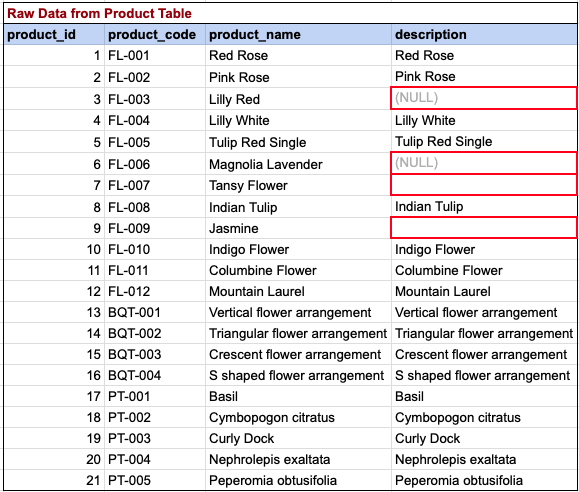
Here, we are attempting to substitute descriptions with the string 'Not provided' in cases where the description is null.
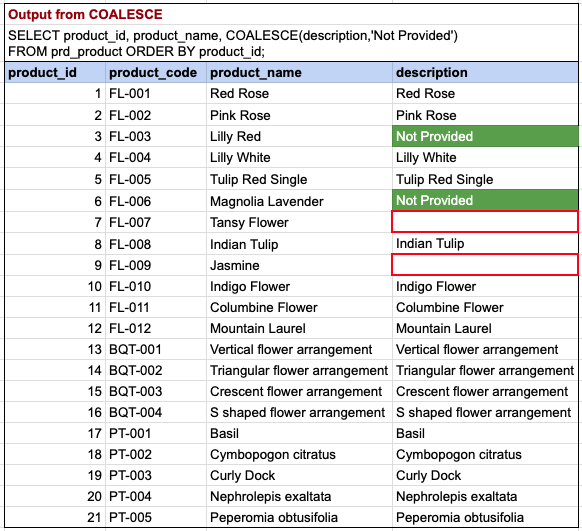
Please note that the query has successfully replaced null descriptions for product IDs 3 and 6 with the desired string 'Not Provided'. However, descriptions for product IDs 7 and 9 remain as empty strings. It's important to differentiate between an empty string and NULL. Our query was designed to replace NULL values, not empty strings.
Comments Not Found