
Microsoft SQL Server
AND and OR Operators
In Microsoft SQL Server, the AND and OR operators are used in the WHERE clause to combine multiple conditions in a query. These operators allow you to filter data based on more than one condition. The AND operator returns rows only when all the conditions are true, while the OR operator returns rows if at least one of the conditions is true. For beginners, understanding how to use these operators is crucial for writing more complex queries and retrieving specific data from the database.
Below is a detailed explanation of how to use the AND and OR operators with examples and best practices.
1. Basic Syntax of AND Operator
The AND operator is used to filter rows based on multiple conditions. All conditions combined with AND must be true for the row to be included in the result.
SELECT column_name
FROM table_name
WHERE condition1 AND condition2;
- Replace
column_namewith the column(s) you want to retrieve. - Replace
table_namewith the actual table name. - Replace
condition1andcondition2with the actual conditions to be checked.
Example:
SELECT ProductName, Price
FROM Products
WHERE Price > 50 AND Category = 'Electronics';
This query retrieves all products from the Products table that belong to the Electronics category and are priced above 50.
2. Basic Syntax of OR Operator
The OR operator is used to filter rows where at least one of the conditions is true.
SELECT column_name
FROM table_name
WHERE condition1 OR condition2;
Example:
SELECT ProductName, Price
FROM Products
WHERE Category = 'Clothing' OR Category = 'Furniture';
This query retrieves all products from the Products table that belong to either the Clothing or Furniture categories.
3. Combining AND and OR in a Query
You can combine both AND and OR operators in a single query to create more complex conditions. When combining these operators, it’s important to use parentheses () to group conditions and control the logic flow.
SELECT ProductName, Price
FROM Products
WHERE (Category = 'Electronics' OR Category = 'Clothing')
AND Price > 100;
This query retrieves all products that are either in the Electronics or Clothing categories and have a price greater than 100.
4. Using AND and OR with NOT
You can also combine AND and OR operators with NOT to exclude specific values or conditions.
SELECT ProductName, Price
FROM Products
WHERE Category = 'Electronics' AND Price > 50
AND NOT Brand = 'BrandX';
This query retrieves all Electronics products priced above 50, but excludes those made by 'BrandX'.
5. Best Practices for Using AND and OR
Use Parentheses for Complex Conditions – When combining
ANDandOR, always use parentheses to make the logic clear. This ensures the query behaves as expected by controlling the order of condition evaluation.SELECT * FROM Products WHERE (Category = 'Electronics' OR Category = 'Furniture') AND Price < 200;Minimize
ORfor Better Performance – In large datasets, using too manyORconditions can slow down the query. Try to useINinstead of multipleORconditions for better performance.SELECT * FROM Products WHERE Category IN ('Electronics', 'Furniture', 'Clothing');Be Mindful of
ANDwith Null Values – When using theANDoperator, ensure that none of the conditions involveNULLvalues unless specifically handled, asNULLcan cause the entire condition to fail.SELECT * FROM Customers WHERE Email IS NOT NULL AND Country = 'USA';Test Complex Queries for Logical Flow – Always test complex queries that involve multiple
ANDandORoperators to ensure that they return the expected results. Misuse of these operators can lead to incorrect data being returned.
By using AND and OR effectively, you can create more refined and targeted queries, allowing you to retrieve exactly the data you need from your SQL Server database.
To gain complete access, login with gmail or outlook, no need of signup, click here

Test code
To choose male customers located in the state of New York, you can use the AND clause to filter records based on both gender and state.
SELECT *
FROM org_client
WHERE gender = 'M'
AND state = 'NY';In Microsoft SQL Server, to fetch customers from either the state of Pennsylvania or the city of Miami, the OR clause is used. This clause ensures that records meeting any of the specified conditions are retrieved.
SELECT *
FROM org_client
WHERE city = 'Miami'
OR state = 'PA';In Microsoft SQL Server, to fetch customers from the state of New York who, at the secondary level, have a credit limit greater than 7000 or reside in the city of Albany, use the following query:
SELECT *
FROM org_client
WHERE state = 'NY'
AND (city = 'Albany' OR credit_limit > 7000);SQL's AND and OR operators
Here are examples illustrating the use of SQL's AND and OR operators.
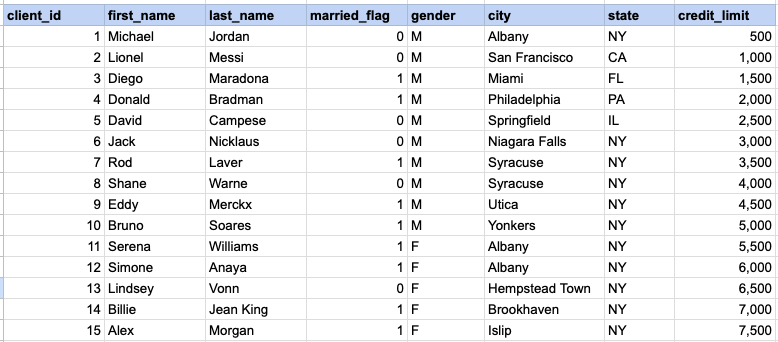
Example 1 - Raw data from client table
Example 1 - AND operator
SELECT * FROM org_client WHERE gender = 'M' AND state = 'NY';Example 1 - Query data mapping
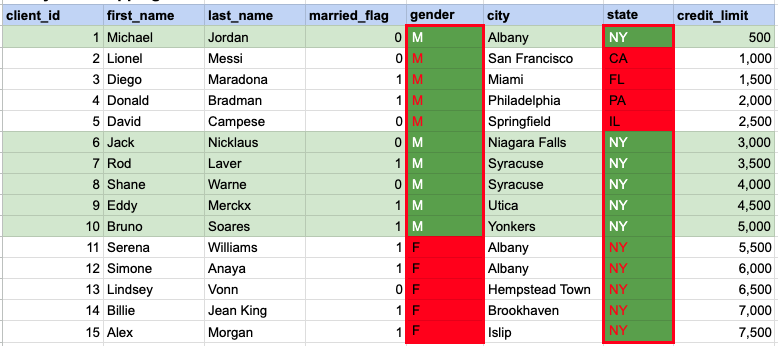
In the given image, the green hue indicates the data that has been chosen or meets the criteria specified in our query. When using the AND operator, both column values must satisfy the specified criteria.
Example 1 - Query Output

Example 2 - OR operator
SELECT * FROM org_client WHERE city = 'Miami' OR state = 'PA';Example 2 - Query data mapping
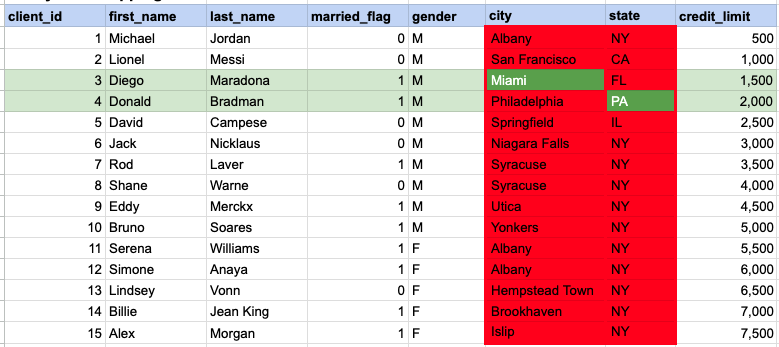
In the given image, the green hue indicates the data that has been chosen or meets the criteria specified in our query. In the case of the OR operator, at least one of the column values needs to meet the specified criteria.
Example 2 - Query Output

Example 3 - AND operator
SELECT * FROM org_client WHERE state = 'NY' AND (city = 'Albany' OR credit_limit > 7000);Example 3 - Query data mapping
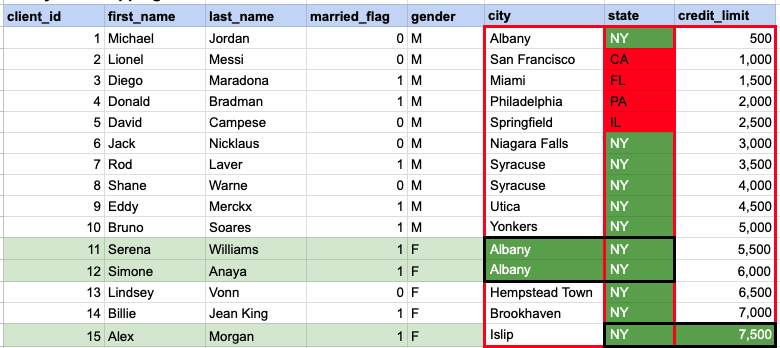
In the given image, the green hue indicates the data that has been chosen or meets the criteria specified in our query. In this instance, a specific row must satisfy the conditions based on the state, and subsequently, there should be a match in at least one value between the city and credit limit.
Example 3 - Query Output

Comments Not Found