
Microsoft SQL Server
IS NOT NULL Operator
In Microsoft SQL Server, the IS NOT NULL operator is part of the Data Query Language (DQL) and is used to filter out rows that have NULL values in a specific column. A NULL value represents missing or undefined data, and the IS NOT NULL operator helps to retrieve only the records that contain actual data in the specified column. For beginners, learning how to use IS NOT NULL is important when dealing with databases that may have incomplete information or missing values.
Below is a breakdown of how to use the IS NOT NULL operator, along with code samples and best practices.
1. Basic Syntax of IS NOT NULL
The IS NOT NULL operator is used to retrieve rows where a column contains a non-null value.
SELECT column_name
FROM table_name
WHERE column_name IS NOT NULL;
- Replace
column_namewith the column you want to check for non-null values. - Replace
table_namewith the actual table name.
Example:
SELECT ProductName, Price
FROM Products
WHERE Price IS NOT NULL;
This query retrieves all products from the Products table where the Price column contains actual values, filtering out any products where the price is missing.
2. Using IS NOT NULL with Joins
IS NOT NULL is often used with joins to filter out records that do not have corresponding matches in another table.
SELECT p.ProductName, s.SaleDate
FROM Products p
JOIN Sales s ON p.ProductID = s.ProductID
WHERE s.SaleDate IS NOT NULL;
This query retrieves all products that have been sold by filtering out any sales records where the SaleDate is missing.
3. Combining IS NOT NULL with Other Conditions
You can combine the IS NOT NULL operator with other conditions like AND or OR to refine the results further.
SELECT CustomerName, Email
FROM Customers
WHERE Email IS NOT NULL
AND Country = 'USA';
This query retrieves all customers from the USA who have an email address listed, ignoring those without an email.
4. Handling Non-Null Values in Aggregate Functions
When using aggregate functions like COUNT(), AVG(), or SUM(), SQL Server automatically ignores NULL values. However, using IS NOT NULL allows you to filter data before applying aggregates.
SELECT COUNT(*)
FROM Customers
WHERE PhoneNumber IS NOT NULL;
This query counts the number of customers who have provided a phone number.
5. Best Practices for Using IS NOT NULL
Always Check for
NULLValues in Columns with Optional Data – If a column can containNULLvalues (like email, phone number, etc.), always useIS NOT NULLto ensure you're working only with records that have data.SELECT CustomerName FROM Customers WHERE PhoneNumber IS NOT NULL;Use in Joins for Filtering Non-Matching Records – When performing joins, use
IS NOT NULLto ensure that only records with corresponding matches in both tables are included.Combine with Other Filters – Combining
IS NOT NULLwith other filters ensures that you're retrieving relevant data with valid entries.SELECT ProductName, Price FROM Products WHERE Price IS NOT NULL AND Price > 100;Be Mindful of Aggregate Functions – When counting or averaging data, keep in mind that
NULLvalues are ignored. UseIS NOT NULLbefore applying aggregate functions to ensure accuracy.SELECT AVG(Price) FROM Products WHERE Price IS NOT NULL;
By using the IS NOT NULL operator effectively, you can ensure that your SQL queries retrieve accurate and complete data while filtering out missing or undefined values.
To gain complete access, login with gmail or outlook, no need of signup, click here
Test code
In Microsoft SQL Server, to retrieve records using the IS NOT NULL operator on a date column and select orders that have been shipped, you can use the following query:
SELECT *
FROM act_order
WHERE shipped_date IS NOT NULL;In Microsoft SQL Server, to fetch data by utilizing the IS NOT NULL operator on a date column and specifically choose employees who have provided their date of birth, you can use the following query:
SELECT *
FROM org_employee
WHERE date_of_birth IS NOT NULL;Example 1:
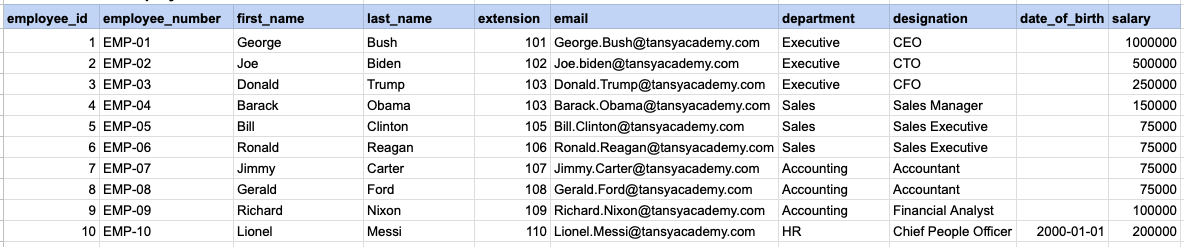
Let's explore the procedure of extracting information from a designated table using the IS NOT NULL SQL operator. This query retrieves employees who have provided their date of birth.
Example 1 - Raw data from employee table
Example 1 - Query
SELECT * FROM org_employee WHERE date_of_birth IS NOT NULL;Example 1 - Query data mapping
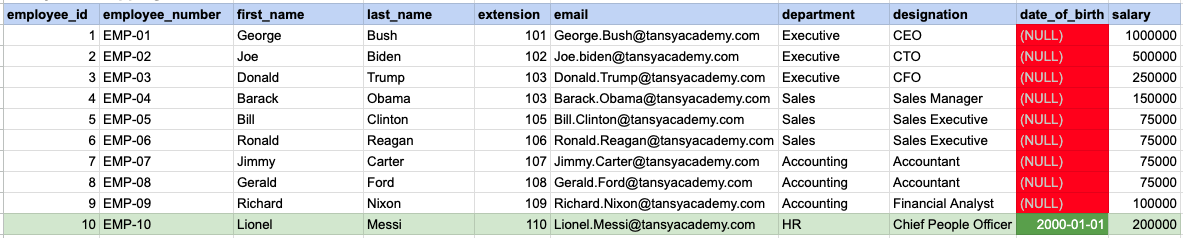
In the provided image, the green color signifies the data that has been selected or satisfies the conditions specified in our query. Data points in red indicate information that does not meet the criteria set by the query.
Example 1 - Query Output

Example 2:
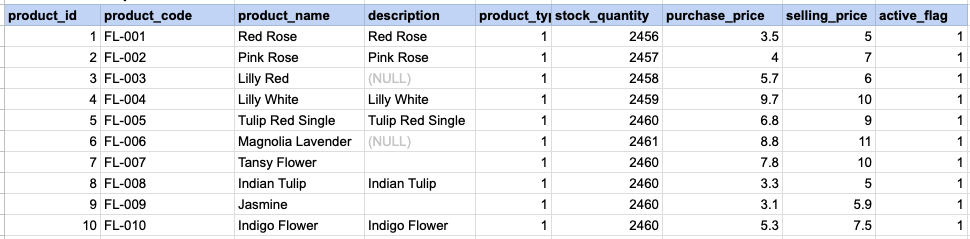
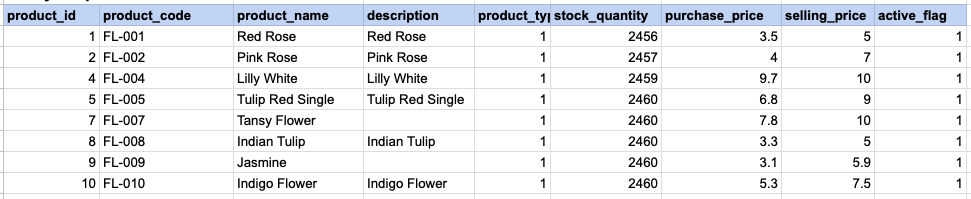
Let's delve into the process of retrieving information from a specified table using the SQL IS NOT NULL operator on string data. The query retrieves all rows from the products table where the description is not null.
Example 2 - Raw data from product table
Example 2 - Query
SELECT * FROM prd_product WHERE description IS NOT NULL;Example 2 - Query data mapping
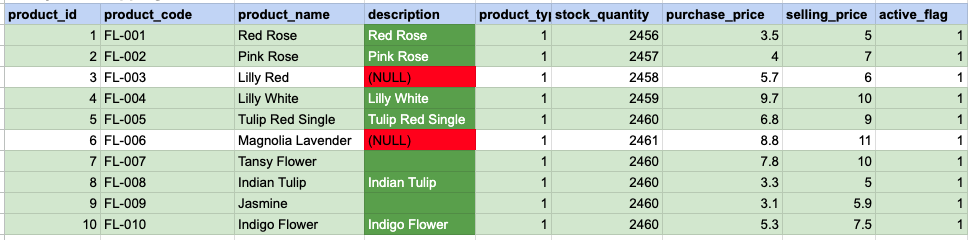
In the provided image, the green color signifies the data that has been selected or satisfies the conditions specified in our query. Data points in red indicate information that does not meet the criteria set by the query. NOTE that description value for product id 7 and 9 compose a empty string, this is not a null.
Example 2 - Query Output
Example 3:
Using '<> NULL' is not permissible; instead, you must use 'IS NOT NULL'. As demonstrated below, employing '<> NULL' results in an empty result set.
SELECT * FROM prd_product WHERE description <> NULL;Example 3 - Empty result set

Comments Not Found