
Microsoft SQL Server
GROUP RANK
In Microsoft SQL Server, ranking functions such as RANK(), DENSE_RANK(), and ROW_NUMBER() allow you to assign ranks to rows within a result set, often based on specific criteria such as sales or prices. These ranking functions are typically used in combination with the PARTITION BY clause to divide the data into groups and assign a rank within each group. Understanding how to rank records within groups is essential for analyzing data, identifying top-performing products, or comparing customer sales.
Below is a detailed explanation of how to use group ranking functions, along with examples and best practices.
1. RANK() Function
The RANK() function assigns a unique rank to each row within a partition, with the same rank being assigned to rows with equal values. If two rows have the same value, they will be assigned the same rank, and the next rank will be skipped.
SELECT column_name, RANK() OVER (PARTITION BY column_to_group ORDER BY column_to_rank DESC) AS Rank
FROM table_name;
Example:
SELECT ProductName, Category, Price,
       RANK() OVER (PARTITION BY Category ORDER BY Price DESC) AS PriceRank
FROM Products;
This query ranks products by price within each category, assigning the highest price a rank of 1.
2. DENSE_RANK() Function
The DENSE_RANK() function works similarly to RANK(), but it does not skip ranks when there are ties. If two rows have the same value, they will share the same rank, but the next rank will not be skipped.
SELECT column_name, DENSE_RANK() OVER (PARTITION BY column_to_group ORDER BY column_to_rank DESC) AS DenseRank
FROM table_name;
Example:
SELECT ProductName, Category, Price,
       DENSE_RANK() OVER (PARTITION BY Category ORDER BY Price DESC) AS PriceRank
FROM Products;
This query ranks products by price within each category, with no gaps in the ranking when products have the same price.
3. ROW_NUMBER() Function
The ROW_NUMBER() function assigns a unique row number to each row within a partition. Unlike RANK() and DENSE_RANK(), it does not assign the same rank to rows with identical values.
SELECT column_name, ROW_NUMBER() OVER (PARTITION BY column_to_group ORDER BY column_to_rank DESC) AS RowNum
FROM table_name;
Example:
SELECT ProductName, Category, Price,
       ROW_NUMBER() OVER (PARTITION BY Category ORDER BY Price DESC) AS PriceRowNum
FROM Products;
This query assigns a unique row number to each product within each category, based on price.
4. Ranking with Multiple Conditions
You can use multiple columns to rank records by combining them in the ORDER BY clause.
SELECT ProductName, Category, Price, StockQuantity,
       RANK() OVER (PARTITION BY Category ORDER BY Price DESC, StockQuantity ASC) AS Rank
FROM Products;
This query ranks products first by price (highest to lowest) and then by stock quantity (lowest to highest) within each category.
5. Using Group Rank with WHERE and HAVING
You can combine ranking functions with WHERE or HAVING clauses to filter results based on rank.
SELECT ProductName, Category, Price,
       RANK() OVER (PARTITION BY Category ORDER BY Price DESC) AS PriceRank
FROM Products
WHERE Category = 'Electronics'
HAVING PriceRank <= 3;
This query retrieves the top 3 most expensive products in the Electronics category.
6. Best Practices for Using Group Ranking
Choose the Right Ranking Function – Use
RANK()if you want to allow gaps in the rank when there are ties,DENSE_RANK()if you want continuous ranks, andROW_NUMBER()if you need unique ranks for each row.SELECT CustomerID, SaleAmount, RANK() OVER (PARTITION BY CustomerID ORDER BY SaleAmount DESC) AS SalesRank FROM Sales;Use
PARTITION BYto Group Data – ThePARTITION BYclause allows you to group data by specific columns before applying the ranking function. WithoutPARTITION BY, the ranking function will treat the entire dataset as one group.SELECT CustomerID, SaleAmount, ROW_NUMBER() OVER (PARTITION BY CustomerID ORDER BY SaleAmount DESC) AS RowNum FROM Sales;Optimize with Indexes for Performance – When ranking large datasets, performance can become an issue. Ensure that the columns used in the
PARTITION BYandORDER BYclauses are indexed to improve query performance.Combine with
CTEfor Readability – If you're working with complex ranking queries, consider using a Common Table Expression (CTE) to improve readability and maintainability.WITH RankedProducts AS ( SELECT ProductName, Category, Price, RANK() OVER (PARTITION BY Category ORDER BY Price DESC) AS PriceRank FROM Products ) SELECT * FROM RankedProducts WHERE PriceRank = 1;Test Different Ranking Scenarios – Test your queries on different data sets to understand how ties and rank gaps are handled. This is especially important for business scenarios like sales performance or top product reports.
By mastering ranking functions like RANK(), DENSE_RANK(), and ROW_NUMBER(), you can effectively analyze and sort data in Microsoft SQL Server, especially when you need to rank records within specific groups.
To gain complete access, login with gmail or outlook, no need of signup, click here

Test code
In Microsoft SQL Server, to utilize the RANK() function to assign rankings to employee salaries within specific departments, you can use the following query:
SELECT
  employee_number,
  department,
  salary,
  RANK() OVER (PARTITION BY department ORDER BY salary DESC) AS salary_rank
FROM
org_employee;SQL GROUP RANK
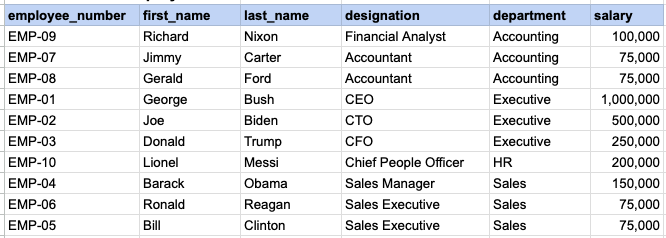
Utilize the RANK() function to assign rankings to employee salaries within specific departments.
RAW EMPLOYEE DATA
QUERY DATA MAPPING
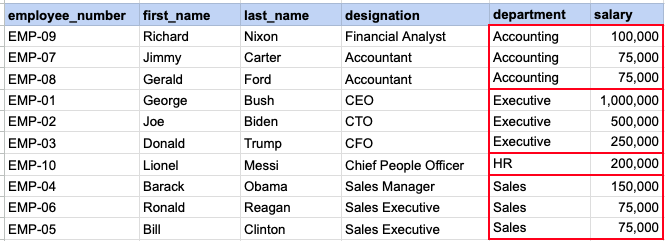
This image demonstrates that we need to rank each salary within a specified department.
QUERY OUT PUT
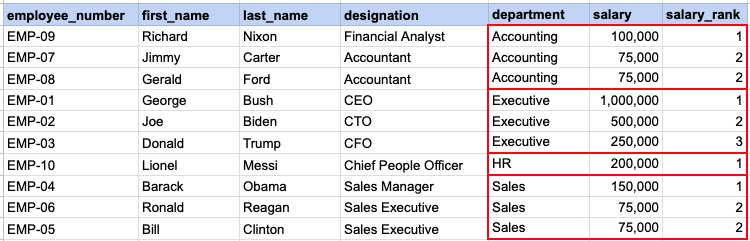
Here you can see ranking of each salary with in a given department.
Comments Not Found