
Microsoft SQL Server
Foreign Key
In an RDBMS like Microsoft SQL Server, a Foreign Key is a column or a set of columns in one table that establishes a link to the Primary Key of another table. This relationship ensures referential integrity, meaning that the foreign key column must contain values that match an existing value in the referenced table, or it must be null. Foreign keys are essential for creating relationships between tables and enforcing rules that ensure consistent data.
Key Concepts of Foreign Key:
Establishing Relationships
- A foreign key creates a relationship between two tables by linking a column in one table to a primary key in another table.
- For example, in a sales system, the
Salestable might have aCustomerIDcolumn that references theCustomerIDcolumn in theCustomerstable.
Example SQL:
CREATE TABLE Sales (
    SaleID INT PRIMARY KEY,
    CustomerID INT,
    SaleAmount DECIMAL(10, 2),
    FOREIGN KEY (CustomerID) REFERENCES Customers(CustomerID)
);
Referential Integrity
- Foreign keys enforce referential integrity, ensuring that the values in the foreign key column must either match a valid primary key value in the referenced table or be null.
- This prevents adding records to the
Salestable with aCustomerIDthat doesn’t exist in theCustomerstable.
Example SQL:
-- This will fail if there is no customer with CustomerID = 100
INSERT INTO Sales (SaleID, CustomerID, SaleAmount)
VALUES (1, 100, 500.00);
Cascading Actions
- You can specify cascading actions when defining a foreign key, such as
ON DELETE CASCADE, which automatically deletes related rows in the child table (e.g.,Sales) when a referenced row in the parent table (e.g.,Customers) is deleted.
Example SQL (with cascading delete):
CREATE TABLE Sales ( SaleID INT PRIMARY KEY, CustomerID INT, SaleAmount DECIMAL(10, 2), FOREIGN KEY (CustomerID) REFERENCES Customers(CustomerID) ON DELETE CASCADE );- You can specify cascading actions when defining a foreign key, such as
Multiple Foreign Keys
- A table can have multiple foreign keys, each linking to different parent tables. For instance, a
Salestable may link to both theCustomersandProductstables.
Example SQL:
CREATE TABLE Sales ( SaleID INT PRIMARY KEY, CustomerID INT, ProductID INT, SaleAmount DECIMAL(10, 2), FOREIGN KEY (CustomerID) REFERENCES Customers(CustomerID), FOREIGN KEY (ProductID) REFERENCES Products(ProductID) );- A table can have multiple foreign keys, each linking to different parent tables. For instance, a
Parent-Child Relationship
- The table containing the foreign key is often referred to as the "child" table, while the referenced table (which holds the primary key) is the "parent" table. The foreign key enforces that every child record corresponds to a valid parent record.
Foreign Key Constraints
- You can add foreign key constraints after a table has been created. This allows you to establish relationships even after both tables exist.
Example SQL (adding a foreign key constraint):
ALTER TABLE Sales
ADD FOREIGN KEY (CustomerID) REFERENCES Customers(CustomerID);
By using foreign keys, you ensure that the relationships between tables in your database are consistent, which helps maintain the integrity of your data over time.
Understanding Foreign Keys in Database Design
A foreign key in database design is a column (or set of columns) in one table that uniquely identifies a row of another table. It's a key used to link two tables together. This concept might seem a bit abstract, so let's use an analogy to simplify it, followed by a basic code example to illustrate how it works in practice.
Analogy: Cities and Countries
Imagine a world map with countries and their cities. Each country can have multiple cities. To represent this relationship in a database, you would have two tables: aCountriestable and aCitiestable.
- TheCountriestable has a primary key calledCountryIDthat uniquely identifies each country.
- TheCities table lists cities around the world, and each city is associated with a country.
In this analogy, theCountryIDfield in theCities table acts as a foreign key. It references theCountryID primary key in theCountries table. This setup ensures that each city in theCities table is linked to a specific country in theCountries table. Just as you would use a country's name to find its cities on a map, in a database, you use the foreign key to retrieve all cities belonging to a particular country.
Code Example
Let's translate this analogy into a simple SQL code example to demonstrate how foreign keys work in practice.
SQL Table Creation
-- Create Countries table
CREATE TABLE Countries (
    CountryID int NOT NULL,
    CountryName varchar(255) NOT NULL,
    PRIMARY KEY (CountryID)
);

-- Create Cities table
CREATE TABLE Cities (
    CityID int NOT NULL,
    CityName varchar(255) NOT NULL,
    CountryID int,
    PRIMARY KEY (CityID),
    FOREIGN KEY (CountryID) REFERENCES
Countries(CountryID)
);
In this example:
- TheCountriestable is created withCountryIDas its primary key.
- TheCitiestable is created withCityIDas its primary key andCountryIDas a foreign key.
- The
FOREIGN KEY (CountryID) REFERENCES Countries(CountryID)line in theCitiestable definition establishesCountryIDas a foreign key that references theCountryIDprimary key in theCountriestable.
This setup allows the database to understand the relationship between countries and their cities. For instance, if you have a country withCountryID = 1, and you want to add cities to this country in theCitiestable, you would setCountryID = 1for these cities. The database then knows these cities belong to the country withCountryID = 1.
Conclusion
Foreign keys serve as crucial links between tables in relational databases, enabling the representation of real-world relationships like the one between countries and cities. They ensure data integrity by only allowing the insertion of records that have a corresponding value in the linked table. Through foreign keys, databases can maintain accurate and consistent relationships between data points across different tables.
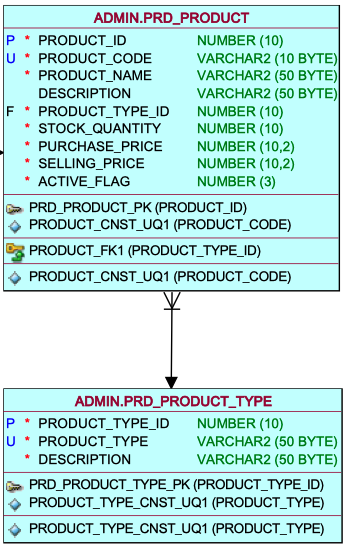
PRODUCT TYPE ID AS FOREIGN KEY IN PRODUCT TABLE
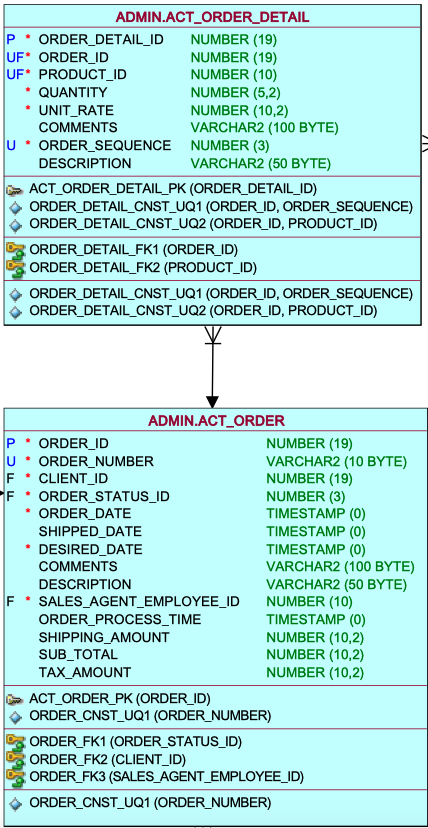
ORDER ID AS FOREIGN KEY IN ORDER DETAIL TABLE
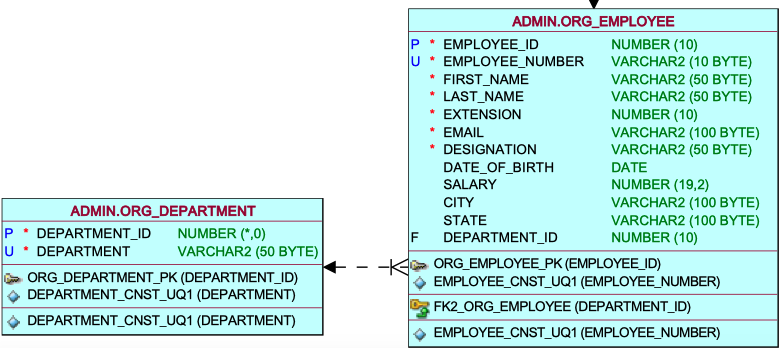
DEPARTMENT ID AS FOREIGN KEY IN EMPLOYEE TABLE
Comments Not Found