
Microsoft SQL Server
CAST
In Microsoft SQL Server, the CAST function is used to convert a value from one data type to another. This is especially useful when you need to format data for calculations, reporting, or when different columns in a query have incompatible data types. The CAST function ensures that the data can be compared, calculated, or displayed in the desired format. For beginners, learning how to use CAST is crucial for performing accurate data conversions in SQL queries.
Below is a detailed explanation of the CAST function with examples and best practices.
1. Basic Syntax of CAST
The CAST function follows this basic syntax:
CAST(expression AS target_data_type)
expressionis the value or column you want to convert.target_data_typeis the data type you want to convert the expression to (e.g.,INT,VARCHAR,DECIMAL, etc.).
Example:
SELECT CAST(Price AS INT) AS PriceAsInt
FROM Products;
This query converts the Price column from its original data type to an integer (INT).
2. Casting Numeric Values to String
You can use CAST to convert numeric values to a string format, which is useful when concatenating numbers with text.
SELECT ProductName, CAST(Price AS VARCHAR(10)) AS PriceAsString
FROM Products;
This query converts the Price column to a VARCHAR string and displays it alongside the product name.
3. Casting Date to String
The CAST function can also convert date and time values into a string format for easier manipulation or presentation.
SELECT OrderID, CAST(OrderDate AS VARCHAR(20)) AS OrderDateString
FROM Orders;
This query converts the OrderDate column to a string, which can be helpful for reports where dates need to be displayed in a particular format.
4. Casting String to Date
Similarly, you can use CAST to convert strings that represent dates back into a date format for calculations or filtering.
SELECT OrderID, CAST('2023-09-15' AS DATE) AS OrderDate
FROM Orders;
This query converts the string '2023-09-15' into a date format.
5. Casting Between Numeric Types
You can cast between different numeric types, such as converting an integer to a decimal for more precise calculations.
SELECT ProductName, CAST(Price AS DECIMAL(10, 2)) AS PriceAsDecimal
FROM Products;
This query converts the Price column into a decimal type with two decimal places, ensuring better precision.
6. Casting in Mathematical Calculations
You can use CAST in calculations to ensure that the result is in the desired data type.
SELECT ProductName, CAST(Price AS DECIMAL(10, 2)) * 1.1 AS PriceWithTax
FROM Products;
This query converts the Price to a decimal before multiplying it by 1.1 to calculate the price with tax.
7. Best Practices for Using CAST
Always Specify Appropriate Data Types – When using
CAST, make sure the target data type is appropriate for your use case. For example, useDECIMALfor precise financial calculations andVARCHARfor displaying text.SELECT CAST(SaleAmount AS DECIMAL(10, 2)) AS FormattedSale FROM Sales;Avoid Data Loss When Converting – Be careful when converting between data types to avoid truncation or data loss. For example, converting a
DECIMALto anINTmay result in the loss of decimal precision.SELECT CAST(Price AS INT) AS RoundedPrice FROM Products;Use
CASTfor Consistent Data Types in Calculations – Ensure that all operands in a calculation have consistent data types. If necessary, useCASTto convert them to the same data type before performing arithmetic operations.SELECT CAST(TotalSales AS DECIMAL(10, 2)) / CAST(Quantity AS DECIMAL(10, 2)) AS AverageSalePrice FROM Sales;Use
CASTfor Data Interoperability – When integrating with other systems that may store data in different formats, useCASTto ensure data is converted into compatible formats before querying or exporting it.Handle Date Formats Carefully – When converting between strings and dates, ensure that the string is in a format that SQL Server recognizes, such as
'YYYY-MM-DD'.SELECT CAST('2023-09-15' AS DATE) AS FormattedDate;
By mastering the CAST function, you will be able to handle data type conversions efficiently in SQL Server, ensuring that your queries run smoothly and produce accurate results. The ability to convert between different data types is fundamental to working with real-world data in SQL Server.
To gain complete access, login with gmail or outlook, no need of signup, click here
Test code
In this instance, the CAST function is applied to the order date, facilitating the conversion of datetime data type into the date format.
SELECT order_id, order_number, CAST(order_date AS DATE) AS order_date
FROM act_order;In this case, the CAST function is used to convert a numeric data type with decimals into an integer data type, eliminating any decimal points.
SELECT employee_id, employee_number, CAST(salary AS INT) AS salary
FROM org_employee;Syntax of CAST
CAST(expression AS target_type)- expressionis the value you wish to convert.
- target_typeis the data type you want the result to be.
Examples of CAST
Converting a price to an integer:
SELECT CAST(price AS INT) FROM products;Formatting a date as a string:
SELECT CAST(order_date AS VARCHAR(10)) FROM orders;TheCASTfunction is part of the ANSI SQL standard and is supported by various SQL databases like MySQL, PostgreSQL, SQL Server, and SQLite, ensuring consistency in its use and behavior across these systems.
Limitations of the CAST Function in SQL
- Data Loss:Casting from a higher precision or larger capacity data type to a lower one can result in data loss or truncation, such as from
FLOATtoINT. - Performance:The
CASTfunction can increase computational overhead and affect query performance, especially with large datasets. - Data Type Compatibility:Not all data type conversions are supported, and incompatible conversions will result in errors.
- Syntax and Support:Different SQL systems may have varying levels of support for
CAST, potentially leading to inconsistencies. - Implicit Conversion Risks:Implicit conversions without
CASTcan lead to unexpected results if the rules for conversion are not well understood. - Locale and Format:Locale settings can affect the behavior of
CASTwith locale-sensitive data types like dates and times. - Storage Format:Data stored in non-standard formats may require additional manipulation beyond
CAST. - Precision and Scale:Consideration of precision and scale is necessary when casting to decimal types to avoid errors.
- SQL Injection:Dynamic SQL using
CASTcan be vulnerable to SQL injection if user input is not properly sanitized. - Default Values:Unlike
COALESCEorISNULL,CASTdoes not handle NULLs or provide a default value if conversion fails.
CAST EXAMPLE1
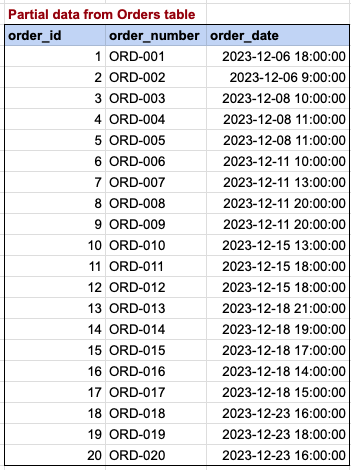
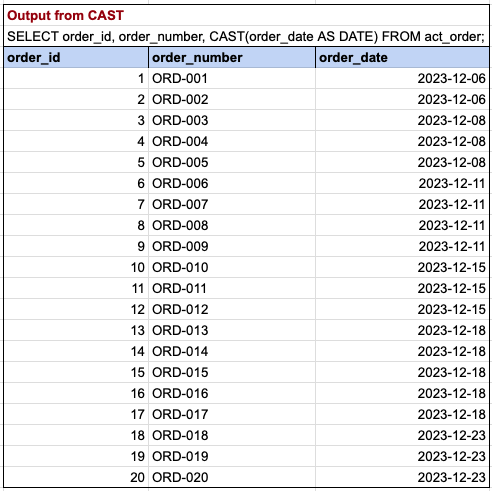
In this instance, the CAST function is applied to the order date, facilitating the conversion of datetime data type into the date format.
CAST EXAMPLE2
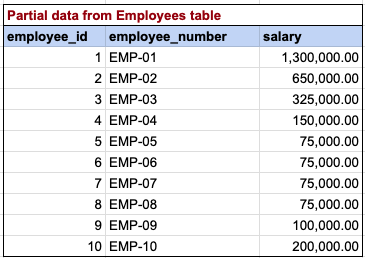
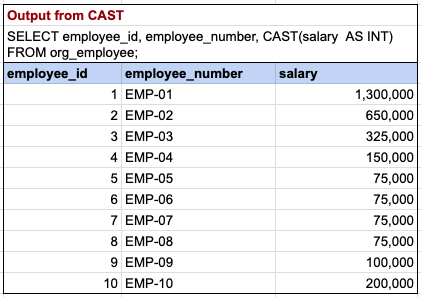
In this case, the CAST function is used to convert numeric data type with decimals into an integer data type, eliminating any decimal points.
Comments Not Found