
Microsoft SQL Server
Data Types
In Microsoft SQL Server, data types define the kind of data that can be stored in each column. Selecting the appropriate data type is crucial for performance, accuracy, and storage efficiency. Whether you're storing text, numbers, or dates, SQL Server provides a wide range of data types to match your needs. This section focuses on commonly used data types in store management systems, covering tables like products, customers, and sales.
Common Data Types in Microsoft SQL Server
Below is a list of commonly used data types, categorized by the type of data they handle.
1. Numeric Data Types
These data types store numerical values for IDs, prices, quantities, etc.
- INT: Stores whole numbers (integer). Example: Product ID, Quantity.
- BIGINT: Stores large integers, often used for larger datasets.
- SMALLINT: Stores smaller integers with less storage space.
- TINYINT: Stores very small integers (0-255).
- DECIMAL(p,s): Stores numbers with fixed precision and scale. Example: Price.
- NUMERIC(p,s): Similar to
DECIMAL, often used interchangeably. - FLOAT: Stores floating-point numbers, useful for calculations requiring precision.
- REAL: Stores floating-point numbers, but with less precision than
FLOAT.
2. String Data Types
These types store text, including product names, descriptions, and customer information.
- CHAR(n): Stores fixed-length strings. Example: Product codes.
- VARCHAR(n): Stores variable-length strings. Example: Customer names, emails.
- TEXT: Stores large blocks of text, ideal for product descriptions.
- NCHAR(n): Stores fixed-length Unicode characters.
- NVARCHAR(n): Stores variable-length Unicode characters.
3. Date and Time Data Types
Used to store date and time information, often for tracking sales transactions.
- DATE: Stores only the date (YYYY-MM-DD).
- TIME: Stores only the time (HH:MM:SS).
- DATETIME: Stores both date and time.
- SMALLDATETIME: Stores date and time with less precision.
- DATETIME2: Provides more precision than
DATETIME. - DATETIMEOFFSET: Stores date and time along with time zone offset.
4. Binary Data Types
Used to store binary data, such as images or encrypted information.
- BINARY(n): Stores fixed-length binary data.
- VARBINARY(n): Stores variable-length binary data.
- IMAGE: Used for storing large binary objects (e.g., product images).
5. Other Data Types
These types are specialized for different use cases.
- BIT: Stores Boolean values (0 or 1). Example: Active/Inactive status.
- UNIQUEIDENTIFIER: Stores globally unique identifiers (GUIDs).
- XML: Stores XML data.
- JSON: Stores JSON-formatted text.
- GEOGRAPHY: Stores spatial data like GPS coordinates.
Key Data Types in Store Management Tables
1. Products Table
- This table stores details about products including name, description, price, and quantity.
- Common data types used:
INT,VARCHAR,DECIMAL,TEXT.
    CREATE TABLE Products (
      ProductID INT PRIMARY KEY IDENTITY(1,1),
      ProductName VARCHAR(100) NOT NULL,
      Description TEXT,
      Price DECIMAL(10,2) NOT NULL,
      QuantityInStock INT DEFAULT 0
  );
2. Customers Table
- Stores customer information such as names, contact details, and address.
- Common data types used:
INT,VARCHAR,CHAR.
   CREATE TABLE Customers (
       CustomerID INT PRIMARY KEY IDENTITY(1,1),
       FirstName VARCHAR(50) NOT NULL,
       LastName VARCHAR(50) NOT NULL,
       Email VARCHAR(100),
       PhoneNumber CHAR(15),
       Address VARCHAR(255)
 );
3. Sales Table
- Logs sales transactions with references to products and customers.
- Common data types used:
INT,DATETIME,DECIMAL.
   CREATE TABLE Sales (
      SaleID INT PRIMARY KEY IDENTITY(1,1),
      SaleDate DATETIME DEFAULT GETDATE(),
      CustomerID INT FOREIGN KEY REFERENCES Customers(CustomerID),
      ProductID INT FOREIGN KEY REFERENCES Products(ProductID),
      Quantity INT NOT NULL,
      TotalAmount DECIMAL(10,2) NOT NULL
  );
Complete Code Sample
Here's the complete code combining all the tables and their respective data types for a store management system.
   CREATE TABLE Products (
      ProductID INT PRIMARY KEY IDENTITY(1,1),
      ProductName VARCHAR(100) NOT NULL,
      Description TEXT,
      Price DECIMAL(10,2) NOT NULL,
      QuantityInStock INT DEFAULT 0
   );

    CREATE TABLE Customers (
       CustomerID INT PRIMARY KEY IDENTITY(1,1),
       FirstName VARCHAR(50) NOT NULL,
       LastName VARCHAR(50) NOT NULL,
       Email VARCHAR(100),
       PhoneNumber CHAR(15),
       Address VARCHAR(255)
    );

    CREATE TABLE Sales (
       SaleID INT PRIMARY KEY IDENTITY(1,1),
       SaleDate DATETIME DEFAULT GETDATE(),
       CustomerID INT FOREIGN KEY REFERENCES Customers(CustomerID),
       ProductID INT FOREIGN KEY REFERENCES Products(ProductID),
       Quantity INT NOT NULL,
       TotalAmount DECIMAL(10,2) NOT NULL
    );
This structure uses various data types to ensure that each column in the Products, Customers, and Sales tables can handle its specific type of data efficiently.
To gain complete access, login with gmail or outlook, no need of signup, click here
1. Exact Numeric Data Types
- BIT: Represents a single bit that can be 0, 1, or NULL.
- TINYINT: Stores whole numbers from 0 to 255.
- SMALLINT: Stores whole numbers from -32,768 to 32,767.
- INT: Stores whole numbers from -2,147,483,648 to 2,147,483,647.
- BIGINT: Stores whole numbers from -9,223,372,036,854,775,808 to 9,223,372,036,854,775,807.
- DECIMAL / NUMERIC: Exact numeric data type that holds fixed precision and scale numbers.
- MONEY / SMALLMONEY: Stores monetary values with fixed precision up to 4 decimal places.
2. Approximate Numeric Data Types
- FLOAT: Stores floating-point numbers within a range of approximately -1.79E+308 to 1.79E+308.
- REAL: Stores floating-point numbers within a range of approximately -3.40E+38 to 3.40E+38.
3. Date and Time Data Types
- DATE: Stores a date value in the format YYYY-MM-DD.
- TIME: Stores a time value in the format HH:MM:SS.
- DATETIME / SMALLDATETIME: Stores date and time values.
- DATETIME2: Stores date and time values with increased precision.
- DATETIMEOFFSET: Stores date and time values with a UTC offset.
4. Character String Data Types
- CHAR: Fixed-length non-Unicode character data (maximum 8,000 characters).
- VARCHAR: Variable-length non-Unicode character data (maximum 8,000 characters).
- TEXT: Variable-length non-Unicode data with a maximum length of 2³¹-1 characters.
- NCHAR: Fixed-length Unicode character data (maximum 4,000 characters).
- NVARCHAR: Variable-length Unicode character data (maximum 4,000 characters).
- NTEXT: Variable-length Unicode data with a maximum length of 2³⁰-1 characters.
5. Binary Data Types
- BINARY: Fixed-length binary data with a maximum length of 8,000 bytes.
- VARBINARY: Variable-length binary data with a maximum length of 8,000 bytes.
- IMAGE: Variable-length binary data with a maximum length of 2³¹-1 bytes.
6. Other Data Types
- UNIQUEIDENTIFIER: Stores a globally unique identifier (GUID).
- XML: Stores XML formatted data.
- GEOMETRY / GEOGRAPHY: Stores spatial data representing shapes or geographical locations.
- SQL_VARIANT: Stores values of various SQL Server data types.
- HIERARCHYID: Represents position in a hierarchy.
- FILESTREAM: Stores unstructured files while maintaining database consistency.
7. Special and Deprecated Data Types
- TEXTIMAGE_ON: Specifies the filegroup for TEXT, NTEXT, or IMAGE columns.
- UNICHAR: Deprecated Unicode character type.
- UNIVARCHAR: Deprecated Unicode variable character type.
8. Specialized Data Types
- CURSOR: Used to process one row of a result set at a time.
- TABLE: Represents a result set for use in Transact-SQL.
- TIMESTAMP / ROWVERSION: Automatically generated binary numbers used for versioning.
Sample Implementation of MS SQL Server Data Types
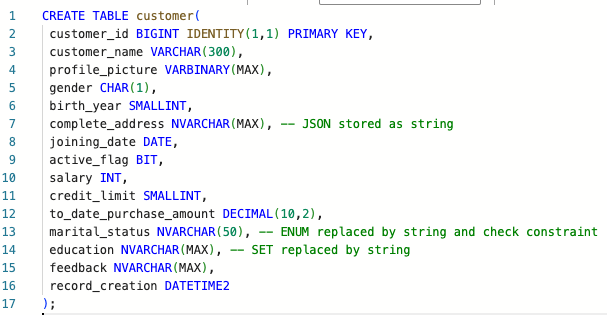
CREATE TABLE customer(
    customer_id BIGINT IDENTITY(1,1) PRIMARY KEY,
    customer_name VARCHAR(300),
    profile_picture VARBINARY(MAX),
    gender CHAR(1),
    birth_year SMALLINT,
    complete_address NVARCHAR(MAX), -- JSON stored as string
    joining_date DATE,
    active_flag BIT,
    salary INT,
    credit_limit SMALLINT,
    to_date_purchase_amount DECIMAL(10,2),
    marital_status NVARCHAR(50), -- ENUM replaced by string and check constraint
    education NVARCHAR(MAX), -- SET replaced by string
    feedback NVARCHAR(MAX),
    record_creation DATETIME2
);

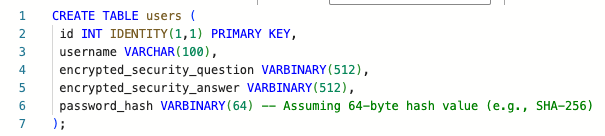
CREATE TABLE users(
    id INT IDENTITY(1,1) PRIMARY KEY,
    username VARCHAR(100),
    encrypted_security_question VARBINARY(512),
    encrypted_security_answer VARBINARY(512),
    password_hash VARBINARY(64) -- Assuming 64-byte hash value (e.g., SHA-256)
);

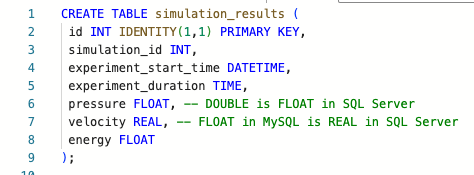
CREATE TABLE simulation_results(
    id INT IDENTITY(1,1) PRIMARY KEY,
    simulation_id INT,
    experiment_start_time DATETIME,
    experiment_duration TIME,
    pressure FLOAT, -- DOUBLE is FLOAT in SQL Server
    velocity REAL, -- FLOAT in MySQL is REAL in SQL Server
    energy FLOAT
);
Comments Not Found