
Microsoft SQL Server
Assignment - List Tables and Columns - Store Management System
Objective:
You are required to create a list of tables and columns for a Store Management System that manages products, customers, sales, and inventory across store branches. Your task is to identify relevant tables and specify key columns for each.
Requirements:
You will need to define the necessary tables and columns to support the following functionalities required for the Store Management System.
1. Product Management
- Tracking product details (name, category, SKU, price)
- Managing product availability and stock levels
- Product categorization and vendor management
- Handling product returns and damages
2. Customer Management
- Managing customer details (name, contact info, purchase history)
- Customer registration and membership management
- Customer feedback and review tracking
- Managing customer loyalty programs and discounts
3. Sales and Order Management
- Recording sales transactions (date, time, items sold)
- Managing payment methods (cash, credit, debit, online payments)
- Tracking sales per store and salespersons
- Managing order fulfillment (online and in-store orders)
4. Inventory Management
- Tracking stock levels of products across branches
- Recording stock movements (inbound, outbound, transfers)
- Managing supplier orders and restocking
- Tracking stock discrepancies and shrinkage
5. Supplier and Vendor Management
- Managing supplier details (contact info, products supplied)
- Tracking purchase orders and supplier contracts
- Supplier performance tracking and assessment
- Managing vendor payments and credit terms
6. Pricing and Discount Management
- Managing product pricing across locations
- Creating and managing discounts and promotions
- Tracking sales during promotional periods
- Price adjustments for specific products or categories
7. Financial Management
- Handling payment reconciliation and invoicing
- Managing returns and refund processes
- Tracking expenses and revenue
- Financial reporting and analysis for stores and branches
8. Document and File Management
- Storing invoices, receipts, and purchase orders
- Managing permissions and access control for documents
- Document version control and history tracking
9. Reporting and Analytics
- Real-time dashboards for sales and inventory tracking
- Customizable reports (e.g., top-selling products, inventory turnover)
- Data visualization and analytics tools for financial and operational insights
10. Compliance and Legal Management
- Tracking compliance with industry regulations (e.g., consumer rights, data protection)
- Storing legal documents and ensuring proper approvals
- Managing employee and customer data compliance
11. Time and Attendance Management (For Store Staff)
- Tracking employee work hours, overtime, and breaks
- Managing time-off requests and approvals
- Integration with payroll for automatic calculations
12. Performance Management (For Store Staff)
- Setting performance goals for store staff and salespersons
- Tracking sales performance and customer feedback
- 360-degree feedback from peers and supervisors
13. Customer Relationship Management (CRM)
- Tracking customer interactions and support requests
- Managing customer loyalty programs and reward points
- Monitoring customer satisfaction and addressing complaints
14. Facility Management
- Managing store space, shelves, and equipment reservations
- Tracking availability and usage of store resources
- Facility maintenance and service requests
15. Security and Access Control
- Role-based access control for sensitive data and functionalities
- Employee login and authentication (e.g., single sign-on, two-factor authentication)
- Monitoring and auditing access to store systems and data
16. Training and Development (For Store Staff)
- Organizing staff training programs (e.g., sales, customer service)
- Tracking certifications and professional development progress
- Scheduling and attendance tracking for training sessions
Sample Tables:
Note: These are just a few example tables; you will need to design additional tables based on the functionalities outlined above for the Store Management System.
Products
Customers
Sales
Inventory
Branches
Sample Columns:
Table Name: Products
Sample Columns:
ProductID: Unique identifier for each product (Primary Key)ProductName: Name of the productSKU: Stock Keeping Unit for the productPrice: Price of the productStockLevel: Current stock quantity available
Additional Guidelines:
- Ensure every table has a primary key.
- Define foreign keys where needed to establish relationships between tables.
- Include important columns relevant to the business scenario (e.g., for products, include columns like
Category,SupplierID, andStockLevel).
Final Notes:
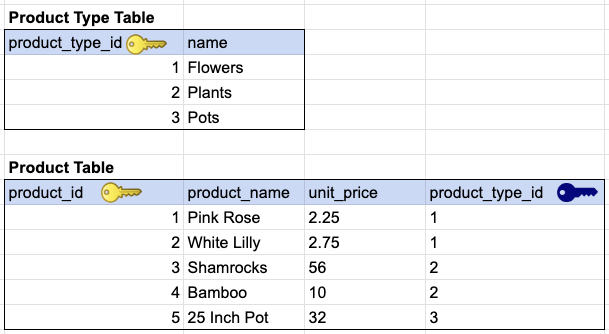
We recommend that you define the necessary tables and columns, along with sample data, using tools like Google Sheets or any relational database design tool.
Students enrolled in our online Zoom class will receive guidance throughout this assignment, and their progress will be manually reviewed incrementally until they reach a certain level of completion.
As a beginner, it is recommended that you complete the table and column listings for 50-75% of the functionalities mentioned above. Completing listings for 100% of the functionalities is a real BONUS.
GOOD LUCK WITH YOUR ASSIGNMENT!!!
Don't forget to contact us if you need any further assistance with your assignments, and most importantly, for a manual review and approval of your work.
To gain complete access, login with gmail or outlook, no need of signup, click here

SAMPLE TABLE DESIGN
Comments Not Found