
Microsoft SQL Server
HAVING Clause
In Microsoft SQL Server, the HAVING clause is used in conjunction with the GROUP BY clause to filter groups of data after they have been aggregated. It is similar to the WHERE clause, but while WHERE filters rows before aggregation, HAVING filters the result set after the aggregation has been applied. This makes HAVING particularly useful when you want to apply conditions on the result of an aggregate function like SUM(), COUNT(), AVG(), etc.
Below is a detailed explanation of how to use the HAVING clause with examples and best practices.
1. Basic Syntax of HAVING
The basic syntax for using HAVING with GROUP BY is as follows:
SELECT column_name, aggregate_function(column_name)
FROM table_name
GROUP BY column_name
HAVING aggregate_function(column_name) condition;
- Replace
column_namewith the column by which you want to group the data. - Replace
aggregate_function(column_name)with an aggregate function likeCOUNT(),SUM(), orAVG(). - Replace
conditionwith the filtering condition (e.g.,> 1000,= 5).
Example:
SELECT Category, SUM(Price) AS TotalPrice
FROM Products
GROUP BY Category
HAVING SUM(Price) > 1000;
This query groups products by their category, calculates the total price for each category, and then filters only the groups where the total price is greater than 1000.
2. Using HAVING with Multiple Conditions
You can apply multiple conditions in the HAVING clause by using logical operators such as AND or OR.
SELECT Category, COUNT(*) AS ProductCount
FROM Products
GROUP BY Category
HAVING COUNT(*) > 10 AND COUNT(*) < 100;
This query retrieves product categories that have more than 10 products but fewer than 100 products.
3. Combining HAVING with WHERE
You can use the WHERE clause to filter individual rows before grouping and then use the HAVING clause to filter the grouped results.
SELECT CustomerID, SUM(SaleAmount) AS TotalSales
FROM Sales
WHERE SaleDate > '2023-01-01'
GROUP BY CustomerID
HAVING SUM(SaleAmount) > 500;
This query filters sales records that occurred after January 1, 2023, then groups the sales by customer, and finally filters out customers whose total sales amount is less than 500.
4. Using HAVING with Other Aggregate Functions
You can use HAVING with a variety of aggregate functions like AVG(), COUNT(), MAX(), and MIN() to apply conditions on those calculations.
SELECT ProductID, AVG(Price) AS AvgPrice
FROM Sales
GROUP BY ProductID
HAVING AVG(Price) > 100;
This query retrieves all products that have an average sale price greater than 100.
5. Best Practices for Using HAVING
Use
HAVINGfor Aggregate Function Conditions – Always useHAVINGwhen you need to filter data based on an aggregate function likeSUM(),COUNT(), orAVG(). TheWHEREclause cannot be used to filter on aggregate functions.SELECT Category, COUNT(*) FROM Products GROUP BY Category HAVING COUNT(*) > 10;Apply
WHEREfor Row-Level Filtering – Use theWHEREclause to filter rows before aggregation, and useHAVINGto filter the result set after aggregation.SELECT ProductID, SUM(SaleAmount) FROM Sales WHERE SaleDate > '2023-01-01' GROUP BY ProductID HAVING SUM(SaleAmount) > 500;Combine with
ANDandORfor Complex Conditions – You can use logical operators likeANDandORin theHAVINGclause to apply multiple conditions.SELECT CustomerID, COUNT(*) AS TotalOrders FROM Sales GROUP BY CustomerID HAVING COUNT(*) > 10 AND COUNT(*) < 100;Be Mindful of Performance on Large Datasets – Using
HAVINGon large datasets can impact performance because it processes data after aggregation. Whenever possible, useWHEREto filter rows before aggregation to reduce the dataset size and improve performance.Ensure Correct Grouping with
GROUP BY– When usingHAVING, always ensure that your query properly groups the data using theGROUP BYclause. If you are using aggregate functions without grouping, you may get unexpected results.
By mastering the HAVING clause, you can filter your aggregated data more effectively, allowing you to generate more meaningful and targeted reports in SQL Server.
To gain complete access, login with gmail or outlook, no need of signup, click here

Test code
In Microsoft SQL Server, to compute the aggregate sum of salaries for each department and subsequently exhibit departments where the total salary surpasses 250,000, you can use the following query:
SELECT department,
SUM(salary) AS department_salary
FROM org_employee
GROUP BY department
HAVING SUM(salary) > 250000;In Microsoft SQL Server, to display the count of orders placed by each employee, focusing on employees who have initiated more than one order, you can use the following query:
SELECT b.employee_number,
COUNT(a.order_number) AS order_count
FROM act_order a
INNER JOIN org_employee b ON b.employee_id = a.sales_agent_employee_id
GROUP BY b.employee_number
HAVING COUNT(a.order_number) > 1;In Microsoft SQL Server, to retrieve data using the HAVING clause to list the order counts for married female clients with more than one order, you can use the following query:
SELECT a.client_id, a.first_name, a.last_name,
COUNT(b.order_number) AS order_count
FROM org_client a
INNER JOIN act_order b ON b.client_id = a.client_id
WHERE a.married_flag = 1
AND a.gender = 'F'
GROUP BY a.client_id, a.first_name, a.last_name
HAVING COUNT(b.order_number) > 1;Example 1:
In the following example, we will demonstrate the application of WHERE, GROUP BY, and HAVING clauses. It's important to note that the WHERE clause is used before GROUP BY, and the HAVING clause follows GROUP BY. Also, the HAVING clause cannot be used without preceding it with GROUP BY.
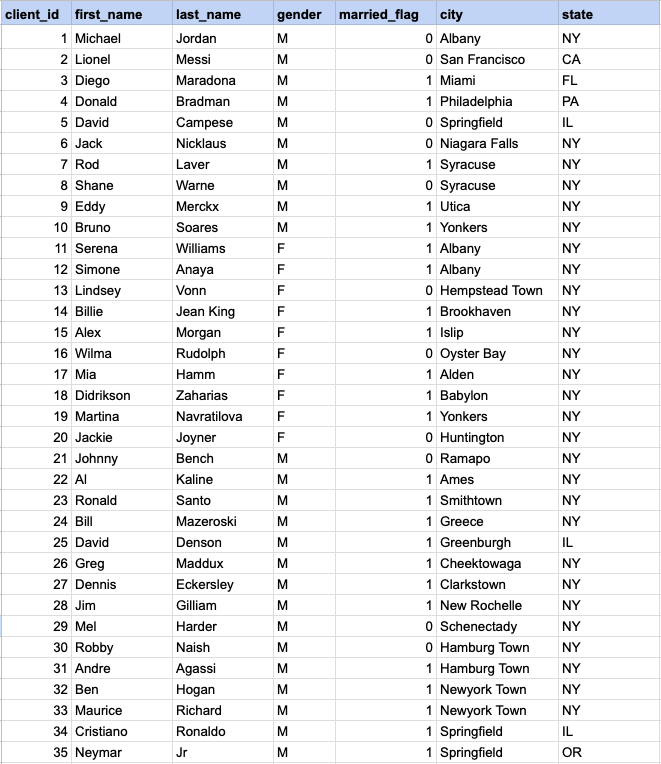
Example 1 - Raw data from client table
GROUP BY query
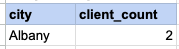
In this example, we will ascertain the number of married female clients in each city, and then identify cities that have more than one married female client.
SELECT city , count(client_id) FROM org_client WHERE gender= 'F' AND married_flag = 1 GROUP BY city HAVING count(client_id) > 1Step 1, Apply WHERE conditions
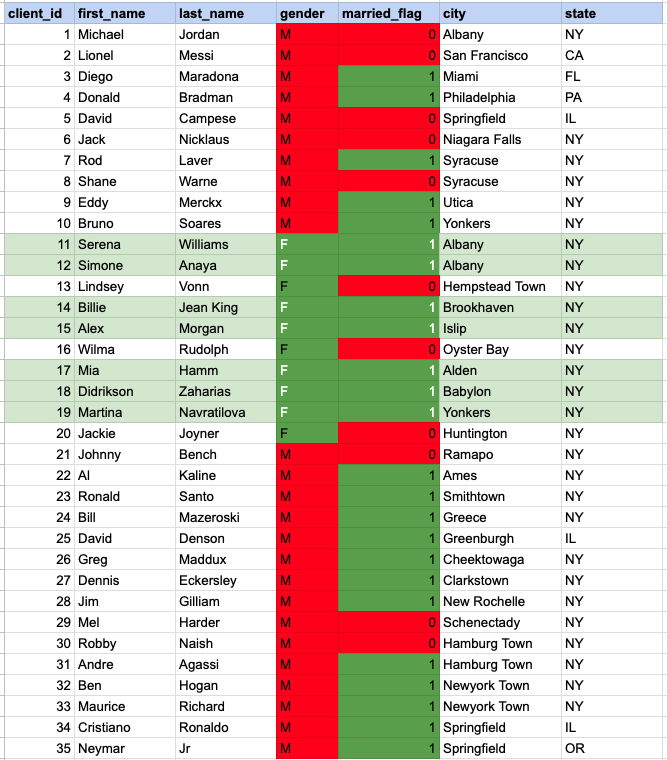
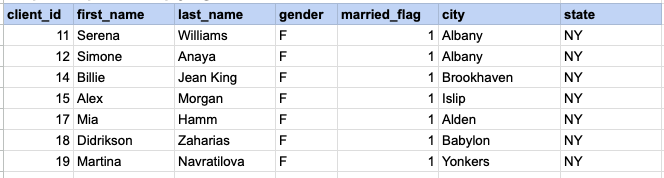
In the image above, the cells highlighted with a green background and white font represent those that satisfy both criteria of the WHERE condition (being married females).
Step 1 output after applying WHERE condition
Step 2 - Apply GROUP BY
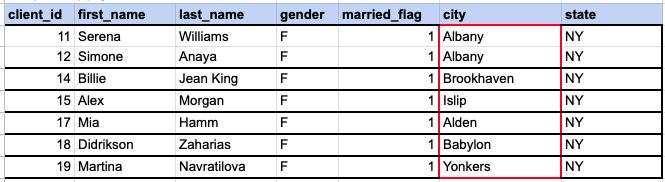
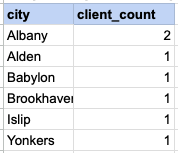
In the provided image, we need to group the data by the 'city' column. As observed, Albany is represented by 2 client rows, while the other cities each have only one row.
Step 2 output, after applying GROUP BY
Step 3 - Apply HAVING Clause
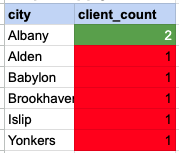
Using the HAVING clause essentially means filtering the grouped rows based on the condition specified in the HAVING clause. In this example, we are looking for groups with a client count greater than one. The cells highlighted in green with white font are those that meet the condition set by the HAVING clause.
Final output of entire query
Comments Not Found