
Microsoft SQL Server
INNER JOIN
In Microsoft SQL Server, the INNER JOIN clause is used to combine rows from two or more tables based on a related column between them. The INNER JOIN returns only the rows where there is a match in both tables. It’s one of the most common types of joins and is essential for querying data across multiple related tables. For beginners, understanding how to use INNER JOIN helps in retrieving data from different tables while establishing relationships between them, such as orders associated with customers or products linked to sales.
Below is a detailed explanation of how to use the INNER JOIN clause with examples and best practices.
1. Basic Syntax of INNER JOIN
The basic syntax for an INNER JOIN is as follows:
SELECT table1.column1, table2.column2
FROM table1
INNER JOIN table2
ON table1.common_column = table2.common_column;
table1andtable2are the names of the two tables.common_columnis the column shared between both tables that you use to join them.
Example:
SELECT Customers.CustomerName, Orders.OrderDate
FROM Customers
INNER JOIN Orders
ON Customers.CustomerID = Orders.CustomerID;
This query retrieves customer names and their order dates by joining the Customers table with the Orders table based on the CustomerID column.
2. Joining Multiple Tables
You can use INNER JOIN to join more than two tables by chaining multiple JOIN clauses together.
SELECT Customers.CustomerName, Orders.OrderDate, Products.ProductName
FROM Customers
INNER JOIN Orders ON Customers.CustomerID = Orders.CustomerID
INNER JOIN Products ON Orders.ProductID = Products.ProductID;
In this query, we join the Customers, Orders, and Products tables to retrieve the customer name, order date, and the name of the product ordered.
3. Using Aliases with INNER JOIN
Table aliases can be used to simplify the query and improve readability, especially when working with multiple tables or long table names.
SELECT c.CustomerName, o.OrderDate, p.ProductName
FROM Customers AS c
INNER JOIN Orders AS o ON c.CustomerID = o.CustomerID
INNER JOIN Products AS p ON o.ProductID = p.ProductID;
This query achieves the same result as the previous example, but uses aliases (c, o, p) to shorten the table names.
4. Filtering with WHERE and INNER JOIN
You can combine the INNER JOIN with the WHERE clause to filter the results further.
SELECT Customers.CustomerName, Orders.OrderDate
FROM Customers
INNER JOIN Orders ON Customers.CustomerID = Orders.CustomerID
WHERE Orders.OrderDate > '2023-01-01';
This query retrieves customer names and their order dates but only includes orders placed after January 1, 2023.
5. Using INNER JOIN with Aggregates
You can also use INNER JOIN with aggregate functions such as SUM(), COUNT(), or AVG() to generate summaries of related data.
SELECT Customers.CustomerName, COUNT(Orders.OrderID) AS TotalOrders
FROM Customers
INNER JOIN Orders ON Customers.CustomerID = Orders.CustomerID
GROUP BY Customers.CustomerName;
This query counts the number of orders placed by each customer.
6. Best Practices for Using INNER JOIN
Use
INNER JOINWhen You Need Matching Records –INNER JOINreturns only the rows that have matching records in both tables. If you need to include unmatched records, consider usingLEFT JOIN.SELECT Customers.CustomerName, Orders.OrderDate FROM Customers INNER JOIN Orders ON Customers.CustomerID = Orders.CustomerID;Index Columns for Better Performance – Ensure that the columns used for joining tables (e.g.,
CustomerIDorProductID) are indexed. This can significantly improve the performance of queries withINNER JOIN, especially on large datasets.Use Aliases for Readability – When working with multiple tables or long table names, use table aliases to make your query more readable.
SELECT c.CustomerName, o.OrderDate
FROM Customers AS c
INNER JOIN Orders AS o ON c.CustomerID = o.CustomerID;
Filter Results with
WHEREfor Efficiency – If you only need a subset of data, use theWHEREclause to filter the rows returned by theINNER JOIN. Filtering early reduces the amount of data processed and returned.SELECT * FROM Orders INNER JOIN Products ON Orders.ProductID = Products.ProductID WHERE Products.Category = 'Electronics';Test Queries with Smaller Data – When using
INNER JOINon large tables, start by testing your query on smaller subsets of data to ensure correctness and optimize performance.
By mastering the INNER JOIN clause, you will be able to retrieve related data from multiple tables efficiently, making your SQL queries more powerful and flexible in Microsoft SQL Server.
To gain complete access, login with gmail or outlook, no need of signup, click here

Test code
To perform a basic INNER JOIN to obtain the product name, product code, and product type by combining the product table with the product type table, use the following query:
SELECT prd_product.product_code,
prd_product.product_name,
prd_product_type.product_type
FROM prd_product
INNER JOIN prd_product_type
ON prd_product_type.product_type_id = prd_product.product_type_id;In Microsoft SQL Server, to calculate the total salaries of all employees within each department using an INNER JOIN in conjunction with GROUP BY, you can use the following query:
SELECT org_department.department,
SUM(org_employee.salary) AS total_salary
FROM org_department
INNER JOIN org_employee ON org_employee.department_id = org_department.department_id
GROUP BY org_department.department;In Microsoft SQL Server, to retrieve information from 3 tables by employing multiple INNER JOIN operations, and list the order number, product names, and the quantity ordered, you can use the following query:
SELECT act_order.order_number,
prd_product.product_name,
act_order_detail.quantity AS product_quantity
FROM act_order
INNER JOIN act_order_detail ON act_order_detail.order_id = act_order.order_id
INNER JOIN prd_product ON prd_product.product_id = act_order_detail.product_id
ORDER BY act_order.order_number, prd_product.product_name;In Microsoft SQL Server, to retrieve data from 4 tables using multiple INNER JOIN operations and present details such as the order number, sales agent, client name, and the quantity of products ordered within a specific order, you can use the following query:
SELECT a.order_number,
d.first_name AS sales_agent,
c.first_name AS client_name,
COUNT(b.product_id) AS products_ordered
FROM act_order a
INNER JOIN act_order_detail b ON b.order_id = a.order_id
INNER JOIN org_client c ON c.client_id = a.client_id
INNER JOIN org_employee d ON d.employee_id = a.sales_agent_employee_id
GROUP BY a.order_number, d.first_name, c.first_name
ORDER BY COUNT(b.product_id) DESC;In Microsoft SQL Server, to retrieve information from 5 tables by implementing multiple INNER JOIN operations and obtain details such as the order number, sales agent, product type, product name, and the quantity of product units ordered, you can use the following query:
SELECT act_order.order_number,
org_employee.first_name AS sales_agent,
prd_product_type.product_type,
prd_product.product_name,
act_order_detail.quantity AS product_quantity
FROM act_order
INNER JOIN act_order_detail ON act_order_detail.order_id = act_order.order_id
INNER JOIN prd_product ON prd_product.product_id = act_order_detail.product_id
INNER JOIN prd_product_type ON prd_product_type.product_type_id = prd_product.product_type_id
INNER JOIN org_employee ON org_employee.employee_id = act_order.sales_agent_employee_id
ORDER BY act_order.order_number, prd_product.product_name;In Microsoft SQL Server, to extract data from 6 tables using multiple WHERE conditions, INNER JOINs, GROUP BY, HAVING clause, ORDER BY, SUM, and arithmetic multiplication operations, you can use the following query:
SELECT act_order.order_number,
org_employee.first_name AS sales_agent,
org_client.first_name AS client,
prd_product_type.product_type,
prd_product.product_name,
SUM(act_order_detail.unit_rate * act_order_detail.quantity) AS product_sub_total
FROM act_order
INNER JOIN act_order_detail ON act_order_detail.order_id = act_order.order_id
INNER JOIN prd_product ON prd_product.product_id = act_order_detail.product_id
INNER JOIN prd_product_type ON prd_product_type.product_type_id = prd_product.product_type_id
INNER JOIN org_employee ON org_employee.employee_id = act_order.sales_agent_employee_id
INNER JOIN org_client ON org_client.client_id = act_order.client_id
WHERE org_client.gender = 'F'
GROUP BY act_order.order_number, org_employee.first_name, org_client.first_name, prd_product_type.product_type, prd_product.product_name
HAVING SUM(act_order_detail.unit_rate * act_order_detail.quantity) >= 5
ORDER BY act_order.order_number, prd_product.product_name;In Microsoft SQL Server, to retrieve data from 6 tables using the recommended INNER JOIN syntax with each JOIN on its own line, and include multiple WHERE conditions, GROUP BY, HAVING clause, ORDER BY, SUM, and arithmetic multiplication operations, you can use the following query:
SELECT a.order_number,
e.first_name AS sales_agent,
f.first_name AS client,
d.product_type,
c.product_name,
SUM(b.unit_rate * b.quantity) AS product_sub_total
FROM act_order a
INNER JOIN act_order_detail b ON b.order_id = a.order_id
INNER JOIN prd_product c ON c.product_id = b.product_id
INNER JOIN prd_product_type d ON d.product_type_id = c.product_type_id
INNER JOIN org_employee e ON e.employee_id = a.sales_agent_employee_id
INNER JOIN org_client f ON f.client_id = a.client_id
WHERE f.gender = 'F'
GROUP BY a.order_number, e.first_name, f.first_name, d.product_type, c.product_name
HAVING SUM(b.unit_rate * b.quantity) >= 5
ORDER BY a.order_number, c.product_name;EXAMPLE 1 - SQL INNER JOIN
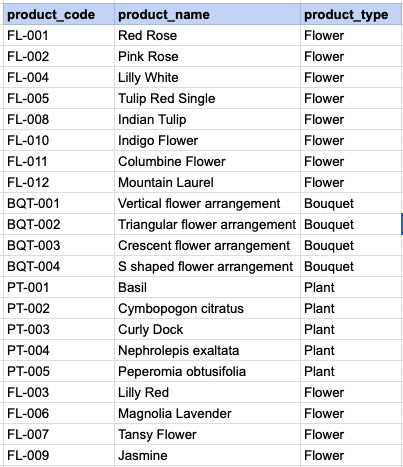
Here is a simple example of an inner join. In this case, the objective is to extract the product code and product name from the product table and the corresponding product type from the product type table. The data model below illustrates these three columns and the tables involved in this JOIN operation.
EXAMPLE 1 - Tansy Academy Data Model
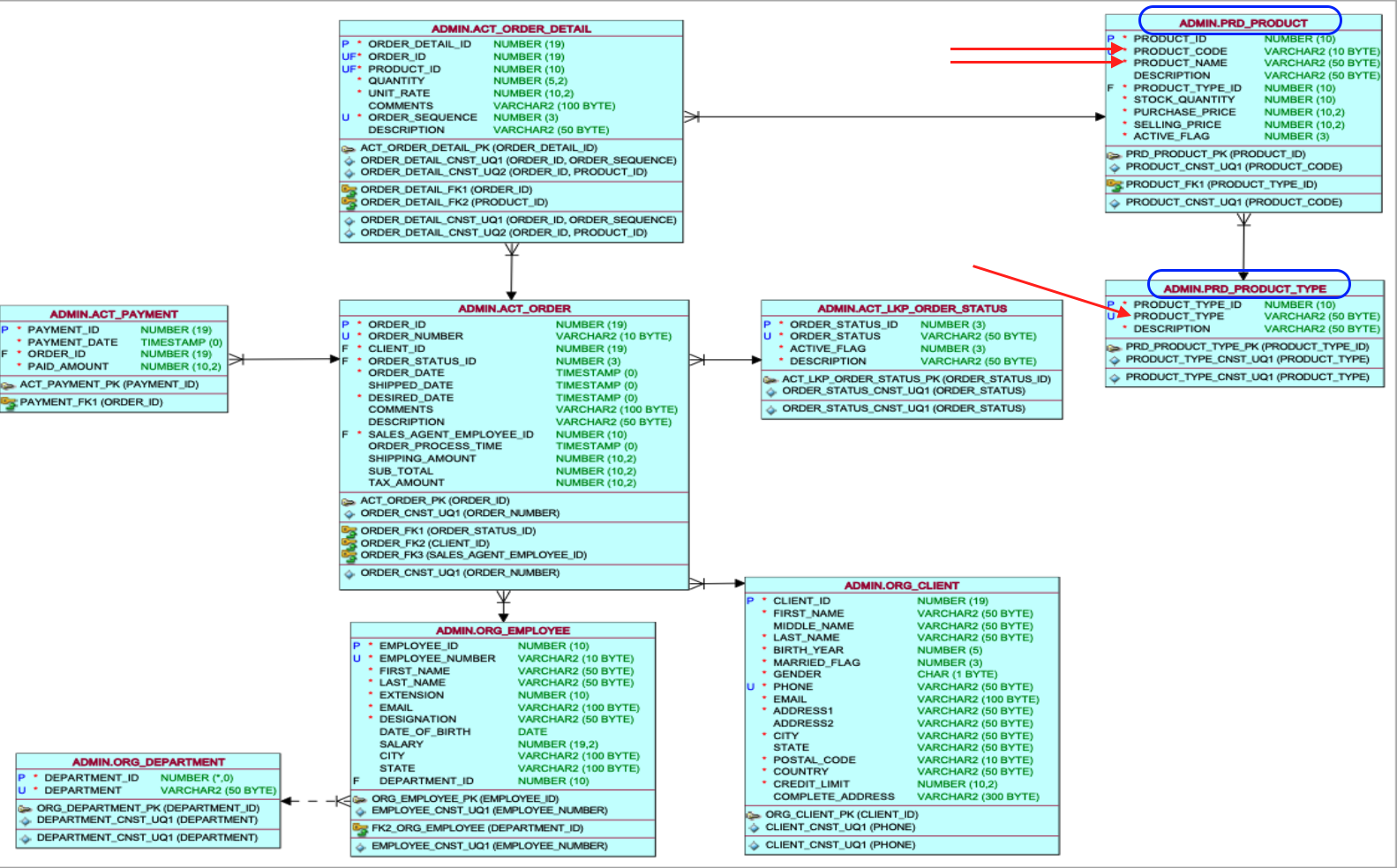
To accomplish this, you must perform a join between the product table and the product type table using the primary key and foreign column, which, in this case, is the product type ID column.
EXAMPLE 1 - INNER JOIN query
SELECT prd_product.product_code, prd_product.product_name,prd_product_type.product_type FROM prd_product INNER JOIN prd_product_type ON prd_product_type.product_type_id = prd_product.product_type_id;EXAMPLE 1 - Query Data Mapping
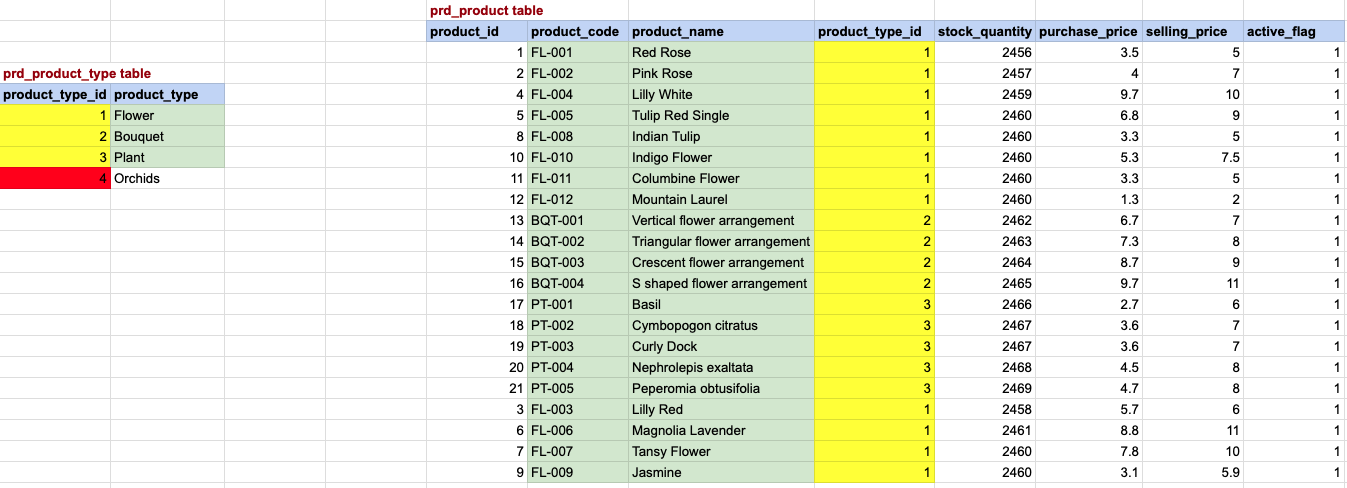
In this image, a yellow background signifies a match between the primary key and foreign key, while a red background indicates non-matching product type IDs. The green-colored background denotes the data selected for the final output. Please note that in the case of an INNER JOIN, the value in the join column must exist in BOTH TABLES.
EXAMPLE 1 - Final OUTput
EXAMPLE 2 - COMPLEX INNER JOIN
Extract data from 6 tables using multiple WHERE conditions, INNER JOINs, GROUP BY, HAVING clause, ORDER BY, SUM, and arithmetic multiplication operations. Obtain details including the order number, sales agent, female clients, product type, product name, and the subtotal for each product.
EXAMPLE 2 - Tansy Academy Data Model
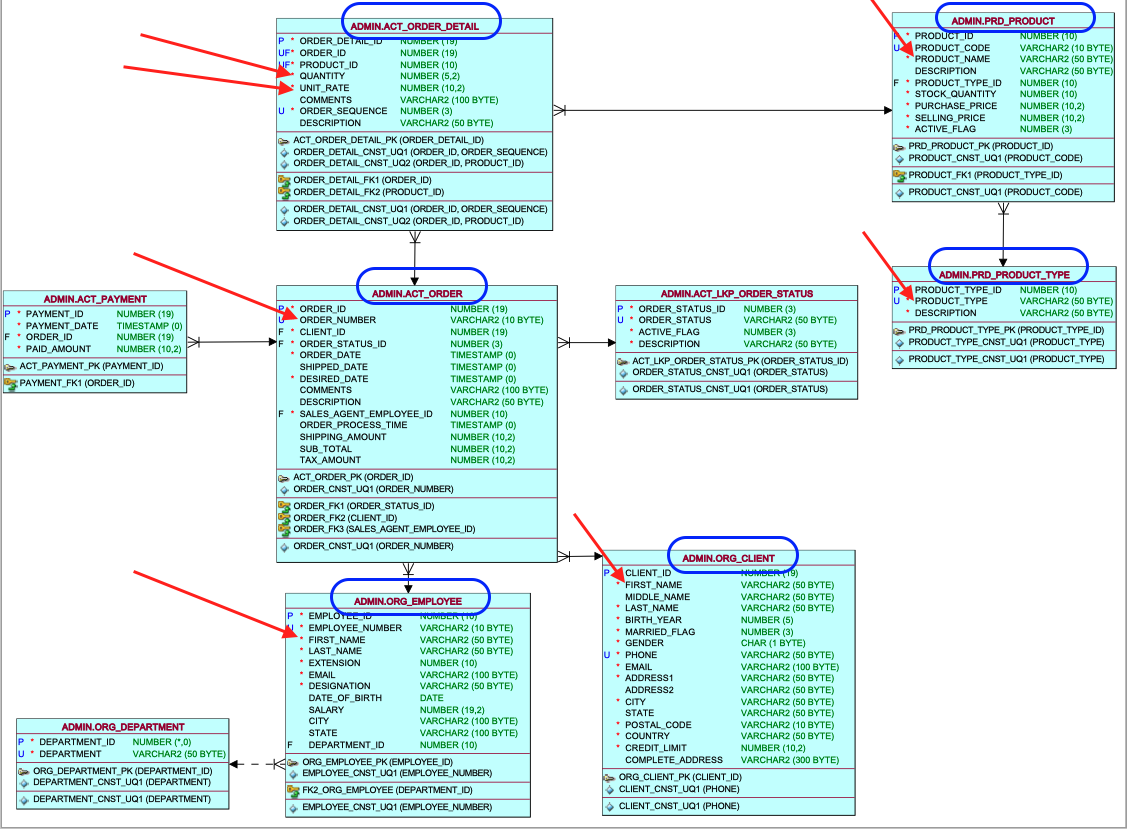
To achieve this, you need to execute joins across all six tables, and it's important to note that the join between each pair of tables differs from the others. We will approach this query incrementally, taking one step at a time, with each step involving a join between two tables.
EXAMPLE 2 - STEP 1

Join order and order detail tables. In this image, a yellow background signifies a match between the primary key and foreign key, while a red background indicates non-matching product type IDs. The green-colored background denotes the data selected for the final output.
EXAMPLE 2 - STEP 1 OUTPUT

EXAMPLE 2 - STEP 2
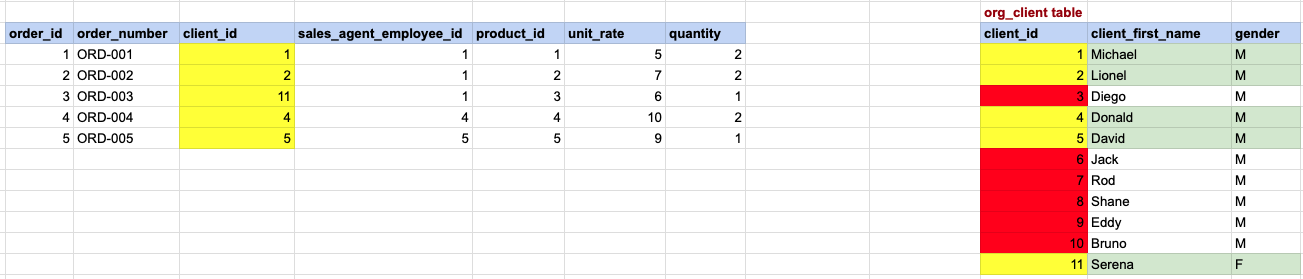
Join with client table, in this image, a yellow background signifies a match between the primary key and foreign key, while a red background indicates non-matching product type IDs. The green-colored background denotes the data selected for the final output.
EXAMPLE 2 - STEP 2 OUTPUT

EXAMPLE 2 - STEP 3

Join with employee table, in this image, a yellow background signifies a match between the primary key and foreign key, while a red background indicates non-matching product type IDs. The green-colored background denotes the data selected for the final output.
EXAMPLE 2 - STEP 3 OUTPUT

EXAMPLE 2 - STEP 4

Join with product table, in this image, a yellow background signifies a match between the primary key and foreign key, while a red background indicates non-matching product type IDs. The green-colored background denotes the data selected for the final output.
EXAMPLE 2 - STEP 4 OUTPUT

EXAMPLE 2 - STEP 5

Join with product type table, in this image, a yellow background signifies a match between the primary key and foreign key, while a red background indicates non-matching product type IDs. The green-colored background denotes the data selected for the final output.
EXAMPLE 2 - STEP 5 OUTPUT

EXAMPLE 2 - STEP 6

Apply WHERE condition filter, pick female clients only.
EXAMPLE 2 - STEP 6 OUTPUT

EXAMPLE 2 - STEP 7

Multiply unit rate and quantity to arrive at sub total
EXAMPLE 2 - STEP 7 OUTPUT

EXAMPLE 2 - STEP 8

Apply HAVING clause condition, here in the explanation we are avoiding GROUP BY step as it would yeild same results
EXAMPLE 2 - STEP 8 OUTPUT

Comments Not Found