
Microsoft SQL Server
IS NULL Operator
In Microsoft SQL Server, the IS NULL operator is part of the Data Query Language (DQL) and is used to check for NULL values in columns. A NULL value represents missing or unknown data, and it is important to distinguish NULL from empty strings or zeros, as NULL signifies the absence of a value. For beginners, learning to use IS NULL helps filter and identify records that have incomplete data, which is often useful for reporting or data validation.
Here’s a detailed explanation of how to use IS NULL, along with examples and best practices.
1. Basic Syntax of IS NULL
The IS NULL operator is used to check if a value in a column is NULL.
SELECT column_name
FROM table_name
WHERE column_name IS NULL;
- Replace
column_namewith the column you want to check forNULLvalues. - Replace
table_namewith the name of the table.
Example:
SELECT ProductName
FROM Products
WHERE Price IS NULL;
This query retrieves all products where the Price is missing or unknown (i.e., NULL).
2. Using IS NOT NULL
You can use IS NOT NULL to filter rows where the column does not have NULL values. This helps in cases where you only want to see records with valid data.
SELECT CustomerName, Country
FROM Customers
WHERE Country IS NOT NULL;
This query retrieves all customers who have a country listed, i.e., their Country column is not NULL.
3. Using IS NULL with JOIN
The IS NULL operator is commonly used in conjunction with joins to find rows that do not have a matching record in another table.
SELECT p.ProductName
FROM Products p
LEFT JOIN Sales s ON p.ProductID = s.ProductID
WHERE s.ProductID IS NULL;
This query retrieves all products that have never been sold, by performing a LEFT JOIN and checking for NULL values in the Sales table.
4. Combining IS NULL with Other Conditions
You can combine IS NULL with other conditions like AND or OR to refine your searches.
SELECT ProductName, Category
FROM Products
WHERE Price IS NULL
AND Category = 'Electronics';
This query retrieves products from the Electronics category that do not have a price set.
5. Handling NULL in Aggregate Functions
When using aggregate functions like COUNT(), AVG(), or SUM(), SQL Server typically ignores NULL values. However, you can still filter out NULL values using IS NULL before applying the aggregate.
Example:
SELECT COUNT(*)
FROM Sales
WHERE SaleDate IS NULL;
This query counts the number of sales records where the SaleDate is missing.
6. Best Practices for Using IS NULL
Always Handle
NULLValues in Data Queries – When dealing with real-world databases, it’s common to have missing or unknown data. Always account forNULLvalues in your queries to avoid incomplete or inaccurate results.SELECT ProductName, Price FROM Products WHERE Price IS NULL OR Price > 50;In this example, you handle both products with missing prices and those priced above 50.
Be Careful with
=Operator andNULL– Remember thatNULLis not the same as an empty string or zero. Using=or!=to compare withNULLwill not work. Always useIS NULLorIS NOT NULLwhen checking forNULLvalues.Use
NULL-safe Functions When Necessary – Functions likeCOALESCE()orISNULL()can help replaceNULLvalues with default values in your queries to avoid unexpected results.SELECT ProductName, ISNULL(Price, 0) AS Price FROM Products;This query replaces
NULLprices with0for better readability and consistency.Check for
NULLValues in Joins – When joining tables, always check forNULLvalues, especially inLEFT JOINorRIGHT JOIN, to ensure you handle unmatched records properly.
By using the IS NULL and IS NOT NULL operators effectively, you can better manage incomplete or missing data and write more reliable SQL queries.
To gain complete access, login with gmail or outlook, no need of signup, click here
Test code
In Microsoft SQL Server, you can use the IS NULL operator to filter rows based on a NULL value in the shipped_date column. This query retrieves all orders that have not been shipped yet:
SELECT *
FROM act_order
WHERE shipped_date IS NULL;In Microsoft SQL Server, you can use the IS NULL operator to filter rows based on a NULL value in the date_of_birth column. This query retrieves all employees who have not provided their date of birth:
SELECT *
FROM org_employee
WHERE date_of_birth IS NULL;Example 1:
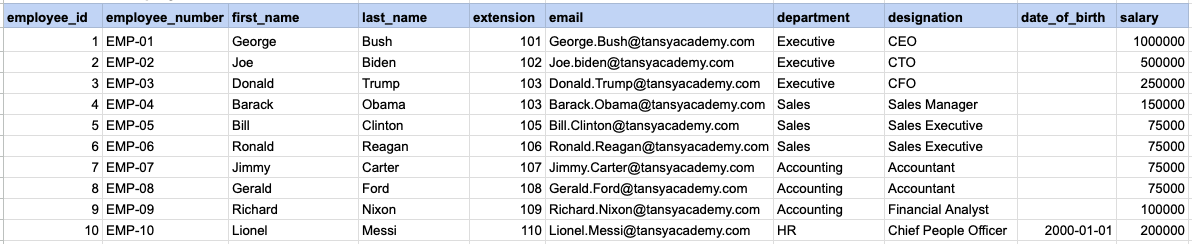
Let's explore the procedure of extracting information from a designated table using the IS NULL SQL operator. This query retrieves employees who have not provided their date of birth.
Example 1 - Raw data from employee table
Example 1 - Query
SELECT * FROM org_employee WHERE date_of_birth IS NULL;Example 1 - Query data mapping
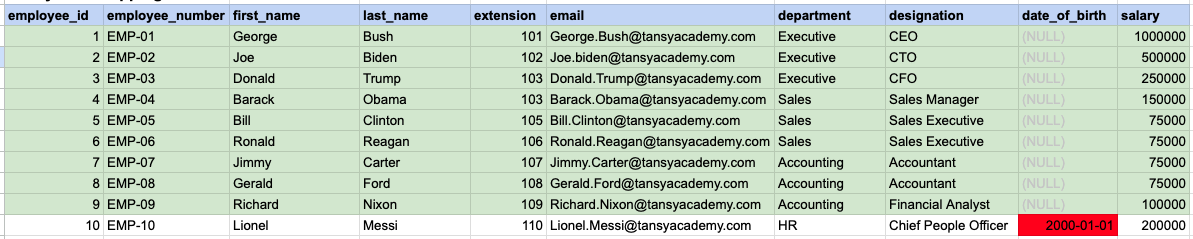
In the provided image, the green color signifies the data that has been selected or satisfies the conditions specified in our query. Data points in red indicate information that does not meet the criteria set by the query.
Example 1 - Query Output

Example 2:
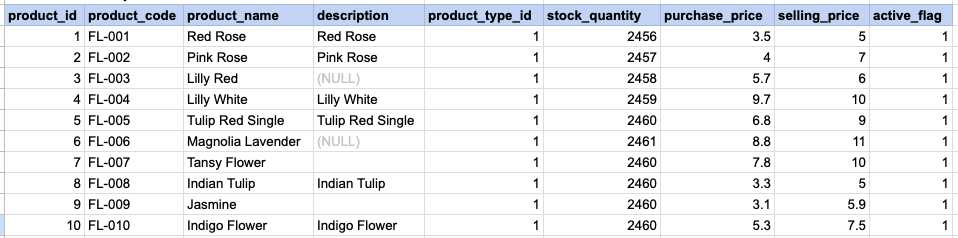
Let's delve into the process of retrieving information from a specified table using the SQL IS NULL operator on string data. The query retrieves all rows from the products table where the description is null.
Example 2 - Raw data from product table
Example 2 - Query
SELECT * FROM prd_product WHERE description IS NULL;Example 2 - Query data mapping
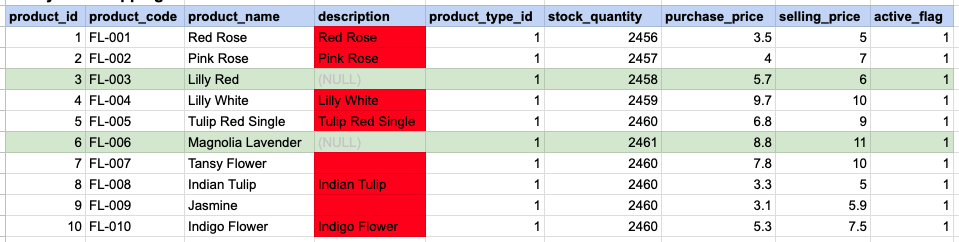
In the provided image, the green color signifies the data that has been selected or satisfies the conditions specified in our query. Data points in red indicate information that does not meet the criteria set by the query. NOTE that description value for product id 7 and 9 compose a empty string, this is not a null.
Example 2 - Query Output

Example 3:
Using '= NULL' is not permissible; instead, you must use 'IS NULL'. As demonstrated below, employing '= NULL' results in an empty result set.
SELECT * FROM prd_product WHERE description = NULL;Example 3 - Empty result set

Comments Not Found