
Microsoft SQL Server
IN Operator
The IN operator in Microsoft SQL Server is part of the Data Query Language (DQL) and is used to filter rows based on whether a column's value matches any value in a specified list. It simplifies the syntax when filtering a column against multiple possible values. This is especially useful when working with large datasets where you need to check if a value exists within a predefined set of values. For beginners, learning how to use the IN operator will help simplify SQL queries and make them more readable.
Below is a detailed explanation of how to use the IN operator, along with examples.
1. Basic Syntax of IN
The basic syntax for using IN is as follows:
SELECT column_name
FROM table_name
WHERE column_name IN (value1, value2, ..., valueN);
- Replace
column_namewith the column you want to filter. - Replace
table_namewith the actual table name. - The values inside the parentheses are the list of possible values.
Example:
SELECT ProductName, Price
FROM Products
WHERE Category IN ('Electronics', 'Clothing', 'Furniture');
This query retrieves all products that belong to the categories Electronics, Clothing, or Furniture.
2. Using IN with Numeric Values
The IN operator works with both text and numeric values. Here's how you would use it with numbers:
SELECT CustomerName, Country
FROM Customers
WHERE CustomerID IN (1, 3, 5, 7);
This query retrieves all customers whose CustomerID is either 1, 3, 5, or 7.
3. Using IN with Subqueries
You can also use the IN operator with a subquery, allowing you to filter data based on the results of another query.
SELECT ProductName, Price
FROM Products
WHERE ProductID IN (SELECT ProductID FROM Sales WHERE SaleDate = '2023-09-01');
This query retrieves all products that were sold on September 1, 2023, by using a subquery to find matching ProductID values in the Sales table.
4. Using NOT IN
You can use the NOT IN operator to exclude values that match a list. This is useful when you want to filter out certain values.
SELECT CustomerName, Country
FROM Customers
WHERE Country NOT IN ('USA', 'Canada', 'Mexico');
This query retrieves customers who are not located in the USA, Canada, or Mexico.
5. Combining IN with Other Conditions
The IN operator can be combined with other SQL conditions like AND or OR to refine your search.
SELECT ProductName, Price
FROM Products
WHERE Price > 20
AND Category IN ('Electronics', 'Clothing');
This query retrieves all products in the Electronics or Clothing categories that are priced above 20.
6. Best Practices for Using IN
Use
INfor Readability – TheINoperator makes your queries more readable and concise compared to using multipleORconditions.-- Less readable version SELECT * FROM Products WHERE Category = 'Electronics' OR Category = 'Clothing' OR Category = 'Furniture'; -- More readable version using IN SELECT * FROM Products WHERE Category IN ('Electronics', 'Clothing', 'Furniture');Limit Long Lists in
IN– Avoid using long lists of values in theINclause, as this can negatively impact query performance. If you need to check against a large list of values, consider using joins or subqueries.Use
INwith Caution on Large Data Sets – When usingINwith large subqueries or many values, it may slow down performance. Always test and optimize your queries, especially when working with large databases.Use
NOT INwith Care – When usingNOT IN, be cautious withNULLvalues. If any values in the list areNULL, SQL Server will exclude all rows from the result set. Ensure your data doesn't have unexpectedNULLvalues when usingNOT IN.
By following these practices and understanding the IN operator, you can make your queries more efficient, readable, and easier to maintain.
To gain complete access, login with gmail or outlook, no need of signup, click here

Test code
In Microsoft SQL Server, you can use the IN operator to filter rows based on a list of string values. This query retrieves all rows from the "org_employee" table where the designation column corresponds to any of the specified values ('Sales Manager', 'Financial Analyst', 'CFO'):
SELECT *
FROM org_employee
WHERE designation IN ('Sales Manager', 'Financial Analyst', 'CFO');In Microsoft SQL Server, you can use the IN operator to filter rows based on a list of numeric values. This query retrieves all rows from the "org_client" table where the birth year column matches any of the specified values (1990, 1980):
SELECT *
FROM org_client
WHERE birth_year IN (1990, 1980);In Microsoft SQL Server, you can use the IN operator to filter rows based on a list of datetime values. This query retrieves all rows from the "act_order" table where the desired_date column matches any of the specified values ('2023-12-09', '2023-12-10', '2023-12-18', '2023-12-25'):
SELECT *
FROM act_order
WHERE desired_date IN ('2023-12-09', '2023-12-10', '2023-12-18', '2023-12-25');Example 1:
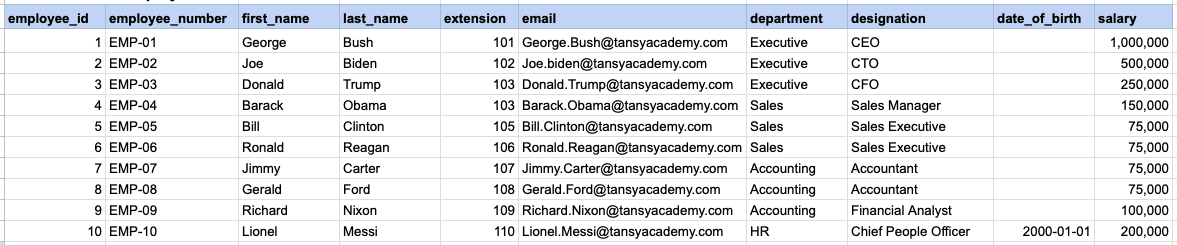
Let's explore the procedure of extracting information from a designated table using the IN SQL operator with string data. This query retrieves all rows from the employees table where the designation column corresponds to any of the specified values ('Sales Manager', 'Financial Analyst', 'CFO').
Example 1 - Raw data from employee table
Example 1 - Query
SELECT * FROM org_employee WHERE designation IN ('Sales Manager', 'Financial Analyst', 'CFO');Example 1 - Query data mapping
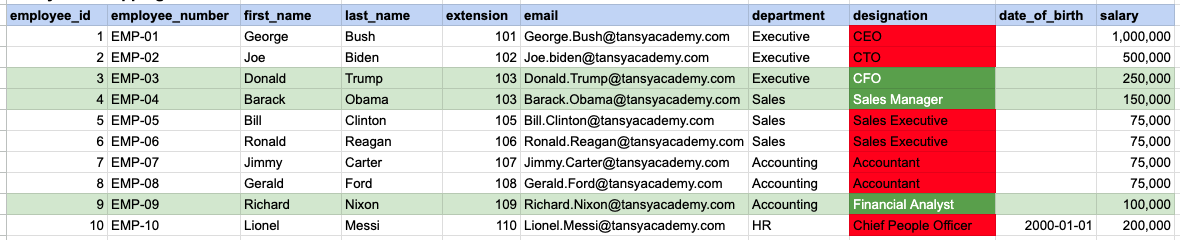
In the provided image, the green color signifies the data that has been selected or satisfies the conditions specified in our query. Data points in red indicate information that does not meet the criteria set by the query.
Example 1 - Query Output

Example 2:
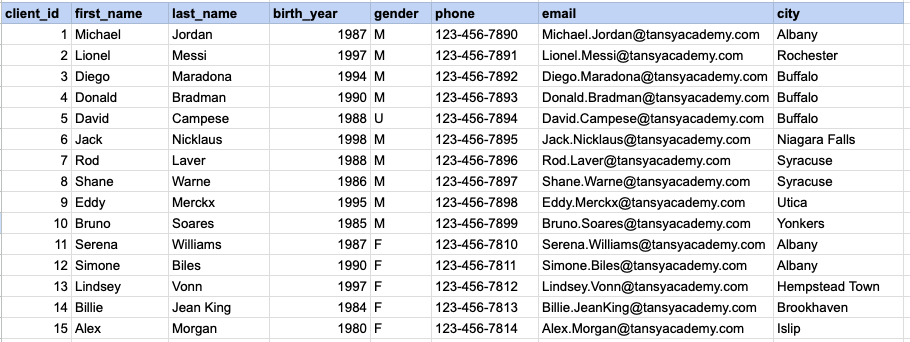
Let's explore the procedure for extracting information from a designated table using the IN SQL operator on integer data. The query fetches all rows from the clients table where the birth year column matches any of the specified values (1990, 1980).
Example 2 - Raw data from client table
Example 2 - Query
SELECT * FROM org_client WHERE birth_year IN (1990, 1980);Example 2 - Query data mapping
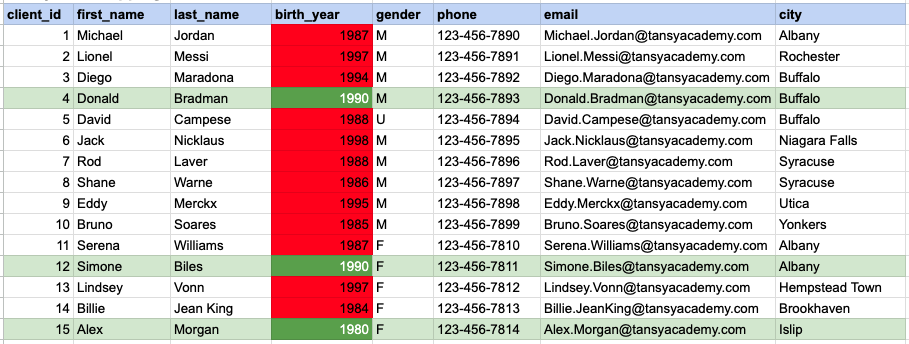
In the provided image, the green color signifies the data that has been selected or satisfies the conditions specified in our query. Data points in red indicate information that does not meet the criteria set by the query.
Example 2 - Query Output

Example 3:
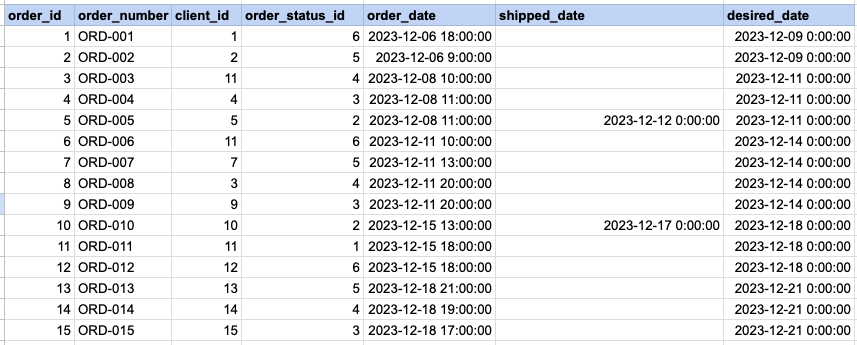
Let's explore the procedure for extracting information from a designated table using the IN SQL operator on date time data. This query retrieves all rows from the orders table where the desired ship date column corresponds to any of the specified values ('2023-12-09', '2023-12-10', '2023-12-18', '2023-12-25').
Example 3 - Raw data from order table
Example 3 - Query
SELECT * FROM act_order WHERE desired_date IN ('2023-12-09', '2023-12-10', '2023-12-18', '2023-12-25');Example 3 - Query data mapping
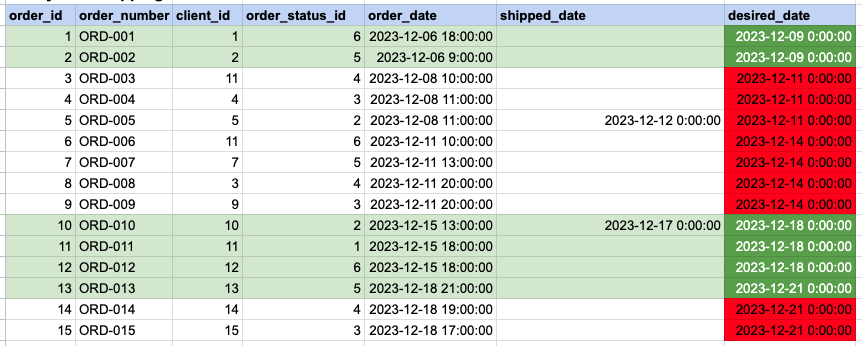
In the provided image, the green color signifies the data that has been selected or satisfies the conditions specified in our query. Data points in red indicate information that does not meet the criteria set by the query.
Example 3 - Query Output

Comments Not Found