
Microsoft SQL Server
'=' (equal to) Operator
In Microsoft SQL Server, the = operator is used to compare values in a query to filter data. It retrieves rows where a column's value exactly matches a specified value. The = operator is fundamental in SQL and is commonly used in SELECT, UPDATE, and DELETE queries. For beginners, learning to use the = operator is crucial for writing basic and efficient SQL queries to retrieve specific records based on exact matches.
Below is a detailed explanation of how to use the = operator with examples and best practices.
1. Basic Syntax of = (Equal)
The = operator compares a column's value with a specific value to return rows where the two values are equal.
SELECT column_name
FROM table_name
WHERE column_name = value;
- Replace
column_namewith the column you want to compare. - Replace
table_namewith the actual table name. - Replace
valuewith the value you want to match.
Example:
SELECT ProductName, Price
FROM Products
WHERE Category = 'Electronics';
This query retrieves all products that belong to the Electronics category.
2. Using = with Numeric Values
The = operator can be used with numeric values to filter rows where a column contains a specific number.
SELECT CustomerName, Country
FROM Customers
WHERE CustomerID = 1;
This query retrieves the customer whose CustomerID is equal to 1.
3. Using = with Date Values
You can use the = operator to compare dates, which is useful when you want to retrieve records for a specific date.
SELECT OrderID, OrderDate
FROM Sales
WHERE OrderDate = '2023-01-01';
This query retrieves all sales orders that were placed on January 1, 2023.
4. Combining = with Other Conditions
You can combine the = operator with other conditions using AND or OR to create more complex queries.
SELECT ProductName, Price
FROM Products
WHERE Category = 'Electronics'
AND Price = 100;
This query retrieves all products in the Electronics category that are priced at exactly 100.
5. Handling NULL Values with =
The = operator does not work with NULL values because NULL represents an unknown value. If you want to check for NULL values, you need to use the IS NULL operator.
SELECT ProductName
FROM Products
WHERE Category IS NULL;
This query retrieves all products that have no category assigned (i.e., where the Category column contains NULL).
6. Best Practices for Using =
Use
=for Exact Matching – The=operator is ideal for queries where you need to retrieve rows that exactly match a specific value. Make sure the value you're comparing against is correct and formatted properly.SELECT * FROM Products WHERE ProductID = 100;Be Mindful of Case Sensitivity – When using
=with text values, SQL Server is usually case-insensitive by default, meaningProduct = 'Laptop'is treated the same asProduct = 'laptop'. However, the case sensitivity can depend on the collation setting of your database.Use Indexing for Improved Performance – When frequently querying large datasets, ensure that columns frequently compared using
=(such asIDorProductName) are indexed. This can improve query performance significantly.Handle
NULLValues Explicitly – The=operator will not matchNULLvalues. Always useIS NULLwhen you need to check for missing or undefined data.SELECT * FROM Customers WHERE Email IS NULL;Combine with
ANDorORfor Complex Queries – The=operator can be used withANDorORto create more refined queries, allowing you to filter records based on multiple exact matches.SELECT * FROM Sales WHERE CustomerID = 1 AND SaleAmount = 500;
By understanding and using the = operator effectively, you can create simple yet powerful queries to retrieve exactly the data you need from your SQL Server database.
To gain complete access, login with gmail or outlook, no need of signup, click here
Test code
In Microsoft SQL Server, to fetch records for clients identified as female, you can use the following query:
SELECT *
FROM org_client
WHERE gender = 'F';In Microsoft SQL Server, to fetch orders where the order status is equal to 5, you can use the following query:
SELECT *
FROM act_order
WHERE order_status_id = 5;In Microsoft SQL Server, to retrieve orders with shipping dates matching December 12th, 2023, you can use the following query:
SELECT *
FROM act_order
WHERE shipped_date = '2023-12-12';Example 1:
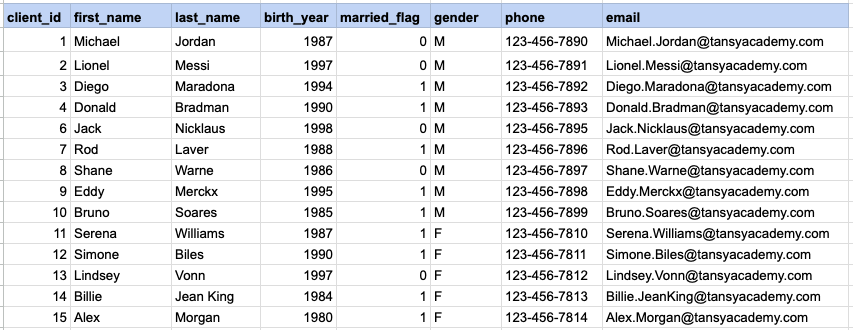
Let's explore the procedure of retrieving information from a designated table using the SQL '=' (equal to) operator with string data. Fetch records for clients identified as females.
Example 1 - Raw data from client table
Example 1 - Query
SELECT * FROM org_client WHERE gender = 'F';Example 1 - Query data mapping
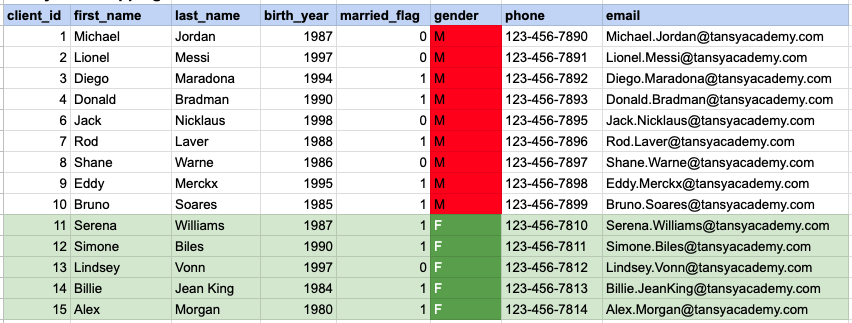
In the provided image, the green color signifies the data that has been selected or satisfies the conditions specified in our query. Data points in red indicate information that does not meet the criteria set by the query.
Example 1 - Query Output

Example 2:
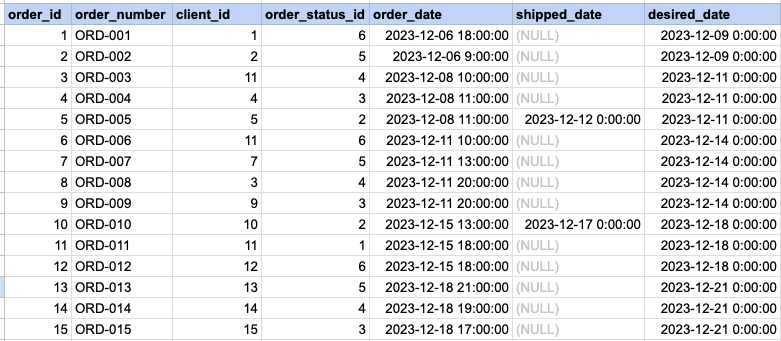
Let's delve into the process of retrieving information from a specified table using the SQL '=' (equal) operator with numeric data. Retrieve orders with statuses that match the value 5.
Example 2 - Raw data from orders table
Example 2 - Query
SELECT * FROM act_order WHERE order_status_id = 5;Example 2 - Query data mapping
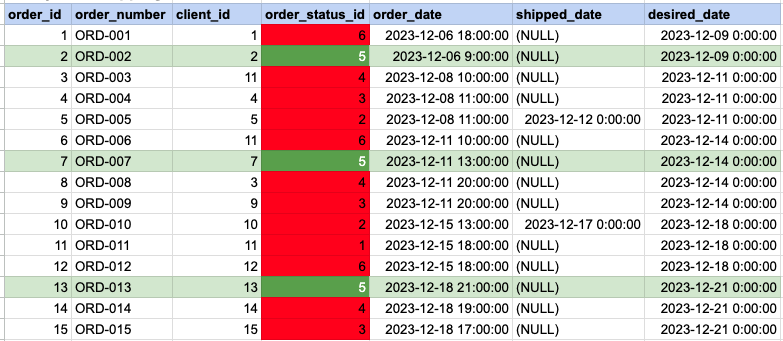
In the provided image, the green color signifies the data that has been selected or satisfies the conditions specified in our query. Data points in red indicate information that does not meet the criteria set by the query.
Example 2 - Query Output

Example 3:
Let's explore the process of retrieving information from a designated table using the SQL '=' (equal) operator with date data. Fetch orders with shipping dates that match December 12th.
Example 3 - Raw data from orders table
Example 3 - Query
SELECT * FROM act_order WHERE shipped_date = '2023-12-12';Example 3 - Query data mapping
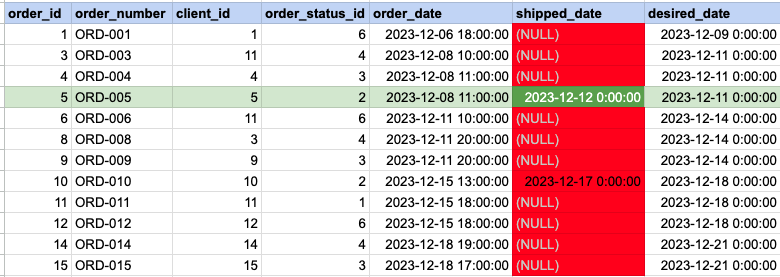
In the provided image, the green color signifies the data that has been selected or satisfies the conditions specified in our query. Data points in red indicate information that does not meet the criteria set by the query. Please be aware that the query will attempt to filter based on the value of December 12th. Since many records have NULL for the shipped date value, NULL cannot be compared as it is not an actual value. Consequently, these null records will be excluded from the results as well.
Example 3 - Query Output

Comments Not Found