
Microsoft SQL Server
CONCAT
In Microsoft SQL Server, the CONCAT function is part of the Data Query Language (DQL) and is used to join two or more strings together into one. It is a simple yet powerful function, especially useful when you want to combine data from different columns into one. The CONCAT function automatically handles NULL values by treating them as empty strings, so it won't break your query. For beginners, understanding how to use CONCAT will help in formatting and presenting data in a more readable form.
Below is a detailed explanation of how to use the CONCAT function with examples.
1. Basic Syntax of CONCAT
The basic syntax of CONCAT is as follows:
SELECT CONCAT(string1, string2, ..., stringN)
FROM table_name;
- Replace
string1, string2, ..., stringNwith the strings or columns you want to concatenate. - Replace
table_namewith the actual name of the table.
Example:
SELECT CONCAT(FirstName, ' ', LastName) AS FullName
FROM Customers;
This query combines the FirstName and LastName columns from the Customers table into a single column called FullName, with a space between them.
2. Using CONCAT with Multiple Columns
You can concatenate multiple columns together, allowing you to format data exactly how you want.
SELECT CONCAT(ProductName, ' - ', Category) AS ProductInfo
FROM Products;
This query concatenates the ProductName and Category columns from the Products table, separated by a dash (-).
3. Handling NULL Values in CONCAT
The CONCAT function treats NULL values as empty strings, meaning it won't cause errors or return NULL when used with NULL columns.
SELECT CONCAT(CustomerName, ' (', Country, ')') AS CustomerDetails
FROM Customers;
Even if the Country value is NULL, the query will still return a valid string with the CustomerName and the parentheses. If Country is NULL, it will just return CustomerName ().
4. Using CONCAT with WHERE Clause
You can combine the CONCAT function with other SQL clauses like WHERE to filter data while concatenating strings.
SELECT CONCAT(ProductName, ' - $', Price) AS ProductInfo
FROM Products
WHERE Category = 'Electronics';
This query concatenates ProductName and Price for all products in the "Electronics" category, formatting the output with a $ sign.
5. Concatenating Literals and Columns
The CONCAT function allows you to concatenate literal strings (like text) with column values. This is especially useful for adding extra formatting or labels.
SELECT CONCAT('Product: ', ProductName, ', Price: $', Price) AS ProductDetails
FROM Products;
This query concatenates literal strings with column data to create a more readable result that shows product details.
6. Best Practices for Using CONCAT
Use
CONCATInstead of+for Safety – While you can also use the+operator to concatenate strings,CONCATis generally safer because it automatically handlesNULLvalues without returningNULL.Use Meaningful Separators – When concatenating multiple columns, use separators like spaces, commas, or dashes to make the result more readable.
SELECT CONCAT(CustomerName, ', ', Country) AS CustomerLocation
FROM Customers;
Consider Data Formatting – When using
CONCAT, make sure to format your data properly, especially when dealing with numbers, dates, or special symbols (like$for prices).Avoid Over-Concatenation – Don’t concatenate too many columns in a single query as it may reduce readability. Always keep the result easy to understand.
By using the CONCAT function, you can effectively combine different columns and literal values into one, making your SQL queries more flexible and your results easier to read.
To gain complete access, login with gmail or outlook, no need of signup, click here

Test code
In Microsoft SQL Server, you can use the `+` operator to concatenate the first name and last name into a full name. However, using the CONCAT function is recommended to handle NULL values gracefully:
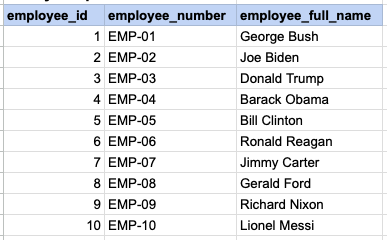
SELECT employee_id, employee_number, CONCAT(first_name, ' ', last_name) AS employee_full_name
FROM org_employee;SQL CONCAT, combine multiple columns
Example 1 - Raw data from employee table
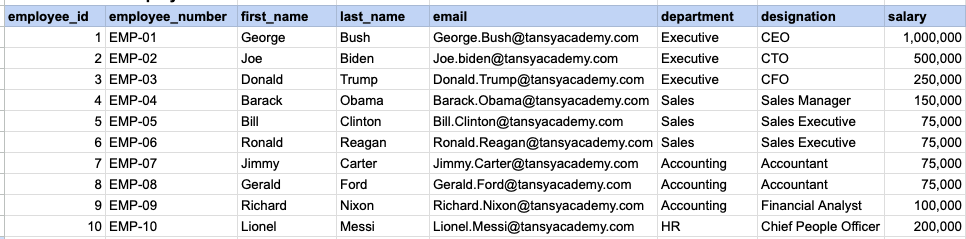
Example 1 - CONCAT employee first and last name
SELECT employee_id, employee_number ,concat(first_name , ' ' , last_name) as employee_full_name FROM org_employee;Example 1 - Query data mapping
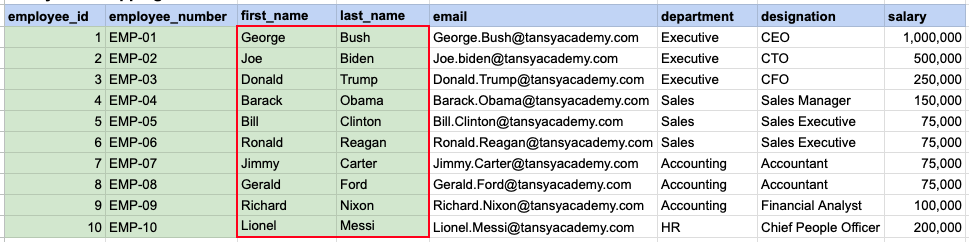
The contents of the first_name and last_name columns will be merged to create a unified column, separated by a space.
Example 1 - Query Output
Example 2 - Raw data from client table
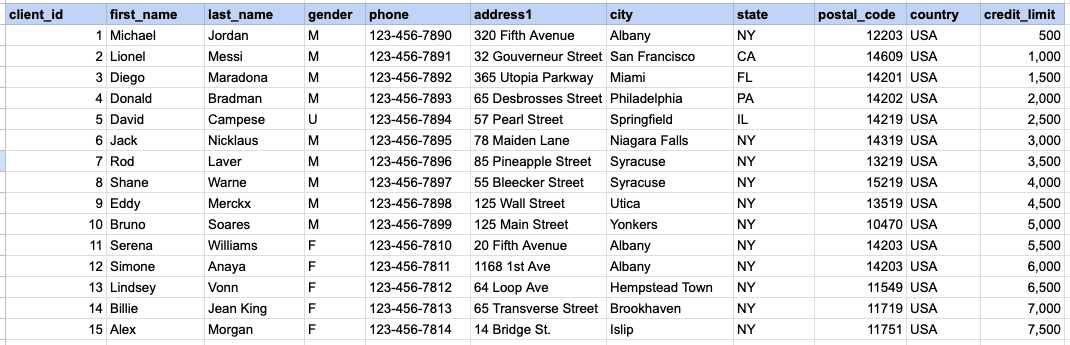
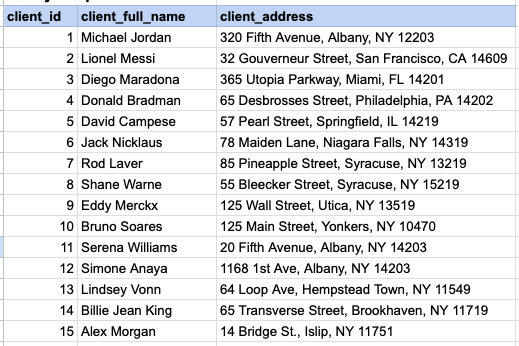
Example 2 - CONCAT client name and address
SELECT client_id , first_name || ' ' || last_name as client_full_name , address1 || ', ' || city || ', ' || state || ' ' || postal_code as client_address FROM org_clientExample 2 - Query data mapping
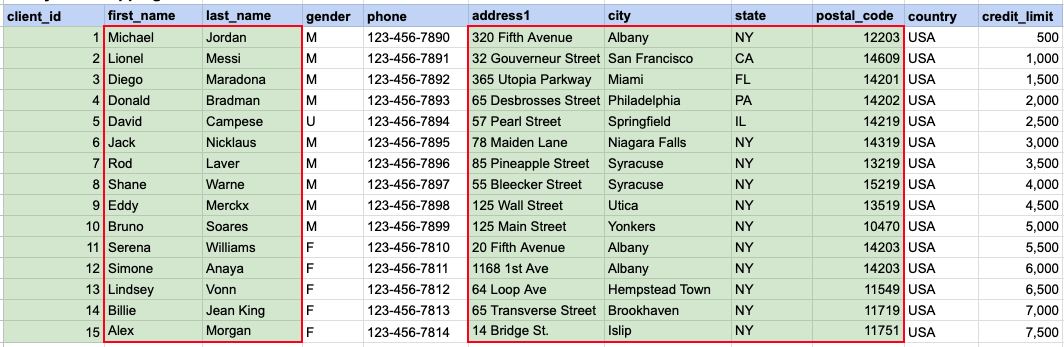
The first_name and last_name columns will be amalgamated to generate a consolidated column named 'client full name', with a space as the separator. Subsequently, the address, city, state, and zip will be amalgamated to produce the client's address.
Example 2 - Query Output
Comments Not Found