
Microsoft SQL Server
SELECT *
In SQL, the SELECT statement is part of the Data Query Language (DQL) and is used to retrieve data from a database. The SELECT * command is one of the simplest ways to retrieve all columns from a table. This is especially useful for beginners as it helps fetch complete records without specifying column names. However, understanding when and how to use SELECT * effectively is important as it can have performance implications, especially in larger databases.
Here’s a breakdown of how to use SELECT * in Microsoft SQL Server and additional details that will help you better understand this command.
1. Basic Syntax of SELECT *
The SELECT * query retrieves all columns from a specific table. Here’s a simple syntax:
SELECT *
FROM table_name;
- Replace
table_namewith the actual table name you want to query. - It will fetch all rows and columns from the specified table.
Example:
SELECT *
FROM Products;
This query will return all columns (e.g., ProductID, ProductName, Price, etc.) from the Products table.
2. Using SELECT * with a WHERE Clause
If you want to filter the results to return only specific records, you can use the WHERE clause:
SELECT *
FROM Sales
WHERE SaleDate = '2023-09-01';
This query retrieves all columns from the Sales table where the SaleDate is equal to 2023-09-01.
3. Limiting Results Using TOP
To limit the number of rows returned by your query, you can use the TOP clause:
SELECT TOP 10 *
FROM Customers;
This query will return only the first 10 rows from the Customers table.
4. Join Tables with SELECT *
You can also use SELECT * in a join to retrieve data from multiple tables at once:
SELECT *
FROM Sales s
JOIN Customers c
ON s.CustomerID = c.CustomerID;
This query returns all columns from both the Sales and Customers tables, where there is a match on the CustomerID.
5. Best Practices for Using SELECT *
Using SELECT * is convenient but can lead to inefficiencies, especially as the database grows. Consider these best practices:
Avoid
SELECT *in production code – Instead, specify only the columns you need, which can reduce the amount of data retrieved and improve query performance.SELECT ProductName, Price FROM Products;Use Aliases for Better Readability – When using joins or multiple tables, it's a good practice to use table aliases to make your query more readable.
SELECT c.CustomerName, s.SaleAmount
FROM Sales s
JOIN Customers c
ON s.CustomerID = c.CustomerID;
Limit Data with
WHEREandTOP– Always try to limit the amount of data returned by usingWHEREconditions or theTOPclause.Consider Indexes – Retrieving data with
SELECT *from large tables without proper indexing can be slow. Ensure that your table has proper indexes to support frequent queries.
By following these steps, you’ll improve both the performance and maintainability of your SQL queries, even as your database grows in complexity.
To gain complete access, login with gmail or outlook, no need of signup, click here

Test code
Select specific columns and all rows from the org_client table.
SELECT client_id, first_name, last_name, gender, city
FROM org_client;Select specific columns and all rows from the org_client table. The order of columns in the result set may differ from the table definition.
SELECT city, gender, first_name, last_name, email, client_id
FROM org_client;Retrieve all rows from org_client table, selecting a subset of columns.
SELECT city, gender, first_name, last_name, email FROM org_client;Select a subset of columns and retrieve all rows from org_client.
SELECT city
,gender
,first_name
,last_name
,email
FROM org_client;Select specific columns and fetch all rows from org_client table.
SELECT city, gender, first_name, last_name, email
FROM org_client
ORDER BY first_name;Example 1:
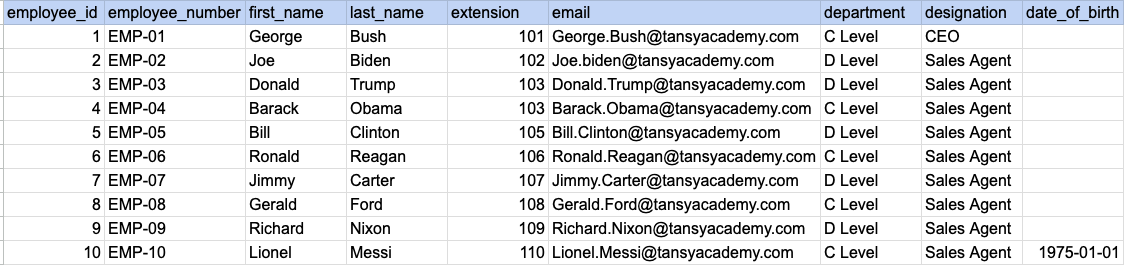
Let's understand the process of extracting data from a specified table. In this case, we aim to retrieve all rows and columns from the employee table.
Example 1 - Raw data from employee table
Example 1 - Query
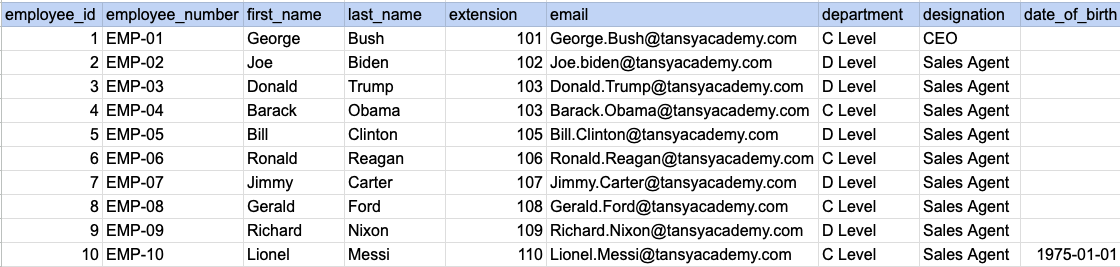
SELECT * FROM org_employee;Example 1 - Query data mapping
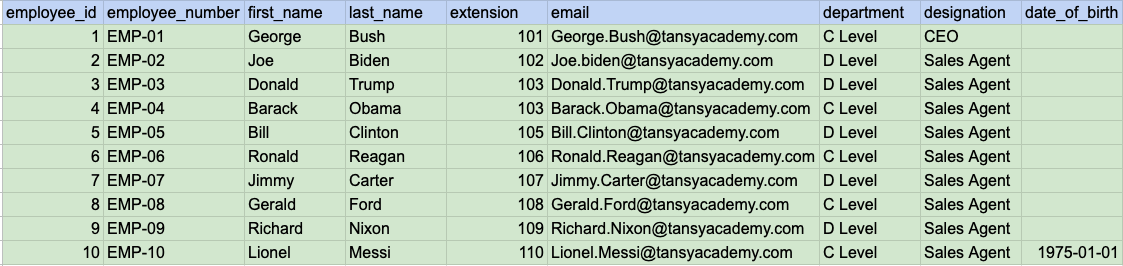
In above image, the color green signifies that the output for our query will include all rows and columns being selected.
Example 1 - Query Output
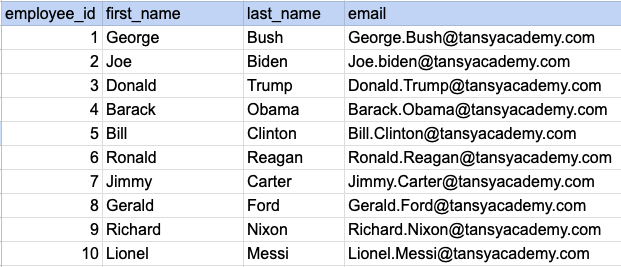
Example 2:
Let's understand the process of extracting desired columns from a specified table. In this case, we aim to retrieve 4 columns from the employee table.
Example 2 - Raw data from employee table
Example 2 - Query
SELECT employee_id, first_name, last_name, email FROM org_employee;Example 2 - Query data mapping
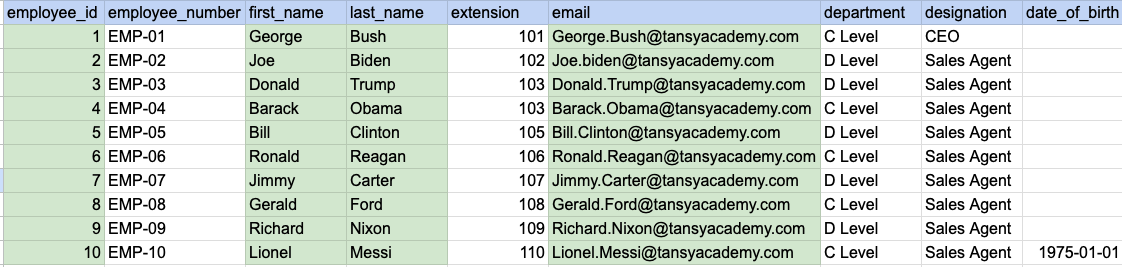
In above image, the color green signifies that the output for our query will include data from desired columns(employee_id, first_name, last_name and email).
Example 2 - Query Output
Comments Not Found