
Microsoft SQL Server
NOT LIKE Operator
In Microsoft SQL Server, the NOT LIKE operator is used to filter data by excluding rows that match a specific pattern. It is commonly used with wildcards like % (for any sequence of characters) and _ (for a single character) to search for values that do not follow a certain pattern. For beginners, learning to use the NOT LIKE operator is essential when you need to exclude certain patterns in your query results, such as filtering out names or product descriptions that contain specific characters.
Below is a detailed explanation of how to use the NOT LIKE operator with examples and best practices.
1. Basic Syntax of NOT LIKE
The basic syntax of NOT LIKE is as follows:
SELECT column_name
FROM table_name
WHERE column_name NOT LIKE pattern;
- Replace
column_namewith the column you want to filter. - Replace
table_namewith the actual table name. - Replace
patternwith the string pattern you want to exclude.
Example:
SELECT ProductName
FROM Products
WHERE ProductName NOT LIKE 'L%';
This query retrieves all products whose names do not start with the letter "L".
2. Using % with NOT LIKE to Exclude Patterns
The % wildcard represents any sequence of characters, and when combined with NOT LIKE, it helps to exclude rows that match a specific pattern.
SELECT CustomerName
FROM Customers
WHERE CustomerName NOT LIKE '%son';
This query retrieves all customers whose names do not end with "son" (e.g., it excludes "Johnson" and "Emerson").
3. Using _ with NOT LIKE for Single Character Exclusion
The _ wildcard represents a single character, and it can be used with NOT LIKE to exclude rows that have specific characters in certain positions.
SELECT ProductName
FROM Products
WHERE ProductName NOT LIKE 'T_shirt';
This query retrieves all products that do not follow the pattern "T-shirt" or any name where the second character is unknown (e.g., it excludes "T-shirt" and "T1shirt").
4. Combining NOT LIKE with AND or OR
You can combine NOT LIKE with other conditions using AND or OR to exclude rows based on multiple patterns.
SELECT ProductName
FROM Products
WHERE ProductName NOT LIKE '%Laptop%'
AND ProductName NOT LIKE '%Tablet%';
This query retrieves all products that do not contain "Laptop" or "Tablet" in their names.
5. Using NOT LIKE with NULL Values
It's important to remember that NOT LIKE does not filter NULL values, as NULL represents unknown data. If you need to include NULL values, you must explicitly check for them using IS NULL.
SELECT ProductName
FROM Products
WHERE ProductName NOT LIKE 'A%'
OR ProductName IS NULL;
This query retrieves all products that either do not start with the letter "A" or have a NULL value in the ProductName column.
6. Best Practices for Using NOT LIKE
Use
NOT LIKEto Exclude Patterns Efficiently – TheNOT LIKEoperator is very useful when you need to exclude rows that match a certain pattern. For example, excluding all products starting with "A":SELECT * FROM Products WHERE ProductName NOT LIKE 'A%';Limit Use of Leading
%for Better Performance – Using a leading%in the pattern (e.g.,%pattern) can reduce performance, especially on large datasets. Avoid leading wildcards when possible.Use
_for Precise Single Character Exclusion – The_wildcard allows you to exclude patterns based on specific character positions. This can be useful for cases where small variations in a string need to be excluded.SELECT * FROM Products WHERE ProductCode NOT LIKE 'P_00';Combine with
ANDandORfor Complex Exclusions – You can combine multipleNOT LIKEconditions usingANDorORto create more complex filters.SELECT * FROM Customers WHERE CustomerName NOT LIKE 'A%' AND CustomerName NOT LIKE 'B%';Handle
NULLValues Explicitly – TheNOT LIKEoperator does not includeNULLvalues in its results. Always check forNULLvalues usingIS NULLif needed.SELECT * FROM Products WHERE ProductName NOT LIKE '%Phone%' OR ProductName IS NULL;
By mastering the NOT LIKE operator, you can create flexible and powerful queries to exclude unwanted patterns from your results, helping you filter data more effectively in SQL Server.
To gain complete access, login with gmail or outlook, no need of signup, click here
Test code
In Microsoft SQL Server, to fetch records for clients whose last names do not start with 'M%', where '%' indicates the potential presence of zero or more characters following 'M', you can use the following query:
SELECT *
FROM org_client
WHERE last_name NOT LIKE 'M%';In Microsoft SQL Server, to retrieve entries for clients whose first names do not conclude with 'e', you can use the following query:
SELECT *
FROM org_client
WHERE first_name NOT LIKE '%e';Example 1:
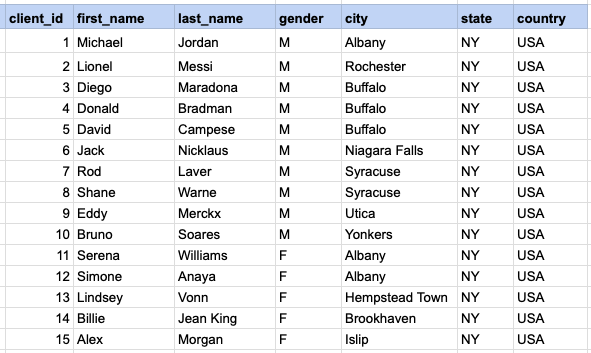
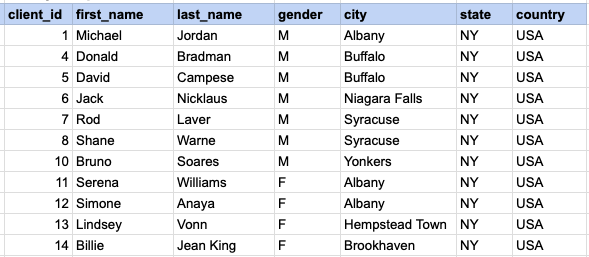
Explore the procedure of retrieving data from a designated table using the SQL NOT LIKE operator. Fetch records for clients whose last names do not start with 'M%', where '%' indicates the potential presence of zero or more characters following 'M'.
Example 1 - Raw data from client table
Example 1 - Query
SELECT * FROM org_client WHERE last_name NOT LIKE 'M%';Example 1 - Query data mapping
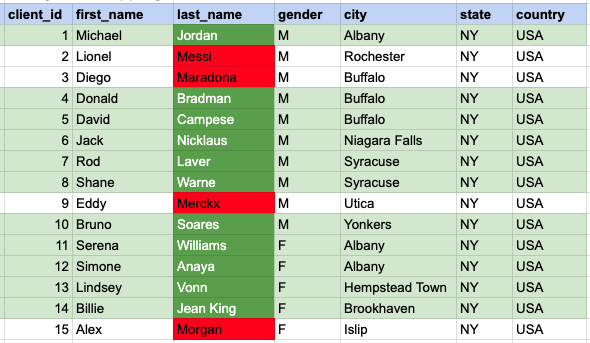
In the provided image, the green color signifies the data that has been selected or satisfies the conditions specified in our query. Data points in red indicate information that does not meet the criteria set by the query.
Example 1 - Query Output
Example 2:
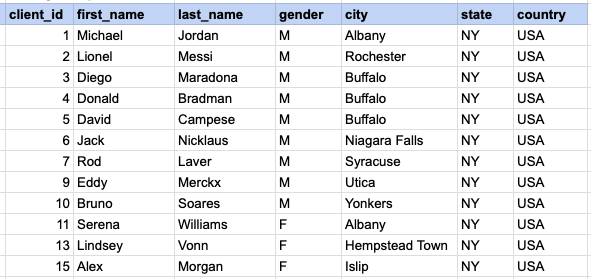
Retrieve entries for clients whose first names do not conclude with '%e'.
Example 2 - Query
SELECT * FROM org_client WHERE first_name NOT LIKE '%e';Example 2 - Query data mapping
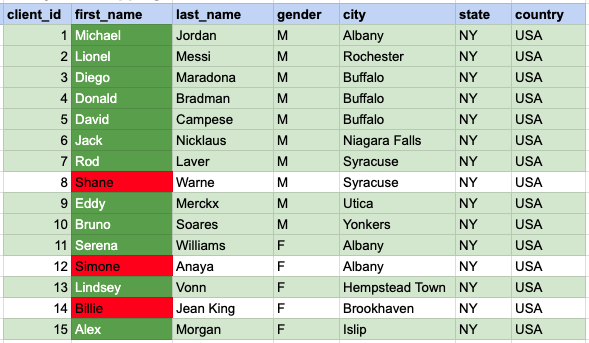
In the provided image, the green color signifies the data that has been selected or satisfies the conditions specified in our query. Data points in red indicate information that does not meet the criteria set by the query.
Example 2 - Query Output
Comments Not Found