
Microsoft SQL Server
CASE statement
The CASE statement in Microsoft SQL Server is a powerful tool that allows you to add conditional logic to your SQL queries. It is used to create different output values based on conditions, similar to the IF-THEN-ELSE structure in programming languages. The CASE statement evaluates each condition in order and returns the first result where the condition is true. If none of the conditions are true, an optional ELSE clause can be used to provide a default value. For beginners, understanding the CASE statement is key to adding dynamic and flexible conditions in SQL queries.
Below is a detailed explanation of how to use the CASE statement with examples and best practices.
1. Basic Syntax of the CASE Statement
The CASE statement has two forms: the simple form and the searched form.
Simple Form:
SELECT column_name,
    CASE column_name
        WHEN value1 THEN result1
        WHEN value2 THEN result2
        ELSE default_result
    END AS alias_name
FROM table_name;
Searched Form:
SELECT column_name,
    CASE
        WHEN condition1 THEN result1
        WHEN condition2 THEN result2
        ELSE default_result
    END AS alias_name
FROM table_name;
2. Using CASE in a SELECT Statement
You can use the CASE statement to modify how data is displayed based on specific conditions.
Example:
SELECT ProductName, Price,
    CASE
        WHEN Price < 50 THEN 'Low'
        WHEN Price BETWEEN 50 AND 100 THEN 'Medium'
        ELSE 'High'
    END AS PriceCategory
FROM Products;
In this query, the CASE statement categorizes each product’s price as Low, Medium, or High based on the price range.
3. Using CASE with Multiple Conditions
You can use multiple conditions in the CASE statement to create more complex logic. For example, you can use it to check conditions across different columns.
SELECT ProductName, Category,
    CASE
        WHEN Category = 'Electronics' AND Price > 100 THEN 'Premium Electronics'
        WHEN Category = 'Clothing' AND Price < 20 THEN 'Discount Clothing'
        ELSE 'Standard Product'
    END AS ProductCategory
FROM Products;
This query returns custom labels for products based on their category and price.
4. Using CASE in ORDER BY and GROUP BY
You can also use the CASE statement in the ORDER BY clause to dynamically order your results.
SELECT ProductName, Price
FROM Products
ORDER BY
    CASE
        WHEN Price < 50 THEN 1
        WHEN Price BETWEEN 50 AND 100 THEN 2
        ELSE 3
    END;
In this query, products are ordered by price categories: first the low-priced, then medium, then high-priced products.
5. Using CASE with Aggregates
The CASE statement can be combined with aggregate functions like SUM(), COUNT(), etc., to calculate totals based on conditions.
SELECT
    SUM(CASE WHEN Category = 'Electronics' THEN SaleAmount ELSE 0 END) AS ElectronicsSales,
    SUM(CASE WHEN Category = 'Clothing' THEN SaleAmount ELSE 0 END) AS ClothingSales
FROM Sales;
This query calculates total sales for electronics and clothing categories separately.
6. Best Practices for Using CASE
Use the Simple Form When Comparing a Single Column – If you're comparing a single column to specific values, use the simple
CASEform to make the query more readable.SELECT ProductName, CASE Category WHEN 'Electronics' THEN 'Gadgets' WHEN 'Clothing' THEN 'Apparel' ELSE 'Other' END AS ProductType FROM Products;Use the Searched Form for Complex Conditions – If you need to evaluate multiple conditions or compare different columns, use the searched
CASEform for better flexibility.SELECT CustomerName, CASE WHEN Country = 'USA' AND TotalSales > 1000 THEN 'VIP' WHEN Country = 'Canada' AND TotalSales < 500 THEN 'Regular' ELSE 'Standard' END AS CustomerCategory FROM Customers;Always Include an
ELSEClause – It’s a good practice to include anELSEclause to handle cases that don’t match any condition. If omitted,NULLwill be returned when no condition is met.SELECT ProductName, CASE WHEN Price > 100 THEN 'Expensive' WHEN Price < 20 THEN 'Cheap' ELSE 'Moderate' END AS PriceCategory FROM Products;Optimize Performance with Indexed Columns – When using
CASEin conditions that involve column comparisons, ensure that those columns are indexed for better query performance, especially in large datasets.Test Queries with Complex Logic – When using
CASEwith multiple conditions, test your queries carefully to ensure that the logic flows correctly and that all edge cases are handled.
By mastering the CASE statement, you can add flexibility to your SQL queries, making it easier to apply conditional logic and generate more customized results from your Microsoft SQL Server databases.
To gain complete access, login with gmail or outlook, no need of signup, click here

Test code
In Microsoft SQL Server, to organize customers based on their credit limit and create a temporary column called client_category using the CASE statement, you can use the following query:
SELECT client_id,
first_name,
last_name,
married_flag,
gender,
city,
state,
credit_limit,
CASE
WHEN credit_limit >= 7000 THEN 'Platinum'
WHEN credit_limit >= 5000 THEN 'Gold'
ELSE 'Silver'
END AS client_category
FROM org_client
ORDER BY credit_limit DESC;In Microsoft SQL Server, to translate gender abbreviations into full descriptive text, you can use the following query:
SELECT client_id,
first_name,
last_name,
CASE
WHEN gender = 'F' THEN 'Female'
WHEN gender = 'M' THEN 'Male'
ELSE 'No Data'
END AS gender
FROM org_client;In Microsoft SQL Server, to generate counts for categories using a CASE statement, you can use the following query:
SELECT COUNT(CASE WHEN gender = 'F' THEN 1 END) AS female_count,
COUNT(CASE WHEN gender = 'M' THEN 1 END) AS male_count
FROM org_client;Example 1:
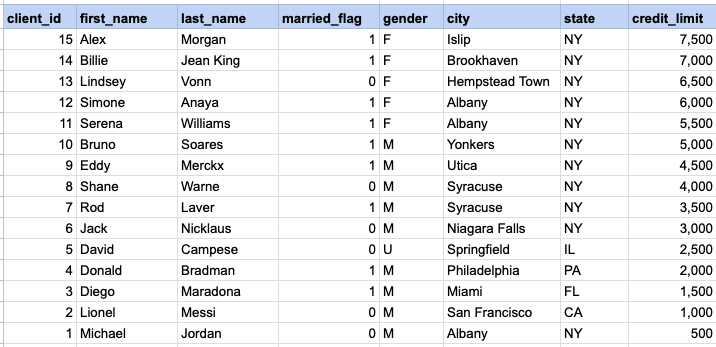
Organize customers based on their credit limit. The client category is a temporary column created with the CASE statement as part of the SELECT statement and is not present in the database table.
Example 1 - Raw data from client table
Example 1 - CASE statement
SELECT client_id, first_name, last_name, married_flag ,gender ,city ,state ,credit_limit, CASE WHEN credit_limit >= 7000 then 'Platinum' WHEN credit_limit >= 5000 then 'Gold' ELSE 'Silver' END client_category FROM org_client ORDER BY credit_limit DESCExample 1 - Query data mapping and final output
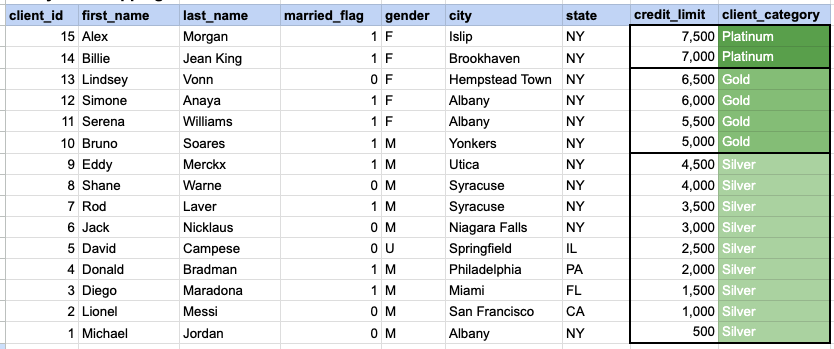
In the provided image, the client category is a temporary column generated as part of the SELECT statement. This column does not exist in the database, and its values are generated based on the conditions specified in the CASE statement.
Comments Not Found