
Microsoft SQL Server
SQL ERD Data Model Assignment - Food Delivery System
Introduction to ERD (Entity-Relationship Diagram)
An Entity-Relationship Diagram (ERD) is a graphical representation of the relationships between various entities in a database. ERDs help in understanding and designing the database structure and can be used to model how data is stored, processed, and related to one another. In this assignment, you will build an ERD for a Food Delivery System using Microsoft SQL Server.
Tools for Creating ERDs
To design an ERD, you can use tools such as Microsoft SQL Server Management Studio (SSMS) or third-party tools like dbForge Studio for SQL Server. These tools allow you to visually design the ERD, define relationships, and generate the required DDL SQL scripts to create the actual database.
Objective of the Assignment
The objective of this assignment is to design and implement a database for a Food Delivery System. You will create tables, define primary keys, foreign keys, and relationships, and apply constraints like unique constraints, indexes, and checks.
This assignment contains 25 tasks that guide you through designing and implementing a complete data model for the system, which includes customers, orders, restaurants, and more.
Assignment Tasks
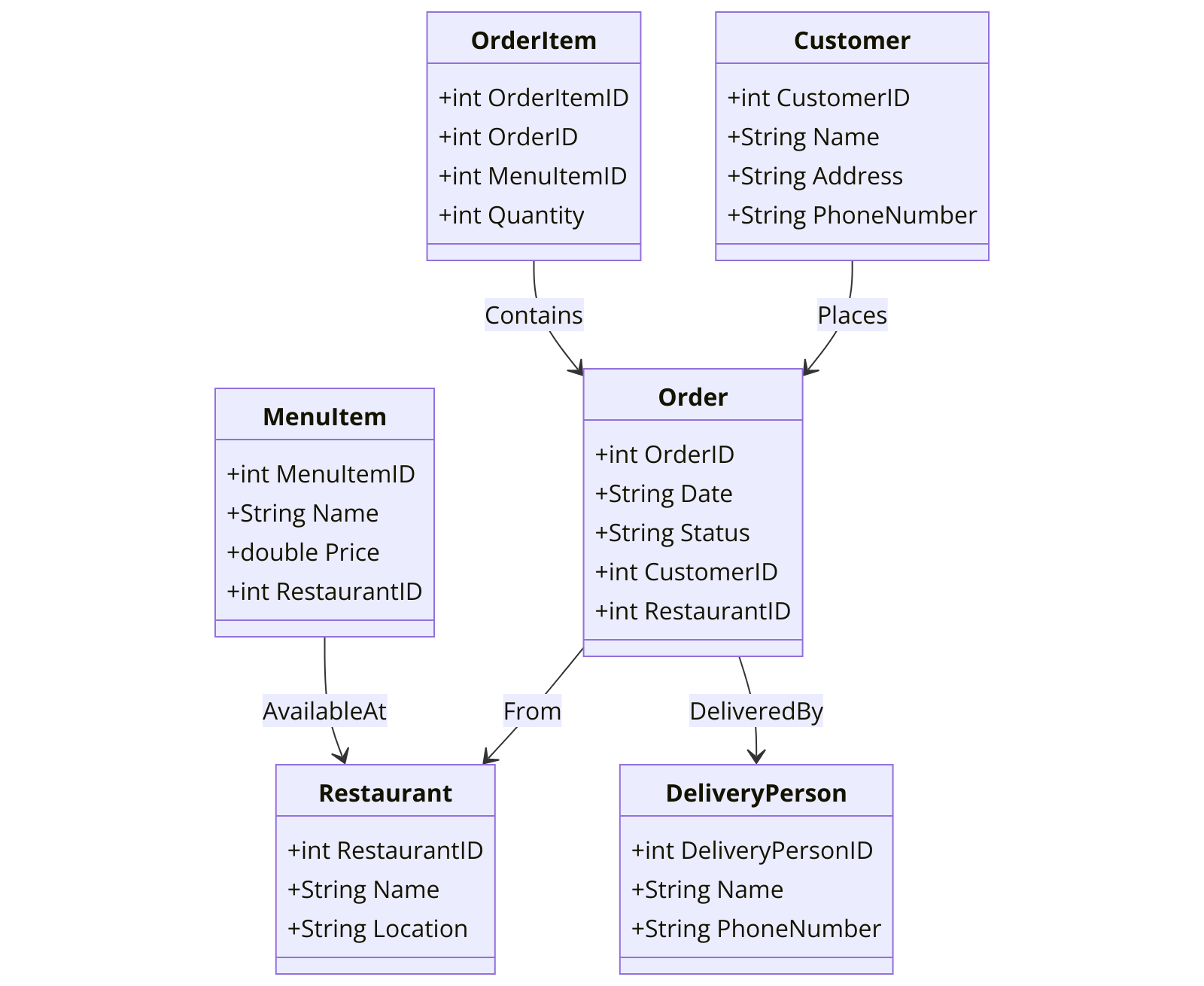
Construct all the tables from Chapter 5 DDL assignment within the ERD diagram using an ERD tool.
- Begin by creating each table, then define the columns within the table on the ERD tool canvas.
- Specify the DATA TYPES and NULLABILITY for all columns.
- Set PRIMARY KEYS for the tables.
- Define auto increment (IDENTITY) columns as needed.
- Establish FOREIGN KEY relationships where necessary.
- Define INDEXES where applicable.
- Implement CHECK constraints as needed.
- Define DEFAULTS where applicable.
- Refer to Chapter 5 DDL assignment for detailed instructions on tables and columns (https://tansyacademy.com/mssql/data-definition-language-sql-ddl/sql-ddl-assignment-food-delivery-system-project).
Submission Instructions
ERD Design:
- Option 1: Export your ERD as a PDF using pgAdmin 4.
- Option 2: Export the ERD as a DDL SQL script.
SQL Scripts:
- Submit SQL scripts for creating tables, constraints, indexes, and relationships.
Documentation:
- Provide a brief explanation of the relationships between the tables and your design decisions.
Good luck with your assignment! Don't forget to contact us if you need any further assistance with your assignments, and most importantly, for a manual review and approval of your work.
PARTIAL DATA MODEL FOR Food Delivery System SQL ASSIGNMENT
Comments Not Found