
Microsoft SQL Server
Sub Queries
In Microsoft SQL Server, a subquery (also known as an inner query or nested query) is a query embedded within another query. It can be used to retrieve data that will be used in the main query or to return specific values to perform filtering, calculations, or comparisons. Subqueries allow you to write more complex queries in a modular way and are useful for situations where you need to retrieve data from multiple tables or where conditional logic is needed. For beginners, mastering subqueries helps in creating dynamic and flexible SQL queries.
Below is a detailed explanation of how to use subqueries with examples and best practices.
1. Basic Syntax of a Subquery
A subquery can be used in various clauses such as SELECT, FROM, or WHERE. The basic syntax of a subquery looks like this:
SELECT column_name
FROM table_name
WHERE column_name = (SELECT column_name FROM table_name WHERE condition);
Example:
SELECT ProductName, Price
FROM Products
WHERE Price = (SELECT MAX(Price) FROM Products WHERE Category = 'Electronics');
This query retrieves the product name and price of the most expensive product in the Electronics category by using a subquery to find the maximum price.
2. Subquery in the WHERE Clause
You can use a subquery in the WHERE clause to filter records based on another query.
SELECT CustomerName
FROM Customers
WHERE CustomerID IN (SELECT CustomerID FROM Sales WHERE SaleAmount > 1000);
This query retrieves the names of customers who have made sales greater than 1000.
3. Subquery in the FROM Clause
Subqueries can be used in the FROM clause to treat the results of the subquery as a derived table.
SELECT ProductName, TotalSales
FROM (SELECT ProductID, SUM(SaleAmount) AS TotalSales FROM Sales GROUP BY ProductID) AS SalesSummary
JOIN Products ON SalesSummary.ProductID = Products.ProductID;
This query summarizes total sales for each product and retrieves the corresponding product names by joining the subquery with the Products table.
4. Subquery in the SELECT Clause
You can also use a subquery directly in the SELECT clause to return calculated or aggregated values for each row.
SELECT ProductName,
       (SELECT AVG(Price) FROM Products WHERE Category = p.Category) AS AvgCategoryPrice
FROM Products p;
This query retrieves the product name and the average price of products within the same category by using a subquery inside the SELECT clause.
5. Correlated Subqueries
A correlated subquery is a subquery that refers to columns from the outer query. It is executed once for each row returned by the outer query.
SELECT ProductName, Price
FROM Products p
WHERE Price > (SELECT AVG(Price) FROM Products WHERE Category = p.Category);
This query retrieves all products whose price is higher than the average price of products in the same category.
6. Best Practices for Using Subqueries
Use Subqueries to Simplify Complex Queries – Subqueries allow you to break down complex queries into smaller parts, making your code easier to understand and maintain.
SELECT ProductName
FROM Products
WHERE ProductID IN (SELECT ProductID FROM Sales WHERE SaleDate > '2023-01-01');
Use Correlated Subqueries for Row-Specific Logic – Correlated subqueries are useful for comparing each row to a related set of data. They execute once for each row in the outer query but can slow down performance, so use them wisely.
SELECT CustomerName
FROM Customers c
WHERE EXISTS (SELECT * FROM Sales s WHERE s.CustomerID = c.CustomerID AND s.SaleAmount > 1000);
Avoid Subqueries Where a
JOINis More Efficient – While subqueries are powerful, in some cases, using aJOINcan improve performance, especially with large datasets. Test your queries to determine which method is faster.SELECT c.CustomerName, s.SaleAmount FROM Customers c JOIN Sales s ON c.CustomerID = s.CustomerID WHERE s.SaleAmount > 1000;Use Subqueries in
FROMfor Derived Tables – You can use subqueries in theFROMclause to create a derived table that can be referenced by the main query. This helps in simplifying multi-step data aggregation or summarization.SELECT p.ProductName, s.TotalSales FROM Products p JOIN (SELECT ProductID, SUM(SaleAmount) AS TotalSales FROM Sales GROUP BY ProductID) AS s ON p.ProductID = s.ProductID;Test Performance with Large Datasets – Subqueries can sometimes slow down query performance, especially correlated subqueries. Test your queries on large datasets to identify performance bottlenecks and optimize them by using indexes or rewriting the query.
By mastering subqueries, you can build more dynamic and efficient SQL queries that handle complex logic and retrieve data from multiple tables or conditions with ease. Subqueries are an essential tool in any SQL developer's skillset, allowing for more flexible and powerful data retrieval.
To gain complete access, login with gmail or outlook, no need of signup, click here

Test code
To display the names of employees earning more than the company's average salary in Microsoft SQL Server, you can use the following query:
SELECT employee_number, first_name, last_name, designation, salary
FROM org_employee
WHERE salary > (SELECT AVG(salary) FROM org_employee);SQL SUB QUERY EXAMPLE
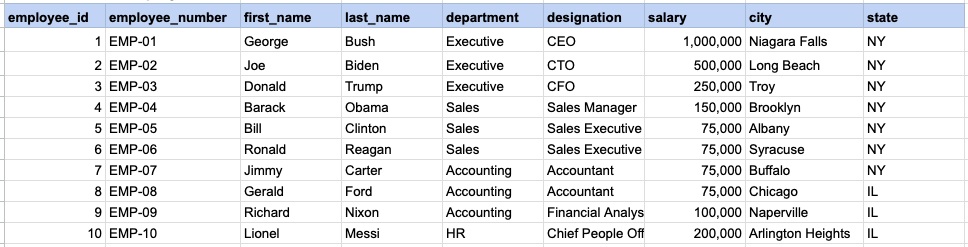
Raw data from employee table
Query
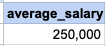
SELECT employee_number, first_name, last_name, designation, salary FROM org_employee WHERE salary >= (SELECT AVG(salary) FROM org_employee);Step1, Execute sub query
First, run the subquery '(SELECT AVG(salary) FROM org_employee)' to obtain its result, which in this instance is the average salary.
Sub query output
Step 2, apply sub query output as filter criteria on main query
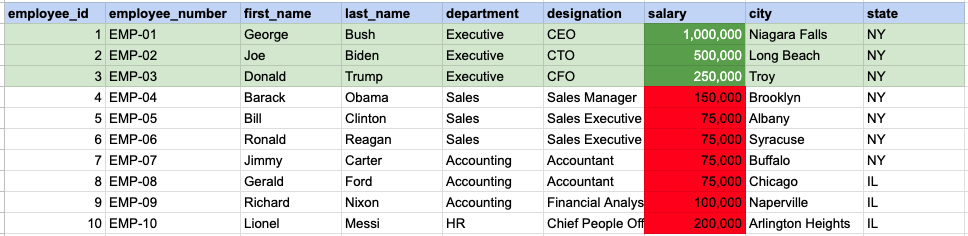
In this step, we filter for employees whose salary is greater than or equal to 250,000, which is the average salary determined from the subquery output.
FINAL, main query output

Comments Not Found