
Microsoft SQL Server
DISTINCT
The DISTINCT keyword in Microsoft SQL Server is part of the Data Query Language (DQL) and is used to remove duplicate rows from the result set of a SELECT query. This is useful when you want to retrieve only unique records, preventing redundancy in your data output. For beginners, learning how to use DISTINCT is essential when querying large datasets where multiple records may contain the same values in specific columns.
Below is a detailed explanation of how to use DISTINCT in SQL Server with examples.
1. Basic Syntax of DISTINCT
The basic syntax of DISTINCT is straightforward:
SELECT DISTINCT column_name
FROM table_name;
- Replace
column_namewith the column from which you want to retrieve unique values. - Replace
table_namewith the name of the table.
Example:
SELECT DISTINCT Category
FROM Products;
This query retrieves unique values from the Category column in the Products table.
2. Using DISTINCT on Multiple Columns
You can also apply DISTINCT to multiple columns. In this case, SQL Server returns unique combinations of values from the specified columns.
SELECT DISTINCT ProductName, Category
FROM Products;
This query returns unique combinations of ProductName and Category from the Products table.
3. Combining DISTINCT with ORDER BY
When using DISTINCT, you can sort the result set with the ORDER BY clause. This helps you organize the unique values in a specific order.
SELECT DISTINCT CustomerName
FROM Customers
ORDER BY CustomerName ASC;
This query returns unique customer names from the Customers table and sorts them alphabetically.
4. Combining DISTINCT with WHERE Clause
You can combine the DISTINCT keyword with the WHERE clause to filter the unique results based on a specific condition.
SELECT DISTINCT Country
FROM Customers
WHERE Country IS NOT NULL;
This query retrieves unique non-null Country values from the Customers table.
5. Using DISTINCT with Aggregation
While DISTINCT is primarily used for returning unique rows, you can also use it with aggregation functions like COUNT() to get the count of unique values in a column.
SELECT COUNT(DISTINCT ProductID) AS UniqueProducts
FROM Sales;
This query returns the count of unique ProductID values in the Sales table.
6. Best Practices for Using DISTINCT
Use
DISTINCTJudiciously – WhileDISTINCTcan help remove duplicate data, it can also reduce performance, especially when applied to large datasets. Always ensure that you truly need unique values before usingDISTINCT.Prefer Indexing for Better Performance – Applying
DISTINCTon indexed columns can improve query performance. Ensure frequently queried columns with duplicate data are indexed to enhance speed.Avoid Unnecessary Use of
DISTINCT– If your table is already designed to store unique values (e.g., primary keys or unique constraints), usingDISTINCTmay be redundant. Be mindful of using it only when necessary.Test Performance with Large Data Sets – If your database is large, using
DISTINCTcould result in slower query performance. Always test the impact ofDISTINCTon query speed, especially in production environments.
By understanding and applying DISTINCT effectively, you can remove unnecessary duplicates from your result sets and ensure more accurate data output while maintaining good performance practices.
To gain complete access, login with gmail or outlook, no need of signup, click here
Test code
To get distinct state names from the clients table in Microsoft SQL Server, use this query:
SELECT DISTINCT state
FROM clients
ORDER BY state;To get distinct city names from the clients table in Microsoft SQL Server, use this query:
SELECT DISTINCT city
FROM clients
ORDER BY city;To get unique combinations of city and state names from the clients table in Microsoft SQL Server, use this query:
SELECT DISTINCT city, state
FROM clients
ORDER BY city, state;To fetch unique order dates from the "act_order" table in Microsoft SQL Server, use the SELECT DISTINCT statement. The query below uses the CAST() function to convert the order_date column to DATE data type, ensuring only distinct dates are returned.
SELECT DISTINCT CAST(order_date AS DATE) AS order_date
FROM act_order
ORDER BY order_date;To fetch unique product type IDs from the "prd_product" table in Microsoft SQL Server using the SELECT DISTINCT statement, execute the following query:
SELECT DISTINCT product_type_id
FROM prd_product
ORDER BY product_type_id;Example 1:
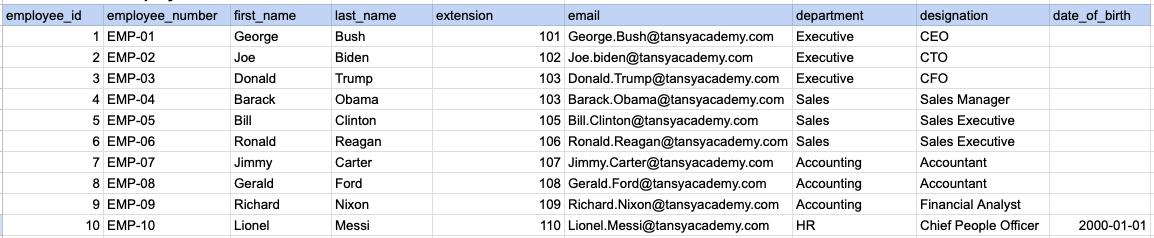
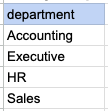
Let's understand the process of extracting data from a specified table using DISTINCT sql clause. In this case, we aim to retrieve distinct/unique department names from the employee table.
Example 1 - Raw data from employee table
Example 1 - Query
SELECT DISTINCT department FROM org_employee ORDER BY department;Example 1 - Query data mapping
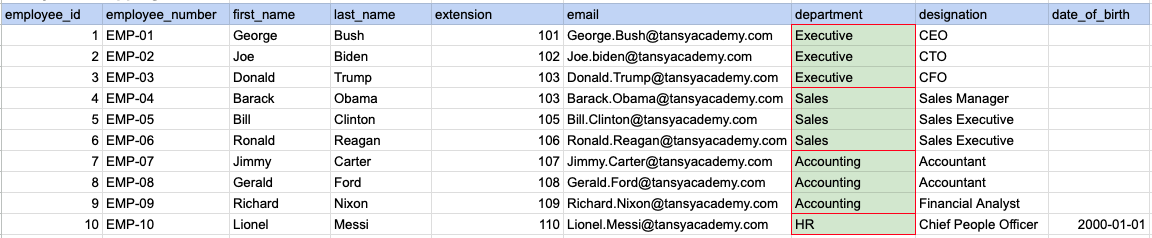
In the image above, the green color indicates the data that has been chosen or meets the criteria for our query.
Example 1 - Query Output
Example 2:
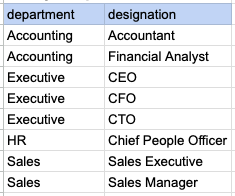
Let's understand the process of extracting multiple columns from a specified table using DISTINCT sql clause. Here, a row will be considered as distinct if all selected columns together form a unique combination.
Example 2 - Raw data from employee table
Example 2 - Query
SELECT DISTINCT department, designation FROM org_employee ORDER BY department, designation;Example 2 - Query data mapping
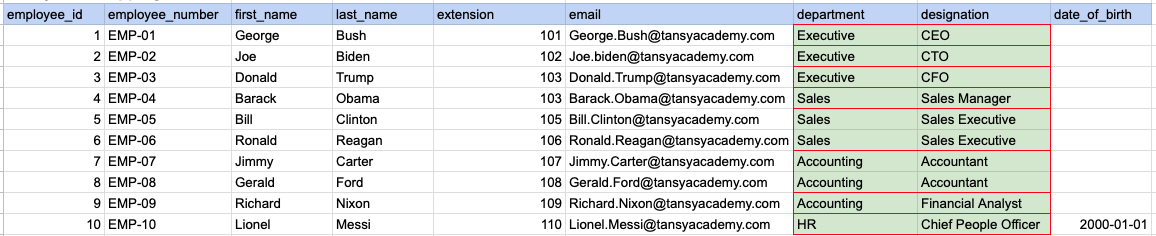
In the image above, the green color indicates the data that has been chosen or meets the criteria for our query.
Example 2 - Query Output
Example 3:
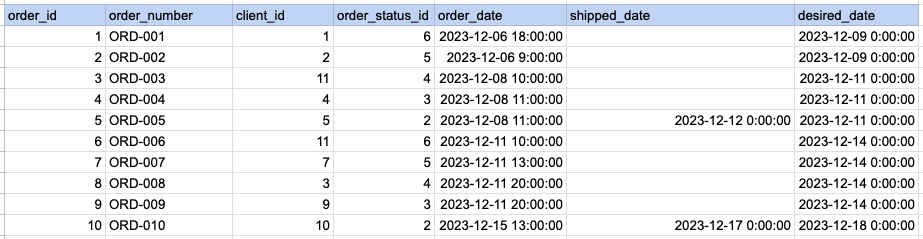
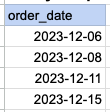
Let's understand the process of extracting order date using DISTINCT sql clause on timestamp column. Here we are trying to get distinct order dates.
Example 3 - Raw data from order table
Example 3 - Query
SELECT DISTINCT DATE(order_date) as order_date FROM act_order ORDER BY DATE(order_date);Example 3 - Step 1 Extract date from order date and time column.
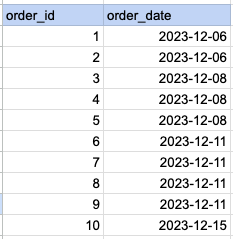
As step 1 first we have to extract date part alone from date and time.
Example 3 - Query data mapping
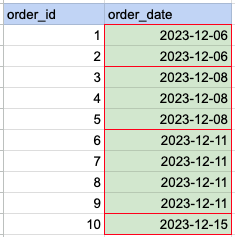
In the image above, the green color indicates the data that has been chosen or meets the criteria for our query.
Example 3 - Query Output
Comments Not Found