
Microsoft SQL Server
DML ASSIGNMENT1 - Store Management System
Objective:
You are required to address a set of Data Manipulation Language (DML) tasks for a Store Management System. Each query focuses on distinct DML tasks, including inserting, updating, deleting, using joins, subqueries, and other data manipulations.
Requirements:
You will need to complete at least 25 different DML tasks, covering inserting, updating, deleting, working with joins, subqueries, and more complex data manipulations.
Question 1: Insert Data into all Tables
Write SQL queries to populate each table created in the Chapter 5 assignment with at least 10 rows of data.
Question 2: Insert a New Product
Write a DML SQL statement to insert a new product into the PRODUCT table with the following details:
- product_name: 'Laptop'
- category: 'Electronics'
- price: 999.99
- quantity_in_stock: 50
Question 3: Insert Multiple Customers
Insert two new customers into the CUSTOMER table with the following details:
- First customer: first_name: 'Alice', last_name: 'Johnson', email: 'alice.johnson@example.com', phone_number: '1234567890'
- Second customer: first_name: 'Bob', last_name: 'Smith', email: 'bob.smith@example.com', phone_number: '0987654321'
Question 4: Insert an Order
Write a DML SQL statement to insert a new order into the ORDER table:
- order_date: Current date
- total_amount: 1499.99
- customer_id: 1
Question 5: Update Product Information
Write a SQL statement to update the price and quantity_in_stock for the product with product_id = 1.
Question 6: Delete a Customer
Write a SQL statement to delete a customer where customer_id = 2.
Question 7: Insert Data Using Subquery
Write a SQL statement to insert a new order into the ORDER_PRODUCT table using a subquery to get the order_id and product_id for an order placed by the customer whose email = 'alice.johnson@example.com'.
Question 8: Insert into SUPPLIER Table
Write a SQL statement to insert a new supplier into the SUPPLIER table:
- supplier_name: 'Tech Supplies Inc.'
- contact_number: '5551234567'
- product_id: 1
Question 9: Update an Order's Total Amount
Write a SQL statement to update the total_amount in the ORDER table where order_id = 1, setting it to 1599.99.
Question 10: Delete with JOIN
Write a SQL statement to delete all orders that include the product with product_name = 'Laptop' using a JOIN between the PRODUCT and ORDER_PRODUCT tables.
Question 11: Insert a New Store
Write a SQL statement to insert a new store into the STORE table:
- store_name: 'Downtown Electronics'
- location: 'Main Street'
- phone_number: '5559876543'
Question 12: Insert a Payment
Write a SQL statement to insert a new payment into the PAYMENT table for an order:
- payment_date: Current date
- amount_paid: 1599.99
- order_id: 1
Question 13: Update with Subquery
Write a SQL statement to update the total_amount of all orders where the customer has the last name 'Johnson'. Use a subquery to find the customer_id.
Question 14: Insert into INVENTORY Table
Write a SQL statement to insert a new inventory record into the INVENTORY table:
- store_id: 1
- product_id: 1
- quantity_in_stock: 30
Question 15: Update Store Information
Write a SQL statement to update the store_name and location of the store with store_id = 1 to 'Tech Superstore' and 'City Center'.
Question 16: Select Into Backup Table
Write a SQL statement to create a backup of all rows in the CUSTOMER table into a new table called CUSTOMER_BACKUP.
Question 17: Add JSON Column to PRODUCT Table
Write a SQL statement to add a meta_data column of type JSON to the PRODUCT table.
Question 18: Insert into JSON Column
Write a SQL statement to insert JSON data into the meta_data column of the PRODUCT table. The JSON should contain keys like "warranty_period", "brand", and "manufacture_date".
Question 19: Update JSON Column
Write a SQL statement to update the meta_data JSON column of the PRODUCT table by adding or updating the "warranty_period" for a specific product.
Question 20: Delete JSON Data
Write a SQL statement to remove the "manufacture_date" field from the meta_data JSON column for a specific product.
Question 21: Perform an UPSERT on CUSTOMER Table
Write a SQL statement to insert a new customer or update the email if the customer_id already exists in the CUSTOMER table.
Question 22: Delete with INNER JOIN
Write a SQL statement to delete all products in the PRODUCT table that are referenced in the SUPPLIER table by joining on product_id.
Question 23: Update with JOIN
Write a SQL statement to update the quantity_in_stock in the INVENTORY table for all products in the store with store_name = 'Tech Superstore'. Use a join between the STORE and INVENTORY tables.
Question 24: Insert a New Discount
Write a SQL statement to insert a new discount into the DISCOUNT table:
- discount_code: 'SUMMER20'
- discount_percentage: 20.00
Question 25: Truncate the ORDER Table
Write a SQL statement to truncate the ORDER table, removing all rows without generating individual delete triggers.
Question 26: SUPER Complex INSERT.
- Create a DATE_DIM table with columns: date_id, calendar_date, year, month, day_of_the_month, week_day_number, week_day_name, yearly_week_number, month_start_date_flag, month_end_date_flag, year_start_date_flag, year_end_date_flag, holiday_flag
- The date_id should be populated in the YYYYMM format (e.g., 202401).
- Populate the DATE_DIM table with data for current year and the next year.
GOOD LUCK WITH YOUR ASSIGNMENT!!!
Don't forget to contact us if you need any further assistance with your assignments, and most importantly, for a manual review and approval of your work.
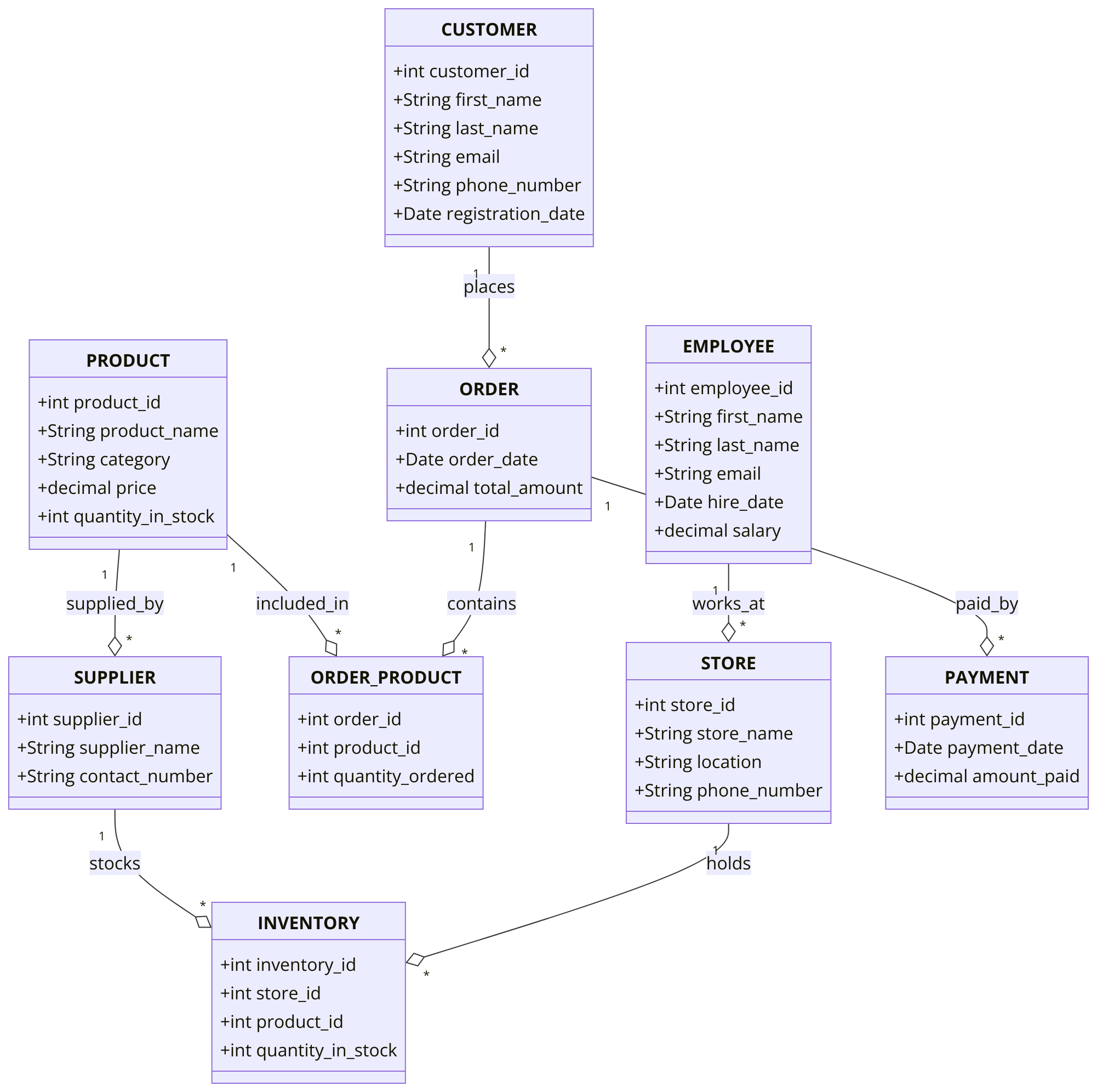
SAMPLE ERD DATA MODEL FOR STORE MANAGEMENT SYSTEM
Comments Not Found