
Microsoft SQL Server
UNION and UNION ALL
In Microsoft SQL Server, UNION and UNION ALL are used to combine the result sets of two or more SELECT queries into a single result set. Both UNION and UNION ALL retrieve data from multiple queries, but they differ in how they handle duplicates. The UNION operator removes duplicate rows, while UNION ALL keeps all rows, including duplicates. These operators are useful when you need to combine data from different tables or queries into one result.
Below is a detailed explanation of how to use UNION and UNION ALL, with examples and best practices.
1. Basic Syntax of UNION
The UNION operator combines the result sets of two or more SELECT queries and removes duplicate rows from the final result set.
SELECT column_name(s)
FROM table1
UNION
SELECT column_name(s)
FROM table2;
Example:
SELECT ProductName
FROM Products
WHERE Category = 'Electronics'
UNION
SELECT ProductName
FROM Products
WHERE Category = 'Clothing';
This query retrieves the product names from the Electronics and Clothing categories, combining the results and removing duplicates.
2. Basic Syntax of UNION ALL
The UNION ALL operator combines the result sets of two or more SELECT queries but includes all rows, even if they are duplicates.
SELECT column_name(s)
FROM table1
UNION ALL
SELECT column_name(s)
FROM table2;
Example:
SELECT ProductName
FROM Products
WHERE Category = 'Electronics'
UNION ALL
SELECT ProductName
FROM Products
WHERE Category = 'Clothing';
This query retrieves product names from the Electronics and Clothing categories but includes all duplicates in the final result.
3. Combining More Than Two Queries with UNION and UNION ALL
You can combine more than two SELECT queries using UNION or UNION ALL.
SELECT ProductName
FROM Products
WHERE Category = 'Electronics'
UNION
SELECT ProductName
FROM Products
WHERE Category = 'Clothing'
UNION
SELECT ProductName
FROM Products
WHERE Category = 'Furniture';
This query retrieves product names from three different categories, eliminating duplicates across all three categories.
4. Column Requirements for UNION and UNION ALL
Both UNION and UNION ALL require the following:
- Each
SELECTquery must have the same number of columns. - The columns must have compatible data types (i.e., they must be comparable).
Example:
SELECT ProductName, Price
FROM Products
WHERE Category = 'Electronics'
UNION ALL
SELECT ProductName, Price
FROM Products
WHERE Category = 'Clothing';
This query retrieves product names and prices from the Electronics and Clothing categories. Both queries return two columns of the same data type, so the UNION ALL works without errors.
5. Using ORDER BY with UNION and UNION ALL
If you want to sort the result of a UNION or UNION ALL, the ORDER BY clause must be applied to the entire result set, and it can only be placed after the last SELECT query.
SELECT ProductName
FROM Products
WHERE Category = 'Electronics'
UNION
SELECT ProductName
FROM Products
WHERE Category = 'Clothing'
ORDER BY ProductName;
This query combines product names from two categories and sorts the result set by product name.
6. Best Practices for Using UNION and UNION ALL
Use
UNIONWhen You Want to Remove Duplicates – TheUNIONoperator is useful when you want to combine results and ensure there are no duplicate rows. However, it is slower thanUNION ALLbecause SQL Server needs to compare and remove duplicates.SELECT ProductName FROM Products WHERE Category = 'Electronics' UNION SELECT ProductName FROM Products WHERE Category = 'Clothing';Use
UNION ALLfor Better Performance When Duplicates Are Allowed –UNION ALLperforms better thanUNIONbecause it doesn’t check for duplicates. UseUNION ALLwhen you know duplicates are acceptable or unnecessary to remove.SELECT ProductName FROM Products WHERE Category = 'Electronics' UNION ALL SELECT ProductName FROM Products WHERE Category = 'Clothing';Ensure Column Compatibility – Make sure that the columns in each
SELECTquery have the same number and compatible data types. SQL Server will throw an error if the number of columns or data types don't match.SELECT ProductName, Price FROM Products UNION ALL SELECT ProductName, Price FROM Sales;Use
ORDER BYfor Final Sorting – If you need to sort the final combined result, useORDER BYafter the lastSELECTquery. Sorting will be applied to the entire result set.SELECT ProductName FROM Products WHERE Category = 'Electronics' UNION SELECT ProductName FROM Products WHERE Category = 'Clothing' ORDER BY ProductName;Test Queries with
UNIONfor Large Datasets – When working with large datasets, test your queries withUNIONto see if removing duplicates is necessary. If duplicates are not a concern, useUNION ALLto improve performance.
By mastering the UNION and UNION ALL operators, you can effectively combine results from different queries, making your SQL Server queries more powerful and flexible.
To gain complete access, login with gmail or outlook, no need of signup, click here

Test code
In Microsoft SQL Server, to retrieve distinct values from the "state" column in both the "org_employee" and "org_client" tables using the UNION operator, you can use the following query:
SELECT state
FROM org_employee
UNION
SELECT state
FROM org_client;In Microsoft SQL Server, to retrieve all values from the "state" column in both the "org_employee" and "org_client" tables using the UNION ALL operator, you can use the following query:
SELECT state
FROM org_employee
UNION ALL
SELECT state
FROM org_client;Example 1:
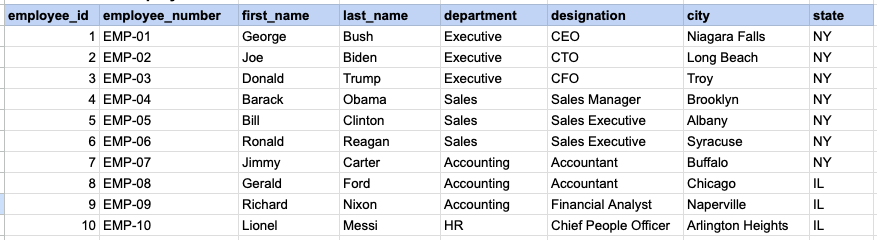
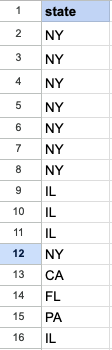
Let's delve into SQL's UNION and UNION ALL operators. This example will showcase the results obtained from both UNION and UNION ALL, simultaneously illustrating the distinctions between them.
Example 1 - Raw data from employee table
Example 1 - Raw data from client table

Example 1 - UNION query
SELECT state FROM org_employee UNION SELECT state FROM org_client;Example 1 - Query data mapping for UNION
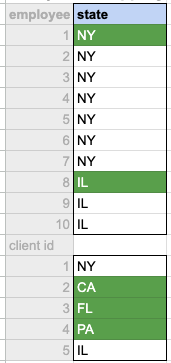
In the given image, the green hue indicates the data that has been chosen or meets the criteria specified in our query. It's evident that only unique values from both the employee and client tables are selected as the output.
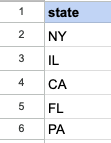
Example 1 - Query Output for UNION
Example 1 - UNION ALL query
SELECT state FROM org_employee UNION ALL SELECT state FROM org_client;Example 1 - Query data mapping for UNION ALL
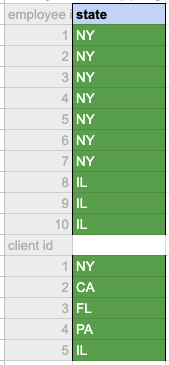
In the given image, the green hue indicates the data that has been chosen or meets the criteria specified in our query. It's evident that all values both the employee and client tables are selected as the output.
Example 1 - Query Output for UNION ALL
Comments Not Found