
Microsoft SQL Server
Chapter 7 - DQL (Data Query Language)
DQL ASSIGNMENT2 - Food Delivery System
Objective:
You are required to address a set of Data Query Language (DQL) tasks for a Food Delivery System using the tables provided. Each task focuses on different aspects of querying data from the system using SELECT statements with various conditions, functions, and joins.
1. SELECT Command
- Select all columns from the
CUSTOMERtable. - Select the
first_name,last_name, andemailfrom theCUSTOMERtable. - Select the
restaurant_nameandlocationfrom theRESTAURANTtable. - Select the
item_name,price, andrestaurant_idfrom theMENU_ITEMtable.
2. WHERE Command
- Select all customers where
loyalty_pointsare greater than 100. - Select all menu items where
priceis less than 20. - Select all orders where the
statusis 'Delivered'. - Select all reviews where
ratingis equal to 5.
3. ORDER BY Command
- Select all restaurants and order them by
restaurant_namein ascending order. - Select all customers and order them by
last_namein descending order. - Select all orders and order them by
order_datein ascending order. - Select all menu items and order them by
pricein descending order.
4. TOP Command
- Select the top 5 customers from the
CUSTOMERtable based onloyalty_points. - Select the top 10 most expensive items from the
MENU_ITEMtable. - Select the top 3 latest orders from the
ORDERtable. - Select the top 5 restaurants from the
RESTAURANTtable based on location.
5. DISTINCT Command
- Select distinct
statusfrom theORDERtable. - Select distinct
ratingfrom theREVIEWtable. - Select distinct
restaurant_namefrom theRESTAURANTtable. - Select distinct
payment_methodfrom thePAYMENTtable.
6. GROUP BY Command
- Group by
restaurant_namefrom theRESTAURANTtable and count the number of menu items per restaurant. - Group by
customer_idfrom theORDERtable and calculate the total orders per customer. - Group by
statusfrom theDELIVERYtable and count the number of deliveries per status. - Group by
ratingfrom theREVIEWtable and calculate the average rating per restaurant.
7. HAVING Command
- Group by
restaurant_namefrom theMENU_ITEMtable and filter the results where the averagepriceis greater than 15. - Group by
customer_idfrom theORDERtable and having total orders greater than 5. - Group by
statusfrom theDELIVERYtable, having more than 10 deliveries in transit. - Group by
ratingfrom theREVIEWtable, having an average rating greater than 4 for restaurants.
8. INNER JOIN Command
- Select all orders along with customer details using
INNER JOINbetween theORDERandCUSTOMERtables. - Select all menu items and their corresponding restaurants using
INNER JOINbetweenMENU_ITEMandRESTAURANT. - Select all deliveries and the corresponding agent details using
INNER JOINbetweenDELIVERYandDELIVERY_AGENT. - Select all reviews and their corresponding restaurant details using
INNER JOINbetweenREVIEWandRESTAURANT.
9. LEFT JOIN Command
- Select all customers and their orders using
LEFT JOIN, including customers without orders. - Select all restaurants and their menu items using
LEFT JOIN, including restaurants without any menu items. - Select all orders and their corresponding deliveries using
LEFT JOIN, including orders without deliveries. - Select all customers and their reviews using
LEFT JOIN, including customers without reviews.
10. COUNT, SUM, AVG Command
- Count the total number of customers in the
CUSTOMERtable. - Count the number of distinct
restaurant_namein theRESTAURANTtable. - Calculate the sum of
total_pricefrom theORDERtable. - Calculate the average
ratingfrom theREVIEWtable.
11. CASE Command
- Select all menu items and use a
CASEstatement to categorize them as 'Expensive' ifpriceis greater than 50, otherwise 'Affordable'. - Select all orders and use a
CASEstatement to show 'High Value' iftotal_priceis greater than 100, otherwise 'Standard'. - Use a
CASEstatement in theREVIEWtable to label ratings as 'Excellent' ifratingis 5, otherwise 'Average'. - Use a
CASEstatement in theDELIVERYtable to show 'On Time' ifstatusis 'Delivered' anddelivery_dateis less than 1 hour from theorder_date.
12. EXISTS and NOT EXISTS Command
- Select all customers where an order exists in the
ORDERtable usingEXISTS. - Select all customers where no order exists in the
ORDERtable usingNOT EXISTS. - Select all restaurants where a menu item exists in the
MENU_ITEMtable usingEXISTS. - Select all deliveries where no agents exist in the
DELIVERY_AGENTtable usingNOT EXISTS.
13. SUBQUERY Command
- Select all customers whose
customer_idis in the result of a subquery selectingcustomer_idfrom theORDERtable wheretotal_priceis greater than 50. - Select all menu items where the
menu_item_idis in the result of a subquery selectingmenu_item_idfrom theORDER_ITEMtable. - Select all orders where the
order_idis in the result of a subquery selectingorder_idfrom thePAYMENTtable whereamountis greater than 100. - Select all restaurants where the
restaurant_idis in the result of a subquery selectingrestaurant_idfrom theREVIEWtable whereratingis 5.
14. RANK and DENSE_RANK Command
- Rank customers based on the number of orders they have placed using
RANK(). - Use
DENSE_RANK()to rank menu items based on their price. - Rank restaurants based on their average rating using
RANK(). - Use
DENSE_RANK()to rank customers based on the total amount of their orders.
15. PIVOT and UNPIVOT
- Pivot the
REVIEWdata byrestaurant_idandrating. - Unpivot the restaurant details to show the
restaurant_name,location, andcontact_numberfor each restaurant. - Pivot the menu item data by
restaurant_idanditem_name. - Unpivot order details by
order_id,total_price, andstatus.
16. UNION and UNION ALL Command
- Select all customers from the
CUSTOMERandDELIVERYtables usingUNION. - Select all menu items from different categories using
UNION ALL. - Use
UNIONto combine pending and delivered orders. - Use
UNION ALLto select all deliveries from two different time periods.
17. COALESCE, ISNULL, NULLIF Command
- Select all customers and use
COALESCEto replace nullloyalty_pointswith 0. - Use
ISNULLto replace nullphone_numberin theDELIVERY_AGENTtable with 'No Phone'. - Use
NULLIFto comparetotal_priceanddiscountin theORDERtable and returnNULLif they are the same. - Select all menu items and use
COALESCEto replace nullpricewith 0.
18. STRING Functions
- Select all customers'
first_namein uppercase using theUPPER()function. - Select all menu items'
item_namein lowercase using theLOWER()function. - Use
CONCAT()to combine thefirst_nameandlast_nameof customers. - Select all restaurants'
restaurant_nameand find the length of the string usingLEN().
19. DATE Functions
- Select all orders and show their
order_dateformatted as 'YYYY-MM-DD' usingFORMAT(). - Add 1 year to all
delivery_datevalues in theDELIVERYtable usingDATEADD(). - Subtract 1 month from all
order_datevalues usingDATEADD(). - Select all customers and extract the year from their
registration_dateusingYEAR().
20. NUMERIC Functions
- Select the
total_pricefrom theORDERtable and round it to the nearest integer usingROUND(). - Select all menu items'
priceand useCEILING()to round up their values. - Use
FLOOR()to round down the prices in theMENU_ITEMtable. - Select the maximum
total_pricefrom theORDERtable usingMAX().
21. CAST and CONVERT Command
- Select all customers and cast the
customer_idas a string usingCAST(). - Convert the
order_datein theORDERtable toVARCHARusingCONVERT(). - Cast the
pricein theMENU_ITEMtable toINT. - Convert the
payment_datefrom thePAYMENTtable toDATETIME.
22. CONCAT and CONCAT_WS Functions
- Use
CONCAT()to joinfirst_nameandlast_namewith a space in between in theCUSTOMERtable. - Use
CONCAT_WS()to combine therestaurant_nameandlocationwith a comma in theRESTAURANTtable. - Use
CONCAT()to combine theitem_nameandpricefrom theMENU_ITEMtable. - Use
CONCAT_WS()to combinefirst_name,last_name, andphone_numberfrom theDELIVERY_AGENTtable.
23. LIKE and NOT LIKE
- Select customers where the
emailcontains 'gmail.com' usingLIKE. - Select restaurants where
restaurant_namestarts with 'S' usingLIKE. - Select menu items where
item_namecontains 'Pizza' usingLIKE. - Select customers where
phone_numberdoes not contain '123' usingNOT LIKE.
24. EXISTS and NOT EXISTS
- Select all customers where orders exist in the
ORDERtable usingEXISTS. - Select all menu items where reviews exist using
EXISTS. - Select all deliveries where agents exist using
EXISTS. - Select all reviews where no customers exist using
NOT EXISTS.
25. JOIN Commands
- Select all customers and their corresponding orders using
INNER JOINbetweenCUSTOMERandORDER. - Select all menu items and their corresponding orders using
INNER JOINbetweenMENU_ITEMandORDER_ITEM. - Select all deliveries and their corresponding agents using
INNER JOINbetweenDELIVERYandDELIVERY_AGENT. - Select all restaurants and their reviews using
INNER JOINbetweenRESTAURANTandREVIEW.
26. BETWEEN Command
- Select all orders where the
total_priceis between 50 and 100. - Select all reviews where the
ratingis between 4 and 5. - Select all customers where the
registration_dateis between '2020-01-01' and '2022-01-01'. - Select all payments where the
amountis between 20 and 500.
27. IN and NOT IN Command
- Select all customers where the
customer_idis in (101, 202, 303). - Select all restaurants where the
restaurant_nameis in ('Pizza Palace', 'Burger Barn', 'Sushi Spot'). - Select all orders where the
statusis not in ('Cancelled', 'Pending'). - Select all deliveries where the
statusis in ('In Transit', 'Delivered').
28. UNION Command
- Select all customers from the
CUSTOMERandREVIEWtables usingUNION. - Select all menu items from different categories using
UNION ALL. - Use
UNIONto combine orders from two different time periods. - Use
UNION ALLto select all reviews from two different rating ranges.
29. ARRAY Command
- Select all
item_nameand convert it into an array usingSTRING_AGG(). - Use
UNSTRING()to expand arrays from theORDER_ITEMtable. - Convert restaurant names into an array using
STRING_AGG()in theRESTAURANTtable. - Use
ARRAYfunctions to select and manipulate data from theREVIEWtable.
GOOD LUCK WITH YOUR ASSIGNMENT!!!
Don't forget to contact us if you need any further assistance with your assignments, and most importantly, for a manual review and approval of your work.
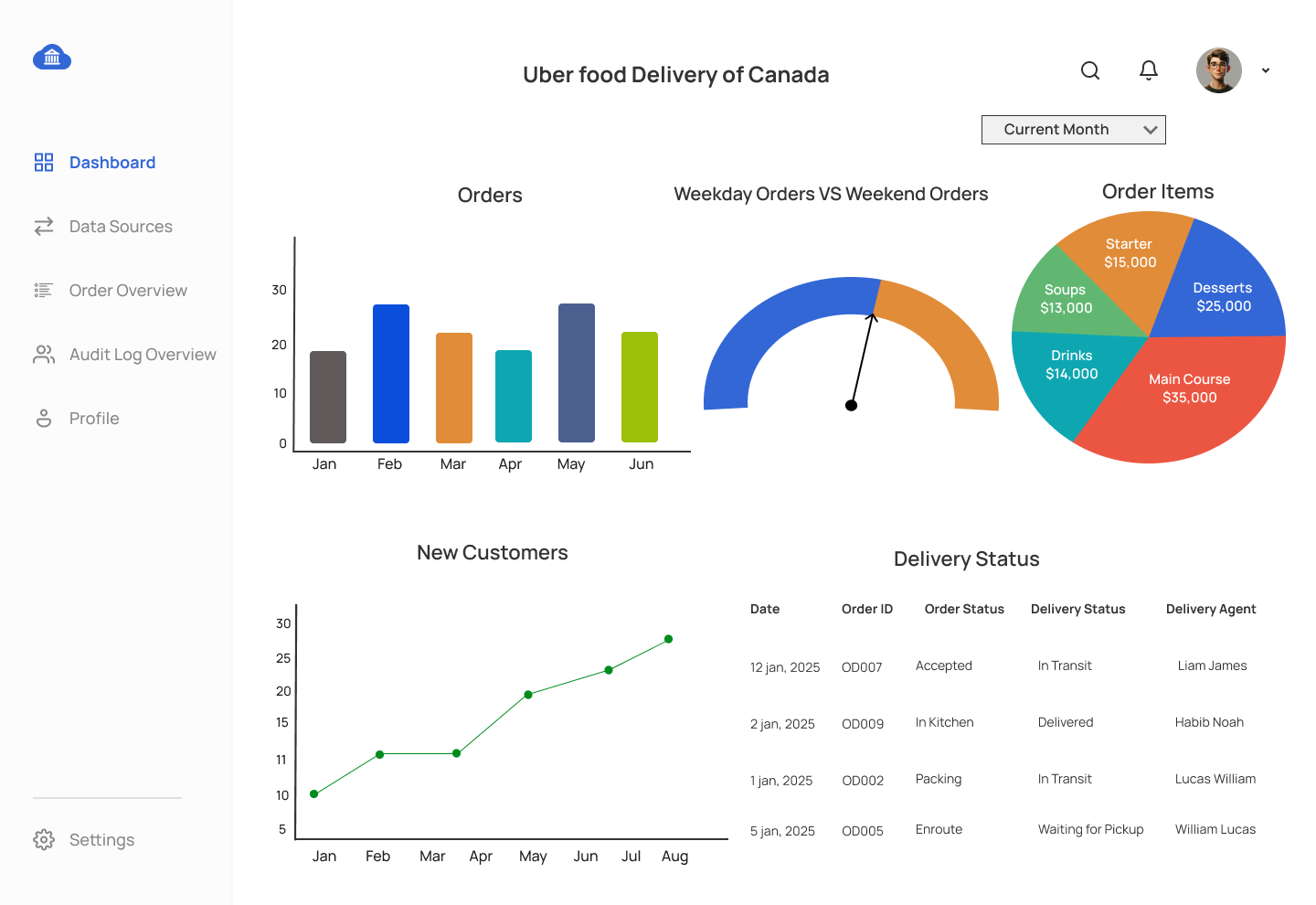
UX Screens for Food Delivery System Dashboard Mockup
Comments Not Found