
Microsoft SQL Server
Cardinality
In relational database systems like Microsoft SQL Server, Cardinality refers to the uniqueness of data values contained in a column or the relationships between tables. In the context of database design, cardinality defines how many instances of one entity (e.g., rows in a table) can relate to instances in another entity. Cardinality is essential for understanding relationships between tables, whether it's a one-to-one, one-to-many, or many-to-many relationship.
Key Concepts of Cardinality:
One-to-One Relationship
- In a one-to-one relationship, each row in a table corresponds to exactly one row in another table.
- This relationship is not very common, but it can be used when additional data needs to be split into separate tables for better organization.
Example SQL:
CREATE TABLE StoreDetails (
    StoreID INT PRIMARY KEY,
    StoreName VARCHAR(100),
    Address VARCHAR(200)
);

CREATE TABLE StoreManager (
    StoreID INT PRIMARY KEY,
    ManagerName VARCHAR(100),
    FOREIGN KEY (StoreID) REFERENCES StoreDetails(StoreID)
);
One-to-Many Relationship
- This is the most common relationship type, where a single row in one table can be related to many rows in another table. For example, a store can have multiple products, but each product belongs to only one store.
Example SQL:
CREATE TABLE Store (
    StoreID INT PRIMARY KEY,
    StoreName VARCHAR(100)
);

CREATE TABLE Products (
    ProductID INT PRIMARY KEY,
    ProductName VARCHAR(100),
    StoreID INT,
    FOREIGN KEY (StoreID) REFERENCES Store(StoreID)
);
Many-to-Many Relationship
- In a many-to-many relationship, multiple rows in one table can be related to multiple rows in another table. To implement this, a junction table is used to link the two tables.
Example SQL:
CREATE TABLE Customers (
    CustomerID INT PRIMARY KEY,
    CustomerName VARCHAR(100)
);

CREATE TABLE Products (
    ProductID INT PRIMARY KEY,
    ProductName VARCHAR(100)
);

CREATE TABLE CustomerPurchases (
    CustomerID INT,
    ProductID INT,
    FOREIGN KEY (CustomerID) REFERENCES Customers(CustomerID),
    FOREIGN KEY (ProductID) REFERENCES Products(ProductID),
    PRIMARY KEY (CustomerID, ProductID)
);
Cardinality in Indexing
- Cardinality also affects indexing. A column with high cardinality has many unique values (like
ProductID), while low cardinality means many duplicate values (e.g.,StoreIDin a products table where multiple products belong to the same store).
Example SQL (checking the cardinality of a column):
SELECT COUNT(DISTINCT ProductID) AS UniqueProductCount FROM Products;- Cardinality also affects indexing. A column with high cardinality has many unique values (like
Cardinality and Query Optimization
- SQL Server uses cardinality to optimize queries. For example, high-cardinality columns (with many unique values) are more likely to benefit from indexing because it reduces the number of rows SQL Server has to scan.
Example SQL (creating an index on a high-cardinality column):
CREATE INDEX idx_ProductID ON Products(ProductID);
Understanding cardinality is key to database design and performance optimization, ensuring efficient data storage and retrieval by organizing relationships appropriately.
1:1 Relationship
A1:1 (one-to-one) relationshipbetween two tables occurs when each record in the first table is related to only one record in the second table, and vice versa. This relationship is often used to extend a table or to store sensitive data separately.
Example: User and User Profile
In an application, each user has a single user profile, and each user profile is associated with a single user.
- Userstable:
UserID,Username,Email - UserProfilestable:
ProfileID,UserID(foreign key),Address,PhoneNumber
SQL Example:
CREATE TABLE Users (
    UserID INT PRIMARY KEY,
    Username VARCHAR(255) NOT NULL,
    Email VARCHAR(255)
);

CREATE TABLE UserProfiles (
    ProfileID INT PRIMARY KEY,
    UserID INT,
    Address VARCHAR(255),
    PhoneNumber VARCHAR(255),
    FOREIGN KEY (UserID) REFERENCES Users(UserID)
);
1:N Relationship
A1:N (one-to-many) relationshipbetween two tables occurs when a single record in the first table can be associated with one or more records in the second table. This is the most common relationship type.
Example: Author and Books
An author can write several books, but each book has only one author.
- Authorstable:
AuthorID,Name,Country - Bookstable:
BookID,Title,PublicationYear,AuthorID(foreign key)
SQL Example:
CREATE TABLE Authors (
    AuthorID INT PRIMARY KEY,
    Name VARCHAR(255) NOT NULL,
    Country VARCHAR(255)
);

CREATE TABLE Books (
    BookID INT PRIMARY KEY,
    Title VARCHAR(255) NOT NULL,
    PublicationYear INT,
    AuthorID INT,
    FOREIGN KEY (AuthorID) REFERENCES Authors(AuthorID)
);
Many-to-One (N:1)
AN:1relationship is the inverse of 1:N, where many rows in Table A relate to a single row in Table B. It's another perspective of viewing a 1:N relationship, focusing on how multiple instances relate to a single instance on the other side.
Many-to-Many (N:N)
AN:Nrelationship occurs when rows in Table A can relate to many rows in Table B and vice versa. This type of relationship requires a third table, known as a junction or join table, to manage the associations between the entities.
Example Diagrams and Implementations:
Entity-Relationship Diagrams (ERDs) are often used to visually represent these relationships, with symbols indicating the type of cardinality between tables.
For example, in a library system, an Authors table and a Books table would have a 1:N relationship (one author can write multiple books), while a Users table and UserProfiles table might have a 1:1 relationship (each user has one profile).
SAMPLE DATA MODEL FOR 1:N (one-to-many)
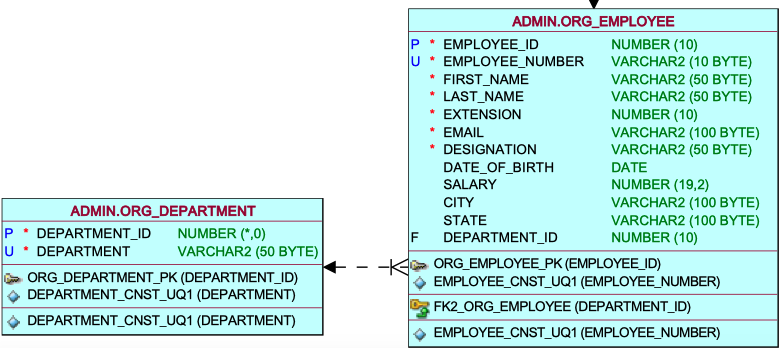

As evident in the data model, the relationship line connecting the department and employee tables illustrates a one-to-many relationship—where one instance exists on the department side and multiple instances on the employee side. This signifies that within the department table, a given department may have zero, one, or multiple occurrences in the employee table. For instance, department ID 1 is utilized once in the employee table, department 2 is used multiple times, and department 5 is not utilized at all in the employee table.
Comments Not Found