
Microsoft SQL Server
WHERE Clause
In Microsoft SQL Server, the WHERE clause is used to filter records based on a specific condition. It allows you to retrieve only the rows that meet the specified criteria, making your queries more efficient and targeted. The WHERE clause is essential for narrowing down large datasets and is commonly used with various comparison, logical, and arithmetic operators. For beginners, learning how to effectively use the WHERE clause is crucial for retrieving relevant data and improving query performance.
Below is a detailed explanation of how to use the WHERE clause, with examples and best practices.
1. Basic Syntax of WHERE
The WHERE clause filters rows based on a specified condition.
SELECT column_name(s)
FROM table_name
WHERE condition;
Example:
SELECT ProductName, Price
FROM Products
WHERE Price > 100;
This query retrieves products with a price greater than 100.
2. Using Multiple Conditions with AND
You can use the AND operator to combine multiple conditions in the WHERE clause. All conditions must be true for a row to be returned.
SELECT ProductName, Price
FROM Products
WHERE Price > 100 AND Category = 'Electronics';
This query retrieves electronic products with a price greater than 100.
3. Using Multiple Conditions with OR
The OR operator allows you to return rows if any one of the conditions is true.
SELECT ProductName, Price
FROM Products
WHERE Category = 'Clothing' OR Price < 50;
This query retrieves products that are either in the Clothing category or have a price lower than 50.
4. Using the IN Operator
The IN operator checks if a value exists within a list of values.
SELECT ProductName, Category
FROM Products
WHERE Category IN ('Electronics', 'Clothing', 'Furniture');
This query retrieves products that belong to the Electronics, Clothing, or Furniture categories.
5. Using the BETWEEN Operator
The BETWEEN operator is used to filter rows within a specified range of values (inclusive of the start and end values).
SELECT ProductName, Price
FROM Products
WHERE Price BETWEEN 50 AND 150;
This query retrieves products with prices between 50 and 150.
6. Using LIKE for Pattern Matching
The LIKE operator is used to filter rows based on a specified pattern. The % symbol is used as a wildcard for any number of characters.
SELECT ProductName
FROM Products
WHERE ProductName LIKE 'S%';
This query retrieves products whose names start with the letter 'S'.
7. Using IS NULL and IS NOT NULL
To filter rows based on whether a column contains a NULL value, you use the IS NULL or IS NOT NULL operators.
SELECT CustomerName, Email
FROM Customers
WHERE Email IS NULL;
This query retrieves customers who do not have an email address.
8. Combining AND, OR, and Parentheses for Complex Conditions
You can combine AND and OR operators, using parentheses to control the order of evaluation.
SELECT ProductName, Price
FROM Products
WHERE (Category = 'Electronics' OR Category = 'Clothing') AND Price > 100;
This query retrieves products from the Electronics or Clothing categories with a price greater than 100.
9. Best Practices for Using the WHERE Clause
Use
WHEREEarly to Filter Unnecessary Data – TheWHEREclause should be used early in the query to filter rows, which reduces the amount of data that needs to be processed.SELECT ProductName, Price FROM Products WHERE Price > 50;Combine Conditions for Specific Filters – Use
ANDandORoperators to combine multiple conditions and filter the data more precisely.SELECT ProductName, Price FROM Products WHERE Price > 100 AND Category = 'Electronics';Use
INfor Multiple Values – Use theINoperator to check for multiple possible values in a single column, especially when working with a set of known values.SELECT ProductName, Category FROM Products WHERE Category IN ('Electronics', 'Clothing', 'Furniture');Use
BETWEENfor Ranges – TheBETWEENoperator is useful for filtering numeric, date, or time ranges. Always use it when you want to define a start and end value.SELECT OrderID, OrderDate FROM Orders WHERE OrderDate BETWEEN '2023-01-01' AND '2023-12-31';Be Aware of
NULLValues – UseIS NULLorIS NOT NULLto handle missing values, asNULLis not considered equal to any value.SELECT CustomerName FROM Customers WHERE Email IS NOT NULL;Use Parentheses for Complex Logic – When combining multiple conditions with
ANDandOR, always use parentheses to make the logic clear and avoid errors.SELECT * FROM Customers WHERE (Country = 'USA' OR Country = 'Canada') AND Age > 18;
By mastering the WHERE clause, you will be able to filter and retrieve only the relevant data you need, making your SQL queries more efficient and precise. Understanding how to use logical operators, range filtering, and NULL handling in the WHERE clause is essential for working with Microsoft SQL Server databases.
To gain complete access, login with gmail or outlook, no need of signup, click here

Test code
To retrieve data in Microsoft SQL Server using the equality operator (=) on a numeric column to identify clients who are married, assuming `married_flag` is a numeric column where 0 represents married clients:
SELECT *
FROM org_clients
WHERE married_flag = 0;To retrieve data in Microsoft SQL Server using the equality operator (=) on a character column to identify female clients, assuming `gender` is a character column where 'F' represents female clients:
SELECT *
FROM org_clients
WHERE gender = 'F';To retrieve data in Microsoft SQL Server using the greater than (`>`) comparison operator on a numeric column to identify clients with a credit limit greater than $1,000, assuming `credit_limit` is a numeric column:
SELECT *
FROM org_clients
WHERE credit_limit > 1000;To retrieve data in Microsoft SQL Server using the less than (`<`) comparison operator on a numeric column to identify clients with a credit limit less than $1,000, assuming `credit_limit` is a numeric column:
SELECT *
FROM org_clients
WHERE credit_limit < 1000;To retrieve data in Microsoft SQL Server using the greater than or equal to (`>=`) comparison operator on a numeric column to identify clients with a credit limit greater than or equal to $1,000, assuming `credit_limit` is a numeric column:
SELECT *
FROM org_clients
WHERE credit_limit >= 1000;To retrieve data in Microsoft SQL Server using the greater than or equal to (`>=`) comparison operator on a numeric column to identify clients with a credit limit less than or equal to $1,000, assuming `credit_limit` is a numeric column:
SELECT *
FROM org_clients
WHERE credit_limit <= 1000;To retrieve data in Microsoft SQL Server using the not equal to (`<>`) comparison operator on a numeric column to identify clients who are married, assuming `married_flag` is a numeric column where 0 represents clients who are not married:
SELECT *
FROM org_clients
WHERE married_flag <> 0;To retrieve data in Microsoft SQL Server using the not equal to (`<>`) comparison operator on a character column to identify clients who are not males, assuming `gender` is a character column where 'M' represents male clients:
SELECT *
FROM org_clients
WHERE gender <> 'M';To retrieve data in Microsoft SQL Server using the logical operator `AND` to identify unmarried male clients, assuming `married_flag` is a numeric column where 0 represents unmarried clients and `gender` is a character column where 'M' represents male clients:
SELECT *
FROM org_clients
WHERE married_flag = 0
AND gender = 'M';To retrieve data in Microsoft SQL Server using the logical operator `OR` to find orders that are in OPEN status or orders that have not been shipped:
SELECT *
FROM act_order
WHERE order_status_id = 1 -- Open
OR shipped_date IS NULL;To retrieve data in Microsoft SQL Server using the logical operator `LIKE` to find clients whose last name starts with 'MA':
SELECT *
FROM org_client
WHERE last_name LIKE 'MA%';To retrieve data in Microsoft SQL Server using the logical operator `LIKE` to find clients whose last names contain the string 'MA' in any position:
SELECT *
FROM org_client
WHERE last_name LIKE '%ma%';To retrieve data in Microsoft SQL Server using the logical operator `NOT LIKE` to find clients whose last names do not start with 'MA':
SELECT *
FROM org_client
WHERE last_name NOT LIKE 'MA%';To retrieve data in Microsoft SQL Server using the logical operator `BETWEEN` to find clients whose credit limit is between 2000 and 5000 (inclusive):
SELECT *
FROM org_client
WHERE credit_limit BETWEEN 2000 AND 5000;To retrieve orders ordered between January 1st and December 31st in Microsoft SQL Server using the logical operator `BETWEEN`:
SELECT *
FROM orders
WHERE order_date BETWEEN '2022-01-01' AND '2022-12-31';To retrieve data in Microsoft SQL Server using the `IN` operator to find clients whose city is either 'Albany', 'Buffalo', or 'Niagara Falls':
SELECT *
FROM org_client
WHERE city IN ('Albany', 'Buffalo', 'Niagara Falls');To retrieve data in Microsoft SQL Server using the logical operator NOT IN to find clients who do not live in 'Albany' or 'Rochester':
SELECT *
FROM org_client
WHERE city NOT IN ('Rochester', 'Albany');To retrieve data in Microsoft SQL Server using the logical operator IS NULL to list orders that are not yet shipped:
SELECT *
FROM act_order
WHERE shipped_date IS NULL;To retrieve data in Microsoft SQL Server using the logical operator IS NOT NULL to list orders that have been shipped:
SELECT *
FROM act_order
WHERE shipped_date IS NOT NULL;To retrieve data in Microsoft SQL Server for orders where the shipment status is not NULL (indicating they have been shipped) and the order date is within the last 30 days:
SELECT *
FROM act_order
WHERE shipped_date IS NOT NULL
AND order_date > GETDATE() - 30;To retrieve data in Microsoft SQL Server using the logical operator EXISTS to fetch clients who have placed orders, excluding clients who do not have any orders:
SELECT *
FROM org_client
WHERE EXISTS (SELECT * FROM act_order WHERE org_client.client_id = act_order.client_id);To retrieve data in Microsoft SQL Server using the logical operator NOT EXISTS to fetch clients who do not have any associated orders:
SELECT *
FROM org_client
WHERE NOT EXISTS (SELECT * FROM act_order WHERE org_client.client_id = act_order.client_id);To retrieve data in Microsoft SQL Server to find products that were sold with a quantity greater than one using the ANY operator:
SELECT *
FROM prd_product
WHERE product_id = ANY (SELECT product_id FROM act_order_detail WHERE quantity > 1);Example 1:
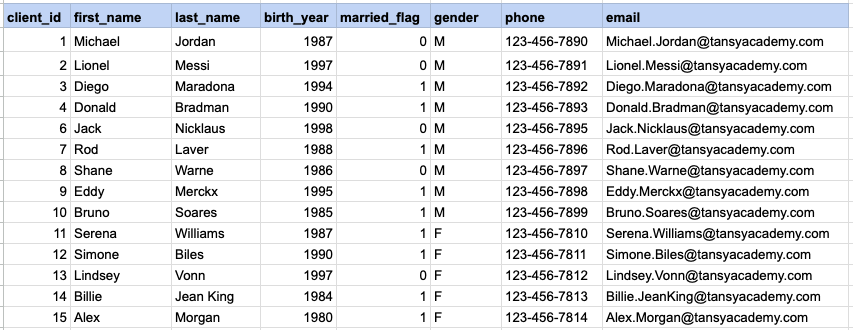
Let's explore the procedure of retrieving information from a designated table using the SQL WHERE cluase with string data. Fetch records for clients identified as females.
Example 1 - Raw data from client table
Example 1 - Query
SELECT * FROM org_client WHERE gender = 'F';Example 1 - Query data mapping
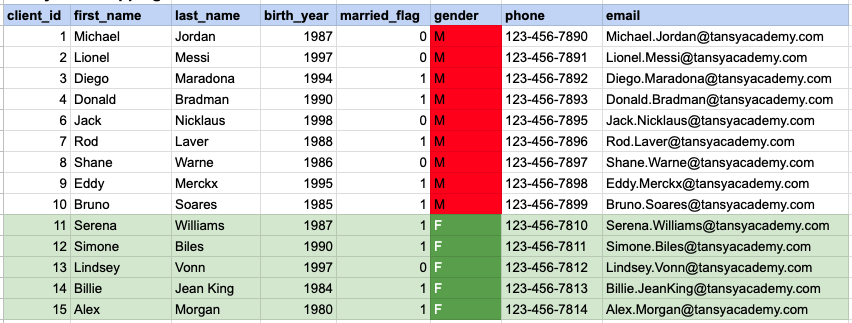
In the provided image, the green color signifies the data that has been selected or satisfies the conditions specified in our query. Data points in red indicate information that does not meet the criteria set by the query.
Example 1 - Query Output

Example 2:
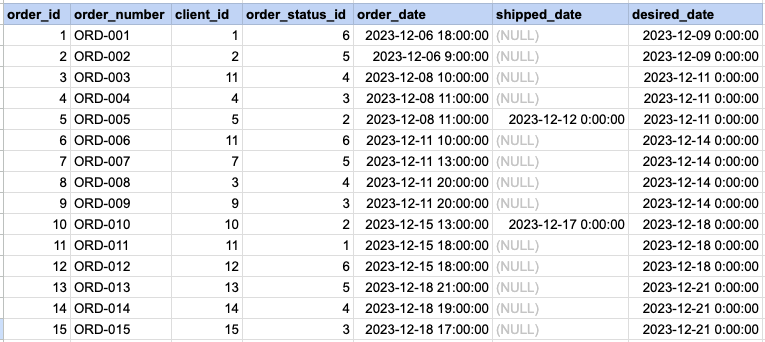
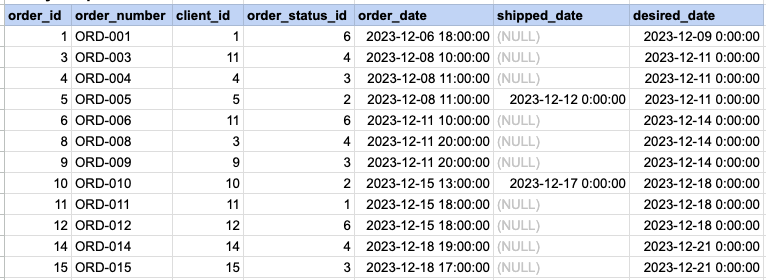
Let's explore the procedure of extracting information from a designated table using WHERE clause with numeric data. Fetch orders with statuses different from 5.
Example 2 - Raw data from orders table
Example 2 - Query
SELECT * FROM act_order WHERE order_status_id != 5;Example 2 - Query data mapping
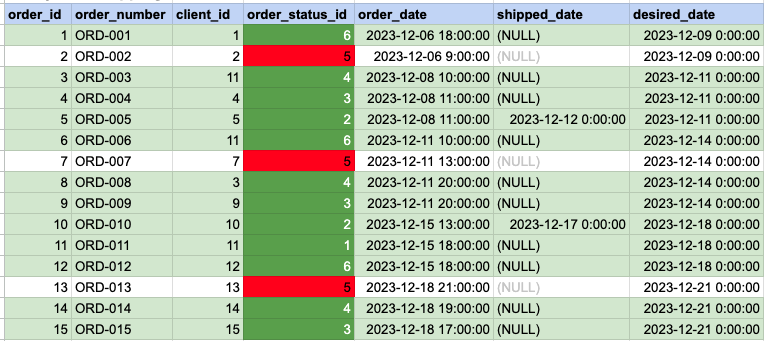
In the provided image, the green color signifies the data that has been selected or satisfies the conditions specified in our query. Data points in red indicate information that does not meet the criteria set by the query.
Example 2 - Query Output
Comments Not Found