
MySQL
DB Function
MySQL database functions are powerful tools for performing operations on data stored in a database. They provide a way to encapsulate reusable logic and simplify complex queries. Functions can range from simple mathematical calculations to complex string manipulations and date operations. Understanding how to create and use custom functions is crucial for optimizing database performance and ensuring data integrity.
Here’s an overview of MySQL database functions with code examples:
1. Creating a Simple Function
MySQL allows you to create custom functions to perform specific tasks. Here’s how you can create a basic function that returns the full name of an employee based on their first and last names:
DELIMITER  //
CREATE FUNCTION  get_full_name(first_name VARCHAR(50), last_name VARCHAR(50))
RETURNS VARCHAR(100)
BEGIN
    RETURN  CONCAT(first_name, ' ', last_name);
END //
DELIMITER  ;
DELIMITER //andDELIMITER ;: These commands are used to change the statement delimiter so that the function definition can be properly parsed.CONCAT(): This function concatenates the first name and last name with a space in between.
2. Using Built-in Functions
MySQL provides many built-in functions that can be used directly in queries. For example, you can use the DATE_FORMAT() function to format date values:
SELECT employee_id, DATE_FORMAT(hire_date, '%M %d, %Y') AS formatted_date
FROM employees;
DATE_FORMAT(): Formats thehire_datecolumn into a more readable format.
3. Creating a Function with Parameters
Sometimes you need functions that accept parameters and perform more complex operations. Here’s an example of a function that calculates the total salary of employees in a specific department:
DELIMITER  //
CREATE FUNCTION  get_total_salary(department_id INT)
RETURNS DECIMAL(10, 2)
BEGIN
    DECLARE  total_salary DECIMAL(10, 2);
    SELECT SUM (salary) INTO total_salary
    FROM employees
    WHERE department_id = department_id;
    RETURN  total_salary;
END //
DELIMITER  ;
SUM(): Aggregates the total salary of employees in the given department.INTO total_salary: Stores the result in a variable.
4. Error Handling in Functions
Functions in MySQL can also include error handling using DECLARE and HANDLER. Here’s an example:
DELIMITER  //
CREATE FUNCTION  get_employee_position(employee_id INT)
RETURNS VARCHAR(50)
BEGIN
    DECLARE  position VARCHAR(50);
    DECLARE CONTINUE HANDLER FOR  SQLWARNING
    BEGIN
        SET position = 'Unknown';
    END;
    SELECT job_title INTO position
    FROM employees
    WHERE id = employee_id;
    RETURN position;
END //
DELIMITER  ;
DECLARE CONTINUE HANDLER FOR SQLWARNING: This handles SQL warnings, ensuring that the function returns 'Unknown' if no position is found.
By using these advanced database functions, you can create more efficient and flexible queries tailored to your specific needs.
When to Use MySQL Stored Functions:
- Reusable Code: For complex calculations or operations that are used frequently, to avoid redundancy and simplify maintenance.
- Simplify SQL Statements: To hide complex computations within a SELECT statement, making the SQL queries simpler.
- Centralized Logic: Business logic can be centralized, making updates more manageable if the logic changes.
- Improve Readability: Functions can make SQL statements more readable and easier to understand by others.
- Security: Functions can provide better security by allowing users to execute functions without direct table access.
When Not to Use MySQL Stored Functions:
- Performance Considerations: Functions can cause performance issues due to single-threaded execution.
- Portability Issues: Stored functions are not easily portable across different database systems.
- Debugging Difficulty: Debugging stored functions can be more challenging compared to application code.
- Overhead of Context Switching: Mixing SQL and procedural logic can affect performance due to context switching.
- Complex Error Handling: Error handling within stored functions can be cumbersome.
Sample Scenarios for Using MySQL Stored Functions:
- Tax Calculation for an e-commerce platform based on product category or customer location.
- Password Hashing for secure storage of user passwords in a database.
- Age Calculation for users on a community website from their birthdate.
- Discount Logic for a retail database, varying by customer tier, product type, and time of year.
- Order Total calculation by summing up line items, applying taxes, discounts, and shipping costs in a sales database.
Sample Scenarios Against Using MySQL Stored Functions:
- Simple Data Retrieval where a SELECT query is sufficient without additional computation.
- High-Volume Batch Operations where the function call overhead could impact performance.
- Cross-Platform Development when the application needs to be database agnostic.
- Real-Time Data Analysis on large datasets where function overhead may slow down the process.
- Simple Operations that are straightforward or used only once might not necessitate a stored function.
Deterministic vs Non-Deterministic Functions in MySQL
What is a Deterministic Function?
A deterministic function in MySQL is one that, given the same input parameters, will always produce the same result. This is regardless of the number of times or the timing of the function call. It implies that the function does not cause any side effects, does not access data that may change over time, and operates solely on the inputs provided to produce its output.
Characteristics of Deterministic Functions:
- They always return the same result when given the same input values.
- They do not depend on any stateful information or database data that might change between calls.
- They are often used for calculations, string manipulation, and other operations that are self-contained.
When to Declare a Function as Deterministic:
You should declare a function as deterministic in MySQL when:
- The function performs operations that always produce the same result given the same input parameters.
- You are certain that it does not reference any data that could change over time or between successive calls to the function.
Example of a Deterministic Function:
CREATE FUNCTION add_numbers (a INT, b INT)
RETURNS INT
DETERMINISTIC
BEGIN
  RETURN a + b;
END;
What is a Non-Deterministic Function?
Non-deterministic functions in MySQL are those that may produce different results each time they are called, even with the same input parameters. This behavior typically arises from factors external to the function such as system state, database state, or when the function includes operations that have inherent variability like random number generation or time-based functions.
Characteristics of Non-Deterministic Functions:
- The result can vary for the same input parameters.
- They may depend on database data that might change, such as the current time or the result of a subquery.
- They may produce side effects, such as modifying data or maintaining a state.
When to Avoid Declaring a Function as Deterministic:
Avoid declaring a function as deterministic when:
- The function performs operations that involve randomness, time, or other changing system variables.
- It references or modifies external state or database data that may change over time.
Example of a Non-Deterministic Function:
CREATE FUNCTION get_current_user ()
RETURNS VARCHAR(100)
NOT DETERMINISTIC
BEGIN
  RETURN CURRENT_USER();
END;
Importance of Correct Declaration
It's important to correctly declare a function as deterministic or non-deterministic because:
- It affects optimization and performance. MySQL can optimize deterministic functions differently than non-deterministic ones.
- It impacts replication. Deterministic functions are safer for statement-based replication, ensuring that the same results are produced on all servers.
- It ensures the accuracy of results, particularly when functions are used in indexed views or computed columns.
Scenarios for Using Deterministic Functions
Deterministic functions are used when the same inputs consistently produce the same output, regardless of the context or state of the database.
- Mathematical Calculations: Functions that perform arithmetic operations, such as calculating the area of a circle based on its radius, are deterministic.
- Data Formatting: When standardizing data formats, such as formatting phone numbers or dates, deterministic functions ensure consistency.
- Static Business Rules: Calculating fixed tax rates or predefined discounts on transactions where the rules do not change over time.
- String Manipulation: Functions that transform text, like converting strings to uppercase or concatenating two static strings.
- Hashing and Encryption: Generating a hash or encrypted value for a given input, such as a password, where the same input always yields the same encrypted output.
Scenarios for Using Non-Deterministic Functions
Non-deterministic functions are used when the output can vary even with the same input parameters, often due to the influence of the environment or data that changes over time.
- Fetching Current Data: Functions that return current system information, such as the current date and time or user session data.
- Randomized Outputs: When generating random numbers for gaming applications or for sampling data in statistical analysis.
- Data Dependent on External Sources: Functions that retrieve data from external APIs or services where the results may vary with each call.
- Dynamic Business Rules: Pricing or promotions that change frequently based on market conditions or inventory levels.
- Auditing Changes: Functions that log changes or activities, which would inherently be different each time they are executed.
MYSQL DB FUNCTION EXAMPLE
We want to create a MySQL function that takes an order_id as input and returns the subtotal for all products in that order. The subtotal for each product can be calculated by multiplying the quantity by the unit_rate from the act_order_detail table. The function will sum these amounts to get the subtotal for the entire order.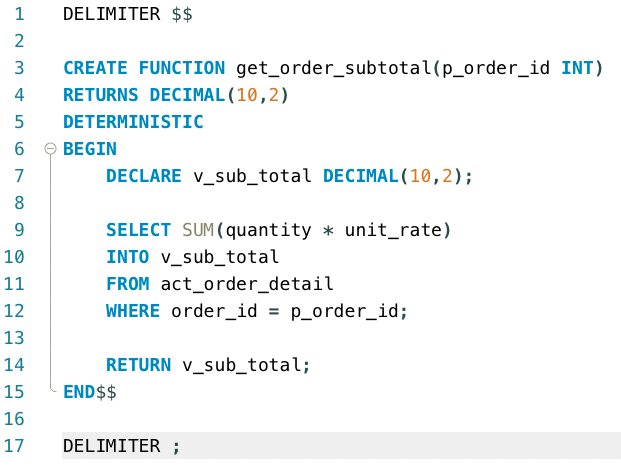
DELIMITER $$

CREATE FUNCTION get_order_subtotal(p_order_id INT)
RETURNS DECIMAL(10,2)
DETERMINISTIC
BEGIN
    DECLARE v_sub_total DECIMAL(10,2);

    SELECT SUM(quantity * unit_rate)
    INTO v_sub_total
    FROM act_order_detail
    WHERE order_id = p_order_id;

    RETURN v_sub_total;
END$$

DELIMITER ;
Comments Not Found