
MySQL
MySQL Stored Procedure
A stored procedure in MySQL is a set of SQL statements that can be stored and executed on the server. Stored procedures allow you to encapsulate complex business logic and reuse it across multiple applications or queries. They can accept parameters, perform various operations, and return results, making them a powerful tool for managing database operations efficiently.
Here’s a detailed look at advanced topics related to MySQL stored procedures:
- Creating a Stored Procedure
- To create a stored procedure, you use the
CREATE PROCEDUREstatement. You can define parameters, specify the procedure's logic, and include error handling.DELIMITER // CREATE PROCEDURE GetEmployeeDetails(IN emp_id INT) BEGIN SELECT e.employee_id, e.name, e.salary, d.department_name FROM employees e JOIN departments d ON e.department_id = d.department_id WHERE e.employee_id = emp_id; END // DELIMITER ;
- To create a stored procedure, you use the
- Calling a Stored Procedure
- Once a stored procedure is created, you can call it using the
CALLstatement. Parameters can be passed to the procedure as needed.CALL GetEmployeeDetails(1);
- Updating Data Using Stored Procedures
- Stored procedures can also be used to update data. You can define procedures that modify table data based on the input parameters.
DELIMITER  //
CREATE PROCEDURE  UpdateEmployeeSalary(IN emp_id INT, IN new_salary DECIMAL(10, 2))
BEGIN
UPDATE employees
SET salary =  new_salary
WHERE employee_id =  emp_id;
END //

DELIMITER  ;
- Stored Procedure with Multiple Statements
- A stored procedure can include multiple SQL statements, allowing you to perform complex operations within a single procedure.
DELIMITER  //
CREATE PROCEDURE  PromoteEmployee(IN emp_id INT, IN new_department_id INT)
BEGIN
UPDATE employees
SET department_id = new_department_id
WHERE employee_id = emp_id;
INSERT INTO promotions_log (employee_id, promotion_date)
VALUES (emp_id, NOW ());
END //
DELIMITER  ;
- Error Handling in Stored Procedures
- Error handling can be implemented within stored procedures using handlers. This allows you to manage exceptions and control the flow of execution based on error conditions.
DELIMITER  //
CREATE PROCEDURE  SafeUpdateEmployeeSalary(IN emp_id  INT, IN new_salary  DECIMAL(10, 2))
BEGIN
DECLARE CONTINUE HANDLER FOR  SQLEXCEPTION
BEGIN
ROLLBACK ;
END;
START TRANSACTION ;
UPDATE employees
SET salary = new_salary
WHERE employee_id = emp_id;
COMMIT ;
END //
DELIMITER  ;
- Dropping a Stored Procedure
- If you need to remove a stored procedure, you can use the
DROP PROCEDUREstatement.DROP PROCEDURE IF EXISTS UpdateEmployeeSalary; - Performance Considerations
- Stored procedures can improve performance by reducing the amount of data sent between the client and server. However, it's essential to ensure that your procedures are well-optimized and avoid unnecessary complexity.
By mastering stored procedures, you can enhance your ability to manage complex operations and maintain cleaner, more efficient SQL code.
Key Features of MySQL Stored Procedures:
Creating a Stored Procedure
The syntax for creating a stored procedure in MySQL is: DELIMITER $$ CREATE PROCEDURE procedure_name (parameter_list) BEGIN -- SQL statements END$$ DELIMITER ;Sample Stored Procedure
Here's an example that adds two numbers: DELIMITER $$ CREATE PROCEDURE AddNumbers(IN num1 INT, INnum2 INT, OUT result INT) BEGIN SET result = num1 + num2; END$$ DELIMITER ;Invoking a Stored Procedure
To invoke the procedure:

CALL AddNumbers(5,10, @result);
To retrieve the output:

SELECT @result;
Benefits of Using Stored Procedures
- Efficiency:Compiled once and stored in executable form for performance.
- Reduced Network Traffic:Operations are performed server-side.
- Improved Security:Direct table access can be restricted.
Considerations
- Debugging:Can be more challenging than application code.
- Portability:Specific to the DBMS and may require rewriting if the system changes.
In summary, MySQL stored procedures offer a way to execute server-side operations efficiently and securely, simplifying application development and improving performance.
MYSQL STORED PROCEDURE EXAMPLE
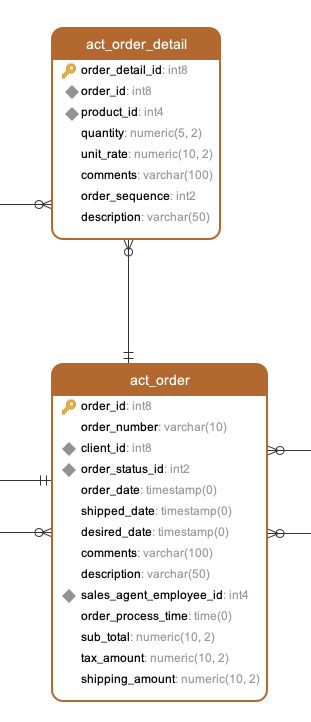
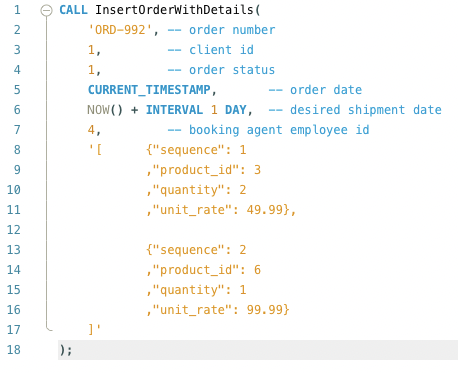
Create a MySQL stored procedure that can accept order details as input and perform inserts into both the act_order and act_order_detail tables, accommodating multiple products per order. After this description, you'll discover the stored procedure definition along with sample code illustrating how to utilize it. Additionally, a data model is provided to understand the structure of the order and order details tables.
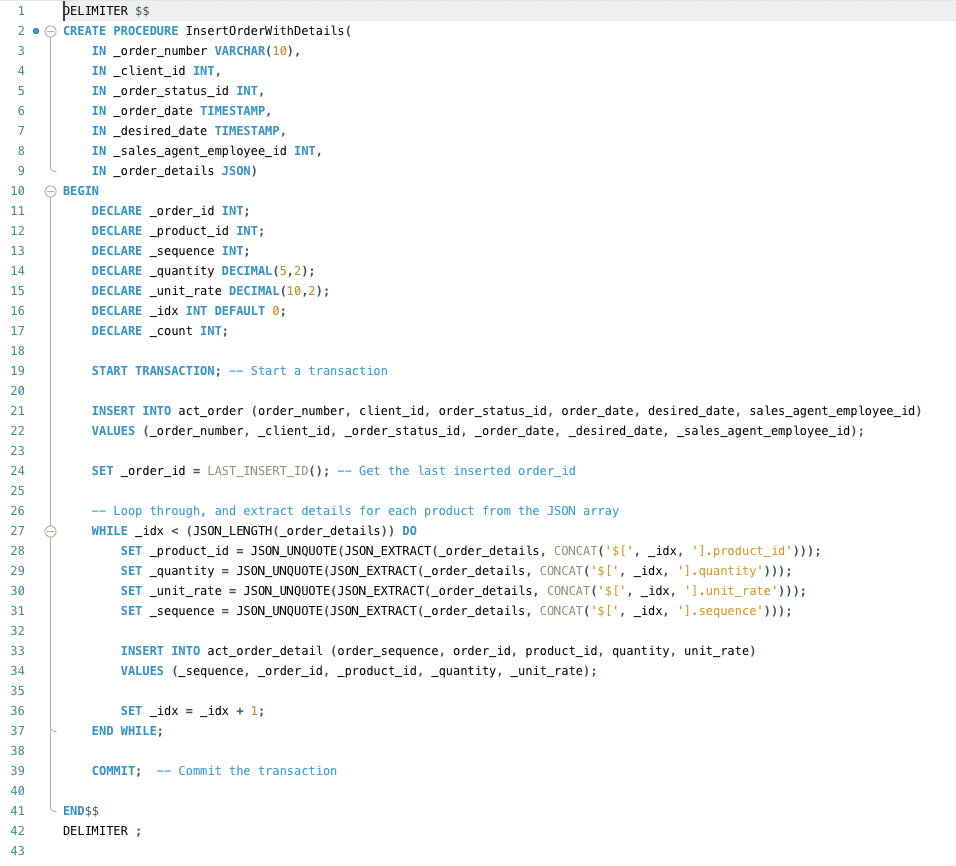
CREATE OR REPLACE PROCEDURE InsertOrderWithDetails(
    IN _order_number VARCHAR(10),
    IN _client_id INT,
    IN _order_status_id INT,
    IN _order_date TIMESTAMP(0),
    IN _desired_date TIMESTAMP(0),
    IN _sales_agent_employee_id INT,
    IN _order_details JSON)
language plpgsql
as $$
    DECLARE _order_id INT;
    _product_id INT;
    _sequence INT;
    _quantity DECIMAL(5,2);
    _unit_rate DECIMAL(10,2);
    _idx INT DEFAULT 0;
    _count INT;
BEGIN

    INSERT INTO act_order (order_number, client_id, order_status_id, order_date, desired_date, sales_agent_employee_id)
    VALUES (_order_number, _client_id, _order_status_id, _order_date, _desired_date, _sales_agent_employee_id);

    _order_id := LASTVAL();

    WHILE _idx < (JSON_LENGTH(_order_details)) LOOP
        _product_id := JSON_UNQUOTE(JSON_EXTRACT(_order_details, CONCAT('$[', _idx, '].product_id')));
        _quantity := JSON_UNQUOTE(JSON_EXTRACT(_order_details, CONCAT('$[<', _idx, '].quantity')));
        _unit_rate := JSON_UNQUOTE(JSON_EXTRACT(_order_details, CONCAT('$[', _idx, '].unit_rate')));
        _sequence := JSON_UNQUOTE(JSON_EXTRACT(_order_details, CONCAT('$[', _idx, '].sequence')));

        INSERT INTO act_order_detail (order_sequence, order_id, product_id, quantity, unit_rate)
        VALUES (_sequence, _order_id, _product_id, _quantity, _unit_rate);

        _idx := _idx + 1;
    END LOOP;

END; $
Comments Not Found