
MySQL
DML ASSIGNMENT2 - Student Management System
Objective:
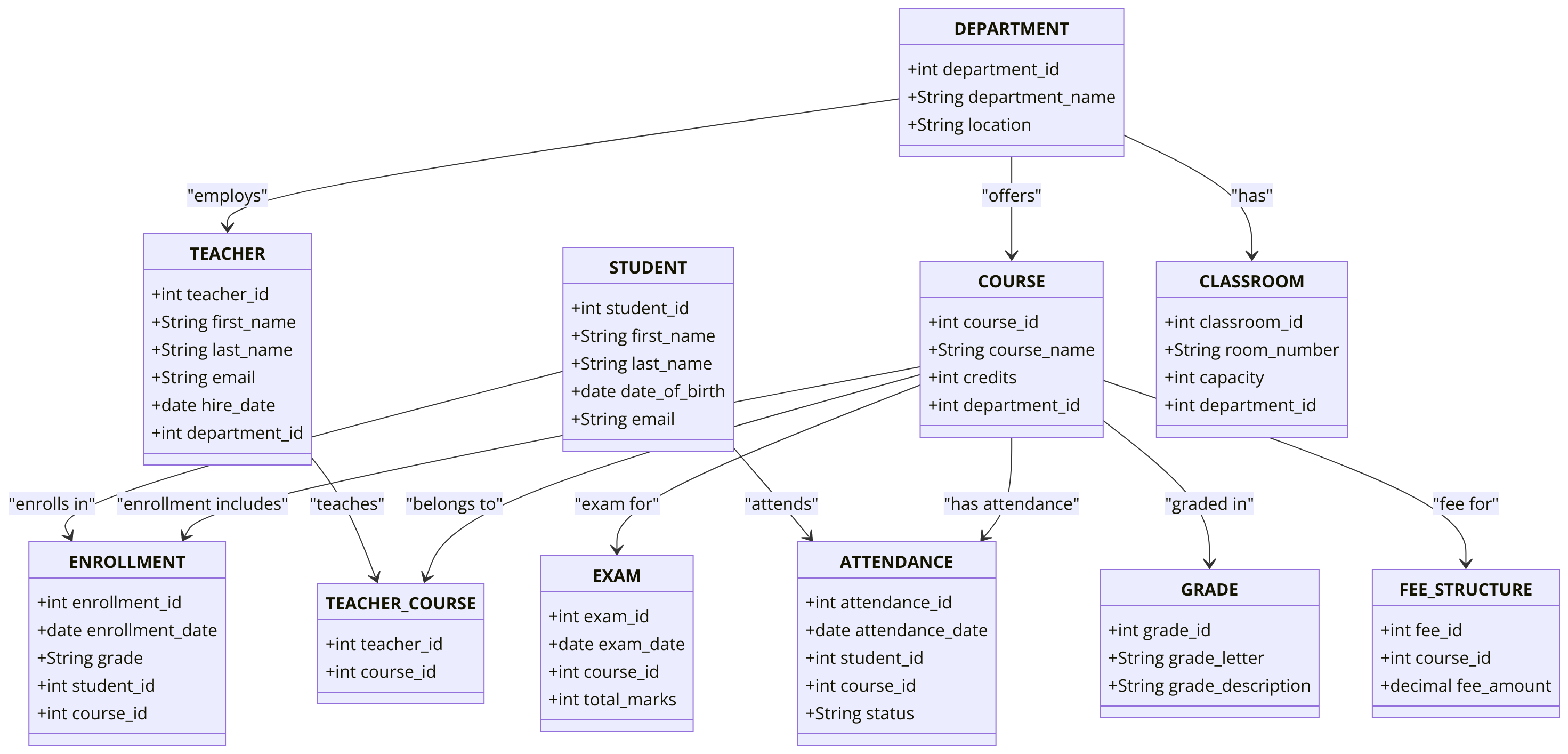
You are required to complete a set of Data Manipulation Language (DML) tasks for a Student Management System. Each query focuses on inserting, updating, deleting, and managing data, including complex operations like subqueries, joins, and JSON data manipulation. The tables and relationships have already been defined based on the DDL from your chapter 5 assignments.
Requirements:
You will need to complete at least 20 different DML tasks covering INSERT, SELECT INTO, UPDATE, UPSERT, DELETE, TRUNCATE, and JSON operations. Each task must be relevant to the tables and constraints defined in the Student Management System DDL.
Question 1: Insert Data into all Tables
Write SQL queries to populate each table created in the Chapter 5 assignment with at least 10 rows of data.
Question 2: Insert Data into the STUDENT Table
Write a single SQL query to insert multiple student records into the STUDENT table.
Question 3: Insert Multiple Records into the FEE_STRUCTURE Table
Write a SQL query to insert multiple records into theFEE_STRUCTURE table in a single statement. Insert at least 3 fee structure records, each with different course_idand fee_amount.
Question 4: Insert a Record into the ENROLLMENT Table with Default Values
Insert a record into theENROLLMENT table using default value forenrollment_date.
Question 5: Insert Data into the ENROLLMENT Table Using SELECT INTO
Insert all records from the ENROLLMENT table where student_id = 3 into a temporary table called TEMP_ENROLLMENT.
Question 6: Insert Data into the COURSE Table Using a Subquery
Insert a new course into the COURSE table, where the credits are the same as the credits of the course with course_id = 1, but set a unique course_name.
Question 7: Update the Credits in the COURSE Table
Update the creditsof the course withcourse_id = 5in the COURSE table by increasing them by 1.
Question 8: Update department Details Using a JOIN
Update the department_idfor all teachers in the TEACHER table to associated department_idfrom the COURSE and TEACHER_COURSE table.
Question 9: Update the Total Marks in the EXAM_SCHEDULE Table Using a Subquery
Update the total_marksin the EXAM_SCHEDULE table by setting it to the highest total marks in the same course_id.
Question 10: Perform an UPSERT (INSERT ON DUPLICATE KEY UPDATE) on the STUDENT Table
Write an SQL query to insert a new student into the STUDENT table with the following data:
- First Name: 'Bob', Last Name: 'Smith', Date of Birth: '2001-08-20', Email: 'bob.smith@example.com'. If the student already exists, update the email to 'bsmith@example.com'.
Question 11: Delete a COURSE Record by Name
Write a SQL query to delete the course from the COURSE table where the course name is 'History 101'.
Question 12: Delete from TEACHER_COURSE Using a Join
Delete all records from theTEACHER_COURSE table where the associated course in the COURSE table has less than 3 credits.
Question 13: Delete All Records from ENROLLMENT Table Older Than a Specific Date
Write an SQL query to delete all records from the ENROLLMENT table where the enrollment_date is older than '2023-01-01'.
Question 14: Truncate the TEMP_ENROLLMENT Table
Truncate the TEMP_ENROLLMENT table to remove all data while keeping the table structure intact.
Question 15: Add a JSON Column to the STUDENT Table
Write an SQL query to add a JSON column named student_profile to the STUDENT table to store additional student details.
Question 16: Insert Data into the JSON Column in the STUDENT Table
Insert JSON data into the student_profilecolumn for the student with student_id = 2. The JSON data should include the fields:
{"major": "Computer Science", "year_of_study": "Sophomore", "hobbies": ["reading", "coding"]}
Question 17: Update Data in the JSON Column in the STUDENT Table
Update the student_profilecolumn for the student with student_id = 2to add the field "minor": "Mathematics".
Question 18: Delete a Field from the JSON Column in the STUDENT Table
Remove the hobbiesfield from the student_profile column for the student with student_id = 2.
Question 19: SUPER Complex INSERT
.Write a single INSERT SQL statement to add multiple absence records for all students into the ATTENDANCE table, for every Saturday of the current semester:
- Create a DATE_DIM table with columns: date_id, calendar_date, year, month, day_of_the_month, week_day_number, week_day_name, yearly_week_number, month_start_date_flag, month_end_date_flag, year_start_date_flag, year_end_date_flag, holiday_flag
- The date_id should be populated in the YYYYMM format (e.g., 202401).
- Populate the DATE_DIM table with data for current year and the next year.
- JOIN DATE_DIM, ENROLLMENT and SEMESTER table to come up with all possible staturdays for each student.
GOOD LUCK WITH YOUR ASSIGNMENT!!!
Don't forget to contact us if you need any further assistance with your assignments, and most importantly, for a manual review and approval of your work.
Sample ERD Data Model for Student Management System
Comments Not Found