
MySQL
GROUP RANK
In MySQL, ranking rows within groups can be achieved using various techniques, such as window functions (ROW_NUMBER(), RANK(), DENSE_RANK()) or manual ranking with subqueries and GROUP BY. Group ranking is useful when you want to assign a rank to records within a specific group, such as ranking employees based on salary within each department.
Here’s how to perform group ranking in MySQL, along with examples and useful tips for new students:
Using
ROW_NUMBER()for Group Ranking:- The
ROW_NUMBER()function assigns a unique sequential integer to rows within a result set, starting from 1 for each group. It’s commonly used for ranking rows based on a specific order within groups. - Syntax:
SELECT first_name, last_name, department_id, salary, ROW_NUMBER() OVER (PARTITION BY department_id ORDER BY salary DESC) AS rank FROM employees;- This query ranks employees by salary within each department. The
PARTITION BYclause creates separate ranking groups for eachdepartment_id.
- The
Using
RANK()for Group Ranking:- The
RANK()function assigns ranks to rows within groups, but it gives the same rank to rows with the same value. The next rank is skipped when there is a tie. - Example:
SELECT first_name, last_name, department_id, salary, RANK() OVER (PARTITION BY department_id ORDER BY salary DESC) AS rank FROM employees;- This query ranks employees by salary within their department. If two employees have the same salary, they will receive the same rank, and the next rank will be skipped.
- The
Using
DENSE_RANK()for Group Ranking:- The
DENSE_RANK()function is similar toRANK(), but it does not skip ranks when there are ties. - Example:
SELECT first_name, last_name, department_id, salary, DENSE_RANK() OVER (PARTITION BY department_id ORDER BY salary DESC) AS rank FROM employees;- This query assigns ranks based on salary within each department, but ranks are not skipped if there are ties.
- The
Manual Ranking Using Subqueries:
- If your MySQL version does not support window functions (prior to MySQL 8.0), you can manually create ranks using subqueries.
- Example:
SELECT e.first_name, e.last_name, e.department_id, e.salary, (SELECT COUNT(*) + 1 FROM employees e2 WHERE e2.salary > e.salary AND e2.department_id = e.department_id) AS rank FROM employees e;- This query ranks employees by salary within their department by counting the number of employees with a higher salary.
Using
RANK()with Multiple Criteria:- You can use multiple columns in the
ORDER BYclause for more complex ranking. - Example:
SELECT first_name, last_name, department_id, salary, hire_date, RANK() OVER (PARTITION BY department_id ORDER BY salary DESC, hire_date ASC) AS rank FROM employees;- This query ranks employees by salary within their department, and in case of ties, the ranking is further sorted by hire date.
- You can use multiple columns in the
Ranking with
GROUP BY:- You can also use
GROUP BYalong with aggregate functions to create a basic ranking system, though it’s less flexible than window functions. - Example:
SELECT department_id, salary, COUNT(*) AS rank FROM employees e1 JOIN employees e2 ON e1.department_id = e2.department_id AND e1.salary >= e2.salary GROUP BY e1.employee_id;- This query ranks employees by salary within each department using a join and group count.
- You can also use
Performance Considerations:
- Window functions like
ROW_NUMBER(),RANK(), andDENSE_RANK()are efficient and easier to use than manual ranking techniques. For large datasets, using these built-in functions can improve performance.
- Window functions like
Combining Ranking with
HAVING:- You can filter ranked results using the
HAVINGclause to limit the output to certain ranks. - Example:
SELECT first_name, last_name, department_id, salary, RANK() OVER (PARTITION BY department_id ORDER BY salary DESC) AS rank FROM employees HAVING rank <= 3;- This query returns the top 3 highest-paid employees within each department.
- You can filter ranked results using the
Group ranking in MySQL is a powerful way to analyze and categorize data within specific groups. Whether using built-in window functions or manual methods, ranking helps you gain deeper insights into your data.
To gain complete access, login with gmail or outlook, no need of signup, click here

Test code
Utilize the RANK() function to assign rankings to employee salaries within specific departments.
SELECT employee_number
    department,
    salary,
    RANK() OVER (PARTITION BY department ORDER BY salary DESC) AS salary_rank
FROM org_employee;SQL GROUP RANK
Utilize the RANK() function to assign rankings to employee salaries within specific departments.
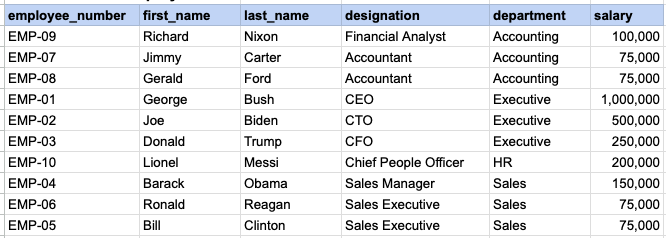
RAW EMPLOYEE DATA
QUERY DATA MAPPING
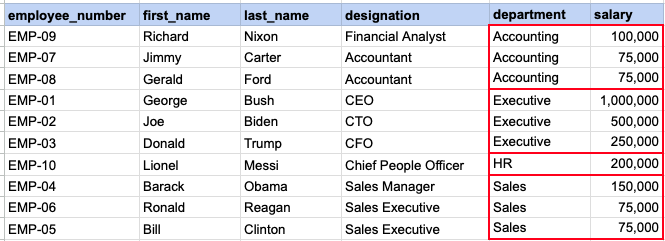
This image demonstrates that we need to rank each salary within a specified department.
QUERY OUT PUT
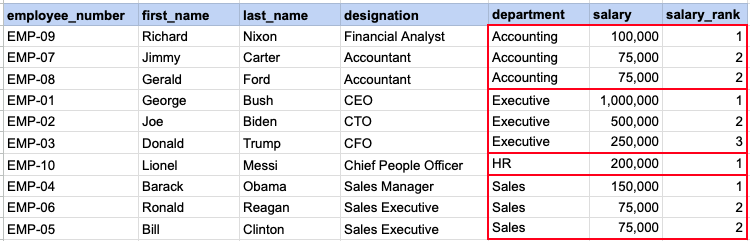
Here you can see ranking of each salary with in a given department.
Comments Not Found