
MySQL
HAVING Clause
In MySQL, the HAVING clause is used to filter the results of an aggregated query. It is similar to the WHERE clause, but HAVING is applied after the aggregation has occurred, allowing you to filter groups of data. The HAVING clause is particularly useful when combined with GROUP BY to filter based on aggregate functions such as COUNT(), SUM(), AVG(), and MAX().
Here’s a detailed guide on using the HAVING clause in MySQL, along with examples for new students:
Basic Syntax of
HAVING:- The
HAVINGclause is used to filter groups that are created by theGROUP BYclause. It allows you to filter based on the results of aggregate functions. - Syntax:
SELECT department_id, COUNT(*) AS employee_count FROM employees GROUP BY department_id HAVING employee_count > 5;- This query returns departments with more than 5 employees.
- The
Difference Between
WHEREandHAVING:WHEREfilters rows before the aggregation, whileHAVINGfilters groups after the aggregation.- Example:
SELECT department_id, AVG(salary) AS avg_salary FROM employees WHERE salary > 30000 GROUP BY department_id HAVING avg_salary > 50000;- In this query,
WHEREfilters individual rows where the salary is greater than 30,000, andHAVINGfilters departments where the average salary is greater than 50,000.
Using
HAVINGwith Aggregate Functions:- The
HAVINGclause is typically used with aggregate functions such asCOUNT(),SUM(),AVG(),MIN(), andMAX(). - Example:
SELECT department_id, SUM(salary) AS total_salary FROM employees GROUP BY department_id HAVING total_salary > 200000;- This query returns departments where the total salary exceeds 200,000.
- The
Using
HAVINGwithGROUP BY:HAVINGis used most often in conjunction with theGROUP BYclause to filter groups after aggregation.- Example:
SELECT manager_id, COUNT(*) AS num_employees FROM employees GROUP BY manager_id HAVING num_employees > 10;- This query returns managers who have more than 10 employees reporting to them.
Using
HAVINGwith Multiple Conditions:- You can use
HAVINGwith multiple conditions by combining them withANDorOR. - Example:
SELECT department_id, AVG(salary) AS avg_salary FROM employees GROUP BY department_id HAVING avg_salary > 50000 AND department_id IN (1, 2, 3);- This query returns departments 1, 2, and 3 where the average salary is greater than 50,000.
- You can use
Using
HAVINGWithoutGROUP BY:- In some cases, you can use
HAVINGwithoutGROUP BY, especially if you're using aggregate functions over the entire result set. - Example:
SELECT SUM(salary) AS total_salary FROM employees HAVING total_salary > 1000000;- This query checks if the total salary of all employees exceeds 1,000,000.
- In some cases, you can use
Combining
HAVINGwithORDER BY:- You can combine
HAVINGwithORDER BYto sort the results after filtering the groups. - Example:
SELECT department_id, COUNT(*) AS employee_count FROM employees GROUP BY department_id HAVING employee_count > 5 ORDER BY employee_count DESC;- This query returns departments with more than 5 employees, sorted by the number of employees in descending order.
- You can combine
Performance Considerations:
- Queries using
HAVINGcan be resource-intensive, especially on large datasets, since the filtering occurs after the aggregation. Indexes on columns used inGROUP BYcan help optimize performance.
- Queries using
The HAVING clause is essential for filtering results in aggregate queries, especially when used with GROUP BY. It allows you to filter data based on aggregate calculations, providing more control over grouped data and results.
To gain complete access, login with gmail or outlook, no need of signup, click here

Test code
Compute the aggregate sum of salaries for each department and subsequently exhibit departments where the total salary surpasses 250,000
SELECT department
    SUM(salary) AS department_salary
FROM org_employee
GROUP BY department
HAVING sum(salary) > 250000;Display the count of orders placed by each employee, focusing on employees who have initiated more than one order.
SELECT b.employee_number,
COUNT(a.order_number) as order_count
FROM act_order a
INNER JOIN org_employee b on b.employee_id = a.sales_agent_employee_id
GROUP BY b.employee_number
HAVING COUNT(a.order_number) > 1Retrieve data using the HAVING clause to list the order counts for married female clients with more than one order.
SELECT a.client_id, a.first_name, a.last_name
    COUNT(b.order_number) as order_count
FROM org_client a
INNER JOIN act_order b on b.client_id = a.client_id
WHERE a.married_flag = 1
AND a.gender = 'F'
GROUP BY a.client_id, a.first_name, a.last_name
HAVING COUNT(b.order_number) > 1Example 1:
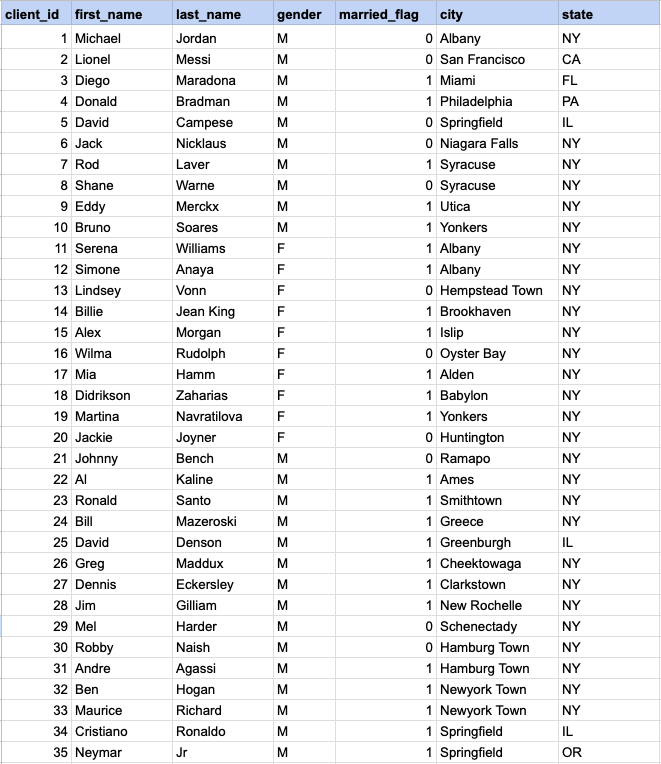
In the following example, we will demonstrate the application of WHERE, GROUP BY, and HAVING clauses. It's important to note that the WHERE clause is used before GROUP BY, and the HAVING clause follows GROUP BY. Also, the HAVING clause cannot be used without preceding it with GROUP BY.
Example 1 - Raw data from client table
GROUP BY query
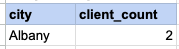
In this example, we will ascertain the number of married female clients in each city, and then identify cities that have more than one married female client.
SELECT city , count(client_id) FROM org_client WHERE gender= 'F' AND married_flag = 1 GROUP BY city HAVING count(client_id) > 1Step 1, Apply WHERE conditions
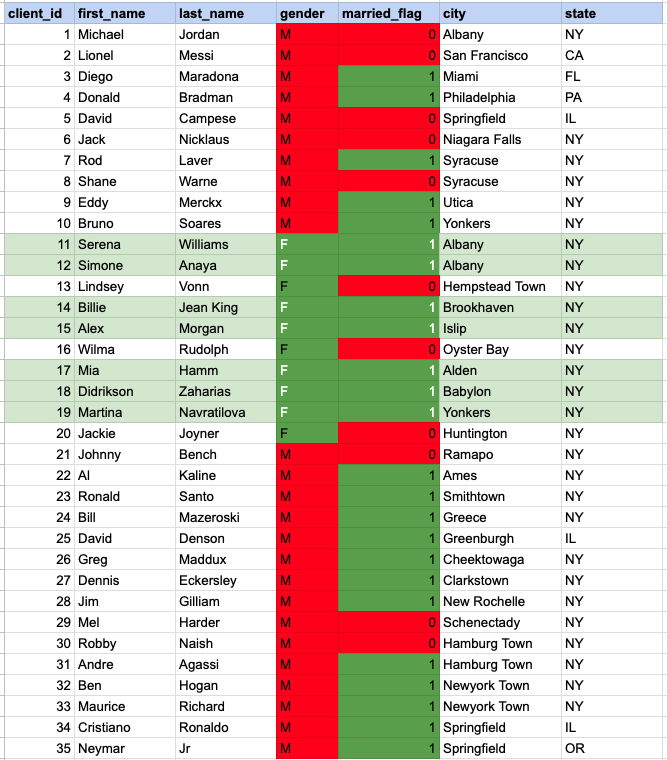
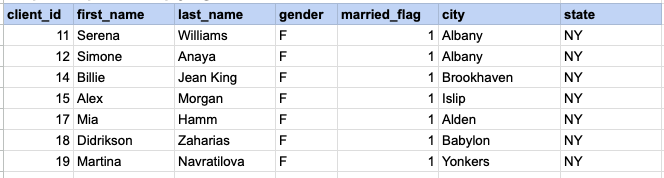
In the image above, the cells highlighted with a green background and white font represent those that satisfy both criteria of the WHERE condition (being married females).
Step 1 output after applying WHERE condition
Step 2 - Apply GROUP BY
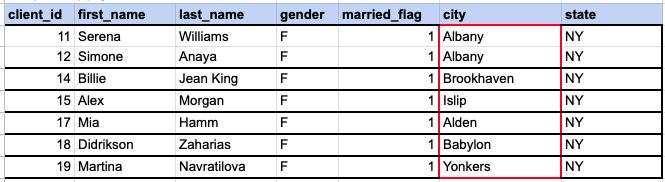
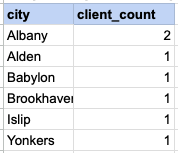
In the provided image, we need to group the data by the 'city' column. As observed, Albany is represented by 2 client rows, while the other cities each have only one row.
Step 2 output, after applying GROUP BY
Step 3 - Apply HAVING Clause
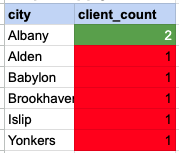
Using the HAVING clause essentially means filtering the grouped rows based on the condition specified in the HAVING clause. In this example, we are looking for groups with a client count greater than one. The cells highlighted in green with white font are those that meet the condition set by the HAVING clause.
Final output of entire query
Comments Not Found