
MySQL
Chapter 7 - DQL (Data Query Language)
DQL ASSIGNMENT2 - Student Management System
Objective:
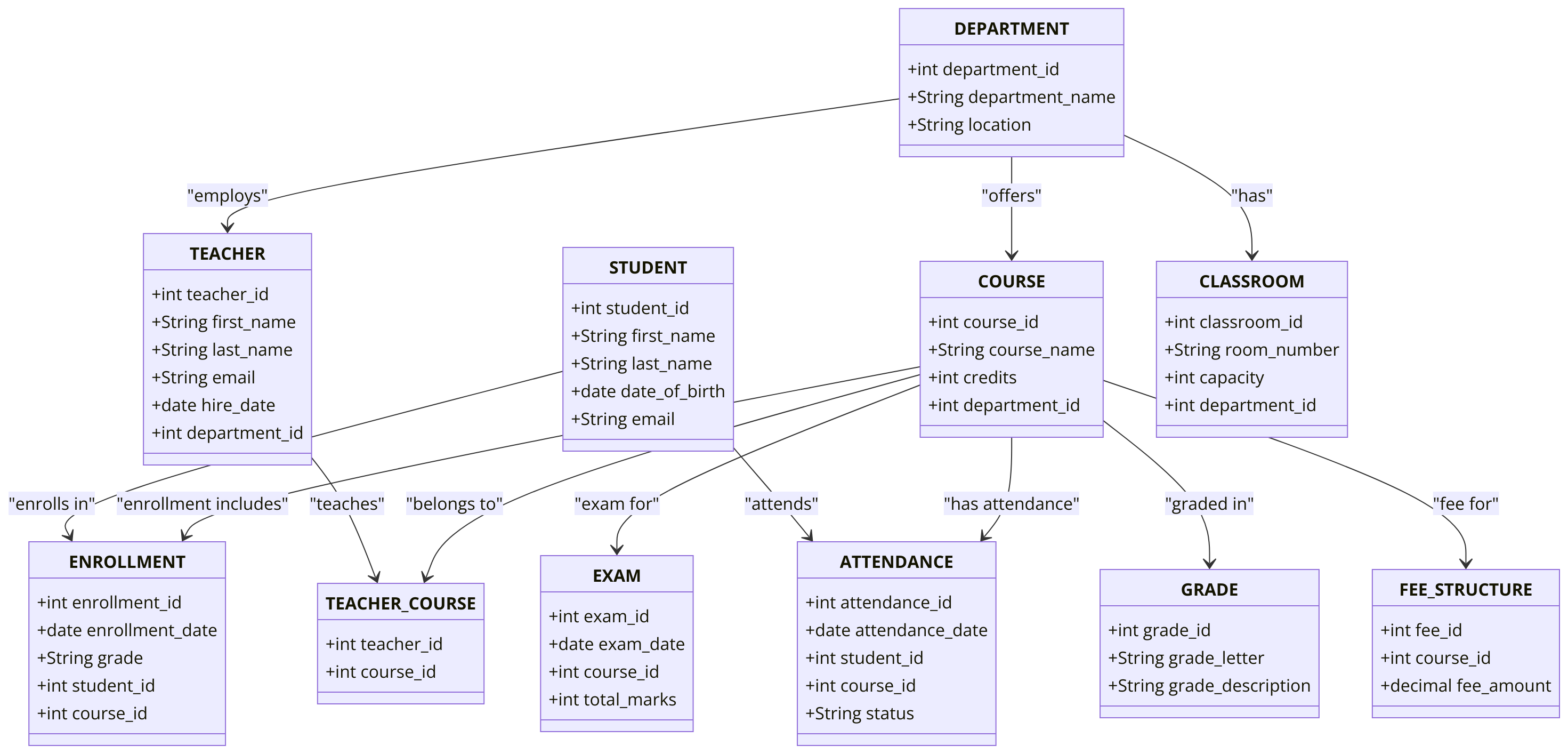
You are required to address a set of Data Query Language (DQL) tasks for a Student Management System using the tables provided. Each task focuses on different aspects of querying data from the system using SELECT statements with a variety of conditions, functions, and joins. Students are required to utilize the tables created during the Chapter 5 DDL assignment.
1. SELECT Command
- Select all columns from the
STUDENTtable. - Select the
first_nameandlast_nameof all students. - Select all students'
emailanddate_of_birth. - Select the
course_nameandcreditsof all courses.
2. WHERE Command
- Select all students who were born before '2000-01-01'.
- Select all courses with more than 3 credits.
- Select all students whose
last_namestarts with the letter 'S'. - Select all students where
emailcontains 'edu' usingLIKE.
3. ORDER BY Command
- Select all students ordered by
last_namein ascending order. - Select all courses ordered by
creditsin descending order. - Select all enrollments ordered by
enrollment_datein descending order. - Select all teachers ordered by
hire_datein ascending order.
4. LIMIT Command
- Select the first 5 students from the
STUDENTtable. - Select the top 3 courses with the highest credits.
- Select the top 10 students ordered by
last_name. - Select the top 2 enrollments with the highest grades.
5. DISTINCT Command
- Select distinct
course_namevalues from theCOURSEtable. - Select distinct
last_namevalues from theSTUDENTtable. - Select distinct
gradevalues from theENROLLMENTtable. - Select distinct
department_namevalues from theDEPARTMENTtable.
6. BETWEEN Command
- Select all students whose
date_of_birthis between '1995-01-01' and '2000-12-31'. - Select all courses where the
creditsare between 2 and 5. - Select all enrollments where the
gradeis between 'A' and 'C'. - Select all teachers hired between '2015-01-01' and '2020-12-31'.
7. IN and NOT IN Command
- Select all students where the
student_idis in (1, 2, 3). - Select all courses where the
creditsare not in (1, 4, 6). - Select all students where
last_nameis in ('Smith', 'Johnson', 'Brown'). - Select all departments where
department_nameis not in ('Physics', 'Mathematics').
8. IS NULL and IS NOT NULL Command
- Select all students where the
emailisNULL. - Select all enrollments where the
gradeis notNULL. - Select all students where
phone_numberisNULL. - Select all teachers where the
emailis notNULL.
9. GROUP BY Command
- Select the
department_nameand count the number of enrolled students in each department grouped bydepartment_name. - Select the month and year from date dim to calculate numer of holidays per month.
- Select the
gradefrom theENROLLMENTtable and group bygradeto calculate the number of enrollments per grade. - Select the
teacher_idand group byteacher_idto calculate the total number of courses assigned to each teacher.
10. HAVING Command
- Select
department_namefrom theDEPARTMENTtable grouped bydepartment_nameand having more than 3 students enrolled in each department. - Select the
course_namefrom theCOURSEtable, grouped bycourse_name, and having averagecreditsgreater than 3. - Select
student_id, group bystudent_id, and having a count of enrollments greater than 2. - Select the
course_idfrom theENROLLMENTtable, grouped bycourse_id, and having a total number of enrollments more than 5.
11. INNER JOIN Command
- Select all students and their enrollments using
INNER JOINbetween theSTUDENTandENROLLMENTtables. - Select all students and the courses they are enrolled in using
INNER JOINbetween theSTUDENT,ENROLLMENT, andCOURSEtables. - Select all students and the
exam_datefor the exams they are enrolled in usingINNER JOINbetweenSTUDENT,ENROLLMENT, andEXAM_SCHEDULE. - Select the
first_nameandlast_nameof students and thecourse_namethey are enrolled in usingINNER JOINbetweenSTUDENTandCOURSE.
12. LEFT JOIN Command
- Select all students and their enrollments using
LEFT JOIN, including students without enrollments. - Select all courses and the corresponding enrollments using
LEFT JOIN, including courses that have no enrollments. - Select all teachers and the courses they teach using
LEFT JOINto include teachers who are not teaching any courses. - Select all students and their exam details using
LEFT JOIN, even if they haven’t taken any exams.
13. COUNT, SUM, AVG Command
- Count the total number of students in the
STUDENTtable. - Count the number of distinct
course_idin theENROLLMENTtable. - Calculate the sum of all
creditsfor each student enrolled in courses. - Calculate the average grade for all students in the
ENROLLMENTtable.
14. CASE Command
- Select all enrollments and create a
CASEstatement to show 'Pass' ifgradeis 'A' or 'B', and 'Fail' otherwise. - Select all students and use a
CASEstatement to show 'Minor' ifdate_of_birthis after '2000-01-01', and 'Adult' otherwise. - Create a
CASEstatement in theENROLLMENTtable to show 'High' ifcreditsare greater than 4, and 'Low' otherwise. - Use a
CASEstatement to categorize teachers by their hire date into 'New' and 'Experienced'.
15. EXISTS and NOT EXISTS Command
- Select students where enrollments exist in the
ENROLLMENTtable. - Select students where the course exists in the
COURSEtable usingEXISTS. - Select students where
gradeis NULL usingNOT EXISTSin theENROLLMENTtable. - Select courses where no enrollment exists using
NOT EXISTS.
16. SUBQUERY Command
- Select all students whose
student_idis in the result of a subquery selectingstudent_idfromENROLLMENTwheregrade= 'A'. - Select all courses where the
course_idis in the result of a subquery selectingcourse_idfrom theEXAM_SCHEDULEtable wheretotal_marks> 80. - Select all students who have never enrolled in any course using a subquery.
- Select all teachers who are assigned to more than 3 courses using a subquery on the
TEACHER_COURSEtable.
17. RANK and DENSE_RANK Command
- Select all students and show their rank based on
date_of_birthusingRANK(). - Select all students and show their rank based on
date_of_birthusingDENSE_RANK(). - Rank students based on their total number of enrollments using
RANK(). - Use
DENSE_RANK()to rank students by their average grade in theENROLLMENTtable.
18. PIVOT and UNPIVOT
- Pivot the enrollment data by
gradeandcourse_id. - Unpivot the exam marks to get a flattened structure of marks and
course_id. - Pivot student enrollments by
student_idand show the total enrollments for each course. - Unpivot exam details to show the
exam_dateandtotal_marksin a single row per student.
19. UNION and UNION ALL Command
- Select all courses using
UNION ALLto include duplicates from multiple departments. - Select enrollments from department 1 and department 2 using
UNION. - Select all students from two different semesters using
UNION ALL.
20. COALESCE, IFNULL, NULLIF Command
- Select all students and use
COALESCEto replace null emails with 'No Email'. - Use
IFNULLto replace nullgradevalues in theENROLLMENTtable. - Use
NULLIFto comparetotal_marksandpassing_marksin theEXAMtable and returnNULLif they are the same. - Select all teachers and replace null
phone_numberwith 'Unknown' usingCOALESCE.
21. STRING Functions
- Select all students'
first_namein uppercase using theUPPER()function. - Select all courses'
course_namein lowercase using theLOWER()function. - Use
CONCAT()to combine thefirst_nameandlast_nameof students. - Select all students'
last_nameand find the length of the name usingLENGTH().
22. DATE Functions
- Select all students and show their
date_of_birthformatted as 'YYYY-MM-DD' usingDATE_FORMAT(). - Add 1 year to all
hire_datevalues in theTEACHERtable usingDATE_ADD(). - Subtract 1 month from all
exam_datevalues usingDATE_SUB(). - Select all students and extract the year from their
date_of_birthusingYEAR().
23. NUMERIC Functions
- Select the
total_marksfrom theEXAM_SCHEDULEtable and round them to the nearest integer usingROUND(). - Select all
creditsfrom theCOURSEtable and useCEIL()to round up. - Use
FLOOR()to round down thecreditsin theCOURSEtable. - Select the highest
creditsfrom theCOURSEtable usingMAX().
24. CAST and CONVERT Command
- Select all students and cast the
student_idas a string usingCAST(). - Convert
total_marksin theEXAM_SCHEDULEtable toDECIMALusingCONVERT(). - Cast
creditsin theCOURSEtable toINTEGER. - Convert the
date_of_birthfromSTUDENTintoCHARformat.
25. CONCAT and CONCAT_WS Functions
- Use
CONCAT()to joinfirst_nameandlast_namewith a space in between. - Use
CONCAT_WS()to combine thedepartment_nameandlocationwith a comma. - Use
CONCAT()to combine thecourse_nameandcreditsfrom theCOURSEtable. - Use
CONCAT_WS()to combinefirst_name,last_name, andemailfrom theSTUDENTtable.
26. LIKE and NOT LIKE
- Select students whose
emailends with 'example.com' usingLIKE. - Select courses where
course_namecontains 'Math' usingLIKE. - Select students whose
last_namedoes not start with 'S' usingNOT LIKE. - Select departments where
department_namecontains 'Engineering' usingLIKE.
27. EXISTS and NOT EXISTS
- Select students where enrollments exist using
EXISTSin theENROLLMENTtable. - Select students where the
gradeis NULL usingNOT EXISTSin theENROLLMENTtable. - Select courses where enrollments exist using
EXISTS. - Select teachers who have no assigned courses using
NOT EXISTS.
28. UNION and INTERSECT
- Select common students enrolled in two different courses using
INTERSECT. - Select all courses in two departments using
UNION. - Select students who are in both
PUPILandSTUDENTusingINTERSECT.
29. JOIN Commands
- Select all students and their corresponding enrollments using
INNER JOINbetweenSTUDENTandENROLLMENT. - Select all teachers and their courses using
LEFT JOINbetweenTEACHERandTEACHER_COURSE. - Select all students and their department names using
INNER JOINbetweenSTUDENTandDEPARTMENT. - Select all courses and the classrooms they are taught in using
INNER JOIN.
GOOD LUCK WITH YOUR ASSIGNMENT!!!
Don't forget to contact us if you need any further assistance with your assignments, and most importantly, for a manual review and approval of your work.
To gain complete access, login with gmail or outlook, no need of signup, click here
Sample ERD Data Model for Student Management System
Comments Not Found