
MySQL
UNION and UNION ALL
In MySQL, the UNION and UNION ALL operators are used to combine the result sets of two or more SELECT queries. Both operators allow you to merge results from multiple queries, but there are important differences between them. The UNION operator eliminates duplicate rows, while UNION ALL includes all rows, including duplicates. These operators are useful when you need to gather data from multiple tables or queries and combine them into a single result set.
Here’s a detailed guide on using UNION and UNION ALL in MySQL, with examples for new students:
Using
UNION:- The
UNIONoperator combines the result sets of two or moreSELECTqueries and removes any duplicate rows in the final result. - Syntax:
SELECT first_name, last_name, department_id FROM employees WHERE department_id = 1 UNION SELECT first_name, last_name, department_id FROM employees WHERE department_id = 2;- This query retrieves employees from both department 1 and department 2, eliminating any duplicate rows.
Additional Points:
- Each
SELECTstatement must have the same number of columns and corresponding data types. - By default,
UNIONsorts the result set, which can affect performance.
- The
Using
UNION ALL:- The
UNION ALLoperator combines the result sets of two or moreSELECTqueries and includes all rows, even if there are duplicates. - Example:
SELECT first_name, last_name, department_id FROM employees WHERE department_id = 1 UNION ALL SELECT first_name, last_name, department_id FROM employees WHERE department_id = 2;- This query retrieves employees from both department 1 and department 2, including any duplicate rows.
Additional Points:
UNION ALLdoes not remove duplicates, making it faster thanUNION, especially for large datasets.- Use
UNION ALLwhen you know the result sets don’t contain duplicates, or when you need to keep all records.
- The
Combining More Than Two Queries with
UNIONandUNION ALL:- You can combine more than two
SELECTqueries using eitherUNIONorUNION ALL. - Example:
SELECT first_name, last_name, department_id FROM employees WHERE department_id = 1 UNION ALL SELECT first_name, last_name, department_id FROM employees WHERE department_id = 2 UNION ALL SELECT first_name, last_name, department_id FROM employees WHERE department_id = 3;- This query retrieves employees from departments 1, 2, and 3, including any duplicate records.
- You can combine more than two
Using
ORDER BYwithUNION:- If you want to sort the final result set after combining queries with
UNION, you can apply theORDER BYclause to the entire result set (not to individual queries). - Example:
SELECT first_name, last_name FROM employees WHERE department_id = 1 UNION SELECT first_name, last_name FROM employees WHERE department_id = 2 ORDER BY last_name;- This query combines employees from departments 1 and 2 and sorts the final result set by the
last_namecolumn.
- If you want to sort the final result set after combining queries with
Handling Different Data Types in
UNION:- The columns in the
SELECTstatements must have the same number of columns, and their data types must be compatible. - Example:
SELECT first_name, salary FROM employees WHERE department_id = 1 UNION ALL SELECT first_name, salary FROM employees WHERE department_id = 3;- Both queries return the same number of columns with compatible data types (
first_nameis a string, andsalaryis numeric).
- The columns in the
Performance Considerations:
UNIONis slower thanUNION ALLbecause it must sort and remove duplicates. UseUNION ALLwhen performance is a concern and duplicates are not an issue.- Example:
SELECT first_name, last_name FROM employees WHERE salary > 50000 UNION ALL SELECT first_name, last_name FROM employees WHERE department_id = 2;- This query retrieves employees with a salary greater than 50,000 and employees from department 2, including all duplicate records.
Using
UNIONwith Aggregates:- You can combine aggregate results from multiple queries using
UNIONorUNION ALL. - Example:
SELECT department_id, COUNT(*) AS employee_count FROM employees WHERE department_id = 1 GROUP BY department_id UNION SELECT department_id, COUNT(*) AS employee_count FROM employees WHERE department_id = 2 GROUP BY department_id;- This query combines the employee counts from departments 1 and 2, eliminating duplicates.
- You can combine aggregate results from multiple queries using
UNIONwith Complex Queries:UNIONandUNION ALLcan be used to combine complex queries, including those with joins.- Example:
SELECT e.first_name, e.last_name, d.department_name FROM employees e JOIN departments d ON e.department_id = d.department_id WHERE e.department_id = 1 UNION ALL SELECT e.first_name, e.last_name, d.department_name FROM employees e JOIN departments d ON e.department_id = d.department_id WHERE e.department_id = 2;- This query retrieves employee names and department names for departments 1 and 2, including duplicates.
The UNION and UNION ALL operators are powerful tools for combining data from multiple queries into a single result set. While UNION eliminates duplicates, UNION ALL preserves all records, making it faster and more efficient in certain cases.
To gain complete access, login with gmail or outlook, no need of signup, click here

Test code
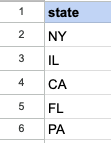
The provided SQL query retrieves distinct values from the "state" column in both the "org_employee" and "org_client" tables using the UNION operator.
SELECT state
FROM org_employee
UNION
SELECT state
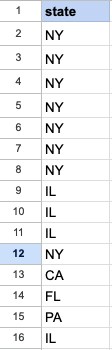
FROM org_client;The given SQL query retrieves all values from the "state" column in both the "org_employee" and "org_client" tables using the UNION ALL operator. This includes duplicate values if they exist in either or both of the tables.
SELECT state
FROM org_employee
UNION ALL
SELECT state
FROM org_client;Example 1:
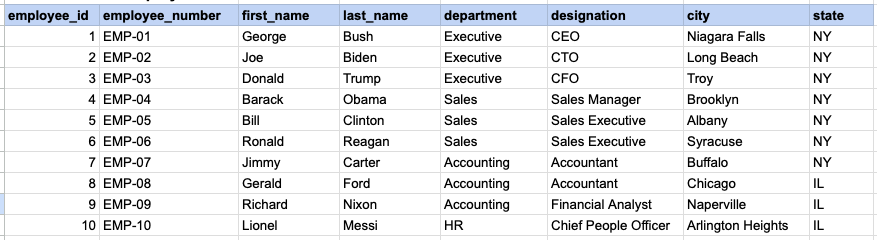
Let's delve into SQL's UNION and UNION ALL operators. This example will showcase the results obtained from both UNION and UNION ALL, simultaneously illustrating the distinctions between them.
Example 1 - Raw data from employee table
Example 1 - Raw data from client table

Example 1 - UNION query
SELECT state FROM org_employee UNION SELECT state FROM org_client;Example 1 - Query data mapping for UNION
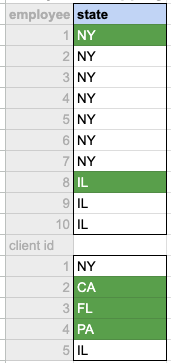
In the given image, the green hue indicates the data that has been chosen or meets the criteria specified in our query. It's evident that only unique values from both the employee and client tables are selected as the output.
Example 1 - Query Output for UNION
Example 1 - UNION ALL query
SELECT state FROM org_employee UNION ALL SELECT state FROM org_client;Example 1 - Query data mapping for UNION ALL
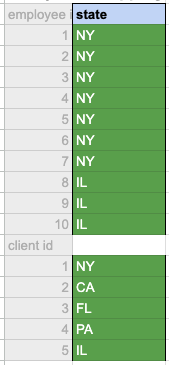
In the given image, the green hue indicates the data that has been chosen or meets the criteria specified in our query. It's evident that all values both the employee and client tables are selected as the output.
Example 1 - Query Output for UNION ALL
Comments Not Found