
MySQL
Arithmetic Operators
In MySQL, arithmetic operators are used to perform mathematical operations on numeric data in queries. These operators allow you to add, subtract, multiply, divide, and perform other basic calculations directly in your SQL queries. Arithmetic operators are commonly used to compute totals, differences, averages, or any other mathematical results based on table data.
Here’s a guide on the most common arithmetic operators in MySQL, along with examples:
Addition (
+):- The addition operator
+is used to add two numbers or fields together. - Syntax:
SELECT first_name, last_name, salary + 1000 AS increased_salary FROM employees;- This query adds 1000 to each employee's salary and returns the updated salary.
- The addition operator
Subtraction (
-):- The subtraction operator
-is used to subtract one number or field from another. - Example:
SELECT first_name, last_name, salary - 500 AS reduced_salary FROM employees;- This query subtracts 500 from each employee's salary.
- The subtraction operator
Multiplication (
*):- The multiplication operator
*is used to multiply two numbers or fields. - Example:
SELECT first_name, last_name, salary * 12 AS annual_salary FROM employees;- This query multiplies each employee’s salary by 12 to calculate their annual salary.
- The multiplication operator
Division (
/):- The division operator
/is used to divide one number or field by another. - Example:
SELECT first_name, last_name, salary / 2 AS half_salary FROM employees;- This query divides each employee’s salary by 2, returning half of their salary.
- The division operator
Modulus (
%):- The modulus operator
%returns the remainder of the division between two numbers. - Example:
SELECT employee_id, salary % 1000 AS remainder FROM employees;- This query returns the remainder when the salary is divided by 1000.
- The modulus operator
Combining Arithmetic Operators:
- You can combine multiple arithmetic operators in a single query to perform more complex calculations.
- Example:
SELECT first_name, last_name, (salary * 12) - 5000 AS adjusted_annual_salary FROM employees;- This query calculates the annual salary for each employee, then subtracts 5000 to account for some deduction.
Using Arithmetic Operators in the
WHEREClause:- You can use arithmetic operators in the
WHEREclause to filter records based on calculated values. - Example:
SELECT first_name, last_name FROM employees WHERE (salary * 12) > 60000;- This query retrieves employees whose annual salary (calculated by multiplying the salary by 12) is greater than 60,000.
- You can use arithmetic operators in the
Using Arithmetic Operators in
ORDER BY:- You can use arithmetic operators in the
ORDER BYclause to sort results based on calculated values. - Example:
SELECT first_name, last_name, salary FROM employees ORDER BY salary * 12 DESC;- This query orders employees by their annual salary in descending order.
- You can use arithmetic operators in the
Arithmetic Operations with Null Values:
- If one of the operands in an arithmetic operation is
NULL, the result will beNULL. You can useIFNULL()to handleNULLvalues. - Example:
SELECT first_name, last_name, IFNULL(salary * 12, 0) AS annual_salary FROM employees;- This query returns the annual salary and treats
NULLsalaries as 0.
- If one of the operands in an arithmetic operation is
Performance Considerations:
- Arithmetic operations are computed on the fly, so consider their impact on performance, especially when performing complex calculations on large datasets. Calculated values in large datasets can be optimized with indexes or precomputed fields if necessary.
These arithmetic operators provide basic mathematical functionality directly within SQL queries, allowing you to perform calculations and filter or sort data based on those calculations. They are essential tools for analyzing and processing numeric data in your MySQL queries.
To gain complete access, login with gmail or outlook, no need of signup, click here

Test code
In this example, our goal is to create a new column named "Total Receipt Amount" by performing an arithmetic addition operation to sum the amounts from the "Sub Total", "Tax", and "Shipment" columns.
SELECT order_number, client_id, order_status_id, order_date
    sub_total, tax_amount, shipping_amount,
    (sub_total + tax_amount + shipping_amount) AS total_amount
FROM act_order
ORDER BY order_number;This query aims to create a new column titled "Profit Margin Per Product Unit", employing a subtraction arithmetic operation to determine the margin by deducting the purchase price from the selling price.
SELECT product_id, product_code, product_name
    purchase_price, selling_price,
    (selling_price - purchase_price) as profit_per_unit
FROM prd_product;This query is designed to add a new column that calculates the subtotal for each product by using a multiplication arithmetic operation, which involves multiplying the number of units by the unit rate.
SELECT
    order_id,
    product_id,
    quantity,
    unit_rate,
    ( quantity * unit_rate) as sub_total
FROM act_order_detail;RAW DATA FOR ADDITION OPERATOR
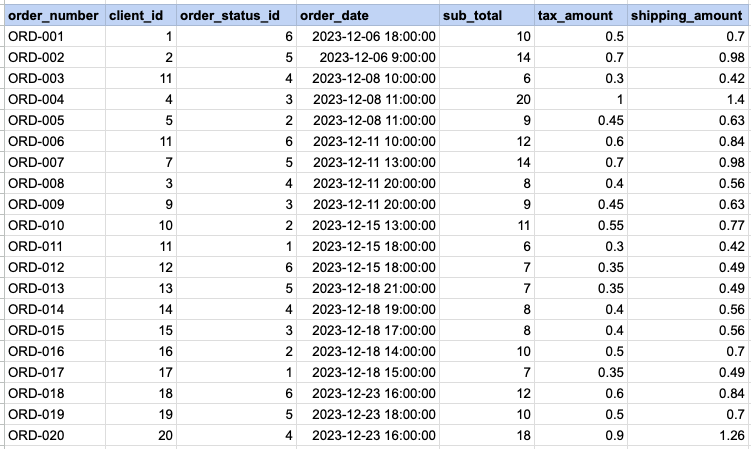
SELECT order_number, client_id, order_status_id, order_date, sub_total, tax_amount, shipping_amount, (sub_total + tax_amount + shipping_amount) AS total_amount FROM act_order ORDER BY order_number;Data Mapping for ADDITION OPERATOR
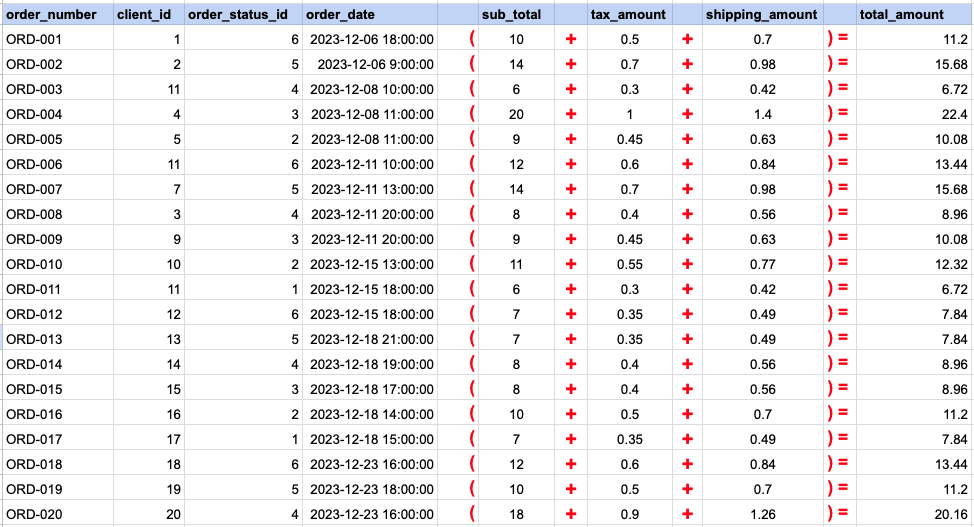
In this data mapping illustration, it's shown how the 'Total Amount' column, which does not originally exist in the raw data, is generated. This is accomplished by using an addition arithmetic operator within an SQL SELECT statement. This operation effectively adds values from existing columns to compute the total amount for each record.
RAW DATA FOR SUBSTRACTION OPERATOR
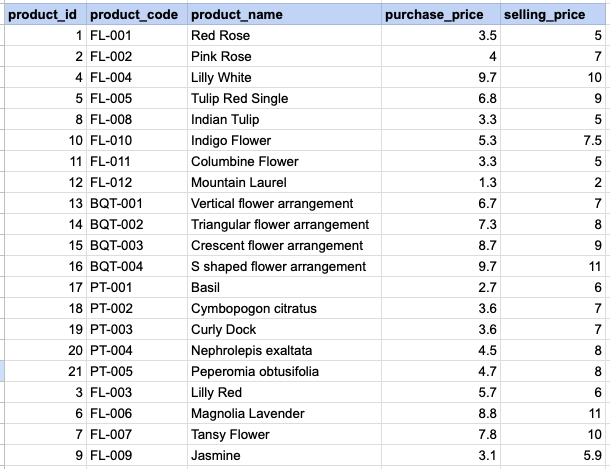
SELECT product_id, product_code, product_name, purchase_price, selling_price, (selling_price - purchase_price) as profit_per_unit FROM prd_product;Data Mapping for SUBSTRACTION OPERATOR
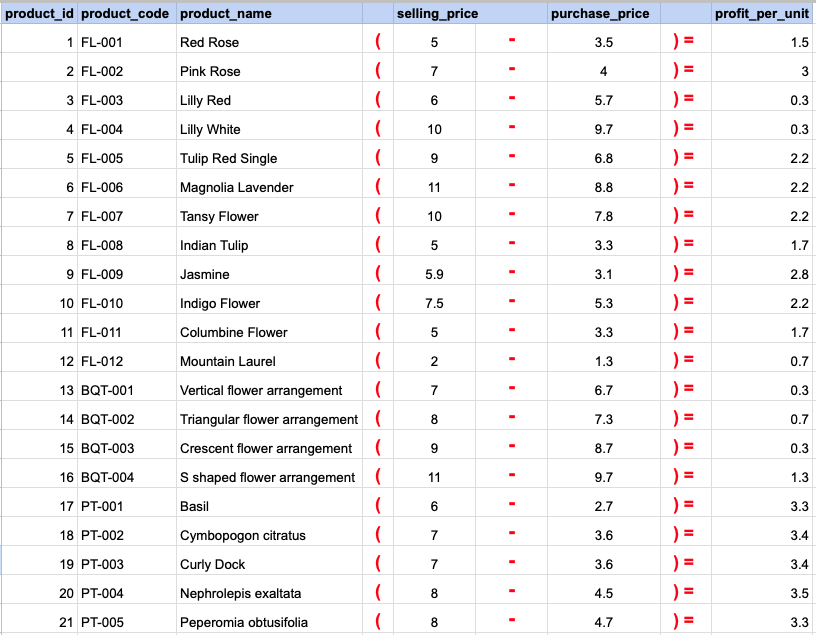
In this data mapping illustration, it's shown how the 'Profit' column, which does not originally exist in the raw data, is generated. This is accomplished by using an substraction arithmetic operator within an SQL SELECT statement. This operation effectively subtracts values from existing columns to compute the profit amount for each record.
RAW DATA FOR MULTIPLICATION OPERATOR
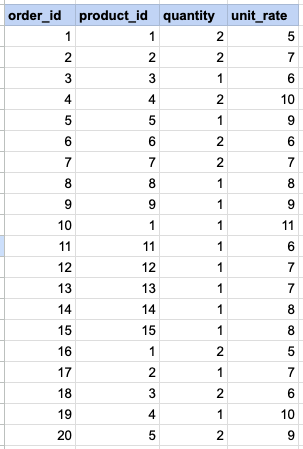
SELECT order_id, product_id,quantity, unit_rate, ( quantity * unit_rate) as sub_total FROM act_order_detail;Data Mapping for MULTIPLICATION OPERATOR
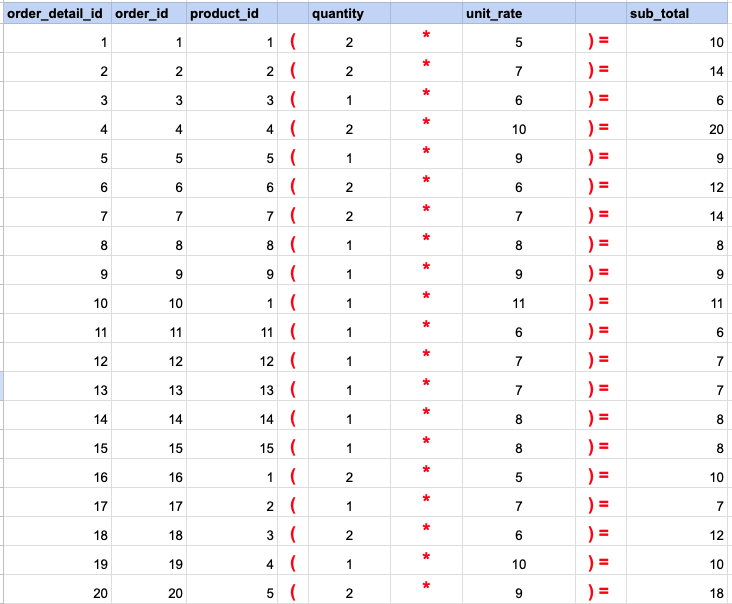
In this data mapping illustration, it's shown how the 'Sub Total' column, which does not originally exist in the raw data, is generated. This is accomplished by using an multiplication arithmetic operator within an SQL SELECT statement. This operation effectively multiplies values from existing columns to compute the total amount for each record.
Comments Not Found