
MySQL
ORDER BY
The ORDER BY clause in MySQL is an important part of Data Query Language (DQL) that allows you to sort the result set of a query by one or more columns. By default, the ORDER BY clause sorts results in ascending order, but you can also specify descending order. It is particularly useful when you want to present data in a meaningful order, such as sorting by name, date, or salary.
Here’s a detailed guide on how to use the ORDER BY clause with examples for new students:
Basic Syntax for Ascending Order:
- By default,
ORDER BYsorts the results in ascending order. - Syntax:
SELECT * FROM employees ORDER BY salary;- This query will return all employees sorted by salary in ascending order.
- By default,
Using
ORDER BYwith Descending Order:- To sort in descending order, you use the
DESCkeyword. - Example:
SELECT * FROM employees ORDER BY salary DESC;- This query will return all employees sorted by salary in descending order.
- To sort in descending order, you use the
Sorting by Multiple Columns:
- You can sort by multiple columns. The results will first be sorted by the first column, and if there are duplicates, then by the second column.
- Example:
SELECT * FROM employees ORDER BY department_id, salary DESC;- This will sort employees by
department_idin ascending order and, within each department, bysalaryin descending order.
Using Aliases in
ORDER BY:- You can use aliases (as defined in the
SELECTclause) inORDER BYto sort the results. - Example:
SELECT employee_id, salary * 12 AS annual_salary FROM employees ORDER BY annual_salary DESC;- This query will sort employees based on their annual salary (calculated as
salary * 12) in descending order.
- You can use aliases (as defined in the
Combining
ORDER BYwithLIMIT:- It’s common to use
ORDER BYwithLIMITto get the top or bottom results. - Example:
SELECT * FROM employees ORDER BY hire_date DESC LIMIT 5;- This query will return the 5 most recently hired employees.
- It’s common to use
Sorting with
NULLValues:- By default,
NULLvalues are treated as lower than any non-NULLvalue when sorting in ascending order, but you can adjust the sorting behavior in some cases. - Example:
SELECT * FROM employees ORDER BY manager_id DESC;- This will return all employees sorted by
manager_idin descending order, whereNULLvalues will appear last.
- By default,
Performance Considerations:
- Sorting large datasets with
ORDER BYcan be resource-intensive, so it's important to have indexes on columns commonly used for sorting to optimize performance.
- Sorting large datasets with
These examples demonstrate how the ORDER BY clause can be used to control the order of your query results, which is essential for organizing and displaying data effectively. Whether sorting by a single column, multiple columns, or working with calculated fields, ORDER BY is a fundamental tool in querying and reporting.
To gain complete access, login with gmail or outlook, no need of signup, click here

Test code
Sort orders table data using ORDER BY sql clause against a date and time column, defaulting to ascending order (ASC).
SELECT *
FROM act_order
ORDER BY order_date;Select data using ORDER BY clause, ascending order, results same as above query.
SELECT *
FROM act_order
ORDER BY order_date ASC;Retrieve data using the ORDER BY clause and arrange it in descending order.
SELECT *
FROM act_order
ORDER BY order_date DESC;Retrieve data using the ORDER BY clause, specifically sorting products by product name in ascending order (A to Z).
SELECT *
FROM prd_product
ORDER BY product_name ASC;Retrieve data using the ORDER BY clause, specifically sorting products by product name in descending order (Z to A).
SELECT *
FROM prd_product
ORDER BY product_name DESC;Retrieve data using the ORDER BY clause, specifically sorting order details by selling price in ascending order, with smaller amounts displayed at the top.
SELECT order_detail_id, product_id, quantity, unit_rate, (quantity * unit_rate)
FROM act_order_detail
ORDER BY (quantity * unit_rate ) ASC;Retrieve data using the ORDER BY clause, specifically sorting order details by selling price in ascending order, with higher amounts displayed at the top.
SELECT order_detail_id, product_id, quantity, unit_rate, (quantity * unit_rate)
FROM act_order_detail
ORDER BY (quantity * unit_rate ) DESC;Retrieve data using the ORDER BY clause, specifically selecting product names and total units sold, with the most sold items displayed at the top.
SELECT a.product_name
    sum(b.quantity) as units_sold
FROM prd_product a
INNER JOIN act_order_detail b on b.product_id = a.product_id
GROUP BY a.product_name
ORDER BY sum(b.quantity) DESC;Retrieve data using the ORDER BY clause, specifically selecting client names and order numbers, with recent orders appearing at the top. Note that the column used for ordering (order date) is not part of the SELECT columns.
SELECT a.first_name as client_name
    b.order_number
FROM org_client a
INNER JOIN act_order b on b.client_id = a.client_id
ORDER BY b.order_date DESC;You have the flexibility to employ both ASC and DESC orders within a single query. In the following example, the data is initially sorted by birth year, placing younger clients at the top. After that the data is sorted alphabetically by name.
SELECT client_id, birth_year, first_name, last_name
FROM org_client
ORDER BY birth_year DESC, (first_name, last_name) ASC;Example 1:
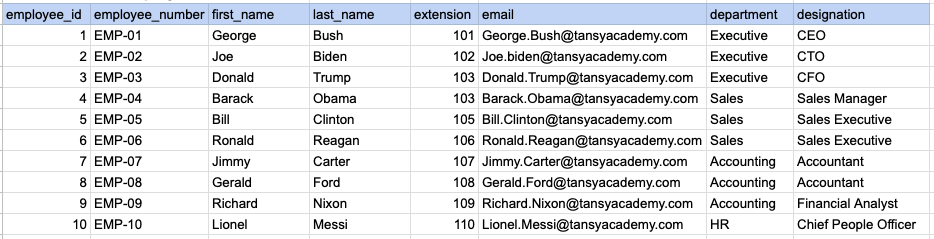
Let's understand the process of extracting data from employee table using ORDER BY sql clause. In this case, we aim to sort the data by employee's last name.
Example 1 - Raw data from employee table
Example 1 - Query
SELECT employee_number, first_name, last_name FROM org_employee ORDER BY first_name;Example 1 - Query data mapping
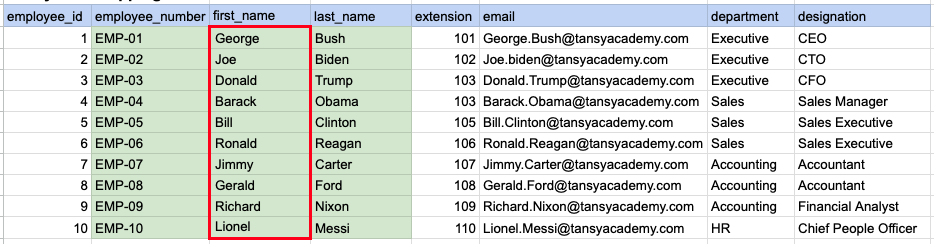
In the depicted illustration, the data highlighted in green represents the selected information that aligns with our query criteria. Additionally, the red box signifies the column requiring alphabetical sorting prior to generating the ultimate output.
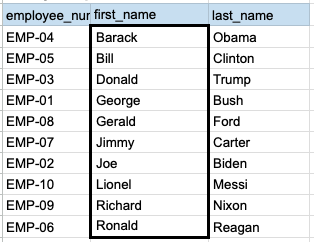
Example 1 - Query Output
Example 2:
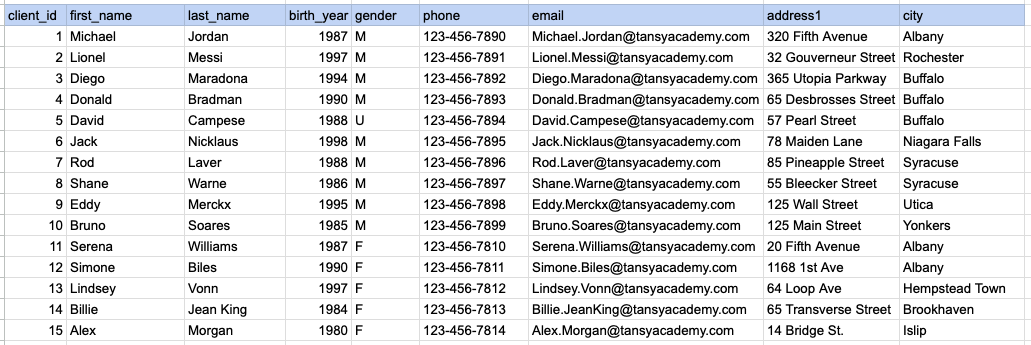
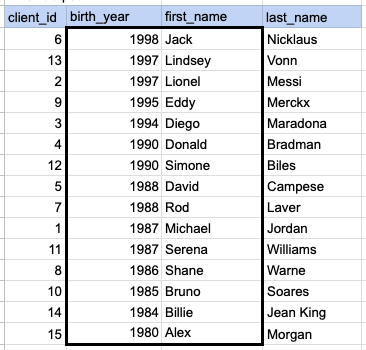
Let's explore the procedure of retrieving data from the client's table using the SQL ORDER BY clause. In this example, our initial objective is to arrange the data in descending order based on the year of birth. Following that, we proceed to sort the output from step 1 based on the first name in ascending order.
Example 2 - Raw data from client table
Example 2 - Query
SELECT client_id, birth_year, first_name, last_name FROM org_client ORDER BY birth_year DESC, first_name ASC;Example 2 - Query data mapping
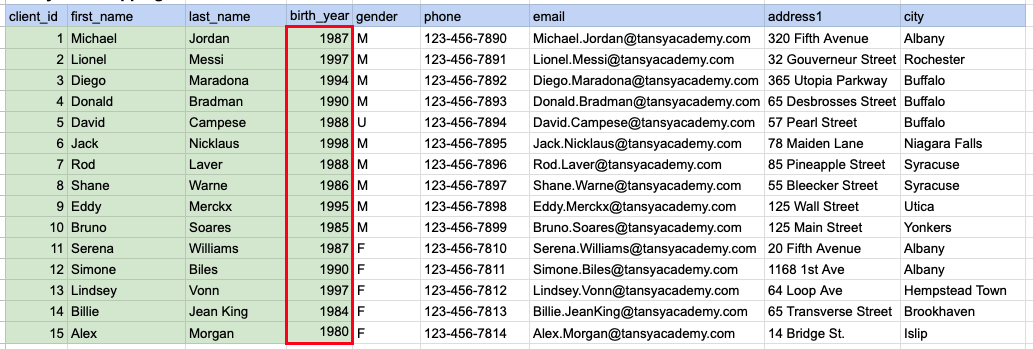
In the image above, the green color indicates the data that has been chosen or meets the criteria for our query. Red box indicates that as step1 we need to sort the data by year of birth in descending order.
Example 2 - Step 2
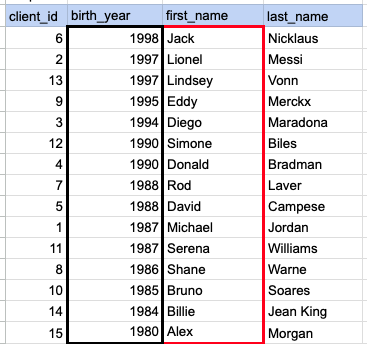
In the depicted image, the data has been arranged in descending order based on the specified year of birth, and an additional sorting is necessary based on the first name in ascending order.
Example 2 - Query Output
Comments Not Found