
MySQL
'>' and '<' Operator (greater than, less than)
In MySQL, the > (greater than) and < (less than) operators are used in the WHERE clause to filter rows based on comparisons of numeric, date, or even text values. These operators allow you to retrieve records where a column's value is greater than or less than a specified value. These comparisons are essential for queries involving ranges, salary comparisons, or date filtering.
Here’s a detailed explanation of how to use the > and < operators in MySQL, along with examples for new students:
Basic Syntax for
>(Greater Than):- The
>operator is used to retrieve rows where the column value is greater than a specified value. - Syntax:
SELECT * FROM employees WHERE salary > 50000;- This query returns all employees with a salary greater than 50,000.
- The
Basic Syntax for
<(Less Than):- The
<operator is used to retrieve rows where the column value is less than a specified value. - Example:
SELECT * FROM employees WHERE salary < 30000;- This query returns all employees whose salary is less than 30,000.
- The
Using
>and<with Dates:- These operators are useful for filtering rows based on date ranges.
- Example:
SELECT * FROM employees WHERE hire_date > '2021-01-01';- This query returns employees hired after January 1, 2021.
Combining
>and<in a Query:- You can use both operators together to define a range. This is especially useful when querying values that fall between two points.
- Example:
SELECT * FROM employees WHERE salary > 40000 AND salary < 80000;- This query returns all employees whose salaries are between 40,000 and 80,000.
Using
>and<with Strings:- The
>and<operators can also be used to compare string values based on lexicographical order. - Example:
SELECT * FROM employees WHERE last_name > 'M';- This query returns all employees whose last names start with a letter greater than 'M' in alphabetical order.
- The
Combining with Other Conditions:
- You can combine
>and<with other operators likeAND,OR, andNOTto refine your queries. - Example:
SELECT * FROM employees WHERE department_id = 2 AND salary > 50000;- This query returns employees in department 2 with a salary greater than 50,000.
- You can combine
Handling
NULLValues:- Keep in mind that
>and<comparisons withNULLvalues will always returnFALSE. If you're working with data that might containNULLvalues, make sure to handle these cases explicitly. - Example:
SELECT * FROM employees WHERE salary > 50000 OR salary IS NULL;- This query returns employees with a salary greater than 50,000 or where the salary is
NULL.
- Keep in mind that
Performance Considerations:
- Using
>and<in queries can impact performance, especially when querying large datasets. Ensure that columns involved in these comparisons are indexed to improve query speed. - Example:
SELECT * FROM employees WHERE hire_date < '2020-01-01';- If
hire_dateis indexed, this query will perform more efficiently on larger datasets.
- Using
These examples show how to use the > and < operators in MySQL to perform basic comparisons. These operators are vital for filtering results based on numerical ranges, dates, or even alphabetical order, making them essential for querying and data analysis.
To gain complete access, login with gmail or outlook, no need of signup, click here

Test code
SELECT query to fetch salaries exceeding 150,000, excluding the amount of 150,000 itself.
SELECT *
FROM org_employee
WHERE salary > 150000
ORDER BY salary;SELECT query to retrieve salaries equal to or greater than 150,000, including the amount of 150,000 itself.
SELECT *
FROM org_employee
WHERE salary >= 150000
ORDER BY salary;SELECT query to fetch date and time information, order date greater than or equal to December 15th.
SELECT *
FROM act_order
WHERE order_date >= '2023-12-15'
ORDER BY order_date;
-- (Oracle) WHERE order_date >= to_date('15/12/23')
Example 1:
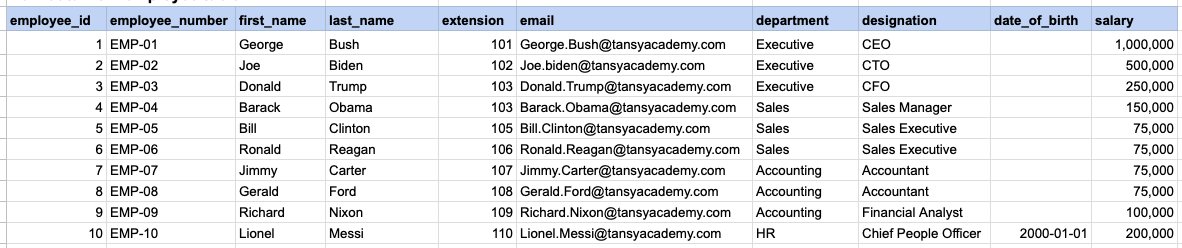
Let's explore the procedure of extracting information from a designated table using the '>' SQL operator with numeric data. This query retrieves all rows from the employee table where the salary column is greater than 150k.
Example 1 - Raw data from employee table
Example 1 - Query
SELECT * FROM org_employee WHERE salary > 150000 ORDER BY salary;Example 1 - Query data mapping
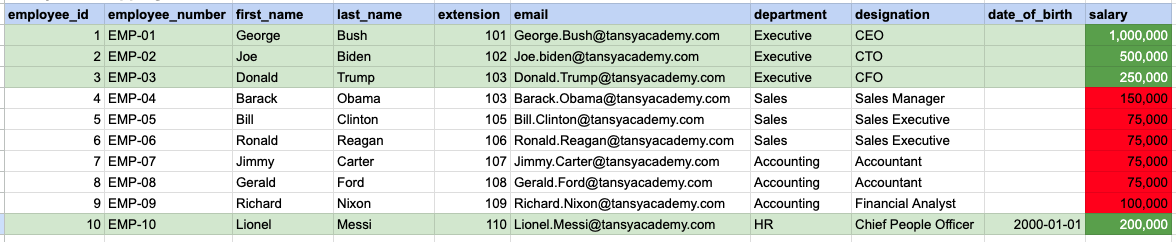
In the provided image, the green color signifies the data that has been selected or satisfies the conditions specified in our query. Data points in red indicate information that does not meet the criteria set by the query. Note that salary 150,000 is not selected.
Example 1 - Query Output

Example 2:
Let's explore the procedure for extracting information from a designated table using '>=' operator on integer data. This query retrieves all rows from the employee table where the salary column is greater than 150k, including border line salary of 150k.
Example 2 - Raw data from employee table
Example 2 - Query
SELECT * FROM org_employee WHERE salary >= 150000 ORDER BY salary;Example 2 - Query data mapping
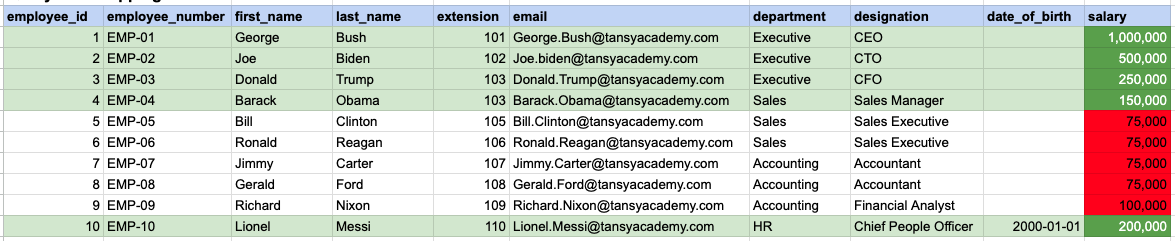
In the provided image, the green color signifies the data that has been selected or satisfies the conditions specified in our query. Data points in red indicate information that does not meet the criteria set by the query. Note that salary 150,000 is also selected, when compared to above query where 150,000 was not selected.
Example 2 - Query Output

Example 3:
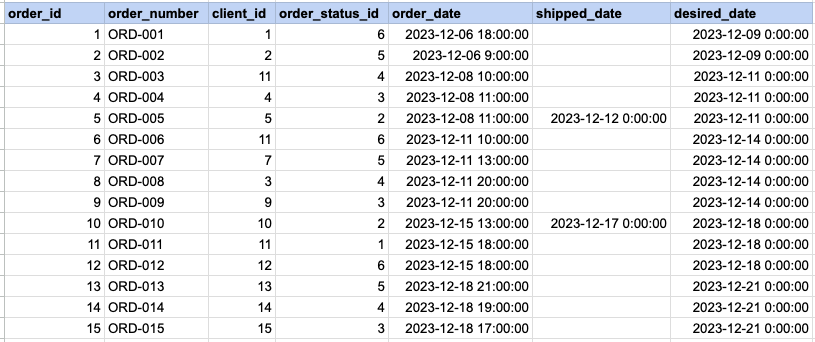
Let's explore the procedure for extracting information from a designated table using the '>=' SQL operator on date time data. This query retrieves all rows from the orders table where the order date is greater than or equal to '2023-12-15'
Example 3 - Raw data from order table
Example 3 - Query
SELECT * FROM act_order WHERE order_date >= '2023-12-15' ORDER BY order_date;Example 3 - Query data mapping
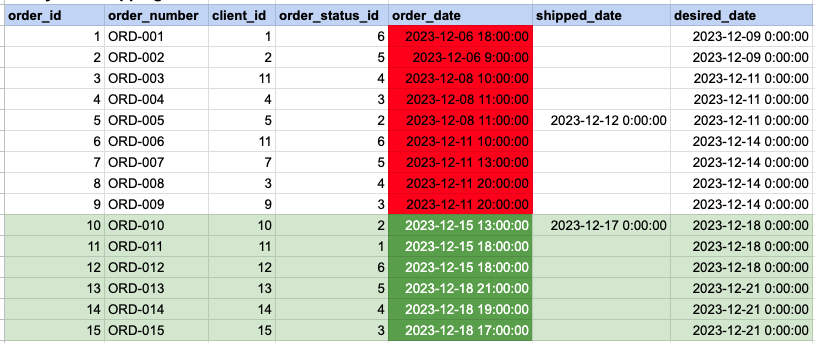
In the provided image, the green color signifies the data that has been selected or satisfies the conditions specified in our query. Data points in red indicate information that does not meet the criteria set by the query.
Example 3 - Query Output

Comments Not Found