
MySQL
SQL Execution Order
In MySQL, the SQL execution order defines the sequence in which the various clauses of a query are processed by the database engine. Understanding this execution order is essential for writing efficient queries and ensuring accurate results. The logical order of execution may differ from the written order of clauses in an SQL query. Below is the logical execution order of an SQL query along with explanations and examples.
SQL Execution Order
FROM:
- The
FROMclause is executed first. It specifies the tables from which the data will be retrieved. - Example:
SELECT first_name, last_name FROM employees;- This query selects the
first_nameandlast_namefrom theemployeestable.
- The
JOIN:
- If the query includes a
JOIN, it is processed next. The database joins the specified tables based on the given condition. - Example:
SELECT e.first_name, e.last_name, d.department_name FROM employees e JOIN departments d ON e.department_id = d.department_id;- This query retrieves employee names and their department names by joining the
employeesanddepartmentstables.
- If the query includes a
WHERE:
- The
WHEREclause filters rows from the tables before any groupings are applied. - Example:
SELECT first_name, last_name FROM employees WHERE salary > 50000;- This query retrieves employees who earn more than 50,000.
- The
GROUP BY:
- The
GROUP BYclause groups rows that share the same values in specified columns, typically used with aggregate functions likeCOUNT(),SUM(), etc. - Example:
SELECT department_id, COUNT(*) AS employee_count FROM employees GROUP BY department_id;- This query groups employees by department and returns the count of employees in each department.
- The
HAVING:
- The
HAVINGclause is used to filter groups created by theGROUP BYclause. It works similarly to theWHEREclause but applies to aggregated data. - Example:
SELECT department_id, COUNT(*) AS employee_count FROM employees GROUP BY department_id HAVING employee_count > 5;- This query returns departments with more than five employees.
- The
SELECT:
- The
SELECTclause specifies which columns or expressions to retrieve. At this stage, any computed columns or aliases are evaluated. - Example:
SELECT first_name, last_name, salary * 12 AS annual_salary FROM employees;- This query calculates the annual salary for each employee.
- The
DISTINCT:
- The
DISTINCTkeyword is applied to remove duplicate rows from the result set. - Example:
SELECT DISTINCT department_id FROM employees;- This query retrieves unique department IDs from the
employeestable.
- The
ORDER BY:
- The
ORDER BYclause sorts the final result set in either ascending (ASC) or descending (DESC) order. - Example:
SELECT first_name, last_name, salary FROM employees ORDER BY salary DESC;- This query retrieves employees and sorts them by salary in descending order.
- The
LIMIT:
- The
LIMITclause is processed last. It restricts the number of rows returned by the query. - Example:
SELECT first_name, last_name, salary FROM employees ORDER BY salary DESC LIMIT 5;- This query retrieves the top 5 highest-paid employees.
- The
Full Example with Execution Order:
SELECT department_id, COUNT(*) AS employee_count
FROM employees
JOIN departments ON employees.department_id = departments.department_id
WHERE salary > 30000
GROUP BY department_id
HAVING employee_count > 10
ORDER BY employee_count DESC
LIMIT 3;
Execution Order:
FROM: Fetch theemployeestable.JOIN: Joinemployeeswithdepartmentsondepartment_id.WHERE: Filter rows where salary is greater than 30,000.GROUP BY: Group bydepartment_id.HAVING: Filter groups having more than 10 employees.SELECT: Selectdepartment_idandCOUNT(*).ORDER BY: Sort byemployee_countin descending order.LIMIT: Limit the results to 3 rows.
Understanding the logical order of execution helps write efficient and accurate queries, making it easier to work with complex SQL statements.
To gain complete access, login with gmail or outlook, no need of signup, click here

SQL Query Order of Execution
Below is an illustration depicting the internal processing sequence of different clauses in a SQL statement by the SQL engine. It's important to note that in this example, the DISTINCT and LIMIT clauses are not utilized.
SQL Execution Order
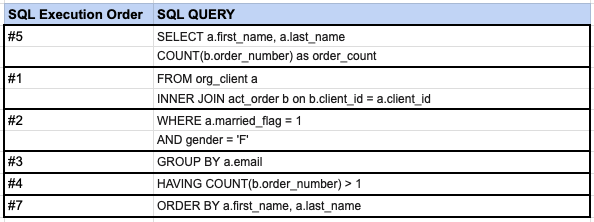
As illustrated in this image, the SQL engine initially executes the FROM clause and any INNER JOINs, followed by the other steps as depicted.
Comments Not Found