
MySQL
'AND' and 'OR' Operators
In MySQL, the AND and OR operators are used in the WHERE clause to filter query results based on multiple conditions. The AND operator ensures that all specified conditions must be true for a row to be included in the result set, while the OR operator allows a row to be included if at least one of the conditions is true. These operators are essential for constructing more complex queries where multiple criteria must be applied.
Here’s a detailed guide on using AND and OR with examples and tips for new students:
Using the
ANDOperator:- The
ANDoperator is used when all conditions in the query must be met for the row to be returned. - Syntax:
SELECT * FROM employees WHERE department_id = 3 AND salary > 50000;- This query returns all employees who belong to department 3 and have a salary greater than 50,000. Both conditions must be true for a row to be included.
- The
Using the
OROperator:- The
ORoperator is used when at least one condition must be true for a row to be included in the result set. - Example:
SELECT * FROM employees WHERE department_id = 3 OR salary > 50000;- This query returns employees who either belong to department 3 or have a salary greater than 50,000. Rows satisfying either condition will be included.
- The
Combining
ANDandORin a Single Query:- You can combine
ANDandORoperators to create more complex conditions. When combining these operators, parentheses should be used to clarify the order of evaluation. - Example:
SELECT * FROM employees WHERE (department_id = 3 OR department_id = 4) AND salary > 50000;- This query returns employees who belong to either department 3 or department 4 and have a salary greater than 50,000. The parentheses ensure that the
ORcondition is evaluated first.
- You can combine
Using
ANDandORwithNOT:- You can also use the
NOToperator in combination withANDandORto exclude specific results. - Example:
SELECT * FROM employees WHERE NOT (department_id = 2) AND salary > 60000;- This query returns employees who do not belong to department 2 and have a salary greater than 60,000.
- You can also use the
Order of Evaluation Without Parentheses:
- When combining
ANDandORwithout parentheses, theANDconditions are evaluated before theORconditions by default. - Example:
SELECT * FROM employees WHERE department_id = 3 OR salary > 50000 AND hire_date > '2020-01-01';- In this query, the
salary > 50000 AND hire_date > '2020-01-01'condition is evaluated first, so it retrieves employees who either belong to department 3 or have a salary greater than 50,000 and were hired after January 1, 2020.
- When combining
Using
ANDandORin Joins:- The
ANDandORoperators are also commonly used in queries that involve joins between multiple tables. - Example:
SELECT e.employee_id, e.first_name, d.department_name FROM employees e JOIN departments d ON e.department_id = d.department_id WHERE d.branch_id = 1 AND (e.salary > 50000 OR e.hire_date > '2022-01-01');- This query returns employees from branch 1 who either have a salary greater than 50,000 or were hired after January 1, 2022.
- The
Performance Considerations:
- When combining
ANDandORin large datasets, query performance can be affected, especially when columns involved are not indexed. Ensure that commonly used columns in your conditions are indexed for faster query execution. - Example:
SELECT * FROM employees WHERE department_id = 1 AND salary > 70000;- If both
department_idandsalaryare indexed, this query will perform more efficiently.
- When combining
The AND and OR operators are essential for building powerful and flexible queries that can retrieve data based on multiple conditions. Understanding how to combine them correctly and efficiently will help you retrieve more accurate and relevant data from your database.
To gain complete access, login with gmail or outlook, no need of signup, click here

Test code
Choose male customers located in the state of New York.
SELECT *
FROM org_client
WHERE gender = 'M'
AND state = 'NY';Select customers either from the state of Pennsylvania or the city of Miami.
SELECT *
FROM org_client
WHERE city = 'Miami'
OR state = 'PA';Choose customers from the state of New York who, at the secondary level, have a credit limit greater than 7000 or reside in the city of Albany.
SELECT *
FROM org_client
WHERE state = 'NY'
AND (city = 'Albany' OR credit_limit > 7000);SQL's AND and OR operators
Here are examples illustrating the use of SQL's AND and OR operators.
Example 1 - Raw data from client table
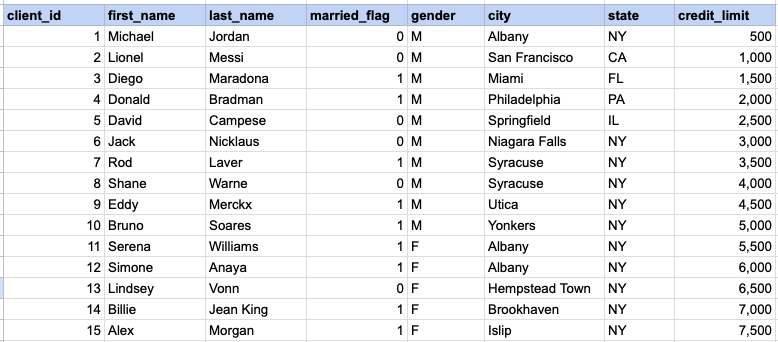
Example 1 - AND operator
SELECT * FROM org_client WHERE gender = 'M' AND state = 'NY';Example 1 - Query data mapping
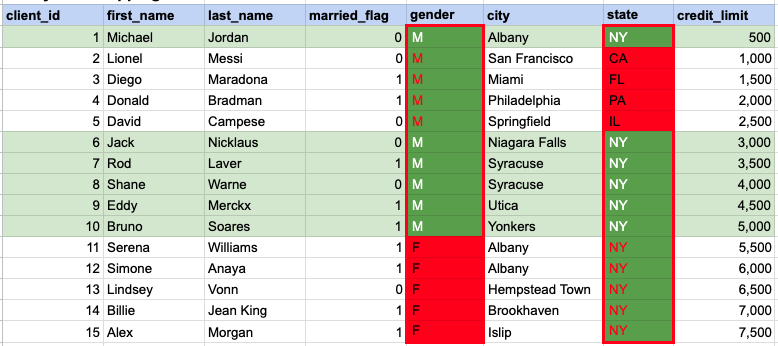
In the given image, the green hue indicates the data that has been chosen or meets the criteria specified in our query. When using the AND operator, both column values must satisfy the specified criteria.
Example 1 - Query Output

Example 2 - OR operator
SELECT * FROM org_client WHERE city = 'Miami' OR state = 'PA';Example 2 - Query data mapping
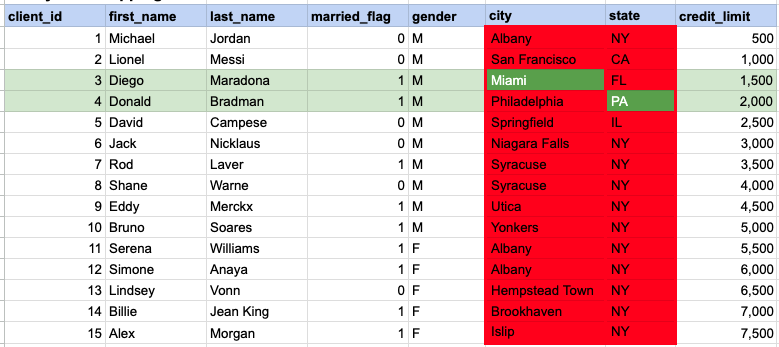
In the given image, the green hue indicates the data that has been chosen or meets the criteria specified in our query. In the case of the OR operator, at least one of the column values needs to meet the specified criteria.
Example 2 - Query Output

Example 3 - AND operator
SELECT * FROM org_client WHERE state = 'NY' AND (city = 'Albany' OR credit_limit > 7000);Example 3 - Query data mapping
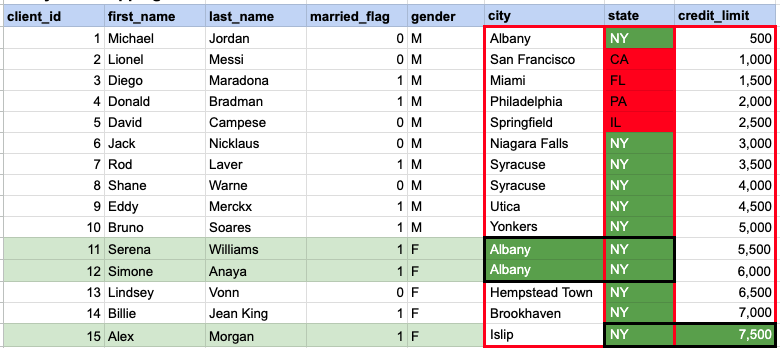
In the given image, the green hue indicates the data that has been chosen or meets the criteria specified in our query. In this instance, a specific row must satisfy the conditions based on the state, and subsequently, there should be a match in at least one value between the city and credit limit.
Example 3 - Query Output

Comments Not Found