
MySQL
Database Table
In MySQL, databases are organized into tables, which are made up of columns and rows. A table represents a specific entity, like employees, departments, or branches. Each table consists of columns (attributes) that define the type of data to be stored, and rows (records) that hold the actual data. Understanding how to define tables, columns, and rows is crucial for effective database design.
Here's an overview of how tables, columns, and rows work in MySQL, along with examples relevant to a company's database:
1. Creating a Table for company
Tables are created using the CREATE TABLE statement. Here's how to define a table for a company:
CREATE TABLE company (
  company_id INT AUTO_INCREMENT PRIMARY KEY,
  company_name VARCHAR(100) NOT NULL,
  founded_year YEAR NOT NULL,
  company_address VARCHAR(255),
  company_phone VARCHAR(20)
);company_id:The primary key, uniquely identifying each company.company_name:The name of the company (required).founded_year:The year the company was founded (required).company_address:The address of the company.company_phone:The contact number of the company.
2. Creating a Table for employees
You can define another table to store details of employees within a company:
CREATE TABLE employees (
  employee_id INT AUTO_INCREMENT PRIMARY KEY,
  first_name VARCHAR(50) NOT NULL,
  last_name VARCHAR(50) NOT NULL,
  email VARCHAR(100),
  phone_number VARCHAR(20),
  hire_date DATE NOT NULL,
  salary DECIMAL(10, 2),
  department_id INT,
  FOREIGN KEY (department_id) REFERENCES departments(department_id)
);employee_id:The primary key, uniquely identifying each employee.first_name, last_name:The employee's name (required).email:Optional email address.phone_number:Optional phone number.hire_date:The date the employee was hired (required).salary:The employee's salary, stored as a decimal value.department_id:Foreign key referencing thedepartmentstable.
3. Creating a Table for departments
The departments table can define various departments in the company:
CREATE TABLE departments (
  department_id INT AUTO_INCREMENT PRIMARY KEY,
  department_name VARCHAR(100) NOT NULL,
  manager_id INT,
  FOREIGN KEY (manager_id) REFERENCES employees(employee_id)
);department_id:The primary key, uniquely identifying each department.department_name:The name of the department (required).manager_id:Foreign key referencing theemployeestable, specifying the manager of the department.
4. Creating a Table for branches
To store information about different branches of the company, you can define the branches table:
CREATE TABLE branches (
  branch_id INT AUTO_INCREMENT PRIMARY KEY,
  branch_name VARCHAR(100) NOT NULL,
  location VARCHAR(255) NOT NULL,
  branch_manager_id INT,
  FOREIGN KEY (branch_manager_id) REFERENCES employees(employee_id)
);branch_id:The primary key, uniquely identifying each branch.branch_name:The name of the branch (required).location:The location of the branch (required).branch_manager_id:Foreign key referencing theemployeestable for the branch manager.
5. Inserting Data into Tables
Once the tables are created, you can insert data using the INSERT INTO statement. For example:
INSERT INTO company (company_name, founded_year, company_address, company_phone)
VALUES ('Tech Innovations', 2010, '123 Tech Street, Silicon Valley', '+1234567890');
This structure allows you to create a company database with well-defined relationships between employees, departments, and branches. Each table has its own primary key, and foreign keys are used to link related tables.
Database Tables and Their Components
Database tables are designed to store data in a structured format, using rows and columns. Each table represents a specific type of entity, such as users, products, or orders, with the columns representing attributes of that entity. Understanding these components is crucial for effective database design and management.
Components of Database Tables
- Table Name:
The unique identifier for a table within a database, descriptive of the data it holds.
- Columns/Fields:
Columns represent the attributes of the entity. Each column has a specific data type and can be defined with various constraints:
- Data Type: The kind of data a column can hold (e.g., VARCHAR, INT, DATE).
- Constraints: Rules for the data stored in a column, including NOT NULL, UNIQUE, PRIMARY KEY, FOREIGN KEY, CHECK, and DEFAULT.
- Rows/Records:
Individual instances of the entity, with each row having a unique identifier through the primary key.
- Indexes:
Special lookup tables that speed up data retrieval, analogous to an index in a book.
- Relationships:
Defines how tables relate to each other, including One-to-One, One-to-Many, and Many-to-Many relationships.
Sample SQL Code
Creating a Table
CREATE TABLE Students (
  StudentID INT PRIMARY KEY,
  FirstName VARCHAR(50) NOT NULL,
  LastName VARCHAR(50) NOT NULL,
  Email VARCHAR(100) UNIQUE,
  Age INT CHECK (Age > 0),
  EnrollmentDate DATE DEFAULT CURRENT_DATE
);
Inserting Data
INSERT INTO Students (StudentID, FirstName, LastName, Email, Age)
VALUES (1, 'John', 'Doe', 'john.doe@example.com', 20);
Querying Data
SELECT * FROM Students WHERE Age >= 18;Updating Data
UPDATE Students SET Email = 'new.email@example.com' WHERE StudentID = 1;Deleting Data
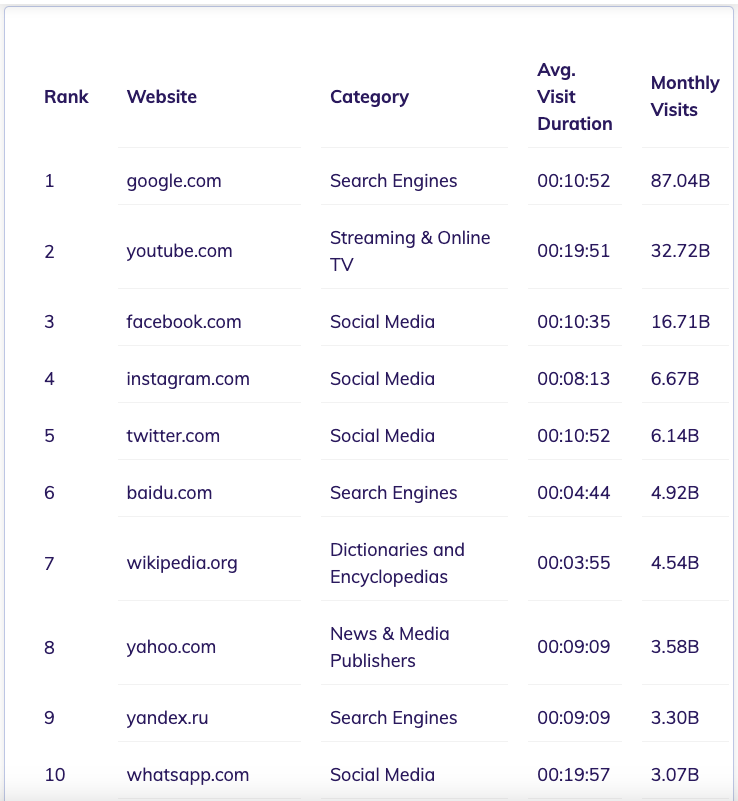
DELETE FROM Students WHERE StudentID = 1;DATA TABLE - TOP 10 WEBSITES
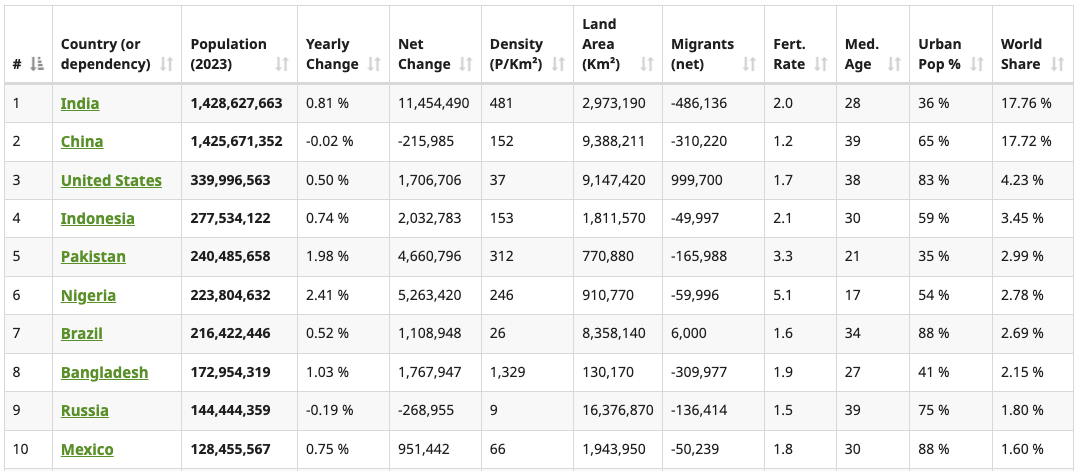
DATA TABLE - TOP 10 POPULATED COUNTRIES
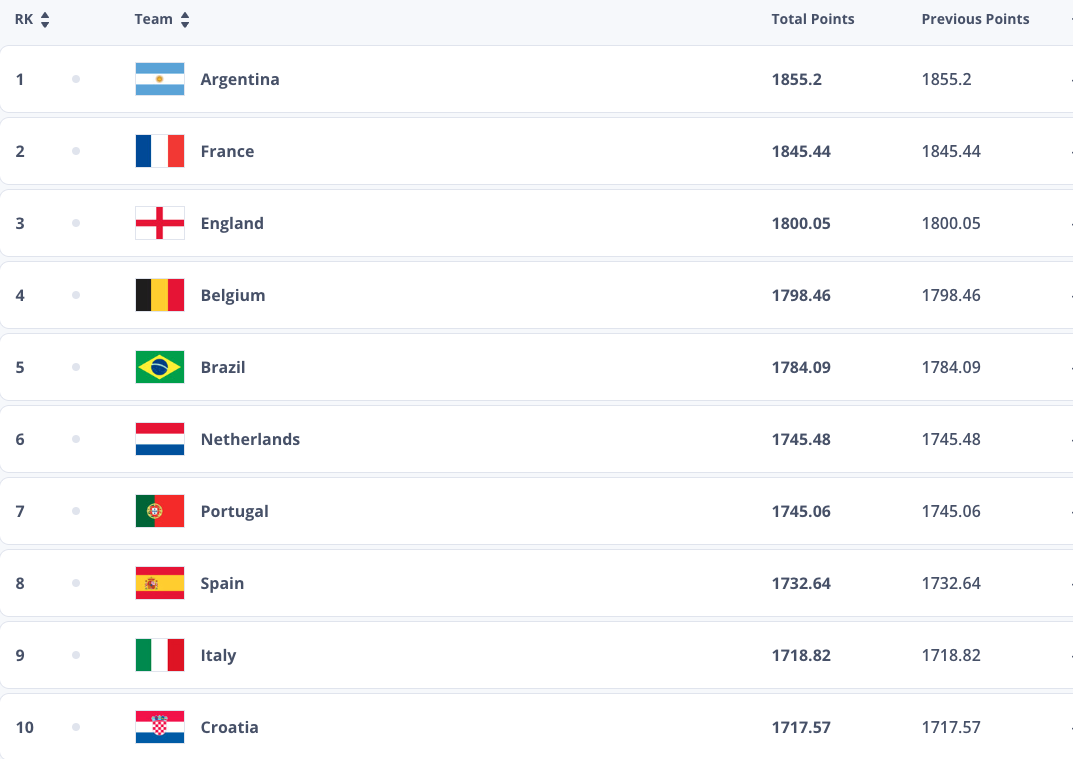
DATA TABLE - TOP 10 FOOTBALL TEAMS
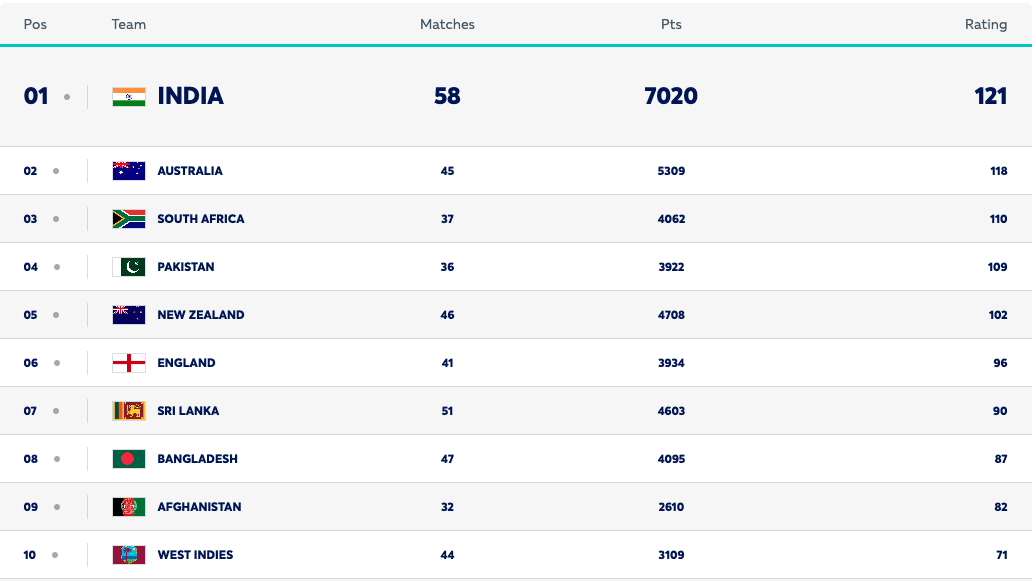
DATA TABLE - TOP 10 CRICKET TEAMS
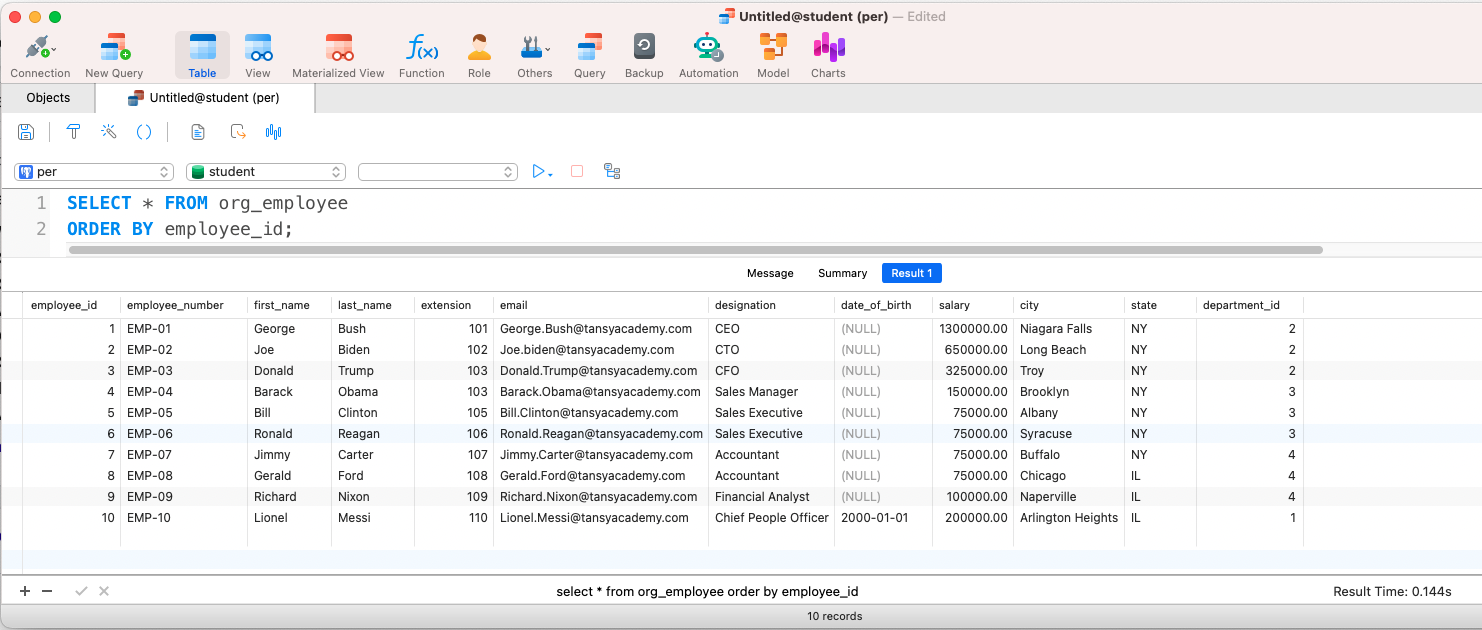
POSTGRESQL - EMPLOYEE TABLE WITH DATA
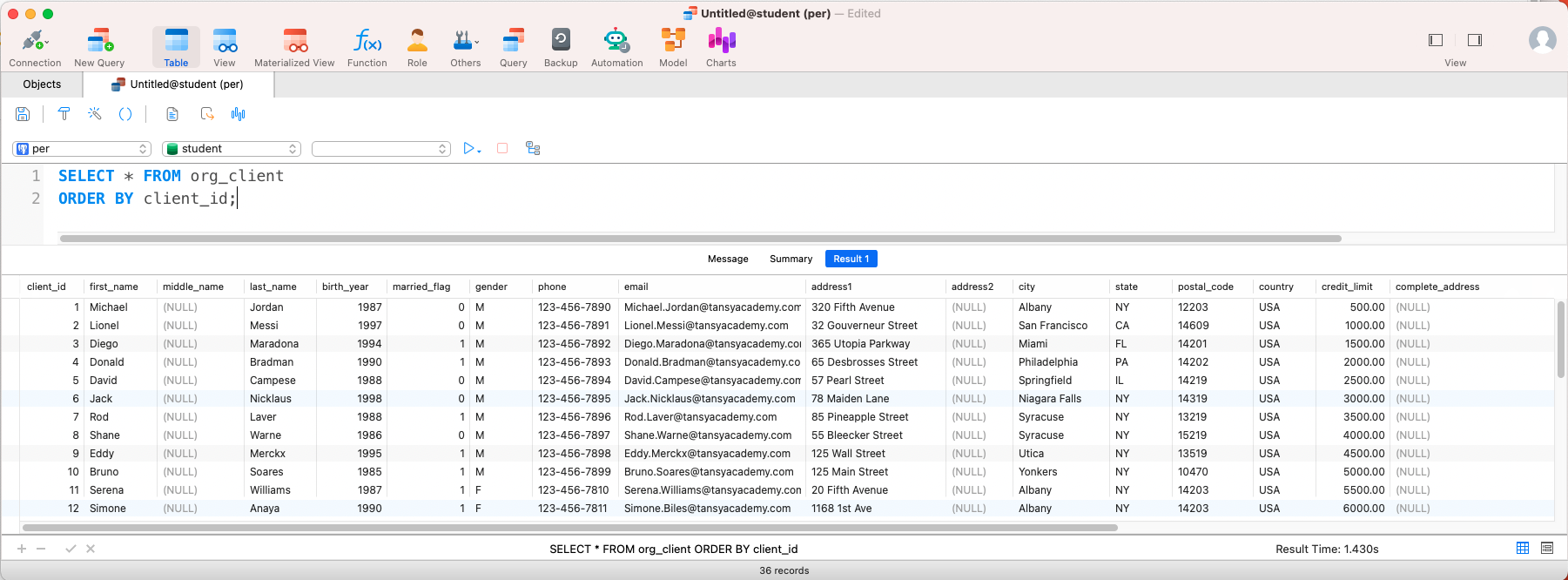
POSTGRESQL - CLIENTS TABLE WITH DATA
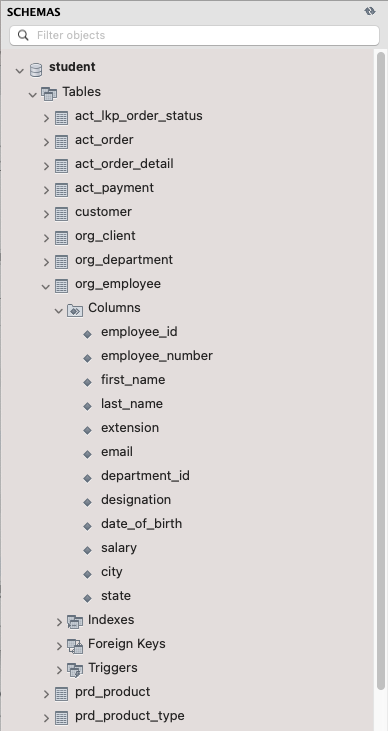
MYSQL TABLE LISTING
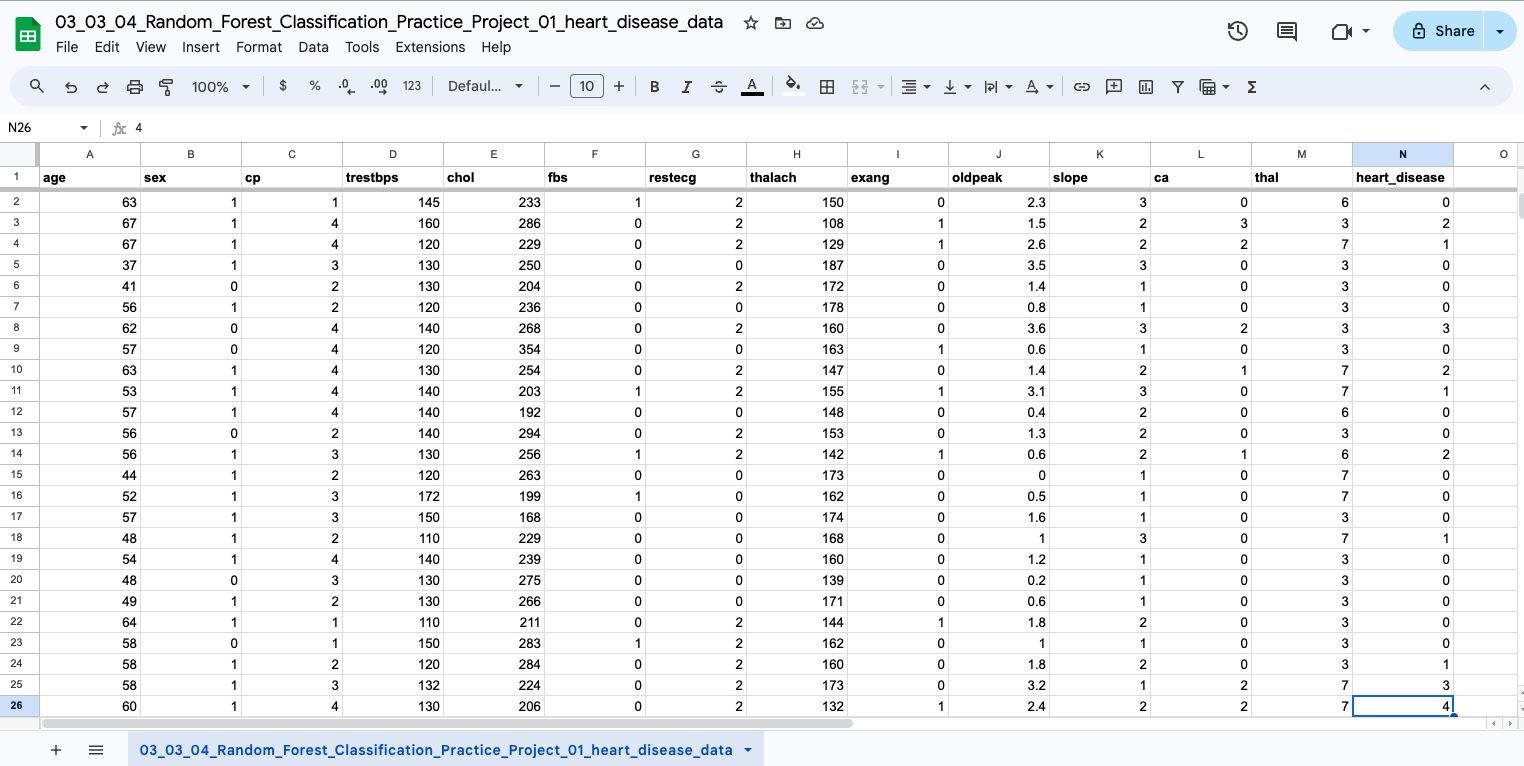
EXCEL DATA TABLE - PATIENT DATA
GRAPH DATA - NOT A SQL TABLE
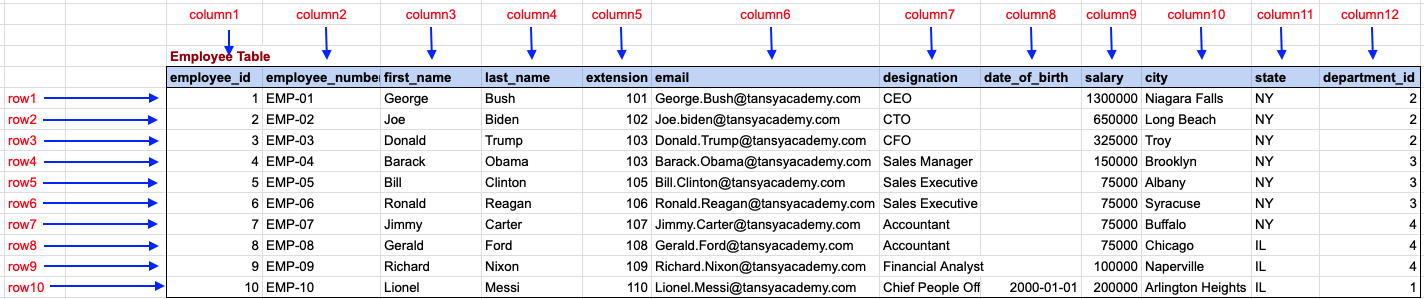
Employee Table with Data
Employee JSON Document, NOT A SQL TABLE
[
  {
    "employee_id": 1,
    "employee_number": "EMP-01",
    "first_name": "George",
    "last_name": "Bush",
    "extension": 101,
    "email": "George.Bush@tansyacademy.com",
    "designation": "CEO",
    "date_of_birth": null,
    "salary": 130000,
    "city": "Niagara Falls",
    "state": "NY",
    "department_id": 2
  },
  {
    "employee_id": 2,
    "employee_number": "EMP-02",
    "first_name": "Joe",
    "last_name": "Biden",
    "extension": 102,
    "email": "Joe.biden@tansyacademy.com",
    "designation": "CTO",
    "date_of_birth": null,
    "salary": 65000,
    "city": "Long Beach",
    "state": "NY",
    "department_id": 2
  }
]
To gain complete access, login with gmail or outlook, no need of signup, click here

Comments Not Found