
MySQL
IS NULL Operator
In MySQL, the IS NULL operator is used to filter rows where a column contains a NULL value. A NULL value in a database represents missing or unknown data, and it is important to handle these values explicitly because comparisons like = NULL or <> NULL do not work as expected. The IS NULL operator provides a way to identify rows where a specific column is NULL.
Here’s how to use the IS NULL operator, along with examples and useful tips for new students:
Basic Syntax of
IS NULL:- The
IS NULLoperator is used to check whether a column contains aNULLvalue. - Syntax:
SELECT * FROM employees WHERE manager_id IS NULL;- This query will return all employees who do not have a manager assigned (
manager_idisNULL).
- The
Using
IS NOT NULL:- The opposite of
IS NULLisIS NOT NULL, which is used to find rows where a column contains a non-NULLvalue. - Example:
SELECT * FROM employees WHERE manager_id IS NOT NULL;- This query returns employees who have a
manager_idassigned.
- The opposite of
Combining
IS NULLwith Other Conditions:- You can combine
IS NULLwith other conditions likeAND,OR, andBETWEENto filter more specifically. - Example:
SELECT * FROM employees WHERE department_id = 3 AND manager_id IS NULL;- This query returns employees in department 3 who do not have a manager assigned.
- You can combine
Handling
NULLin Joins:- When using joins,
NULLvalues may appear in results when no matching records are found. You can useIS NULLto filter these cases. - Example:
SELECT e.employee_id, e.first_name, d.department_name FROM employees e LEFT JOIN departments d ON e.department_id = d.department_id WHERE d.department_id IS NULL;- This query returns employees who do not belong to any department, identified by
NULLvalues in thedepartment_idcolumn.
- When using joins,
Using
IS NULLin Subqueries:- You can use
IS NULLin subqueries to exclude or include records based on the presence ofNULLvalues. - Example:
SELECT * FROM employees WHERE department_id NOT IN (SELECT department_id FROM departments WHERE manager_id IS NULL);- This query returns employees who belong to departments that have managers assigned (i.e., not in departments where the
manager_idisNULL).
- You can use
Performance Considerations:
- Checking for
NULLvalues can be resource-intensive, especially in large tables. Indexes on columns that containNULLvalues can help improve query performance. - Example:
SELECT * FROM employees WHERE salary IS NULL;- If
salaryis an indexed column, this query will perform faster on large datasets.
- Checking for
Comparing
NULLand Empty Values:- It’s important to distinguish between
NULLand empty values (''for strings or0for numbers).NULLmeans the value is unknown or missing, while empty values are known but have no content. - Example:
SELECT * FROM employees WHERE email IS NULL OR email = '';- This query returns employees with either
NULLor empty email fields.
- It’s important to distinguish between
The IS NULL operator is essential for dealing with missing data in a database. By understanding how to use IS NULL and IS NOT NULL, you can effectively query and handle rows with incomplete or unknown values, which is common in real-world data sets.
To gain complete access, login with gmail or outlook, no need of signup, click here

Test code
Retrieve records using the IS NULL operator on a date column, select orders that have not been shipped yet.
SELECT *
FROM act_order
WHERE shipped_date IS NULL;Fetch data by utilizing the IS NULL operator on a date column, and specifically choose employees who have not provided their date of birth.
SELECT *
FROM org_employee
WHERE date_of_birth IS NULL;Example 1:
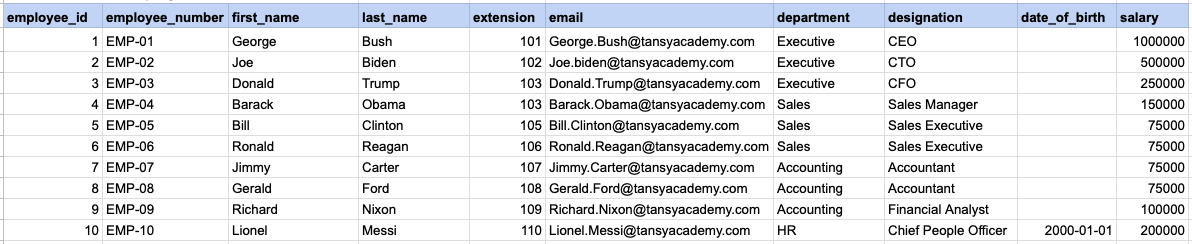
Let's explore the procedure of extracting information from a designated table using the IS NULL SQL operator. This query retrieves employees who have not provided their date of birth.
Example 1 - Raw data from employee table
Example 1 - Query
SELECT * FROM org_employee WHERE date_of_birth IS NULL;Example 1 - Query data mapping
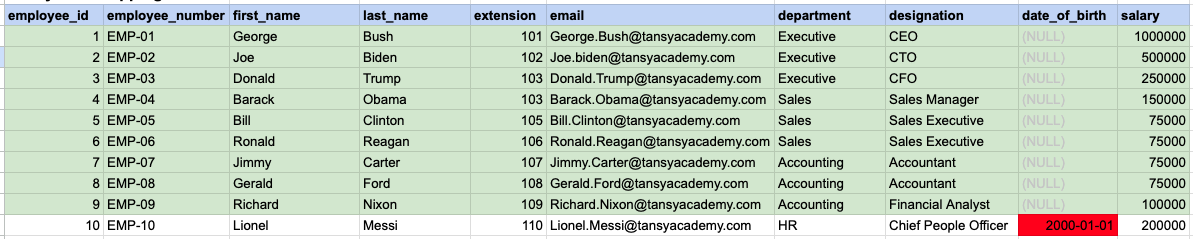
In the provided image, the green color signifies the data that has been selected or satisfies the conditions specified in our query. Data points in red indicate information that does not meet the criteria set by the query.
Example 1 - Query Output

Example 2:
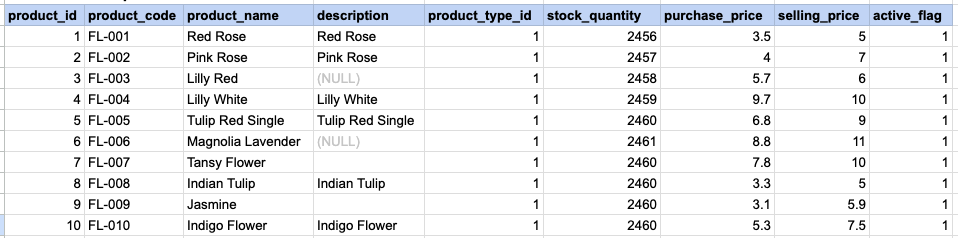
Let's delve into the process of retrieving information from a specified table using the SQL IS NULL operator on string data. The query retrieves all rows from the products table where the description is null.
Example 2 - Raw data from product table
Example 2 - Query
SELECT * FROM prd_product WHERE description IS NULL;Example 2 - Query data mapping
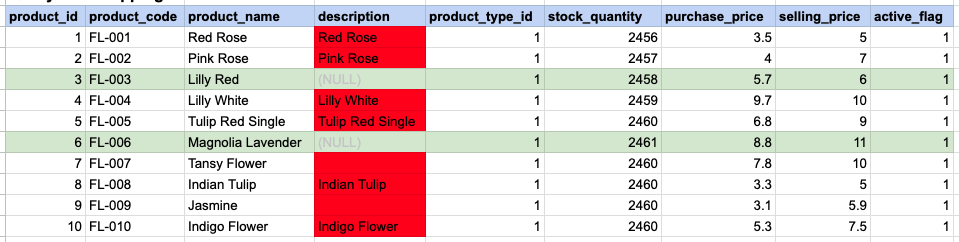
In the provided image, the green color signifies the data that has been selected or satisfies the conditions specified in our query. Data points in red indicate information that does not meet the criteria set by the query. NOTE that description value for product id 7 and 9 compose a empty string, this is not a null.
Example 2 - Query Output

Example 3:
Using '= NULL' is not permissible; instead, you must use 'IS NULL'. As demonstrated below, employing '= NULL' results in an empty result set.
SELECT * FROM prd_product WHERE description = NULL;Example 3 - Empty result set

Comments Not Found