
MySQL
SQL ERD Data Model Assignment - Student Management System
ERD Data Model Assignment
Introduction to ERD (Entity-Relationship Diagram)
An Entity-Relationship Diagram (ERD) is a key tool used in database design, representing the entities (tables) and relationships in your data model. It allows you to understand how different data objects interact and relate to each other, helping you design a more structured and efficient database.
In this assignment, you will create an ERD for a Student Management System. You will model the system in MySQL, defining tables, attributes, relationships, and constraints. By doing so, you'll gain hands-on experience with data modeling and database design principles.
Why Use an ERD?
An ERD is essential in structuring a database. It helps visualize how entities such as students, courses, teachers, and enrollments connect. This visualization aids in understanding the structure and ensuring a logical data flow across the system.
Tools for Creating an ERD
You can create ERDs using several tools. The recommended tool for this assignment is MySQL Workbench, which integrates directly with MySQL databases, allowing you to generate SQL scripts from your ERD designs. Additionally, tools like Lucidchart and dbdiagram.io offer simple drag-and-drop interfaces for ERD creation, and you can export SQL code directly for use in MySQL.
Objective of the Assignment
Your goal is to create a well-designed data model for a Student Management System using MySQL. This includes:
- Defining entities (tables) and their attributes.
- Implementing primary and foreign keys to create relationships.
- Applying constraints to ensure data integrity.
Upon completion, you will have a functional ERD and a set of SQL scripts for your database schema.
Assignment Tasks
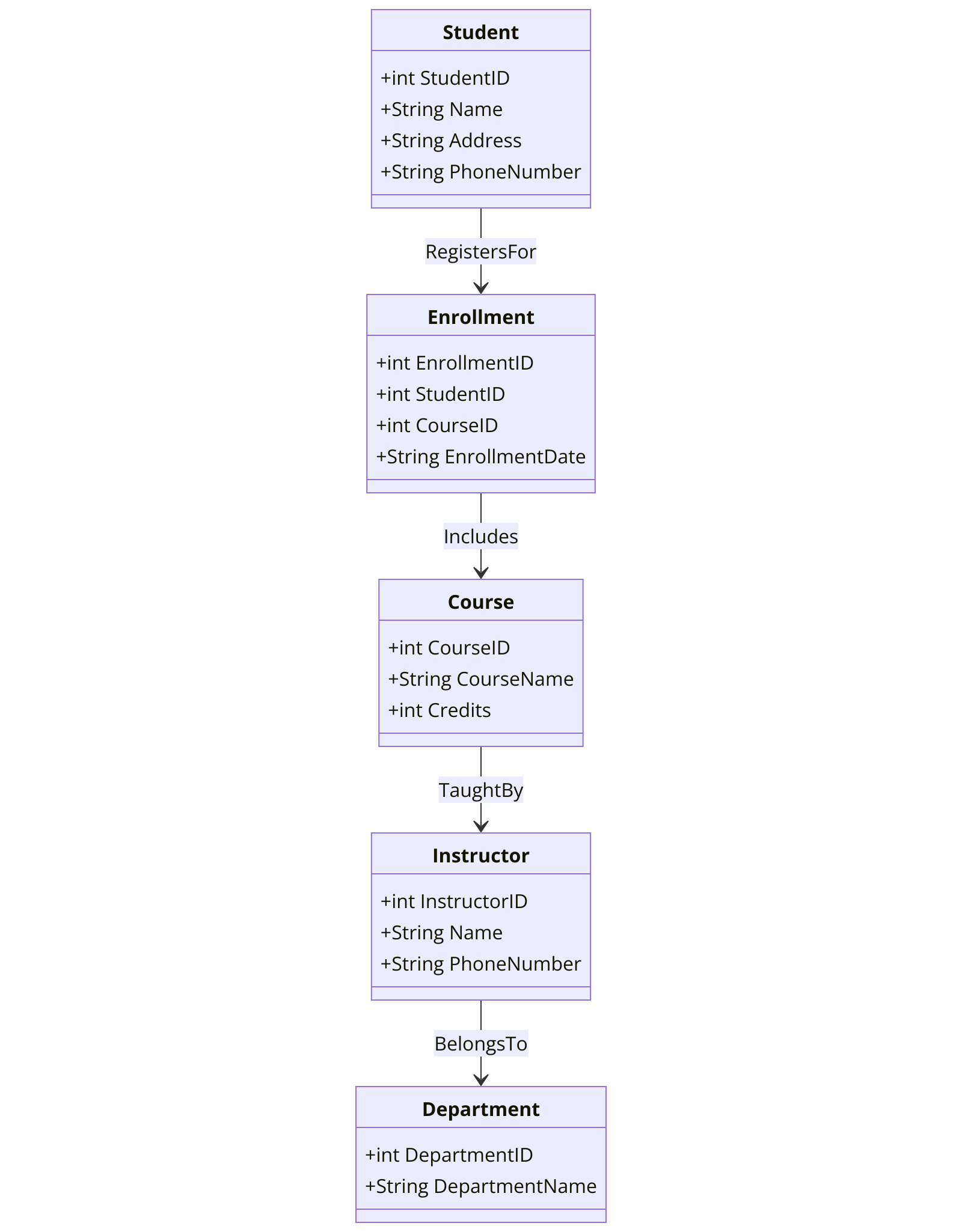
Construct all the tables from Chapter 5 DDL assignment within the ERD diagram using an ERD tool.
- Begin by creating each table, then define the columns within the table on the ERD tool canvas.
- Specify the DATA TYPES and NULLABILITY for all columns.
- Set PRIMARY KEYS for the tables.
- Define auto increment (IDENTITY) columns as needed.
- Establish FOREIGN KEY relationships where necessary.
- Define INDEXES where applicable.
- Implement CHECK constraints as needed.
- Define DEFAULTS where applicable.
- Refer to Chapter 5 DDL assignment for detailed instructions on tables and columns (https://tansyacademy.com/mysql/data-definition-language-sql-ddl/sql-ddl-assignment-student-management-system-project).
Submission Instructions
ERD Design:
- Option 1: Export your ERD as a PDF using pgAdmin 4.
- Option 2: Export the ERD as a DDL SQL script.
SQL Scripts:
- Submit SQL scripts for creating tables, constraints, indexes, and relationships.
Documentation:
- Provide a brief explanation of the relationships between the tables and your design decisions.
Good luck with your assignment! Don't forget to contact us if you need any further assistance with your assignments, and most importantly, for a manual review and approval of your work.
To gain complete access, login with gmail or outlook, no need of signup, click here
PARTIAL DATA MODEL FOR Student Management System SQL ASSIGNMENT
Comments Not Found