
MySQL
GROUP BY
In MySQL, the GROUP BY clause is used to group rows that have the same values in specified columns into summary rows. It is commonly used in conjunction with aggregate functions like COUNT(), SUM(), AVG(), MAX(), and MIN() to perform calculations on each group of data. The GROUP BY clause is essential when you want to analyze data by categories or groups, such as finding the total number of employees per department or the average salary per branch.
Here’s a detailed guide on how to use the GROUP BY clause, along with examples:
Basic
GROUP BYSyntax:- The
GROUP BYclause groups rows that have the same values in the specified column(s). It typically follows theWHEREclause and precedes theHAVINGandORDER BYclauses. - Syntax:
SELECT department_id, COUNT(*) AS employee_count FROM employees GROUP BY department_id;- This query groups employees by
department_idand returns the count of employees in each department.
- The
Using
GROUP BYwith Aggregate Functions:- The
GROUP BYclause is most effective when used with aggregate functions likeCOUNT(),SUM(),AVG(), etc. - Example:
SELECT department_id, AVG(salary) AS avg_salary FROM employees GROUP BY department_id;- This query calculates the average salary for each department.
- The
Grouping by Multiple Columns:
- You can group by multiple columns by listing them in the
GROUP BYclause. - Example:
SELECT department_id, branch_id, SUM(salary) AS total_salary FROM employees GROUP BY department_id, branch_id;- This query groups employees by both
department_idandbranch_idand calculates the total salary for each combination.
- You can group by multiple columns by listing them in the
Using
HAVINGwithGROUP BY:- The
HAVINGclause is used to filter groups after they have been created by theGROUP BYclause. It is similar to theWHEREclause but works on aggregated data. - Example:
SELECT department_id, COUNT(*) AS employee_count FROM employees GROUP BY department_id HAVING employee_count > 5;- This query returns only departments that have more than 5 employees.
- The
Using
ORDER BYwithGROUP BY:- You can sort the result of a
GROUP BYquery using theORDER BYclause. You can sort by either grouped columns or aggregate results. - Example:
SELECT department_id, COUNT(*) AS employee_count FROM employees GROUP BY department_id ORDER BY employee_count DESC;- This query groups employees by department and then sorts the departments by employee count in descending order.
- You can sort the result of a
GROUP BYwithWHEREClause:- You can use a
WHEREclause beforeGROUP BYto filter rows before grouping them. - Example:
SELECT branch_id, SUM(salary) AS total_salary FROM employees WHERE hire_date > '2020-01-01' GROUP BY branch_id;- This query calculates the total salary for employees hired after January 1, 2020, grouped by branch.
- You can use a
Avoiding Non-Aggregated Columns in
GROUP BY:- In standard SQL, when using
GROUP BY, all selected columns that are not part of an aggregate function should appear in theGROUP BYclause. - Example:
SELECT department_id, first_name, COUNT(*) AS employee_count FROM employees GROUP BY department_id, first_name;- This query groups by both
department_idandfirst_name, which might return individual counts for each employee.
- In standard SQL, when using
Using Aliases in
GROUP BY:- You can use aliases in
GROUP BY, especially when using complex expressions. - Example:
SELECT department_id AS dept, COUNT(*) AS employee_count FROM employees GROUP BY dept;- This query groups by the alias
deptfordepartment_id.
- You can use aliases in
Grouping on Calculated Fields:
- You can use calculated fields in the
GROUP BYclause. - Example:
SELECT YEAR(hire_date) AS hire_year, COUNT(*) AS employee_count FROM employees GROUP BY hire_year;- This query groups employees by the year they were hired.
- You can use calculated fields in the
Performance Considerations:
- When using
GROUP BYon large datasets, the performance can be affected. Indexing the columns used in theGROUP BYclause can improve query performance.
- When using
The GROUP BY clause is a powerful tool in MySQL that helps you summarize data by categories, enabling you to perform aggregate calculations efficiently. It’s commonly used for generating reports and analyzing data based on specific groupings.
To gain complete access, login with gmail or outlook, no need of signup, click here

Test code
Calculate the total count of clients in each state.
SELECT state, count(client_id)
FROM org_client
GROUP BY state;Determine the aggregate salary disbursement by each department.
SELECT department, sum(salary)
FROM org_employee
GROUP BY department;Identify the year of birth of the youngest client from each state.
SELECT state, max(birth_year)
FROM org_client
GROUP BY state;Calculate the number of orders for each day.
-- Mysql and Postgres
SELECT DATE(order_date) as order_date,
COUNT(order_number) as order_count
FROM act_order
GROUP BY DATE(order_date);

-- MS SQL Server
-- CONVERT(DATE, order_date) as order_date

-- Oracle
-- to_char(order_date,'DD/MM/YYYY') as order_dateTally of orders handled by each employee or sales agent.
SELECT b.employee_number,
COUNT(a.order_number) as order_count
FROM act_order a
INNER JOIN org_employee b on b.employee_id = a.sales_agent_employee_id
GROUP BY employee_number;Number of female clients in each city.
SELECT city, count(client_id)
FROM org_client
WHERE gender = 'F'
GROUP BY city;Example 1:
In the following example, we will demonstrate the application of WHERE, GROUP BY, and HAVING clauses. It's important to note that the WHERE clause is used before GROUP BY, and the HAVING clause follows GROUP BY. Also, the HAVING clause cannot be used without preceding it with GROUP BY.
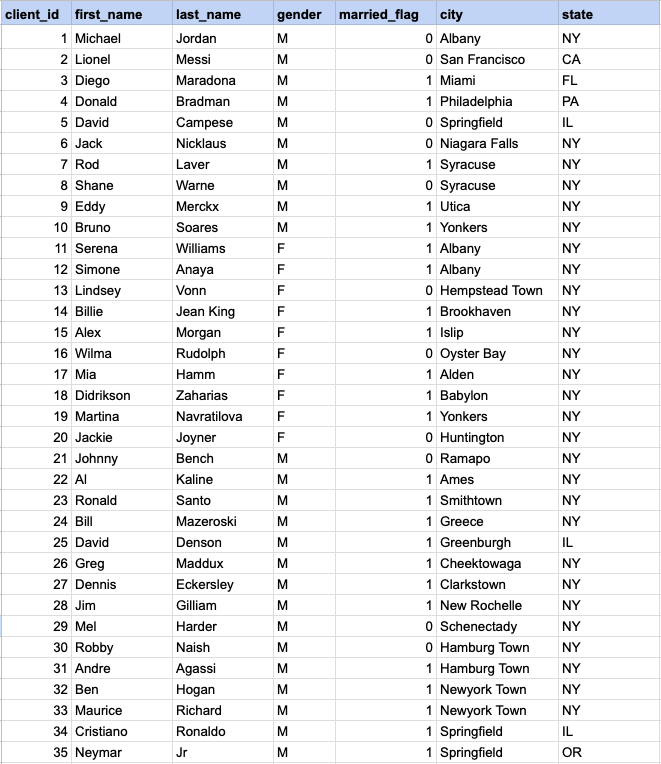
Example 1 - Raw data from client table
GROUP BY query
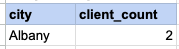
In this example, we will ascertain the number of married female clients in each city, and then identify cities that have more than one married female client.
SELECT city , count(client_id) FROM org_client WHERE gender= 'F' AND married_flag = 1 GROUP BY city HAVING count(client_id) > 1Step 1, Apply WHERE conditions
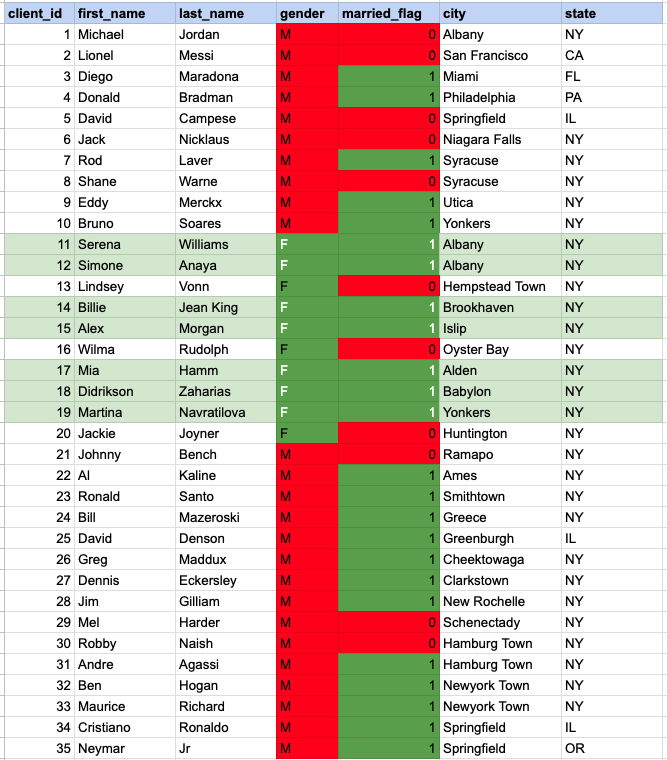
In the image above, the cells highlighted with a green background and white font represent those that satisfy both criteria of the WHERE condition (being married females).
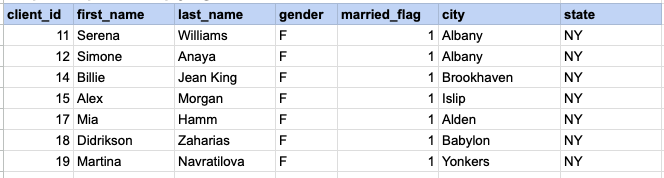
Step 1 output after applying WHERE condition
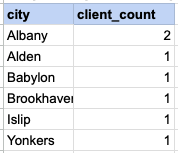
Step 2 - Apply GROUP BY
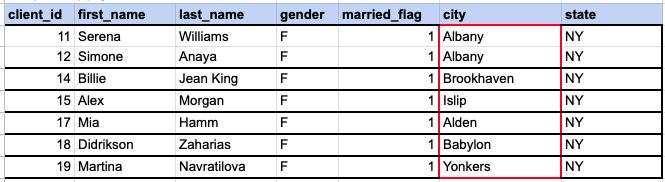
In the provided image, we need to group the data by the 'city' column. As observed, Albany is represented by 2 client rows, while the other cities each have only one row.
Step 2 output, after applying GROUP BY
Step 3 - Apply HAVING Clause
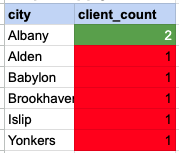
Using the HAVING clause essentially means filtering the grouped rows based on the condition specified in the HAVING clause. In this example, we are looking for groups with a client count greater than one. The cells highlighted in green with white font are those that meet the condition set by the HAVING clause.
Final output of entire query
Comments Not Found