
MySQL
Chapter 7 - DQL (Data Query Language)
DQL ASSIGNMENT1 - Company Management System
Objective:
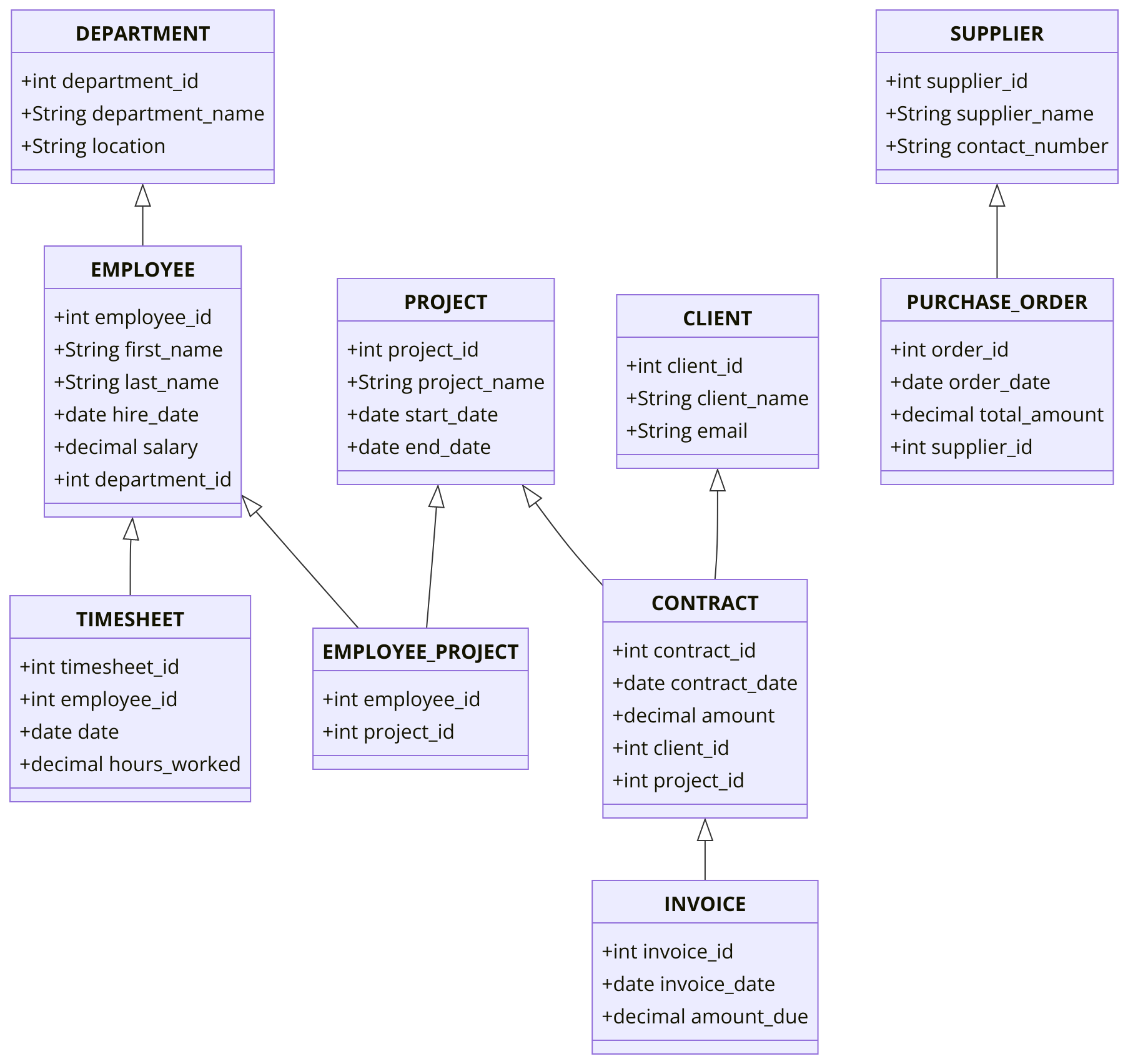
You are required to address a set of Data Query Language (DQL) tasks for a Company Management System using the tables provided. Each task focuses on different aspects of querying data from the system using SELECT statements with a variety of conditions, functions, and joins.
1. SELECT Command
- Select all columns from the EMPLOYEE table.
- Select all columns from the DEPARTMENT table.
- Select the first_name and last_name of all employees.
- Select the department_name and location of all departments.
2. WHERE Command
- Select all employees who have a salary greater than 5000.
- Select all departments located in 'New York'.
- Select employees whose first name starts with the letter 'J'.
- Select employees whose last name does not contain 'Smith'.
3. LIMIT Command
- Select all projects and limit the results to the first 10.
- Select all clients and limit the results to the first 5.
- Select all employees whose salary is in the top 5.
4. DISTINCT Command
- Select all clients with a unique email address.
- Select distinct locations from the DEPARTMENT table.
5. ORDER BY Command
- Select all employees ordered by last_name in ascending order.
- Select all projects ordered by start_date in descending order.
- Select employees ordered by salary in ascending order.
- Select all departments and order them by department_name.
6. BETWEEN Command
- Select employees whose salary is between 3000 and 7000.
- Select projects where the start_date is between '2022-01-01' and '2023-01-01'.
- Select employees whose hire_date is between '2020-01-01' and '2022-12-31'.
7. CONCAT Command
- Select employees and show their full name using CONCAT.
- Select the department_name and location, concatenated with a comma between them.
8. IN and NOT IN Command
- Select employees where the department_id is 1 or 2 using
IN. - Select employees who do not work in department_id = 3 using
NOT IN.
9. IS NULL and IS NOT NULL Command
- Select employees where the phone_number is
NULL. - Select all employees where the hire_date is not null.
10. AND, OR Command
- Select employees where salary is greater than 5000 and hire_date is after '2020-01-01'.
- Select all employees where the department_id is 1 or salary is greater than 10000.
11. Comparison Operators (=, >, <, >=, <=, !=)
- Select all employees where salary is greater than 5000.
- Select all employees where salary is less than or equal to 4000.
- Select all employees where salary is not equal to 3000.
12. LIKE and NOT LIKE Command
- Select projects where the project_name contains the word 'Tech' using
LIKE. - Select clients whose email ends with 'gmail.com' using
LIKE. - Select employees whose first name does not start with 'A' using
NOT LIKE.
13. EXISTS and NOT EXISTS Command
- Select projects that exist in the EMPLOYEE_PROJECT table using
EXISTS. - Select all clients whose email does not exist in the EMPLOYEE table using
NOT EXISTS.
14. ANY and ALL Command
- Select employees where the salary is greater than all salaries in department_id = 2 using
ALL. - Select employees where the salary is greater than any salary in department_id = 3 using
ANY.
15. Aliasing with AS
- Select the department_name as 'Dept' and location as 'Loc'.
- Select all employees using an alias for the salary column as 'monthly_salary'.
16. GROUP BY Command
- Select clients and their total contract value.
- Select supplier and purchased quantity per product.
- Select departments and count employees per department using
GROUP BY.
17. HAVING Command
- Select employees grouped by department_id having salary greater than 5000.
- Select projects grouped by start_date having more than 2 projects started on the same date.
18. COUNT, SUM, AVG Command
- Count the number of employees in each department.
- Calculate the sum of all employee salaries.
- Calculate the average salary of all employees.
19. CASE Command
- Select employees with a CASE statement to display 'High' if salary > 5000, 'Low' otherwise.
- Select employees and use CASE to assign a salary level ('High', 'Medium', 'Low').
20. JOIN Commands
- Select employees and join them with the DEPARTMENT table using
INNER JOIN. - Select employees and their last login dates using
LEFT JOIN. - Select all departments and their employees using
RIGHT JOIN. - Select all combinations of employees and departments using
CROSS JOIN.
21. UNION and UNION ALL Command
- Select projects using
UNIONto combine projects from department 1 and 2. - Select projects using
UNION ALLto combine all projects regardless of duplicates.
22. PIVOT and UNPIVOT
- Select all employees and pivot their hire_date data by department.
- Select all projects and unpivot their start_date and end_date information.
23. SUBQUERY Command
- Select employees using a subquery to find those working on project_id = 1.
- Select employees and use a subquery to find the department name for each employee.
24. RANK and DENSE_RANK Command
- Select projects and show the rank of projects by start_date using
RANK(). - Select projects and show the dense rank of projects by start_date using
DENSE_RANK().
25. JSON Select
- Select all JSON data from a column in the CLIENT table.
- Select a specific JSON key from a column in the CLIENT table.
26. Arithmetic Operators
- Select employees and apply an arithmetic operation on salary (e.g., salary + 500).
- Select employees where salary + bonus is greater than 10000.
27. String Functions
- Select the first_name of employees converted to uppercase using the
UPPER()function. - Select the last_name of employees converted to lowercase using the
LOWER()function. - Select employees and calculate the length of their first_name using
LENGTH().
28. Date Functions
- Select the current date using the
CURDATE()function. - Select the current time using the
CURTIME()function. - Select all employees and add 5 days to their hire_date using
DATE_ADD().
29. Numeric Functions
- Select employees and round their salary to the nearest whole number using
ROUND(). - Select employees and find the highest salary using
MAX(). - Select employees and use the
FLOOR()function to round down their salary.
30. CAST, COALESCE, IFNULL
- Select employees and convert their salary to integers using
CAST(). - Select employees and coalesce the phone_number to 'N/A' if it is null.
- Select employees and use
IFNULLto replace null hire_dates with the current date.
GOOD LUCK WITH YOUR ASSIGNMENT!!!
Don't forget to contact us if you need any further assistance with your assignments, and most importantly, for a manual review and approval of your work.
To gain complete access, login with gmail or outlook, no need of signup, click here
Sample ERD Data Model for Company Management System
Comments Not Found