
MySQL
IN Operator
The IN operator in MySQL is part of the Data Query Language (DQL) and is used to filter query results by matching a value against a list of possible values. It simplifies queries where you need to check if a column’s value is equal to any value in a list. Instead of using multiple OR conditions, you can use IN, which makes the query more readable and concise.
Here’s how to use the IN operator, along with examples and useful tips for new students:
Basic Syntax of
IN:- The
INoperator allows you to specify multiple values in aWHEREclause. It checks if the column’s value matches any value within a specified list. - Syntax:
SELECT * FROM employees WHERE department_id IN (1, 2, 3);- This query will return all employees who belong to departments with IDs 1, 2, or 3.
- The
Using
INwith Subqueries:- The
INoperator can also be used with subqueries to match values returned from another query. - Example:
SELECT * FROM employees WHERE department_id IN (SELECT department_id FROM departments WHERE branch_id = 2);- This query returns all employees whose department belongs to branch 2.
- The
Using
INwith Strings:- The
INoperator works with both numeric and string data types. - Example:
SELECT * FROM employees WHERE job_title IN ('Manager', 'Engineer', 'Analyst');- This query returns employees whose job titles are either Manager, Engineer, or Analyst.
- The
Handling
NULLValues withIN:- The
INoperator does not handleNULLvalues well. If you need to includeNULL, useIS NULLseparately. - Example:
SELECT * FROM employees WHERE manager_id IN (1, 2, 3) OR manager_id IS NULL;- This query returns employees whose manager ID is either 1, 2, or 3, or where the
manager_idisNULL.
- The
Using
NOT INto Exclude Values:- The
NOT INoperator excludes rows that match any value in the list. - Example:
SELECT * FROM employees WHERE department_id NOT IN (4, 5, 6);- This query returns employees who are not in departments with IDs 4, 5, or 6.
- The
Performance Considerations:
- Using
INwith a large number of values or with complex subqueries can affect query performance. In such cases, consider using indexed columns or alternatives likeJOIN. - Example of a join-based alternative:
SELECT e.* FROM employees e JOIN departments d ON e.department_id = d.department_id WHERE d.branch_id = 2;- This query returns employees from departments in branch 2, similar to the previous
INexample but potentially more efficient.
- Using
Combining
INwith Other Operators:- You can combine
INwith other conditions likeAND,OR, andBETWEENto refine your query further. - Example:
SELECT * FROM employees WHERE department_id IN (1, 2) AND salary BETWEEN 50000 AND 100000;- This query returns employees from departments 1 and 2 with salaries between 50,000 and 100,000.
- You can combine
The IN operator is a powerful tool for simplifying queries, especially when you need to check if a value matches any item in a list. It enhances readability and flexibility in querying, particularly when filtering against multiple values or using subqueries.
To gain complete access, login with gmail or outlook, no need of signup, click here

Test code
Here's an example SQL query utilizing the IN operator with string values. This query retrieves all rows from the employees table where the designation column corresponds to any of the specified values ('Sales Manager', 'Financial Analyst', 'CFO').
SELECT *
FROM org_employee
WHERE designation IN ('Sales Manager', 'Financial Analyst', 'CFO');Here is a sample SQL query using the IN operator with numeric values. The query fetches all rows from the clients table where the birth year column matches any of the specified values (1990, 1980).
SELECT *
FROM org_client
WHERE birth_year IN (1990, 1980);Below is an example SQL query employing the IN operator with datetime values. This query retrieves all rows from the orders table where the birth year column corresponds to any of the specified values ('2023-12-09', '2023-12-10', '2023-12-18', '2023-12-25').
SELECT *
FROM act_order
WHERE desired_date IN ('2023-12-09', '2023-12-10', '2023-12-18', '2023-12-25');

-- Oracle
-- WHERE desired_date IN (to_date('09/12/23'), to_date('10/12/23'), to_date('18/12/23'), to_date('25/12/23'));Example 1:
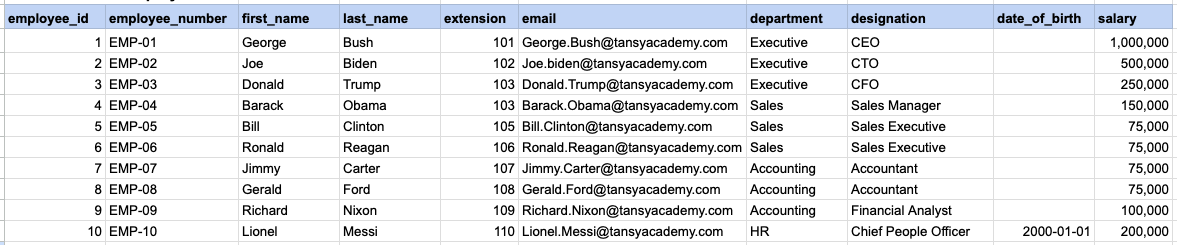
Let's explore the procedure of extracting information from a designated table using the IN SQL operator with string data. This query retrieves all rows from the employees table where the designation column corresponds to any of the specified values ('Sales Manager', 'Financial Analyst', 'CFO').
Example 1 - Raw data from employee table
Example 1 - Query
SELECT * FROM org_employee WHERE designation IN ('Sales Manager', 'Financial Analyst', 'CFO');Example 1 - Query data mapping
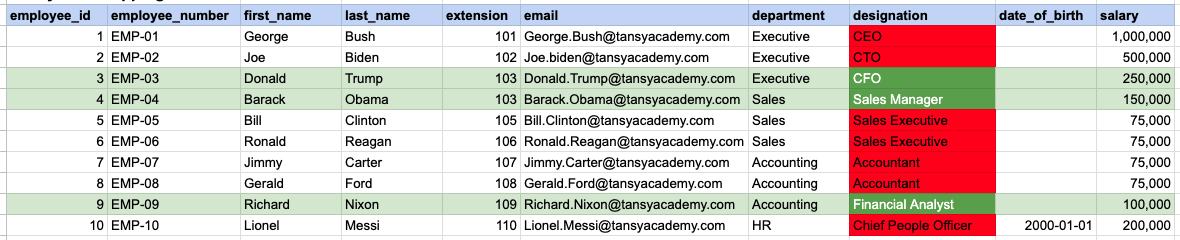
In the provided image, the green color signifies the data that has been selected or satisfies the conditions specified in our query. Data points in red indicate information that does not meet the criteria set by the query.
Example 1 - Query Output

Example 2:
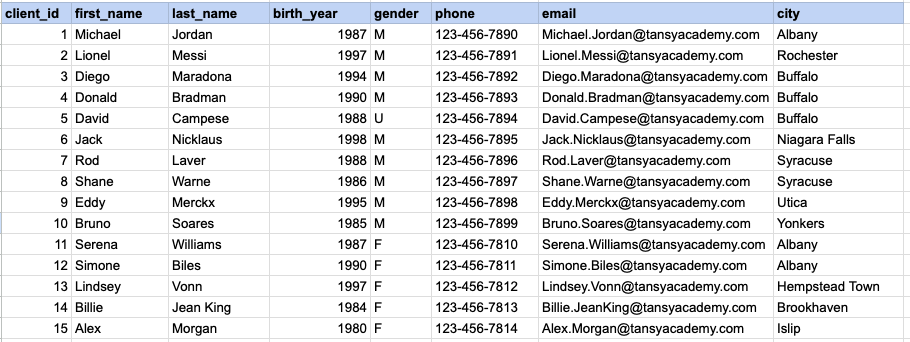
Let's explore the procedure for extracting information from a designated table using the IN SQL operator on integer data. The query fetches all rows from the clients table where the birth year column matches any of the specified values (1990, 1980).
Example 2 - Raw data from client table
Example 2 - Query
SELECT * FROM org_client WHERE birth_year IN (1990, 1980);Example 2 - Query data mapping
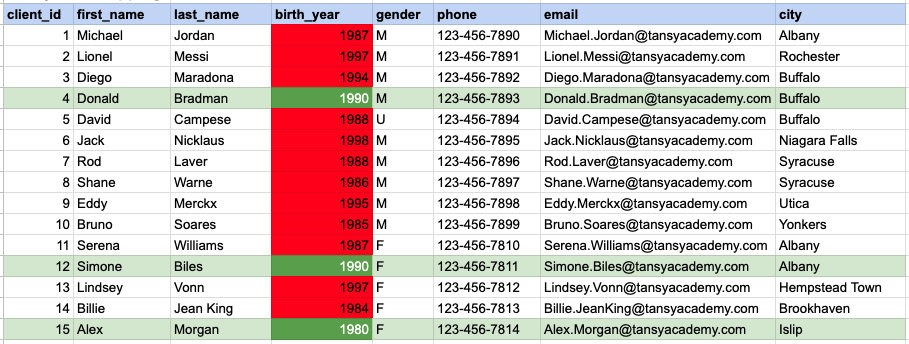
In the provided image, the green color signifies the data that has been selected or satisfies the conditions specified in our query. Data points in red indicate information that does not meet the criteria set by the query.
Example 2 - Query Output

Example 3:
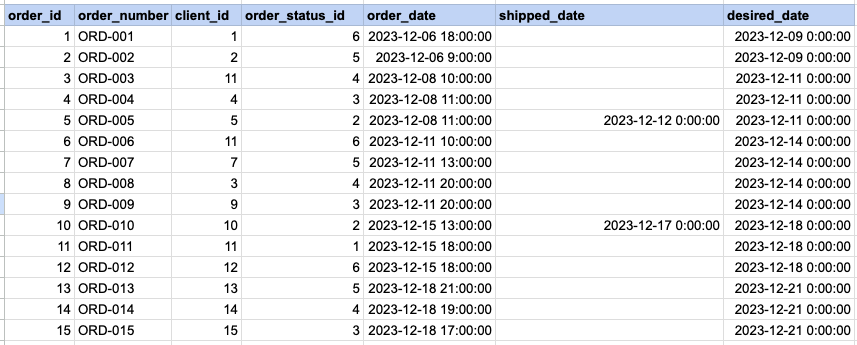
Let's explore the procedure for extracting information from a designated table using the IN SQL operator on date time data. This query retrieves all rows from the orders table where the desired ship date column corresponds to any of the specified values ('2023-12-09', '2023-12-10', '2023-12-18', '2023-12-25').
Example 3 - Raw data from order table
Example 3 - Query
SELECT * FROM act_order WHERE desired_date IN ('2023-12-09', '2023-12-10', '2023-12-18', '2023-12-25');Example 3 - Query data mapping
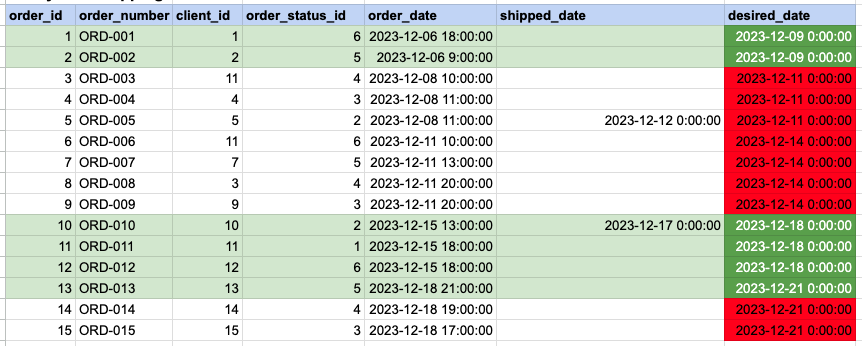
In the provided image, the green color signifies the data that has been selected or satisfies the conditions specified in our query. Data points in red indicate information that does not meet the criteria set by the query.
Example 3 - Query Output

Comments Not Found